TSP Contribution Allocation Excel – Free Template (2026)
0
Free download
Plan student loan payoff and forgiveness with loan inputs, payment estimates, PSLF tracking, payoff dates, interest, and a dashboard.


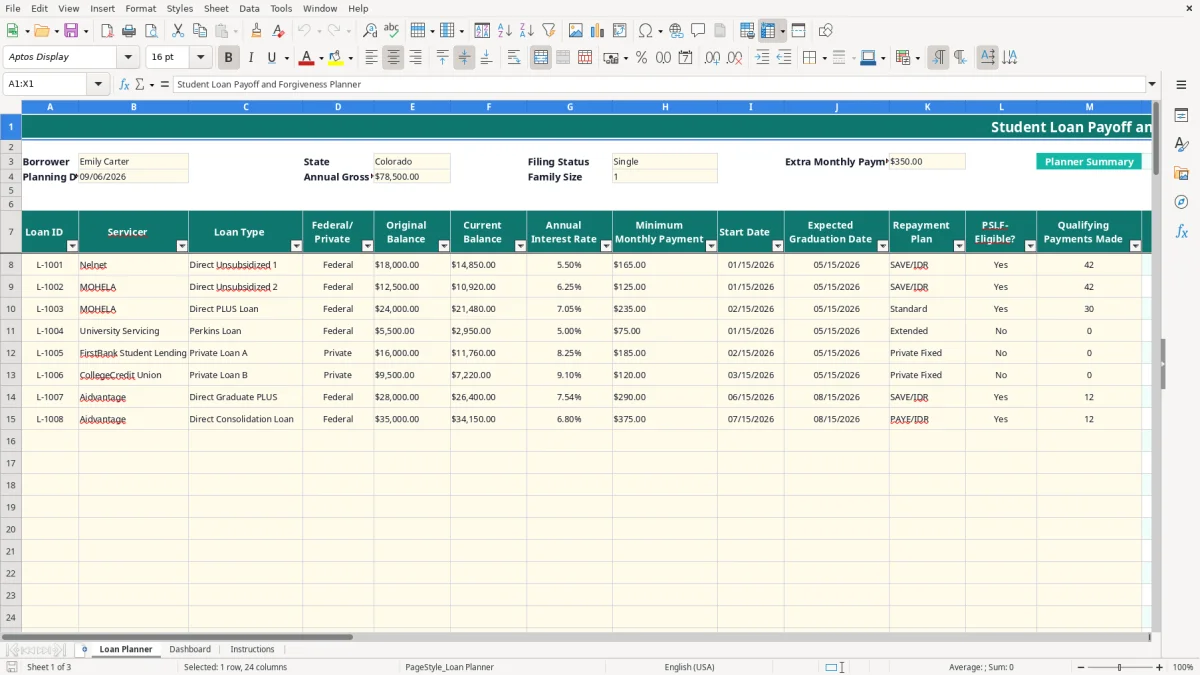
This student loan payoff and forgiveness spreadsheet tracks up to 100 loans, calculates estimated payments and payoff timing, and flags potential forgiveness eligibility. You enter balances, rates, repayment plans, PSLF payment counts, income, family size, and extra payments in the Loan Planner tab; the Dashboard summarizes the results.
Use the sample borrower details as a model, then replace the yellow input cells with your own information. The workbook separates user entries from calculated outputs, so you can update your servicer data without rebuilding the formulas.
Image 1 shows the Loan Planner with loan-level fields from Loan ID through Notes. Image 2 shows the Dashboard with summary metrics, four charts, and an illustrative 12-month balance projection; image 3 contains the written instructions and planning date.
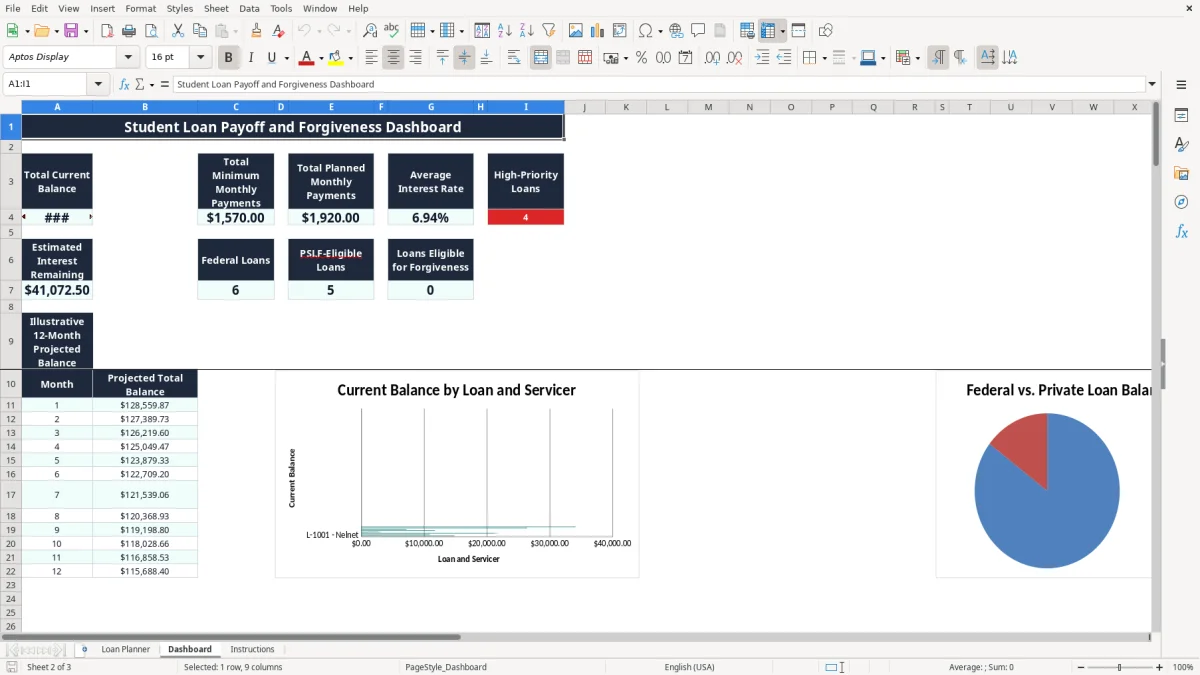
A student loan spreadsheet is most useful when you have several servicers, a mixture of federal and private debt, or a repayment decision that cannot be reduced to one minimum payment. A new graduate may have four federal loans with different balances, while a public-school teacher or nonprofit employee may need to track qualifying payments for Public Service Loan Forgiveness (PSLF). An office manager handling a household budget can also use it when one partner has graduate loans and the other has private refinancing.
Enter each debt separately in Loan Planner rather than combining everything into one balance. For example, a borrower with $18,000 at 5.50%, $32,000 at 6.80%, and a $14,000 private loan at 8.25% needs to see the rates, minimum payments, federal status, and servicers independently. The workbook's Priority result marks private loans High and also marks federal loans with rates of 7% or more High.
The sample row illustrates the level of detail: a $14,850 current balance, a 5.50% annual rate, a $165 minimum payment, the SAVE/IDR plan, PSLF marked Yes, and 42 qualifying payments. Those are populated sample values, not a recommendation or a forecast for every borrower.
A teacher, nurse, firefighter, or nonprofit employee can record an entered qualifying-payment count and compare it with the repayment-plan assumption. A borrower with 42 qualifying payments and a 120-payment requirement has 78 payments remaining before the basic count reaches 120, but employer and loan qualification still matter.
Use Extra Monthly Payment to model a fixed additional amount. If you enter $350 and two loans are marked High, the formula allocates the amount across those High rows. A household deciding between an extra $350 payment and building a cash reserve can compare the resulting payoff months and remaining interest without manually calculating every loan.
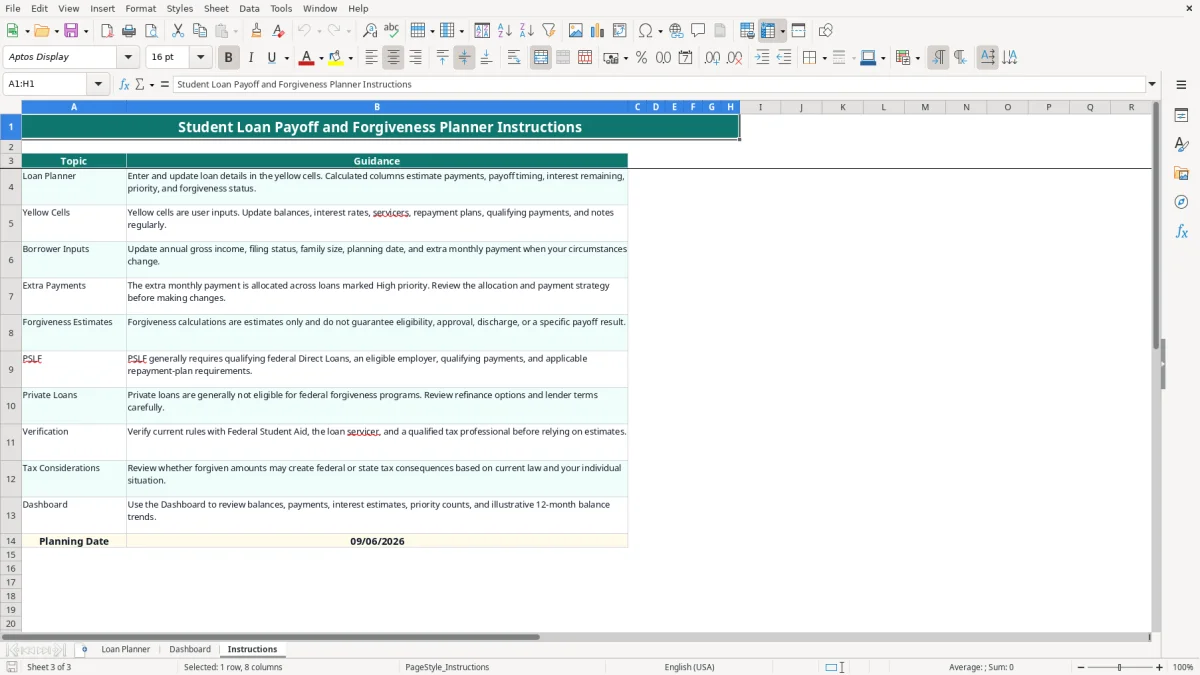
The workbook provides planning estimates; it does not determine federal eligibility. PSLF generally involves qualifying Direct Loans, qualifying employment for an eligible employer, qualifying monthly payments, and applicable repayment-plan requirements. The Instructions tab specifically tells you to verify current rules with Federal Student Aid and your servicer.
Loan Planner compares the entered PSLF-Eligible value, repayment-plan lookup requirement, and qualifying-payment count. The formula labels a row Eligible only when the loan is Federal, PSLF-Eligible is Yes, the lookup returns a positive required-payment number, and the entered count meets that number. A displayed Eligible result is therefore a screening calculation, not an approved forgiveness determination.
The assumptions area lists repayment plans, required PSLF payments, and term months. The exact lookup values belong to the workbook's assumptions and should be reviewed against current federal guidance. For example, a 120-payment assumption means 120 qualifying payments in the planning model; it does not erase the separate employment, loan, certification, and payment requirements.
The Loan Planner accepts annual gross income, filing status, and family size as borrower inputs, but the manifest does not show a federal income-driven-payment formula based on poverty guidelines. Do not treat the $78,500 sample income, Single filing status, or family size of 1 as an official payment determination. The calculated estimated payment instead uses the entered balance, rate, minimum payment, repayment-plan term lookup, and Excel PMT logic.
Forgiven debt can raise federal or state tax questions. Federal and state treatment can change, and private loans are generally not eligible for federal forgiveness programs. A $40,000 displayed estimated forgiveness balance is a planning figure, not automatically tax-free income or a guaranteed discharge. Keep servicer correspondence and qualifying-payment records with the workbook for the period required by your own tax and loan records.
The most expensive spreadsheet error is treating an estimate as a servicer statement. A borrower may see an estimated payoff date 36 months away and assume the account will close then, even though capitalization, payment posting dates, fees, deferment status, or a changed repayment plan can alter the result.
All downstream figures depend on Current Balance, Annual Interest Rate, Minimum Monthly Payment, and the planning date. If a $25,000 balance is entered when the servicer has already applied a $600 payment, the Dashboard overstates debt by $600 before interest calculations even begin. Update the yellow cells after reviewing each statement, not only at tax time.
Private loans are assigned High priority by the formula, while federal loans reach High priority at an interest rate of 7% or more. Mislabeling a private loan as Federal or entering 6.99% instead of 7.00% changes the priority result and can redirect the extra-payment allocation. On a $350 monthly extra payment, a mistaken classification can direct $350 per month away from the debt you intended to attack.
Entering Yes for PSLF-Eligible and 120 qualifying payments can produce an Eligible label even when the employer has not been certified or a payment fails another requirement. A borrower who expects $30,000 to disappear but has not verified qualifying employment could plan rent, savings, or a refinance around money that never arrives. Keep the entered count tied to documented payment history.
Another failure occurs when the payment is too low for the modeled interest. The formula returns Payment Too Low when total monthly payment does not exceed the current balance multiplied by the annual rate divided by 12. For a $20,000 loan at 12%, monthly interest is about $200; a $175 total payment cannot amortize that balance under the model, so the result is not a valid payoff date.
Use the workbook on a fixed date, preferably within two days of downloading each servicer statement. A Friday after payday works well for a household; a bookkeeper can update it during the monthly close. The key is to make the planning date, balances, payment amounts, and qualifying-payment counts part of an existing routine rather than a once-a-year project.
For example, if your budget permits $500 above minimums in September but only $250 in December, change the extra-payment input before relying on a payoff date. The Dashboard recalculates total planned payments, estimated interest, priority counts, and the 12-month projection from the updated values.
Use the drop-down lists instead of typing variations such as Private Loan, private, and PRIV. The validation list accepts Federal or Private, six listed repayment-plan choices, and Yes or No for PSLF eligibility. Consistent entries protect the COUNTIF and lookup formulas that feed the summary.
This workbook is a strong planning tool for up to 100 loan rows, but it is not a servicing system. Move to a dedicated budgeting or loan-management process when you need transaction-level history, automatic statement imports, payment posting reconciliation, or multiple household users editing simultaneously. Keep the spreadsheet as an audit snapshot: save a dated copy such as 09-06-2026 after each meaningful review.
The Loan Planner has prepared entry rows 8 through 107, allowing up to 100 loan records. Enter one loan per row and leave unused rows blank so the formulas and Dashboard summaries continue to work cleanly.
No. The workbook estimates eligibility from the entered federal status, PSLF-Eligible value, repayment-plan assumption, and qualifying-payment count. Verify Direct Loan status, employer eligibility, payment history, and current requirements with Federal Student Aid and your servicer.
The amount entered in Extra Monthly Payment is allocated across loans whose calculated Priority is High. Private loans are marked High, and federal loans with an annual interest rate of at least 7% are also marked High. Review the resulting allocation before making payments.
The modeled total monthly payment does not exceed the first month's interest calculation. For example, a $20,000 balance at 12% creates about $200 of monthly interest, so a $175 payment cannot reduce principal under this model.
Private loans can be entered and are included in balances, payment totals, interest estimates, and payoff calculations, but the workbook does not treat them as eligible for federal forgiveness. Review the lender's contract separately for any private relief or discharge provisions.
No. Annual gross income, filing status, and family size are borrower inputs, while the estimated payment uses the workbook's balance, rate, minimum payment, and repayment-plan term assumptions. Use the result for planning only and confirm an official payment with your servicer.