TSP Contribution Allocation Excel – Free Template (2026)
0
Free download
Track card balances, APRs, minimums, extra payments, utilization, interest, payoff dates, priorities, and account status in Excel.


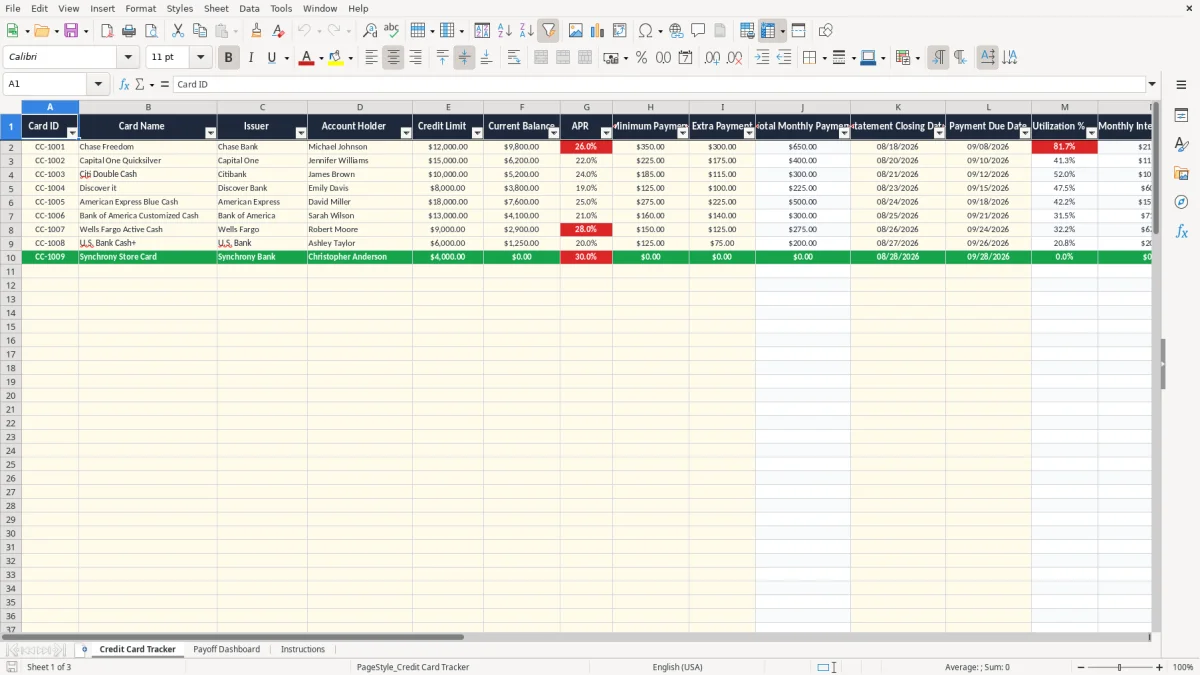
A credit card payoff plan tracker Excel template records each account's balance, credit limit, APR, minimum payment, extra payment, due date, and payoff priority. It calculates total monthly payments, utilization, estimated monthly interest, payoff months, payoff dates, and status across up to 100 prepared account rows.
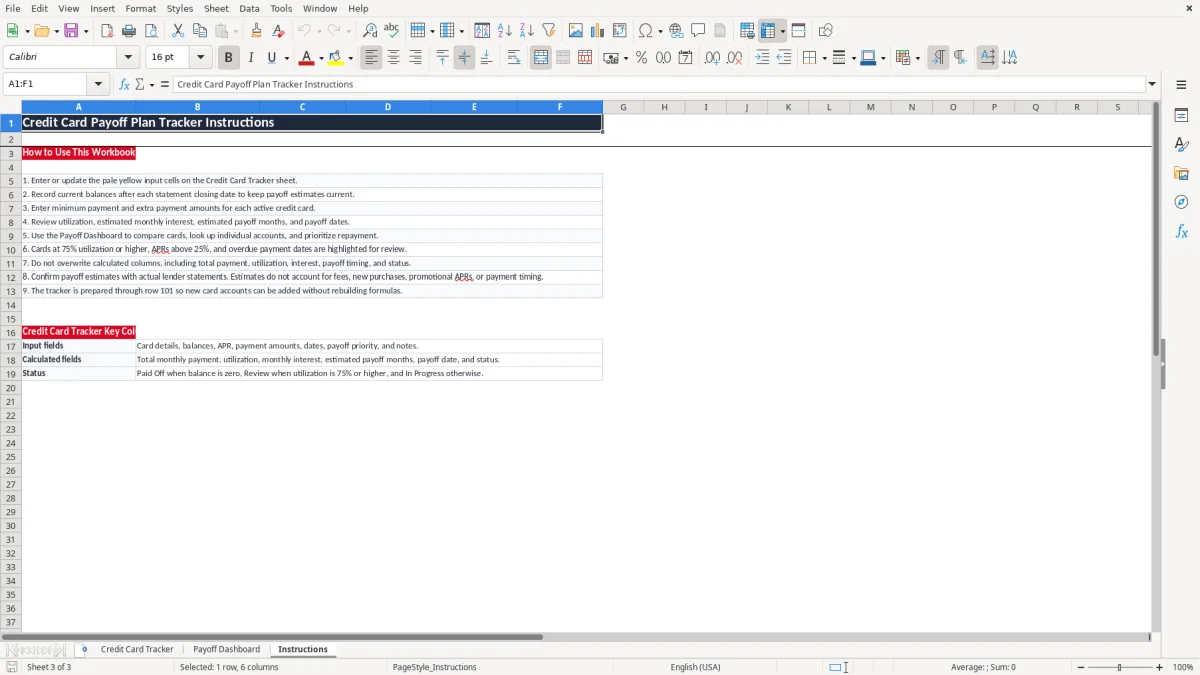
The workbook includes the Credit Card Tracker, Payoff Dashboard, and Instructions tabs. Image 1 shows the detailed tracker with 19 columns, while image 2 shows summary metrics, three charts, and a Card Lookup area for reviewing one account at a time.
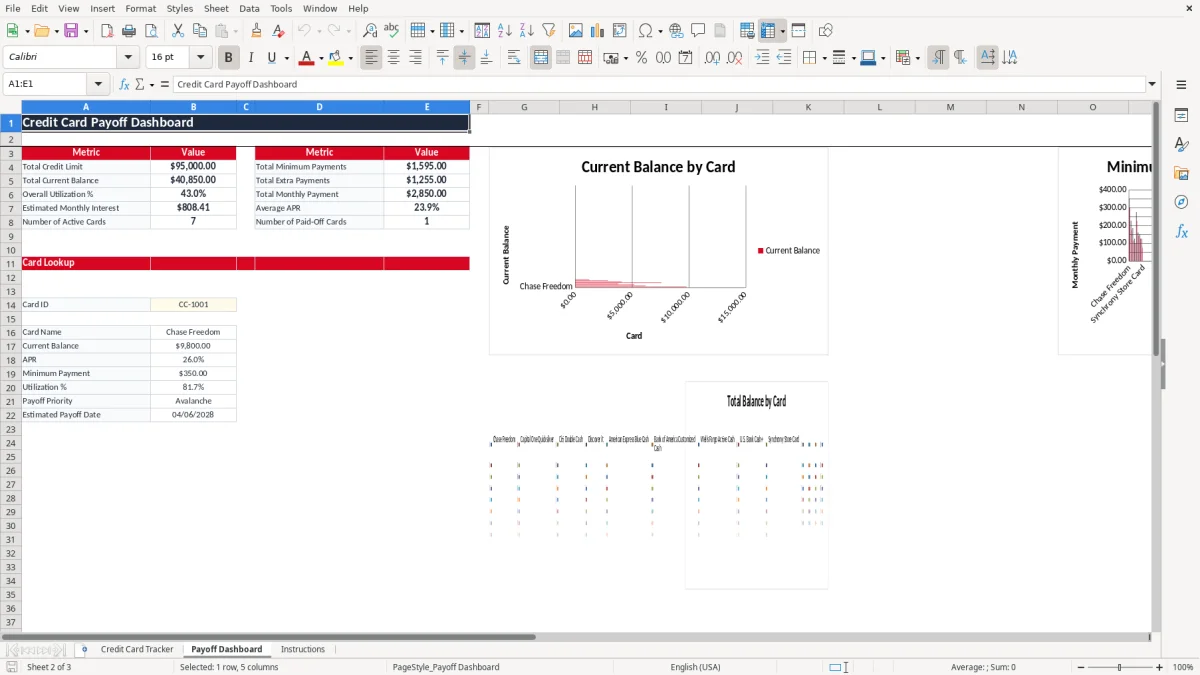
A household with two incomes often has several cards spread across different issuers, statement dates, and automatic-payment settings. The Credit Card Tracker gives you one row per account, so a couple can see whether a $9,800 balance at 25.99% APR is receiving enough monthly payment rather than checking four separate lender websites.
Suppose three cards have balances of $9,800, $6,200, and $5,200. The tracker can show the combined balance, each credit limit, each utilization percentage, and the monthly interest estimate before you decide where an extra $300 should go. That is more useful than recording only a single household debt total.
The sample rows demonstrate the intended structure: Card IDs CC-1001 through CC-1003, named issuers, account holders, statement closing dates, payment due dates, and notes. Those rows are populated examples, not a claim about your accounts; replace them with your own information.
A person using the debt avalanche method can label several accounts Avalanche and direct additional cash toward the highest APR. Someone focused on quick visible wins can select Low Balance or High Balance instead. The workbook records the preference but does not automatically redistribute payments between cards, so you remain responsible for applying the strategy.
Use the sheet after each statement cycle, when balances and due dates are available. A household paying $750 per month could enter $500 of minimum payments and $250 of extra payments, then compare the estimated payoff months and dates for each account on the dashboard.
Credit card issuers generally quote APR as an annual rate, while interest accrues according to the account agreement and daily balances. This workbook uses a planning estimate of current balance multiplied by APR divided by 12. For a $9,800 balance at 25.99%, the estimate is about $212.25 for one month before considering payments, purchases, fees, or daily-compounding details.
The tracker calculates utilization as current balance divided by credit limit. A $9,800 balance against a $12,000 limit produces 81.7%, which meets the workbook's Review rule because the percentage is at least 75%. A $6,200 balance against a $15,000 limit produces 41.3%, even though the dollar balance may still deserve attention.
These are budgeting calculations, not a promise about a credit score. Credit scoring models can use reported balances, account age, payment history, limits, and other information. The workbook does not pull credit reports, lender data, or score information.
The estimated payoff-month formula assumes the current balance, APR, and total monthly payment remain stable. If a $10,000 balance receives $600 monthly and the monthly rate is 2%, the payment must exceed the first month's estimated $200 interest for the balance to decline; a payment at or below that amount can produce little progress or fail to amortize.
Use actual lender statements to confirm the result. Promotional APR periods, annual fees, late fees, new purchases, payment posting dates, and changing minimum-payment formulas are outside this workbook's calculation model.
The most expensive error is entering a statement balance once and never updating it. If you plan around $20,000 but new purchases add $600 each month, a projected payoff date can look precise while the debt barely declines. The Instructions tab specifically directs you to record current balances after each statement closing date.
Users often enter a $300 extra payment but send only the minimum because cash flow changed. If minimums total $760 and the intended extra payment is $300, the dashboard shows a $1,060 total monthly payment. A bank account funded for only $760 will not produce the estimated payoff schedule.
Another common mistake is typing over formulas in columns J, M, N, O, P, or R. The visible number may remain for one row while future balance updates stop recalculating. Restore the formula or re-download the workbook rather than treating a manually typed payoff date as reliable.
Entering 2.599 instead of 25.99% changes the APR by a factor of 100. Entering a credit limit of $0 causes utilization to display as zero through the formula's error protection, which hides the fact that the account data is incomplete. Check APR formatting, dollar amounts, dates, and Card IDs before relying on the dashboard.
Status also needs interpretation. A zero balance returns Paid Off, utilization of 75% or more returns Review, and other populated accounts return In Progress. Status does not verify that a payment cleared, that an account is current, or that the lender accepted your payment.
Attach the workbook to a fixed monthly event instead of opening it only when debt feels urgent. The best time is after each card's statement closes: download or read the statement, update the balance and dates, confirm the payment amounts, and then review the Payoff Dashboard.
For example, if your total monthly payment is $1,060 and a pay-period change reduces available cash by $150, change the extra-payment inputs before the payment date. That keeps the workbook's payoff estimate aligned with what you can actually send rather than preserving an unrealistic target.
This workbook has prepared rows through row 101 and is practical for a household or small personal debt list. It does not import transactions, connect to card issuers, schedule payments, model daily interest, or maintain an audit trail. If you are tracking dozens of accounts, shared finances, or frequent transactions, move the transaction records to a budgeting or personal-finance system and keep this workbook as a planning summary.
The Credit Card Tracker is prepared through row 101, providing rows 2 through 101 for up to 100 account entries. The first rows contain sample accounts; replace those examples with your own data rather than adding duplicate records.
Enter Card ID, Card Name, Issuer, Account Holder, Credit Limit, Current Balance, APR, Minimum Payment, Extra Payment, Statement Closing Date, Payment Due Date, Payoff Priority, and Notes. Total Monthly Payment, Utilization %, Monthly Interest Estimate, Estimated Payoff Months, Estimated Payoff Date, and Status are calculated fields.
The workbook multiplies Current Balance by APR and divides by 12. For example, $9,800 at 25.99% produces an estimate of approximately $212.25. Actual issuer interest can differ because of daily balances, payment timing, fees, and agreement terms.
Review appears when the card has a balance and utilization is at least 75%. Paid Off appears when the balance is zero, while other populated accounts display In Progress. This status does not confirm payment history or account standing.
Yes. The Payoff Priority dropdown includes Avalanche, High Balance, Low Balance, and Custom. Selecting Avalanche records your chosen priority, but the workbook does not automatically move extra payments between cards or calculate a complete multi-card avalanche schedule.
The estimated date uses TODAY() and the calculated payoff months, so it can change as the calendar advances or when you update balances and payments. It also assumes stable inputs and does not account for new purchases, fees, promotional APRs, or lender-specific payment timing.