TSP Contribution Allocation Excel – Free Template (2026)
0
Free download
Track deposits, debits, cleared items, running balance, categories, and cash flow with a personal or household checkbook Excel spreadsheet.


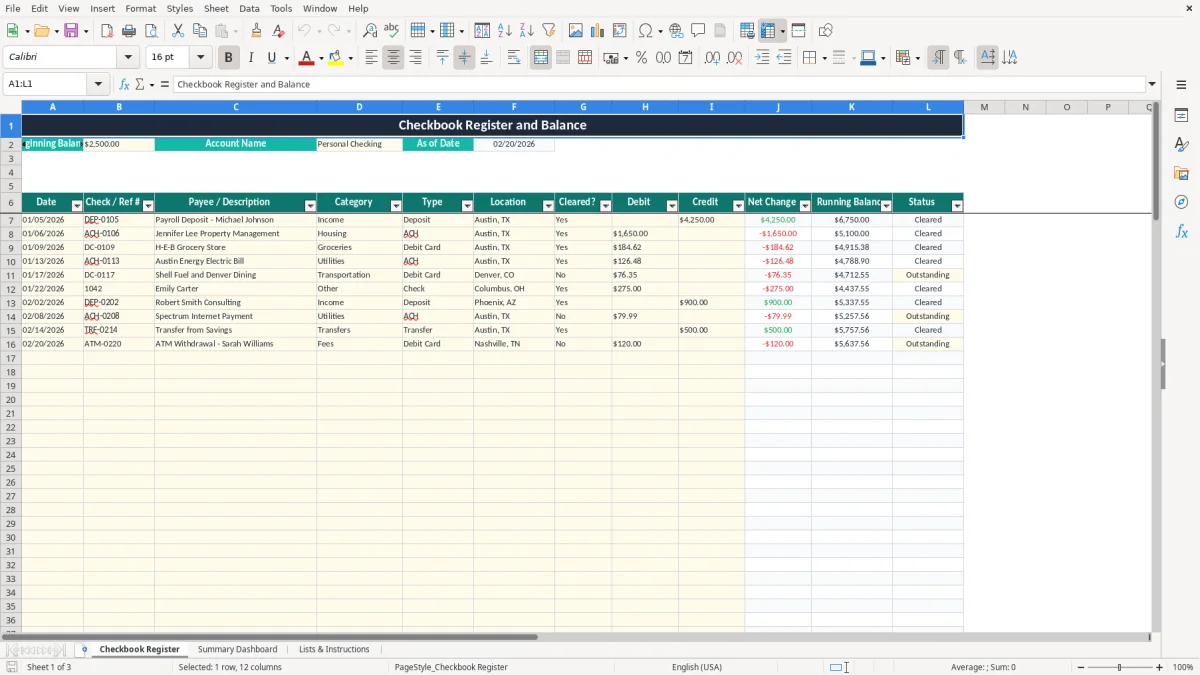
A checkbook register Excel spreadsheet records each deposit, payment, withdrawal, and fee while calculating the net change, running balance, and cleared or outstanding status. This template contains 100 transaction rows, category and transaction-type lists, and a dashboard for reviewing deposits, debits, spending categories, and cash flow.
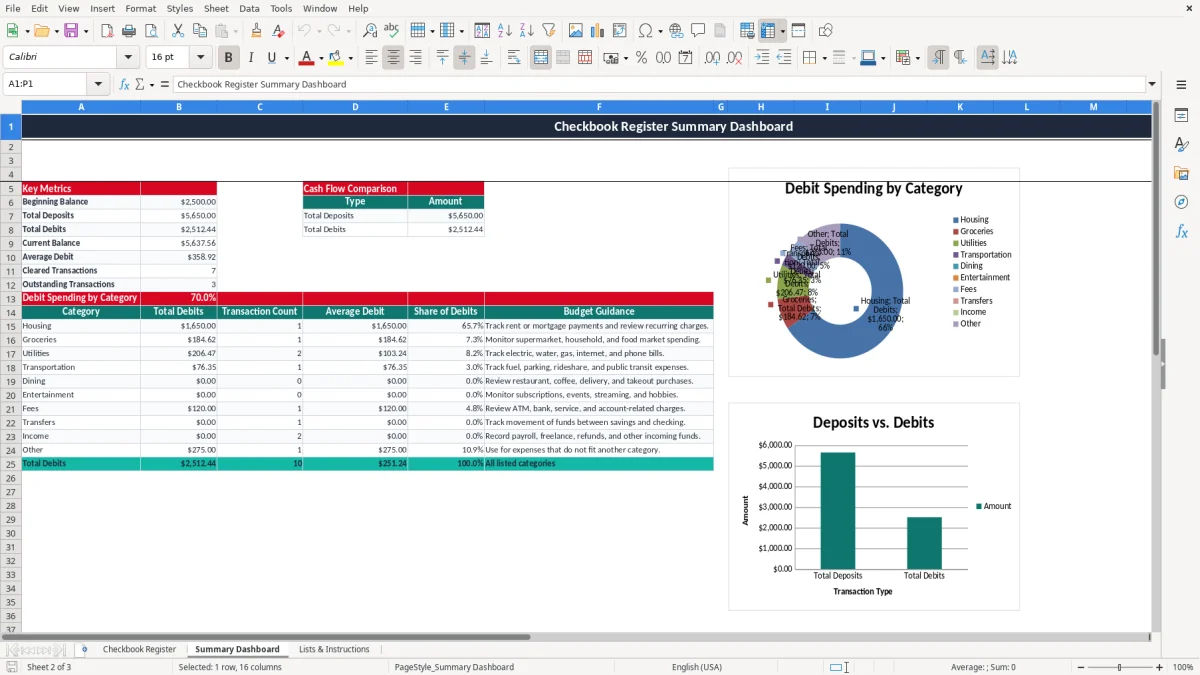
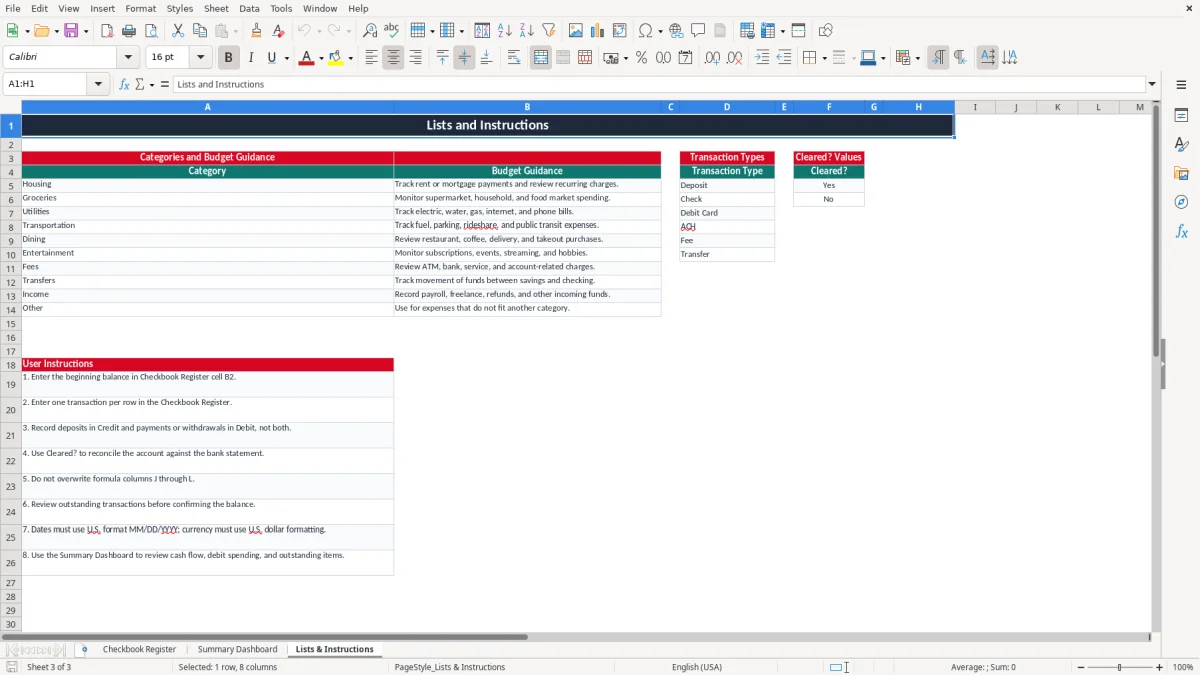
Enter your opening amount in cell B2, then record one transaction per row on the Checkbook Register tab. Image 1 shows the dated register with debit, credit, cleared-status, and balance columns; image 2 summarizes the account, while image 3 provides the approved lists and instructions.
A checkbook register is useful when your bank balance tells only part of the story. A household with two incomes may have $4,250 deposited on January 5 and a $1,650 rent payment posted the next day, while a debit-card grocery purchase is still pending. Recording those items gives you a more realistic view of available cash.
Use the register during weekly bill review to track housing, utilities, groceries, transportation, dining, entertainment, fees, transfers, income, and other spending. For example, a household with $2,500 at the start of the month and $4,250 of payroll deposits has $6,750 before withdrawals; a $1,650 housing debit and $184.62 grocery debit reduce that amount to $4,915.38.
A freelancer can record client payments, refunds, bank fees, and transfers without mixing incoming and outgoing amounts. The separate Credit and Debit columns make it easier to distinguish cash received from money spent, even when income arrives on different dates.
A sole proprietor or bookkeeper at an LLC can use this file for a simple operating account before moving to formal bookkeeping software. It is especially practical during a Friday reconciliation routine or before a payroll run, when several ACH withdrawals and deposits need to be checked against the bank statement.
The workbook is not a full accounting ledger: it has no customer subledger, vendor aging, profit & loss statement, or balance sheet. Treat it as a transaction-level cash tracker for one account, not as a replacement for business accounting records.
Bank reconciliation means comparing your recorded transactions with the bank statement and explaining the difference. The workbook supports that process through the Cleared? field: Yes identifies a transaction you have matched, while No leaves it Outstanding. Do not call the account reconciled merely because the calculated balance looks reasonable.
Suppose the register starts at $2,500, includes a $4,250 deposit, and records $1,650 and $184.62 of debits. The calculated balance is $4,915.38. If a $75 check is recorded but has not cleared, the bank's displayed balance may still be $4,990.38; the $75 difference is explained by the outstanding check.
Deposits belong in Credit and payments or withdrawals belong in Debit. The Net Change formula subtracts Debit from Credit, so entering a $600 paycheck in Debit instead of Credit creates a $1,200 error: the correct increase is $600, but the mistaken entry produces a $600 decrease.
Save bank statements, deposit confirmations, receipts, and check images with the workbook. The IRS generally expects tax records to be retained for 3 years, and some records should be kept up to 7 years. A personal register does not by itself prove a business deduction on Schedule C.
For business use, separate personal and business accounts. The workbook's categories are practical spending labels, but they are not a complete GAAP chart of accounts and do not calculate FICA, sales tax, depreciation, or estimated taxes through Form 1040-ES.
The most expensive register errors are usually small entry mistakes repeated over time. A missing $42.18 subscription may not matter once, but 12 missed monthly charges create a $506.16 annual gap between your records and actual cash.
Entering an ACH payment when it is authorized and again when it clears doubles the debit. A $1,200 mortgage entered twice makes the running balance $1,200 too low and can lead you to postpone a legitimate bill or transfer money unnecessarily.
Marking every line Yes without checking the statement destroys the value of the reconciliation process. If three outstanding debit-card purchases total $138.47, the workbook balance and bank balance will differ by that amount until the transactions post.
Columns J, K, and L contain formulas. Replacing one formula with a typed number can make a single row appear correct while later balances remain wrong; a $300 debit entered after that row may be understated by the overwritten amount. Restore the formula rather than typing a replacement result.
Another frequent problem is entering both Debit and Credit on one row. A $900 transfer recorded in both columns produces a net change of zero, hiding movement that should be visible. Use one row for the transaction and one amount column for its direction.
Finally, do not treat category totals as a tax return. A $2,000 “Other” total may contain personal purchases, business supplies, and transfers; categorizing it later without receipts can cost a legitimate deduction or create an unsupported one.
A register works when you update it close to the transaction, not when you reconstruct three months of spending. Set aside 10 minutes every Friday, enter new activity, and compare the Cleared? values with the current bank statement.
For a household with 25 transactions each week, this routine handles about 100 rows per month without a large catch-up session. Use the Lists & Instructions tab to review the category guidance, and keep descriptions specific enough to identify a merchant later.
Do not type over columns J through L. If you add a new row beyond the prepared range, copy the formulas from the preceding row and verify that the references advance correctly. The register's filter and frozen header row help you inspect rows 7 through 106 while scrolling.
This file is appropriate for one straightforward account and up to 100 prepared transaction rows. Move to QuickBooks or another accounting system when you need multiple bank accounts, formal reconciliations, invoices, bills, payroll, inventory, or a year-end general ledger; a spreadsheet becomes risky when several people edit financial data without an audit trail.
Running Balance starts with the beginning balance in B2 and adds each row's Net Change. Net Change is Credit minus Debit, so a $425.00 deposit followed by a $125.00 payment increases the balance by $300.00.
The Checkbook Register has prepared rows 7 through 106, providing 100 transaction rows. If you need more, copy the formulas and formatting carefully; the Summary Dashboard formulas are set to reference rows 7 through 106.
Enter deposits, refunds, and other incoming funds in Credit. Enter checks, debit-card purchases, ACH payments, fees, and withdrawals in Debit, and do not enter amounts in both columns for one transaction.
Select Yes after you match the transaction to your bank statement. Select No while it is pending or otherwise unmatched; the Status formula then displays Cleared or Outstanding.
Yes, for simple transaction tracking in a sole proprietorship or small LLC. It is not a complete accounting system and does not prepare Schedule C, payroll filings, sales-tax returns, accounts payable, or a formal balance sheet.
The dashboard uses the Category field to summarize Debit amounts. It shows total debits, transaction count, average debit, percentage share, and guidance for categories such as Housing, Groceries, Utilities, Transportation, Dining, Entertainment, Fees, Transfers, Income, and Other.