Goodwill Donation Value Log Template
12
Free download
Track rental income, expenses, and Schedule E totals for U.S. rental property reporting in Excel.


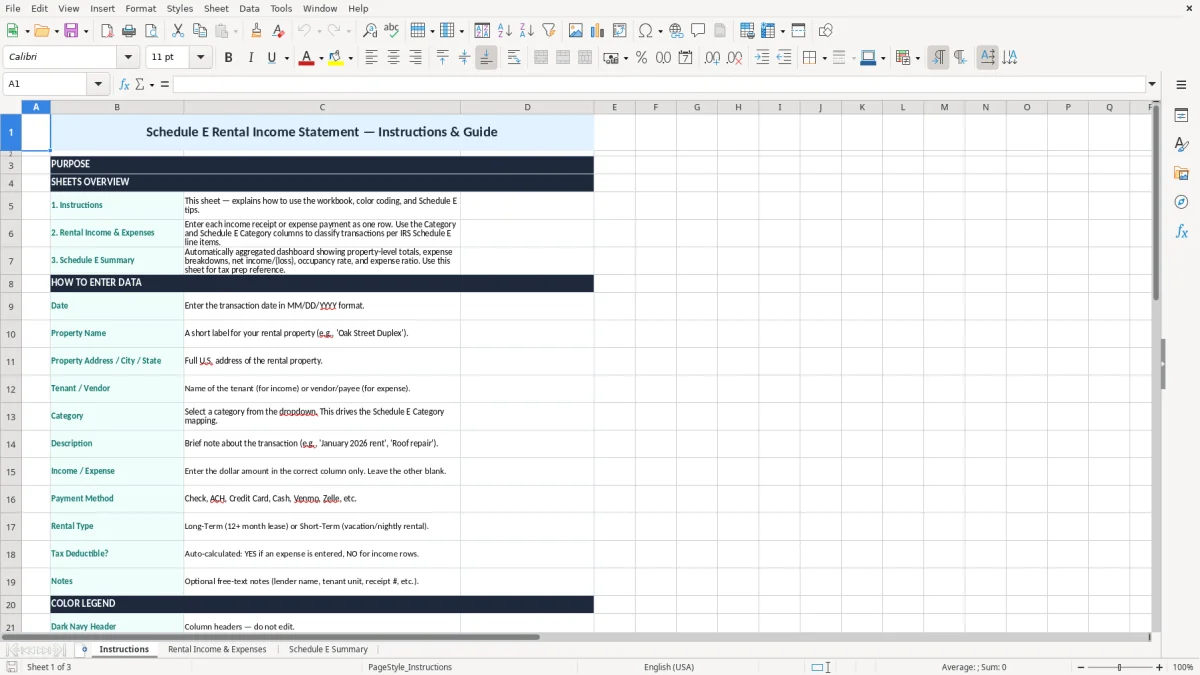
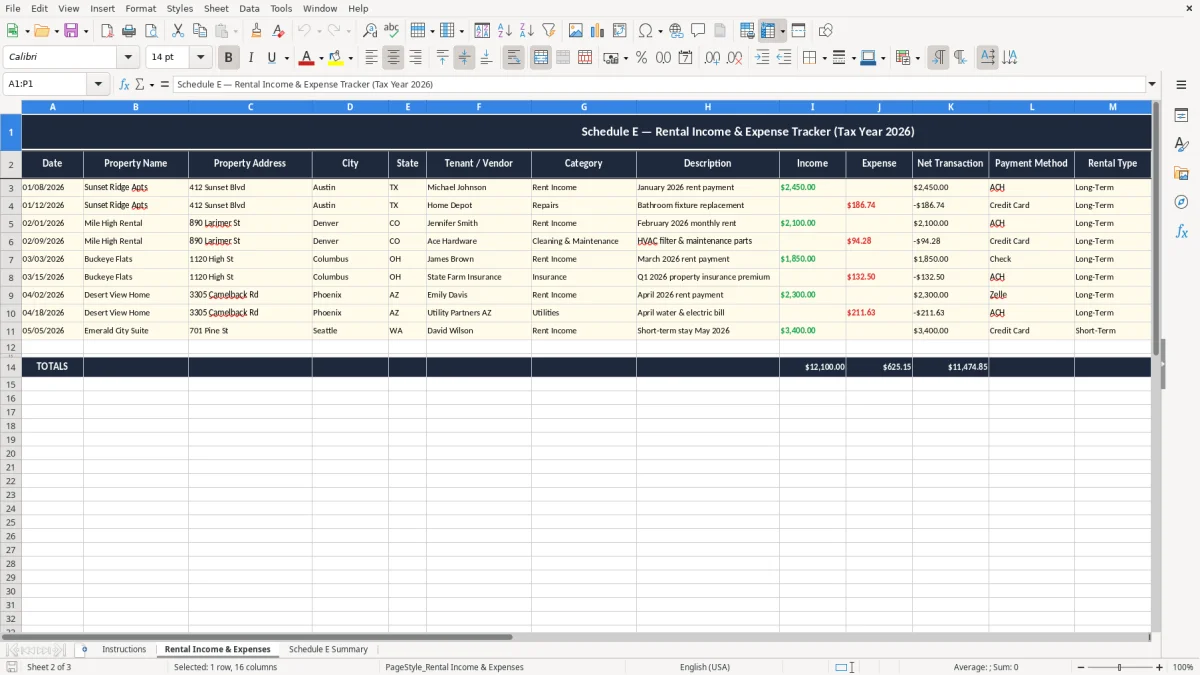
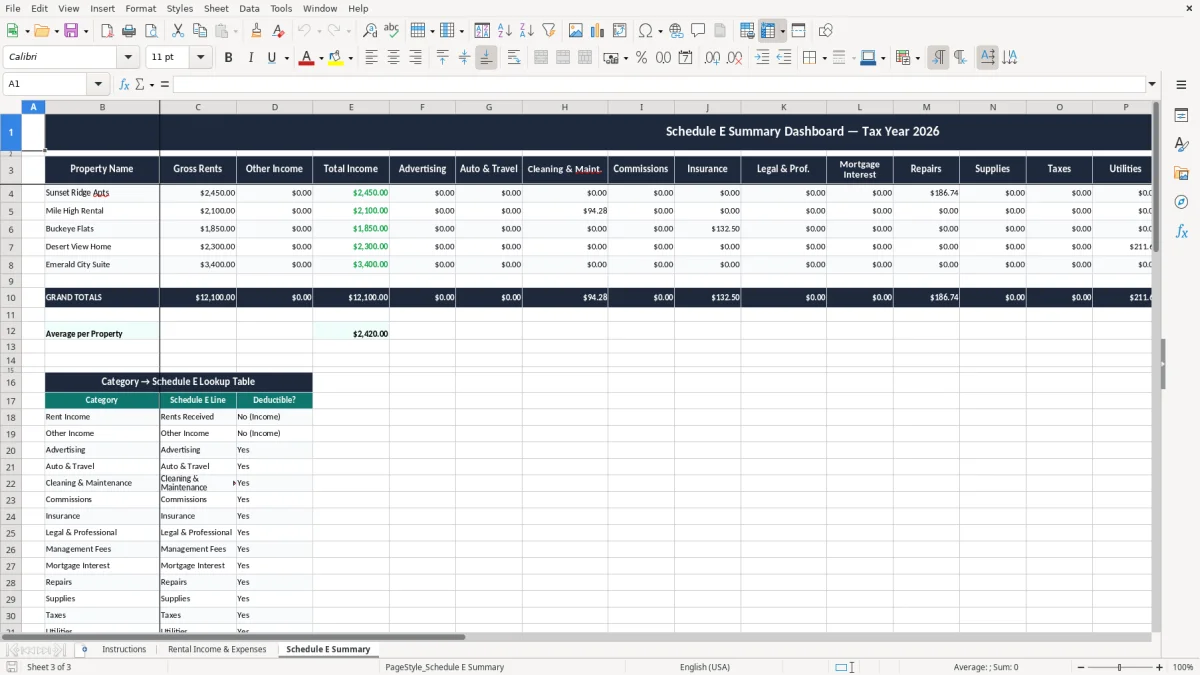
This Schedule E rental income statement Excel template helps you track rent received, deductible expenses, and the totals you need for Schedule E reporting. It includes an Instructions tab, a Rental Income & Expenses tab, and a Schedule E Summary tab.
Use it to separate each property, log income by month, and total the figures you carry into your tax return. The layout is built for landlords, small property owners, and short-term rental hosts who want clean numbers before tax time.
Image 1 shows the Instructions tab, image 2 shows the Rental Income & Expenses entry sheet, and image 3 shows the Schedule E Summary. The workbook is set up so you can move from raw entries to tax-ready totals without rebuilding formulas.
A lot of U.S. users reach for this file when they are done arguing with bank statements and want one place for the year. That includes a sole proprietor with one condo, an LLC owner with three units, or a couple reporting a basement apartment and a vacation rental.
The timing is practical. You might enter transactions every weekend, then use the summary at month-end, at year-end close, or before the April 15 filing deadline for Form 1040. If you collect $2,400 rent and pay $380 for plumbing on the same property in March, the sheet gives you a clean trail instead of a pile of receipts.
It is especially useful when you have one property with routine activity and do not need a full accounting package. A landlord with 2 units and 18 to 24 transactions a month can keep the whole year organized in one workbook without paying for software they will not use.
Image 1 is the Instructions tab, which points you to the right sheet. Image 2 is the entry tab where the income and expense lines live, and image 3 is the summary that helps you see the annual result at a glance.
The IRS does not ask you to guess at rental numbers. You need records that support income, expenses, and the business purpose of each item, and the practical rule is to keep those records for at least 3 years, with some situations stretching to 7 years.
That matters because rental reporting often flows to Schedule E and then into Form 1040. If your property loss or depreciation creates a bigger audit trail, the paper trail has to match the numbers you claim.
The workbook gives you annual totals so you are not adding 12 months of figures by hand on April 14. If your rental brought in $24,000 and cost $9,650 in repairs, insurance, utilities, and other deductible items, the summary gives you the starting point for the return.
Most rental activity does not go on Schedule C unless you are operating a trade or business beyond plain rental reporting. That distinction matters because ordinary rental income usually stays on Schedule E, while active service-heavy operations can create a different filing path and a different tax result.
The mistakes in rental spreadsheets are usually not dramatic; they are expensive because they are quiet. The common ones are mixing personal and rental expenses, dropping a repair into the wrong property, or forgetting a $900 roof patch until the bank feed no longer matches the file.
A missing category can cost you a real deduction. If you forget $1,200 of insurance and $650 of lawn care on one unit, you have just left $1,850 sitting outside the return, and that is before you count the time you spend reconstructing the year from card statements.
If you label a capital improvement as a repair, or the other way around, your tax math gets sloppy fast. A $6,000 HVAC replacement is not the same as a $160 service call, and that difference matters when you are trying to match the deduction to the correct treatment.
Owners with multiple rentals often dump everything into one column because it feels faster. That saves 10 minutes today and costs an hour later when you have to split a $3,200 plumbing invoice across two properties, find the lease, and explain the allocation to yourself at year-end.
The fastest way to make this file stick is to attach it to a fixed date. Most landlords do better when they update it on the first weekend of the month or right after they collect rent, because that is when the receipts are still fresh and the numbers are easy to verify.
The goal is consistency, not perfection. A file updated every month beats a file that sits untouched until March with 11 months of missing detail.
It is used to organize rental income and deductible expenses so you can prepare Schedule E for your tax return. You use it to total rent, repairs, insurance, taxes, and related costs for each property.
Yes. The workbook is written for residential rental reporting and can also track short-term rental income and expenses, which is useful when you want one annual record for each property.
The template has 3 tabs: Instructions, Rental Income & Expenses, and Schedule E Summary. That setup gives you a place to learn the layout, enter transactions, and review yearly totals.
Yes. You can track multiple properties in the same workbook as long as you keep the property names consistent and separate the income and expenses correctly.
Yes. The spreadsheet is only the summary. You still need receipts, bank records, invoices, and other support for the deductions you claim, and the IRS recordkeeping period is generally 3 years.
Update it monthly at a minimum, and ideally right after rent is collected or bills are paid. That keeps the numbers current and makes year-end totals much easier to trust.