Tithe Offering Excel – Free Template (2026)
0
Free download
Track petty cash reconciliations, receipts, replenishments, cash counts, variances, approvals, custodians, and locations in Excel.


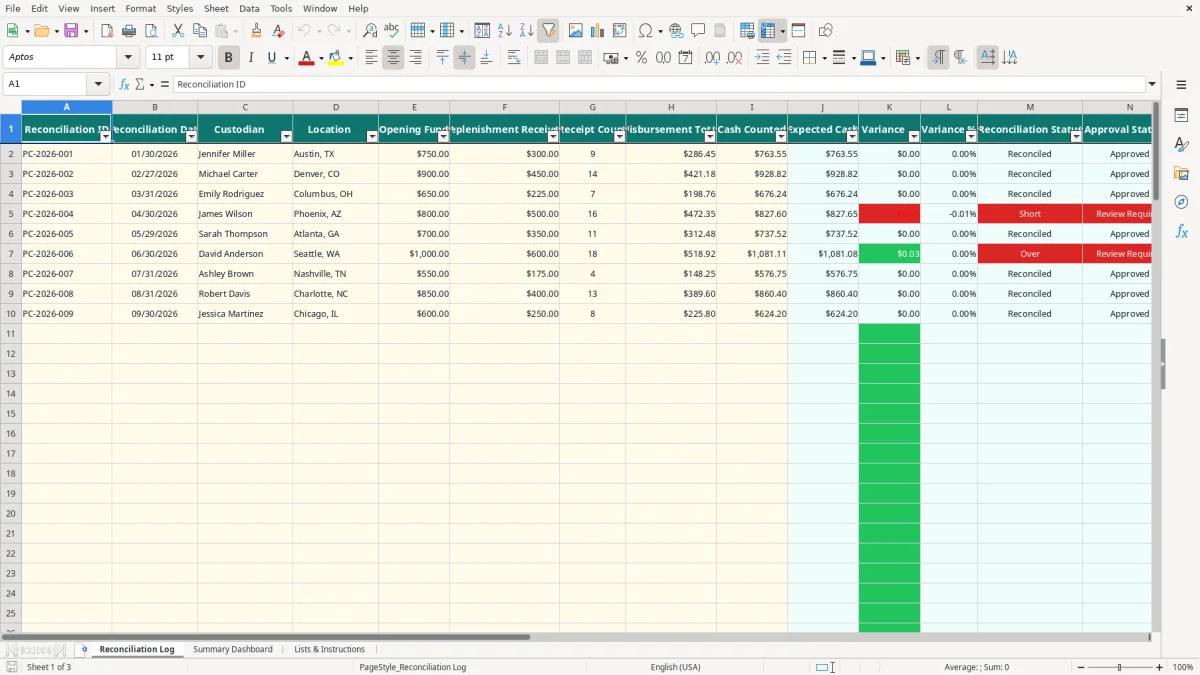
This petty cash reconciliation log Excel spreadsheet records each fund reconciliation, including the date, custodian, location, opening fund, replenishment, receipt count, disbursements, physical cash counted, variance, and approval result. It also calculates expected cash, variance percentage, reconciliation status, and review status for up to 100 prepared entry rows.
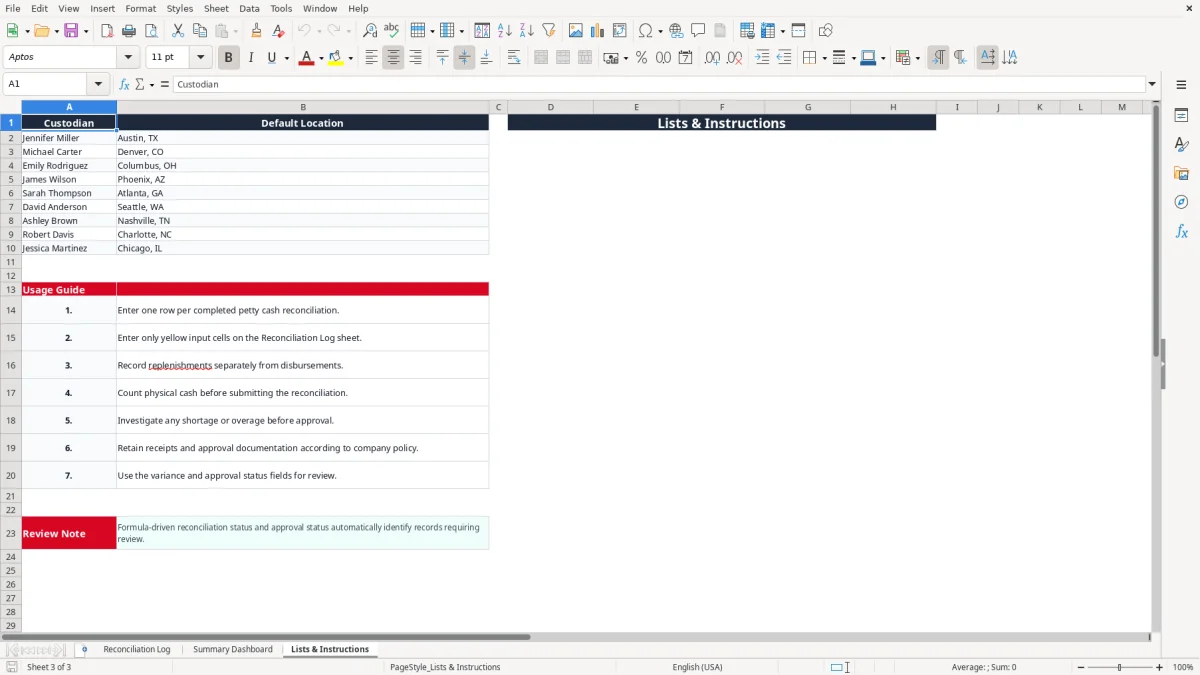
Use the Reconciliation Log tab for transaction-level entry, the Summary Dashboard for totals and custodian comparisons, and Lists & Instructions for the approved custodian list and operating steps. Image 1 shows the detailed log, image 2 shows the dashboard, and image 3 shows the supporting lists and instructions.
A petty cash reconciliation log is most useful when several people handle small cash funds but one person must prove the balance at month-end. An office manager at a four-employee plumbing contractor may reconcile a $500 box every Friday, while a nonprofit treasurer may review a $750 fund before the monthly board packet. The spreadsheet gives both roles one consistent record.
The custodian enters the opening fund, any replenishment, the number of receipts, total disbursements, and the physical cash count. Suppose the opening fund is $600, replenishment is $200, and supported purchases total $184.25. Expected cash is $615.75. If the count is $615.75, the variance is $0.00 and the row is reconciled.
Image 1 shows these fields in the Reconciliation Log: Reconciliation ID, Reconciliation Date, Custodian, Location, Opening Fund, Replenishment Received, Receipt Count, Disbursement Total, and Cash Counted. The calculated columns continue through Expected Cash, Variance, Variance %, Reconciliation Status, Approval Status, and Notes.
A bookkeeper at an LLC can use one row per completed count and then compare the dashboard with the petty cash account in the general ledger. If the ledger shows $1,200 of quarterly disbursements but the log totals only $1,165, the $35 difference is a specific reconciliation question rather than a vague cash problem.
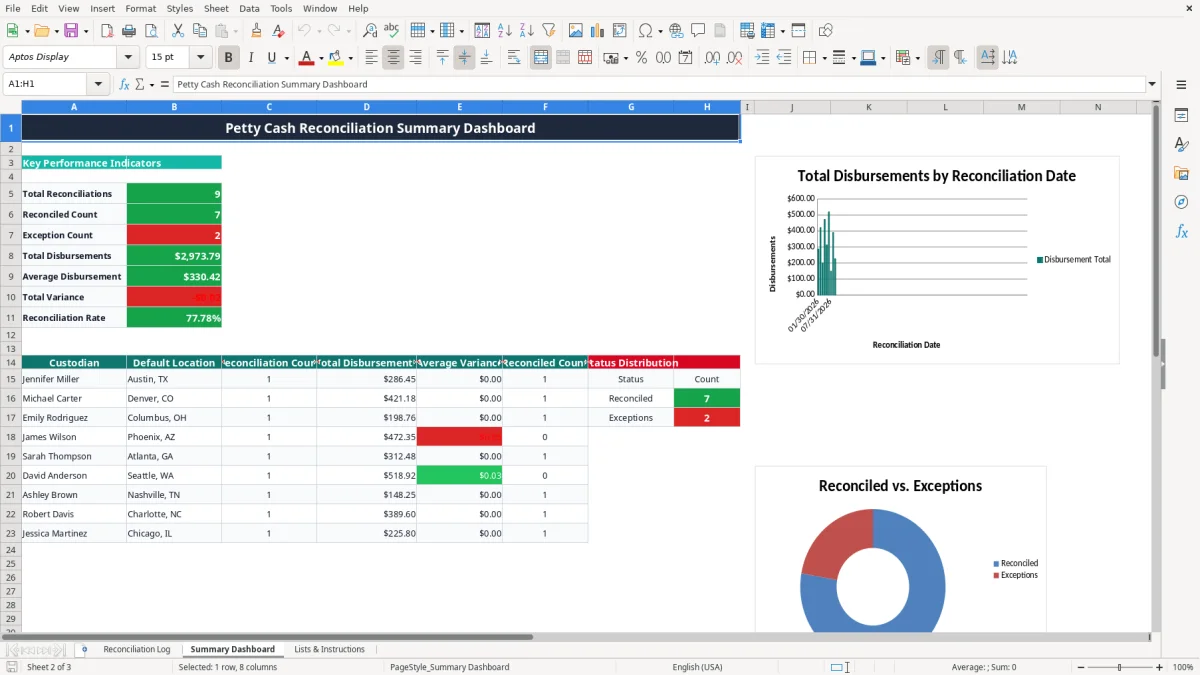
The workbook includes 100 prepared rows, so it suits recurring monthly or weekly reviews without extending formulas immediately. The Summary Dashboard counts entries, reconciled rows, exceptions, disbursements, average disbursement, total variance, and the reconciliation rate.
A regional office can assign separate rows to Austin, Denver, Columbus, Phoenix, Atlanta, Seattle, Nashville, Charlotte, and Chicago custodians listed on the Lists & Instructions tab. The dashboard then shows each custodian's count, total disbursements, average variance, and reconciled count, making a $12 average shortage at one location visible beside a $0.00 average at another.
The central control is a simple cash equation: Opening Fund + Replenishment Received - Disbursement Total = Expected Cash. The workbook calculates that result in column J. It then compares Cash Counted in column I with Expected Cash, so a $20 shortage is not hidden inside a rounded percentage.
The formula marks a row Reconciled when the absolute variance is less than $0.01. A variance of $0.00 passes, while a shortage of $0.01 or an overage of $0.02 becomes an exception. That is a precise spreadsheet control, not permission to ignore larger differences.
For example, opening cash of $900 plus a $450 replenishment less $421.18 of disbursements produces expected cash of $928.82. A physical count of $928.82 produces zero variance. A count of $918.82 produces a negative $10.00 variance and a Short status.
A replenishment restores the fund; it is not a purchase. The Lists & Instructions tab specifically tells you to record replenishments separately from disbursements. If you place a $300 bank replenishment into disbursements, expected cash will be understated by $300 and the resulting exception will be misleading.
Receipt Count is also separate from Disbursement Total. Nine receipts totaling $286.45 is different control evidence from one receipt totaling $286.45. The count helps you locate missing documentation even though it does not calculate the dollar total.
Each row includes Notes for facts such as receipts attached, office supply purchases, or matched documentation. The workbook does not store receipt images or approval signatures, so retain those documents under your company policy and use Notes to identify the supporting package.
Image 3 shows the written instruction to count physical cash before submission and investigate any shortage or overage before approval. The calculated Approval Status is Approved only when the reconciliation status is Reconciled; otherwise it reads Review Required.
The most expensive petty cash errors are usually small enough to escape attention but frequent enough to distort the books. A $7.50 missing receipt every week costs $390 over 52 weeks. More importantly, repeated unexplained differences weaken the audit trail and make it harder to determine whether the fund was used for business purchases.
Suppose a custodian starts with $500, receives a $250 replenishment, and spends $238.40. Expected cash is $511.60. If the $250 is incorrectly added to disbursements, the spreadsheet expects only $11.60, creating a false $500 overage when the custodian counts $511.60. The error can lead to a needless investigation and a wrong general-ledger entry.
A physical count can agree with the formula while the documentation is incomplete. For example, $126.00 of cash and $374.00 of receipts reconcile to a $500 fund, but two receipts totaling $45 may lack a business purpose or approval. The cash equation passes; the support package does not.
Use Receipt Count and Notes to identify this difference. The spreadsheet does not validate receipt images, receipt dates, vendors, or business purpose, so those controls must be performed outside the calculated columns.
Columns J through N contain formulas for 100 rows. Replacing a formula with a typed number can make one row appear correct while disconnecting it from the underlying cash inputs. If expected cash should be $763.55 but someone types $750.00, a real $13.55 shortage may disappear from the review.
Another failure is using inconsistent custodian names. The dashboard uses COUNTIF, COUNTIFS, SUMIF, and VLOOKUP against the listed names. Typing Jennifer Miller as Jennifer Miller with an extra space can cause her activity to be excluded from the intended dashboard comparison.
A $0.00 variance is not the only approval requirement in a real control process, but this workbook specifically marks non-reconciled rows Review Required. Treat a $0.01 shortage differently from a $125.00 shortage operationally, yet do not approve either by assumption. Add the explanation and retain the supporting review record.
Make the count part of an existing event instead of asking the custodian to remember it. For a weekly cash box, reconcile immediately after the Friday close. For a monthly office, perform the count on the last business day and give the reviewer the completed row before the month-end close.
A five-minute routine prevents a common 30-minute search later. For example, three weekly reconciliations with $180, $225, and $195 of disbursements take less time to review while the receipts are still on the desk than after a quarter has passed.
Enter data only in the designated input cells on Reconciliation Log. Do not type over columns J through N, because those formulas identify Expected Cash, Variance, Variance %, Reconciliation Status, and Approval Status. Keep the custodian spelling aligned with the nine names on Lists & Instructions so the dashboard formulas return the correct results.
Use the dashboard after every recurring review rather than waiting for year-end. Image 2 shows the KPI area and custodian table; the workbook also includes charts for disbursements by reconciliation date, status distribution, and custodian disbursements.
This file has 100 prepared reconciliation rows and no Excel table. If you exceed that range, add formulas carefully or move to a bookkeeping system. A business with 12 locations and four weekly counts per location creates about 2,496 rows annually, which is better handled in QuickBooks or a controlled cash-management system with user permissions and audit history.
It calculates Expected Cash, Variance, Variance %, Reconciliation Status, and Approval Status from the entered fund activity and physical cash count. A variance below $0.01 is marked Reconciled; a negative variance is Short and a positive variance is Over.
Enter the reconciliation ID, date, custodian, location, opening fund, replenishment received, receipt count, disbursement total, cash counted, and notes. Columns J through N are formula-driven outputs and should not be replaced with typed values.
The Reconciliation Log has 100 prepared entry rows, from row 2 through row 101. The dashboard formulas summarize that prepared range, so additional rows require formula and dashboard updates.
A row is marked Review Required when the calculated reconciliation status is not Reconciled. Check the opening fund, replenishment, disbursement total, physical count, receipts, and Notes before approval.
No. The workbook provides a Receipt Count and Notes field, but it does not contain receipt attachments, signature fields, or document storage. Retain the supporting receipts and approval documentation separately under your company policy.
The dashboard shows total reconciliations, reconciled count, exception count, total disbursements, average disbursement, total variance, and reconciliation rate. It also compares the nine listed custodians by default location, reconciliation count, total disbursements, average variance, and reconciled count.