Tithe Offering Excel – Free Template (2026)
0
Free download
Track Net 30 invoices, due dates, payments, balances, statuses, aging buckets, and collection notes for small-business receivables.


This Excel template tracks invoices issued under Net 30 and other payment terms from entry through collection. It contains invoice details, customer contacts, due dates, payment amounts, balances, aging categories, collection notes, and automatic payment statuses for up to 100 operational rows.
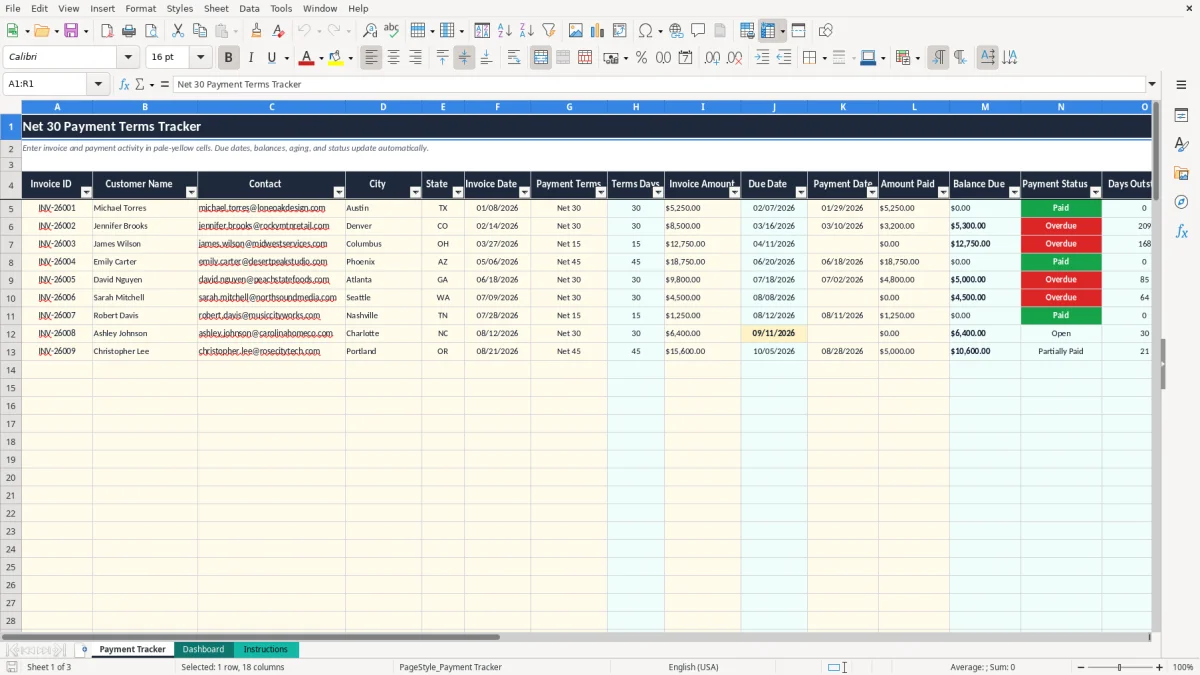
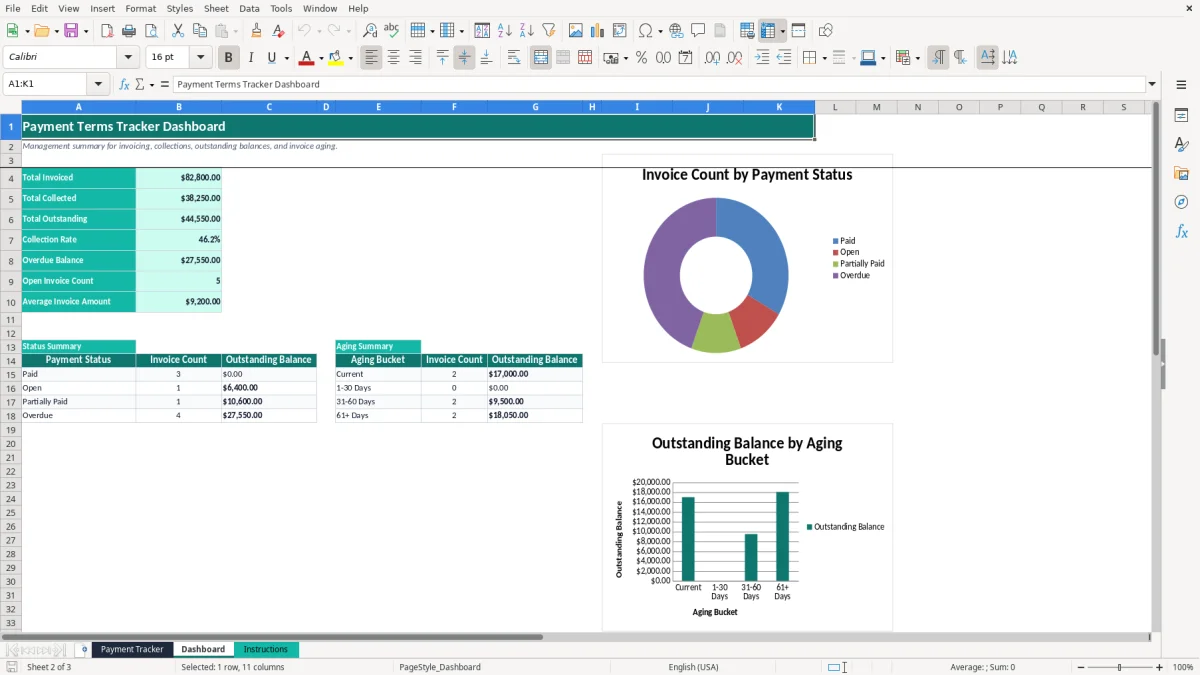
Enter activity in the pale-yellow cells on the Payment Tracker tab. The workbook calculates due dates, outstanding balances, days outstanding, days overdue, and aging buckets, while the Dashboard summarizes receivables and collection progress. Image 1 shows the 18-column tracker layout; image 2 shows its management summary.
A Net 30 tracker is most useful when your business sends invoices today but expects cash roughly one month later. A bookkeeper at an LLC may update it after the weekly billing run, while an office manager at a contractor may use it every Friday to decide which customers need a reminder. A service company with 40 open invoices can lose sight of a $6,500 balance even when every invoice is stored in email.
The Payment Tracker tab is built for that working moment. Image 1 shows columns for Invoice ID, Customer Name, Contact, City, State, Invoice Date, Payment Terms, Terms Days, Invoice Amount, Due Date, Payment Date, Amount Paid, Balance Due, Payment Status, Days Outstanding, Aging Bucket, Days Overdue, and Collection Notes. You enter the transaction facts; the calculated columns turn them into collection information.
For a marketing agency invoicing $8,000 on 04/01/2026 under Net 30, the calculated due date is 05/01/2026. If the client pays $3,000, the tracker shows a $5,000 balance and identifies the invoice as Partially Paid until the remaining amount is recorded.
A sole proprietor can use the same process after each invoice batch, then review the Dashboard before making payroll or transferring money for estimated taxes. The Dashboard shows total invoiced, total collected, total outstanding, collection rate, overdue balance, open invoice count, and average invoice amount. It also separates payment status from aging, which answers two different questions: what happened to the invoice and how long has the unpaid amount been outstanding?
At month-end, a small business can compare the spreadsheet's outstanding balance with its accounts receivable ledger. The template has 100 prepared rows, from row 5 through row 104, so it suits a modest invoice list without requiring a separate database.
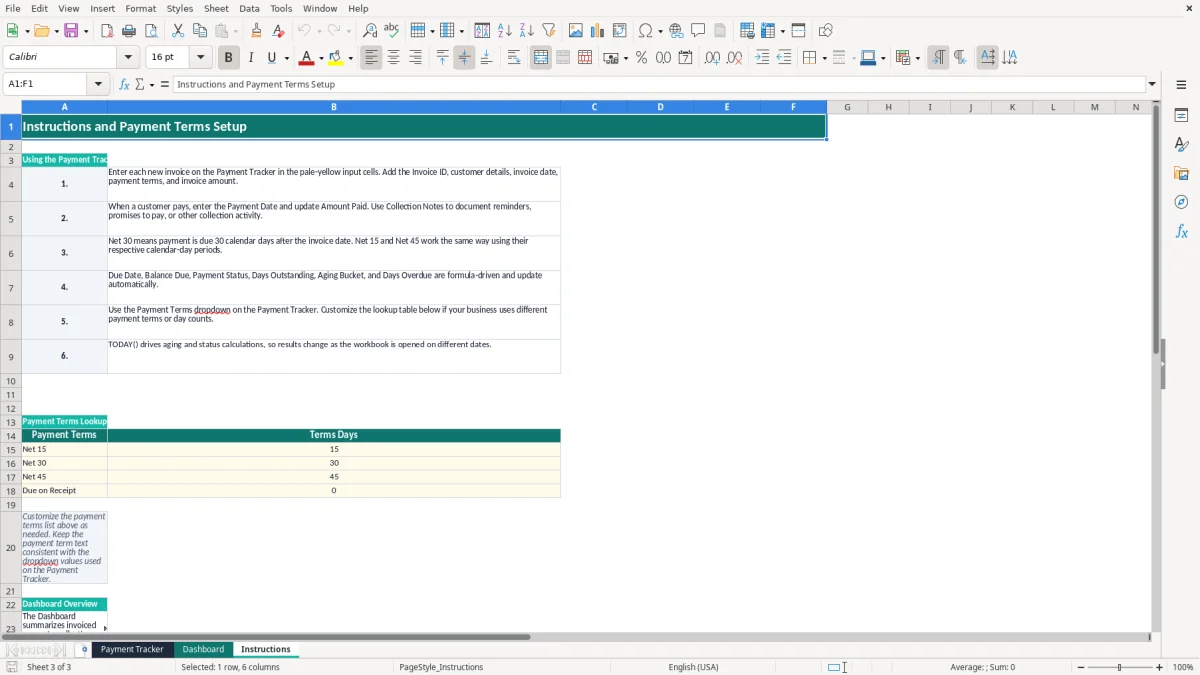
Net 30 is a contract payment term, not a federal tax rule. It ordinarily means the customer owes payment 30 calendar days after the invoice date, although your written agreement should define whether the clock starts on the invoice date, delivery date, or acceptance date. In this workbook, the Instructions tab defines Net 30 as 30 calendar days after the invoice date.
The supplied lookup table also includes Net 15, Net 45, and Due on Receipt. The Payment Tracker uses VLOOKUP to retrieve the day count and adds it to Invoice Date. For example, an invoice dated 03/27/2026 with Net 15 has a calculated due date of 04/11/2026; a Due on Receipt invoice adds zero days.
Invoice terms do not determine when every business reports revenue. A cash-basis business generally records income when payment is received, while an accrual-basis business generally records revenue when earned under its accounting method. A product seller must also handle sales tax, which is state-level: there is no national VAT, and nexus obligations differ by state.
Keep invoices, payment evidence, and collection notes with your accounting records. The IRS generally expects supporting records to be retained for at least 3 years, and some situations require up to 7 years. This tracker is an operational receivables aid, not a replacement for your general ledger or tax workpapers.
The formulas classify a zero balance as Paid. A positive balance past the due date becomes Overdue; a positive balance before the due date is Open unless a partial payment has been entered. Aging uses Current, 1-30 Days, 31-60 Days, and 61+ Days, while TODAY() means the displayed result changes with the workbook's opening date.
The most expensive failure is entering an invoice but never updating the payment fields. Suppose a $12,750 invoice receives $4,000 by ACH. If Amount Paid remains blank, the workbook reports the full $12,750 as outstanding and your collection review may chase a customer who has already paid part of the bill.
A one-word mismatch can also distort the schedule. If a user types Net30 instead of selecting Net 30 from the dropdown, the lookup may not return 30 days. The Due Date then remains blank, and the status and overdue calculations cannot work correctly. Use the dropdown rather than manually typing terms.
Another common error is using a payment date as the invoice date. A $5,250 invoice issued 01/08/2026 under Net 30 is due 02/07/2026. If you enter 01/29/2026 as the invoice date because that is when payment arrived, the calculated due date shifts by 21 days and weakens the collection history.
Collection notes are not decorative. Without a note such as “second collection email sent,” the next person may repeat the same request or miss a promised payment. For a company with 25 overdue invoices averaging $2,400, poor notes can tie up $60,000 in receivables and consume hours reconstructing email history.
Do not treat a Dashboard collection rate as proof that every customer is current. A business could collect $90,000 of $100,000 invoiced, showing a 90% rate, while the remaining $10,000 is concentrated in one strategically important overdue account. Review the overdue balance and aging summary, not only the percentage.
Status and aging rely on TODAY(). A workbook opened on 09/11/2026 will not show the same days overdue as one opened on 08/31/2026. Save a dated export or retain a separate accounting record when you need a historical snapshot.
The spreadsheet works best when you attach it to a fixed event instead of opening it only when cash is short. Update new invoices immediately after the billing run, then review open and overdue balances every Friday. A 20-minute routine can cover 15 invoices if you filter your attention by status and balance rather than rereading every note.
Keep the term text consistent with the lookup values. If your company adds Net 60, add the label and 60 to the Instructions table, then use that exact label in the Payment Terms dropdown setup. Test one invoice before entering a full billing batch.
Use Collection Notes to record a dated action, not a vague phrase. “Emailed 09/11/2026; customer promised ACH 09/15/2026” is more useful than “contacted.” For example, if the Dashboard shows $18,000 in 31-60 Days and $7,500 in 61+ Days, contact the older bucket first unless a customer dispute changes the priority.
Protect the calculated columns from accidental overwriting and keep a backup before changing the lookup table. The tracker has 100 prepared operational rows; when your receivables exceed that regularly, or several staff members need simultaneous access, move to an accounting system such as QuickBooks or a dedicated accounts-receivable platform. A spreadsheet is strongest for a controlled list, not as a substitute for transaction-level audit trails.
Net 30 means payment is due 30 calendar days after the invoice date. The template retrieves 30 from the Instructions lookup table and adds it to Invoice Date to calculate Due Date.
Yes. The supplied lookup table includes Net 15, Net 30, Net 45, and Due on Receipt. You can customize the list on the Instructions tab, keeping the term text consistent with the Payment Terms dropdown.
Enter the payment date in Payment Date and the cumulative amount received in Amount Paid. For an $8,500 invoice with $3,200 collected, the calculated Balance Due is $5,300.
Payment Status, Days Outstanding, Aging Bucket, and Days Overdue use TODAY(). Because TODAY() uses the current date, an unpaid invoice can move from Open to Overdue as time passes.
The prepared tracker contains operational rows 5 through 104, providing space for 100 invoice records. The table spans columns A through R and includes formulas in the calculated fields.
The Dashboard calculates total invoiced, total collected, total outstanding, collection rate, overdue balance, open invoice count, and average invoice amount. It also summarizes invoice counts and outstanding balances by payment status and aging bucket, with two charts.