Goodwill Donation Value Log Template
12
Free download
Track Poshmark orders, fees, shipping costs, profit, and payout totals in one Excel sheet for resellers.


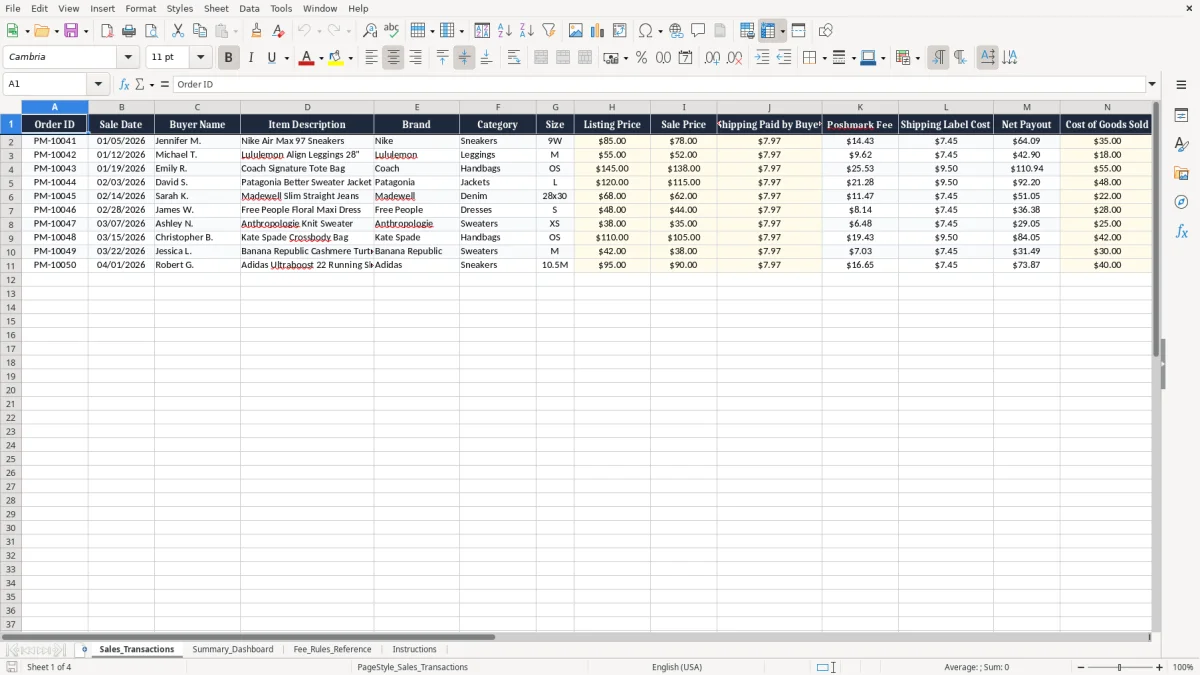
This Poshmark sales and fees tracker Excel template records each order, fee, shipping label cost, net payout, cost of goods sold, profit, and profit margin in one workbook. It is built for resellers who need a clean way to see what each sale actually earns after Poshmark deductions.
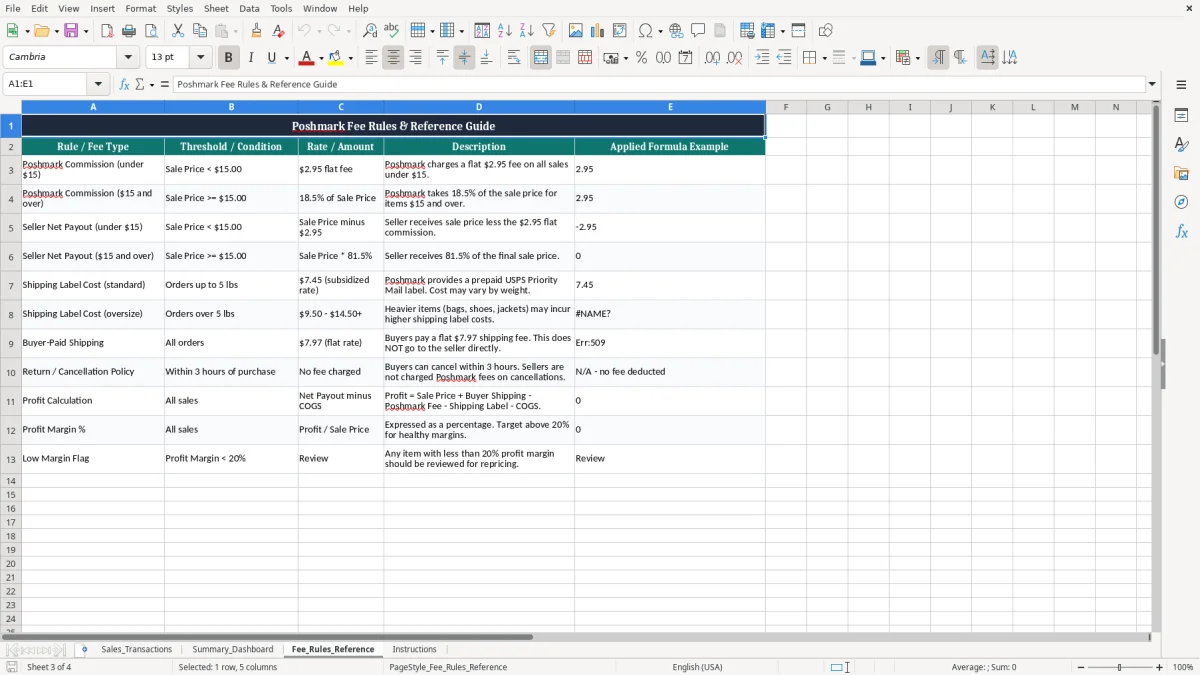
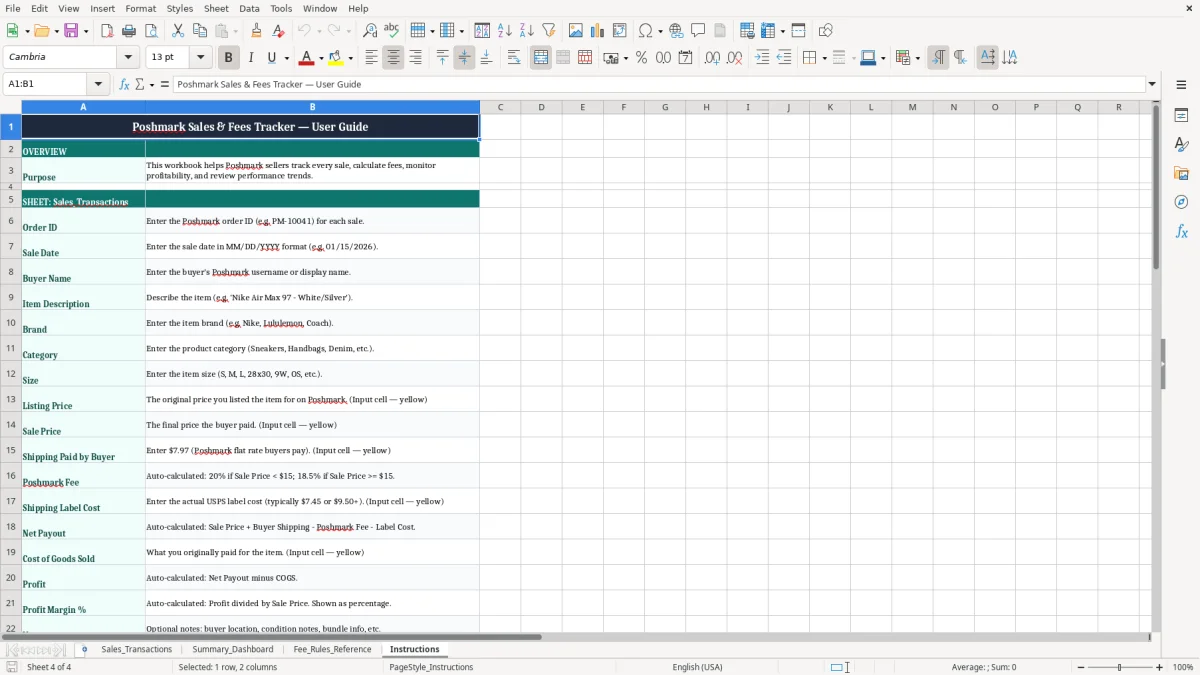
The template includes a Sales_Transactions entry tab, a Summary_Dashboard for totals and charts, a Fee_Rules_Reference tab, and an Instructions tab. You enter order-by-order details once, then use the summary view to check revenue, fees, and profit at a glance.
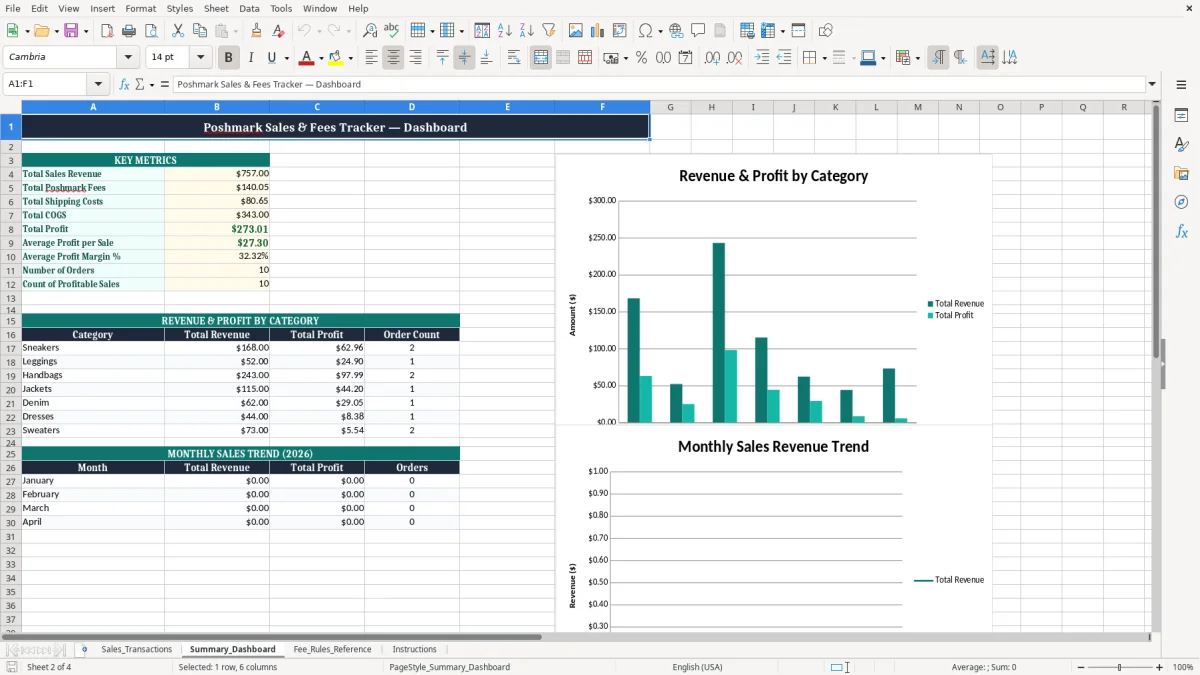
The people who use this workbook most are solo resellers, part-time side hustlers, and small sole proprietor operations that move apparel, shoes, bags, and accessories one order at a time. If you sell 15 items in a month at an average profit of $18.00, that is $270.00 of earnings you can inspect row by row instead of guessing from the payout deposit.
This kind of tracker matters when you are balancing inventory buys, Poshmark fees, and shipping costs while trying to see which categories deserve more sourcing time. A reseller with 60 listings and 12 monthly sales can tell quickly whether sneakers outperform jackets or whether handbags are carrying the store.
Month-end is when the sheet earns its keep. You can total sales, check what shipped, and compare the net payout against your purchase costs without rebuilding the numbers from scratch.
If you run Poshmark alongside a day job, this workbook keeps the resale business separate from household spending. A consignment seller with 25 active items can use the notes field to track condition, buyer location, or shipment issues that explain a return or a lower margin.
For U.S. tax reporting, your resale income usually feeds into Schedule C if you are operating as a business, and the cleanest recordkeeping is still the same: date, item, price, fees, and cost. The IRS generally expects you to keep records for 3 years, and longer if the return has special issues, so a dated row with the fee and payout breakdown is worth more than a bank deposit alone.
On the tax side, the workbook helps you separate gross sales from expenses. If you sold $4,800.00 in goods and paid $612.00 in fees plus $388.00 in shipping labels, you are not looking at $4,800.00 of spendable cash; you are looking at a much smaller margin after expenses and inventory cost.
Poshmark-style resale records are easier to defend when the sale price, buyer-paid shipping, platform fee, and your own cost basis each have a separate column. That is better than one lump-sum deposits column because it lets you match the marketplace payout to the actual order.
A $138.00 handbag sale with a $9.50 shipping cost and $55.00 cost of goods sold can look strong on cash flow while still giving you only modest profit. The workbook keeps those two ideas separate so you do not confuse a healthy deposit with a healthy margin.
The common failure is simple: you track the payout deposit and skip the detail behind it. When you do that, a 30-order month can hide $120.00 in missed label costs, or make a $78.00 sale look profitable when the item actually cleared only $12.00 after fees and inventory.
Another costly mistake is mixing personal wardrobe sales with business inventory. If a reseller pays $35.00 for a jacket, sells it for $52.00, and forgets to record the label cost and fee, the spreadsheet overstates profit and your year-end numbers drift far enough to mess up estimated tax planning.
If you leave cost of goods sold blank, you are not measuring resale performance. You may think you had a $1,000.00 month, but if $620.00 of that was inventory cost and $140.00 was fees and shipping, the real result is very different.
Wrong dates and sloppy order IDs cause reconciliation headaches when the payout lands in a different week than the sale. A seller with 40 transactions can waste an hour per month hunting through email and app history, which is time you should spend sourcing and listing.
Low-margin items are easy to miss unless the sheet calculates margin for you. A $55.00 legging sale with an $18.00 cost and a $7.45 label cost may look fine until you realize the platform fee and shipping leave you with much less than expected.
Use the workbook at the same time every week, not whenever you remember. The best habit is to update it right after your shipping run or after the Poshmark payout posts, because the facts are still fresh and the receipts are already in front of you.
Once you are pushing dozens of orders per week and need inventory counts, purchase tracking, and more formal accounting, move beyond a spreadsheet and into a dedicated inventory or bookkeeping system. Excel is still excellent for control, but it stops being the right tool when your workflow needs multi-user access and automatic order imports.
Until then, this template gives you a disciplined way to keep fees, profit, and payout data in one place without turning your resale business into a pile of screenshots.
It tracks each Poshmark order with order ID, sale date, buyer name, item description, brand, category, size, pricing fields, fee fields, net payout, cost of goods sold, profit, profit margin %, and notes.
Use it to separate gross sales from fees, shipping costs, and inventory cost so you can build cleaner records for Schedule C and year-end reporting. That gives you a better starting point than a bank statement alone.
Sale price is what the buyer paid for the item. Net payout is what remains after the platform fee and shipping label cost are taken out, so a $78.00 sale can turn into a much smaller deposit.
Yes. It works well for a sole proprietor, a single-member LLC, or any small resale operation that needs a simple order-by-order view of sales and profit.
The workbook includes Sales_Transactions, Summary_Dashboard, Fee_Rules_Reference, and Instructions. That setup gives you entry, review, reference, and setup guidance in one file.
Update it at least weekly, and preferably after each shipping batch. If you let 20 or 30 orders stack up, you will spend more time reconstructing fees and margins than you would spend entering them correctly the first time.