Crypto Portfolio Excel – Free Template (2026)
5
Free download
Track beneficiaries, IRMAA tiers, Part B rebates, monthly premiums, annual costs, budgets, payment methods, and status in Excel.


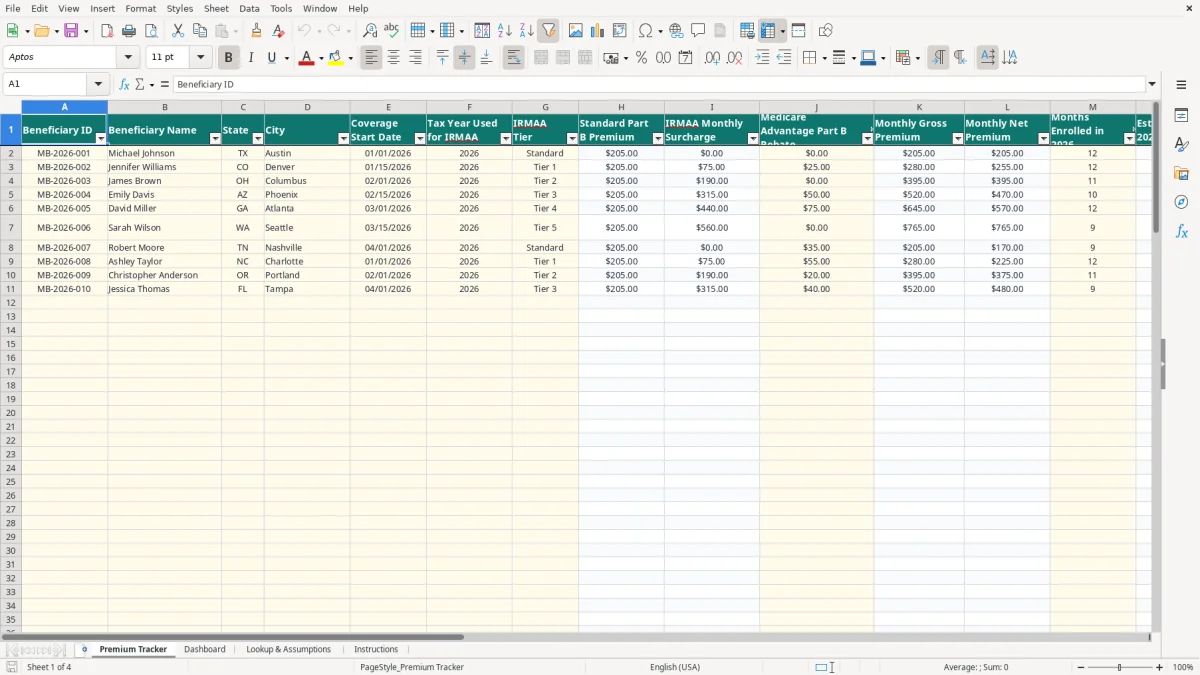
A Medicare Part B premium tracker Excel spreadsheet records each beneficiary's coverage details, IRMAA tier, standard premium, surcharge, Medicare Advantage rebate, enrollment months, and annual budget. This workbook calculates monthly net premiums, estimated 2026 costs, budget variance, and status across up to 100 prepared beneficiary rows.
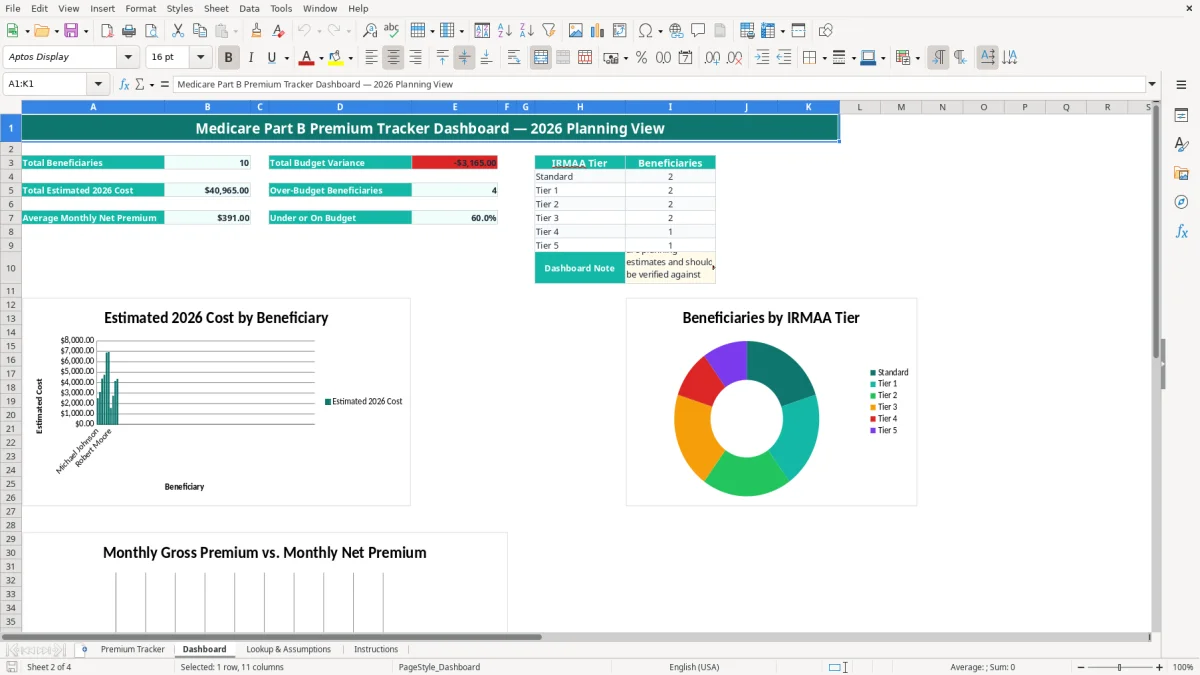
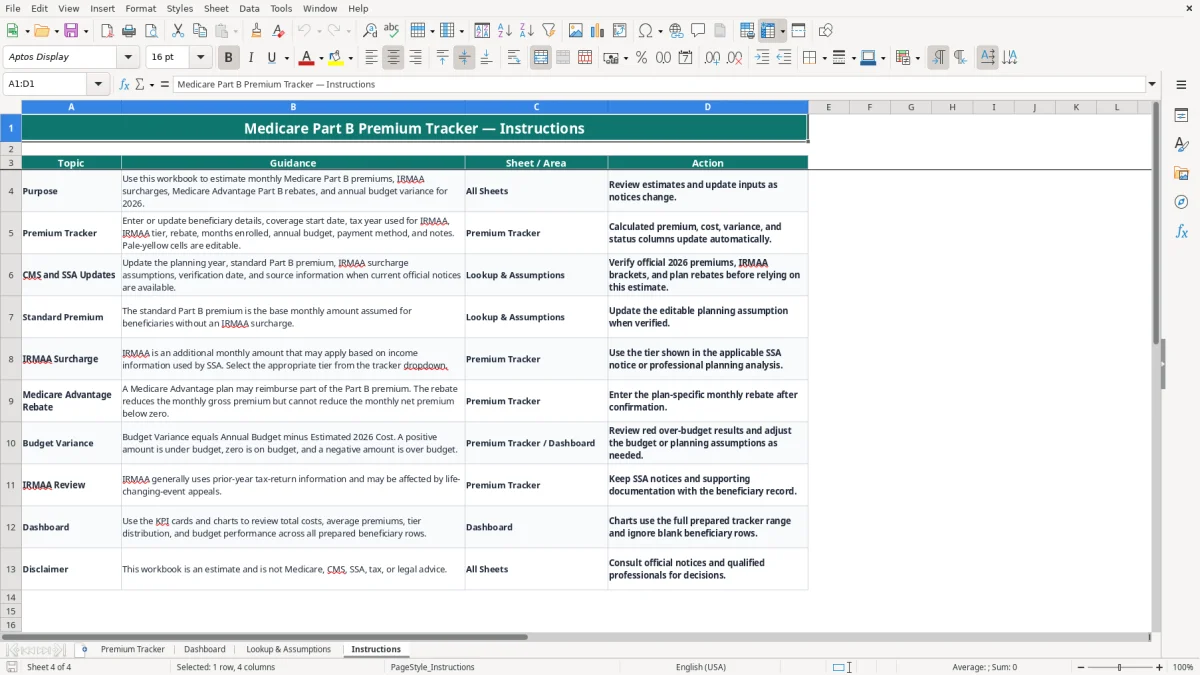
Use the Premium Tracker tab for detailed records, the Dashboard for portfolio-level totals and charts, and Lookup & Assumptions to maintain planning inputs. The Instructions tab explains which cells you enter and which results Excel calculates.
Image 1 shows the tracker table with 19 columns, from Beneficiary ID through Notes. Image 2 shows KPI cards, tier counts, and three charts; images 3 and 4 show the assumptions and instructions tabs.
This spreadsheet fits a household supporting an aging parent, a financial counselor preparing retirement projections, or an administrator managing premiums for several beneficiaries. It is especially useful during annual enrollment planning, after an SSA notice arrives, or when a Medicare Advantage plan confirms a Part B rebate.
Consider a married household with two Medicare beneficiaries. One person has the Standard tier and the other has Tier 2. Using the workbook's planning inputs of $205.00 for the standard premium, $0.00 for Standard surcharge, and $190.00 for Tier 2 surcharge, the gross monthly amounts are $205.00 and $395.00. With 12 months enrolled, the combined estimate is $7,200.00 before rebates.
Enter each spouse as a separate row rather than combining them. That preserves different coverage start dates, payment methods, budgets, and notes, while the Dashboard aggregates the prepared rows.
A benefits coordinator may track a retiree reimbursement in the rebate column, while a caregiver may record Social Security Withholding or Medicare Easy Pay as the payment method. The tracker separates the gross premium from the net amount actually budgeted.
For example, a $25.00 monthly rebate applied to a $280.00 gross premium produces a $255.00 net premium and a $3,060.00 estimate for 12 months. The workbook's formulas perform that calculation consistently across 100 prepared rows.
Use it before setting a monthly retirement budget, after a beneficiary's IRMAA tier changes, and during year-end planning. The Dashboard's over-budget count gives you a quick review point when several records must be checked at once.
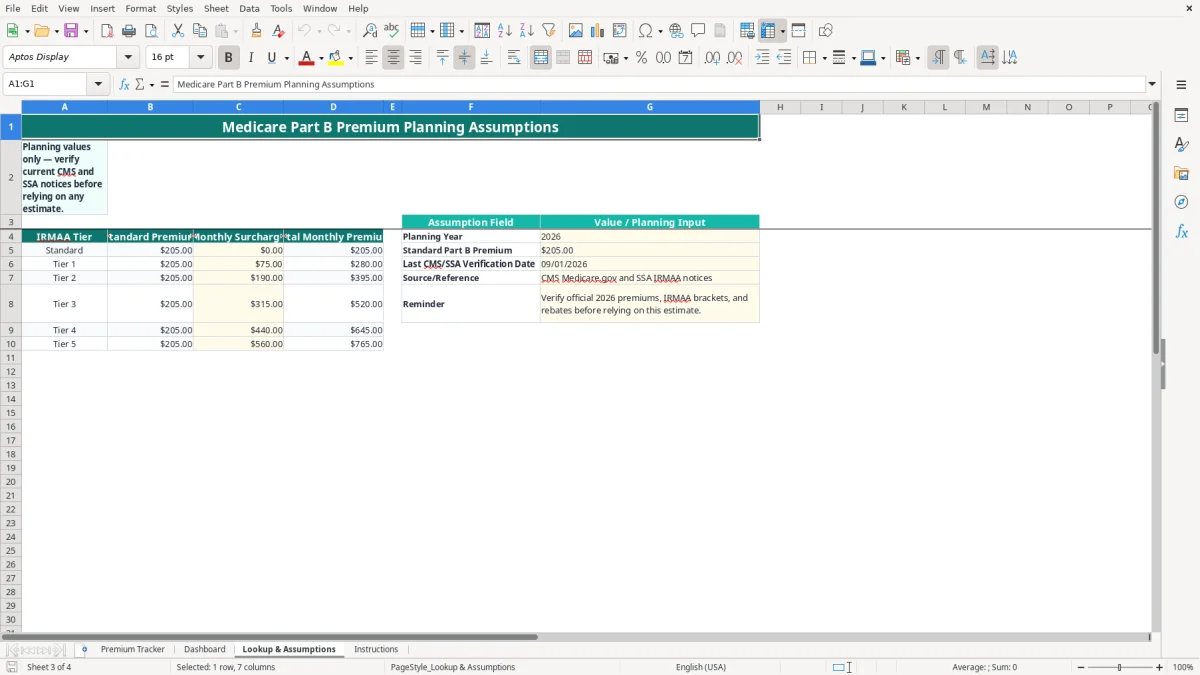
Medicare Part B planning requires current official information, not a permanent rate copied from an old worksheet. The workbook therefore treats its values as editable assumptions: Lookup & Assumptions shows a 2026 planning year, a $205.00 standard premium input, surcharge amounts of $0.00, $75.00, $190.00, $315.00, $440.00, and $560.00, plus a verification date of 09/01/2026.
IRMAA is generally based on income information from a prior federal tax return and is communicated through an SSA notice. Enter the tax year used for IRMAA and select the tier shown by the applicable notice; do not infer a tier from a household budget alone.
The workbook's six-row lookup table maps Standard and Tier 1 through Tier 5 to the planning surcharges. For Tier 1, the displayed planning calculation is $205.00 plus $75.00, or $280.00 per month. Official CMS and SSA notices should control any real payment decision.
A Medicare Advantage plan may reimburse part of the Part B premium. Enter the confirmed monthly amount in Medicare Advantage Part B Rebate. If gross premium is $280.00 and the rebate is $25.00, the net premium is $255.00; the formula uses MAX so the result cannot be negative.
Keep SSA notices, plan documents, and supporting calculations with the beneficiary record. This spreadsheet is a planning tool, not Medicare, CMS, SSA, tax, or legal advice, and the Dashboard itself instructs you to verify current official premiums, IRMAA brackets, and rebates.
The most expensive errors usually start with a wrong tier, an outdated premium assumption, or a rebate entered as if it were the full premium. Those mistakes can distort an annual retirement budget for every month that the row remains unchanged.
A beneficiary may copy a spouse's tier, select Standard because the surcharge is not yet visible, or type a description that does not match the dropdown. A $190.00 monthly surcharge omitted for 12 months understates the estimate by $2,280.00. Select the tier from the relevant SSA notice and retain the notice in the record.
The gross premium is the standard premium plus the IRMAA surcharge. The net premium subtracts the Medicare Advantage rebate. If you budget $280.00 but the actual rebate is $25.00, the annual difference is $300.00 over 12 months; if you budget only $25.00, the shortfall becomes $3,060.00.
Entering 12 months for someone who starts coverage on 02/01/2026 overstates a complete-year estimate by one month. At a $395.00 monthly net premium, that error is $395.00. Enter 11 months when the planning period genuinely covers March through December plus one partial planning month, and document the convention in Notes.
Another problem is treating a negative Budget Variance as a clerical detail. The workbook defines Annual Budget minus Estimated 2026 Cost, so a negative $600.00 means the budget is short by $600.00. Review the red over-budget result before relying on a retirement cash plan.
A tracker works best when you update it at a fixed time instead of waiting for a surprise bill. Set a monthly reminder near the Social Security payment review, then check whether the payment method, rebate, enrollment months, and budget still match the beneficiary's documents.
For example, three beneficiaries with monthly net premiums of $205.00, $255.00, and $395.00 require $855.00 per month. If one rebate ends, the increase is easy to spot by comparing the Dashboard totals and the Premium Tracker status column.
Keep official source information and the verification date in Lookup & Assumptions. The best practice is to change the planning inputs there rather than overwrite calculated premium columns on Premium Tracker. Because tier selections use validation and formulas use VLOOKUP, consistent labels matter.
Use the Instructions tab as your handoff note if a spouse, caregiver, or office assistant maintains the file. The workbook has no chart on the assumptions tab and no automatic connection to CMS or SSA, so updates must be entered manually after verification.
This workbook is appropriate for a defined list of up to 100 prepared rows. If you need payment reconciliation, document storage, recurring notices, or hundreds of beneficiaries, move the process to a benefits administration or accounting system and retain this file as a planning export.
It calculates monthly gross premium, monthly net premium after a Medicare Advantage rebate, estimated 2026 cost based on enrollment months, budget variance, and an Over Budget, On Budget, or Under Budget status.
Lookup & Assumptions contains a $205.00 standard Part B premium planning input for 2026. Verify that amount against current CMS and SSA information before using it for an actual payment or retirement decision.
Select Standard or Tier 1 through Tier 5 in the IRMAA Tier dropdown on Premium Tracker. The worksheet retrieves the corresponding surcharge from Lookup & Assumptions using VLOOKUP; update the assumptions only after verifying the applicable official notice.
No. The Monthly Net Premium formula subtracts the rebate from the Monthly Gross Premium and uses MAX to prevent a result below $0.00. Enter the confirmed monthly rebate in the Medicare Advantage Part B Rebate column.
Budget Variance equals Annual Budget minus Estimated 2026 Cost. A negative result means the estimated cost exceeds the annual budget; for example, a $3,600.00 estimate against a $3,000.00 budget produces a negative $600.00 variance and an Over Budget status.
No. The workbook contains editable planning assumptions and a source reference for CMS Medicare.gov and SSA IRMAA notices, but it has no live data connection. Review official 2026 notices and update Lookup & Assumptions manually.