Goodwill Donation Value Log Template
12
Free download
Track freelance design invoices, client details, due dates, hours, rates, tax, and payment status in Excel.


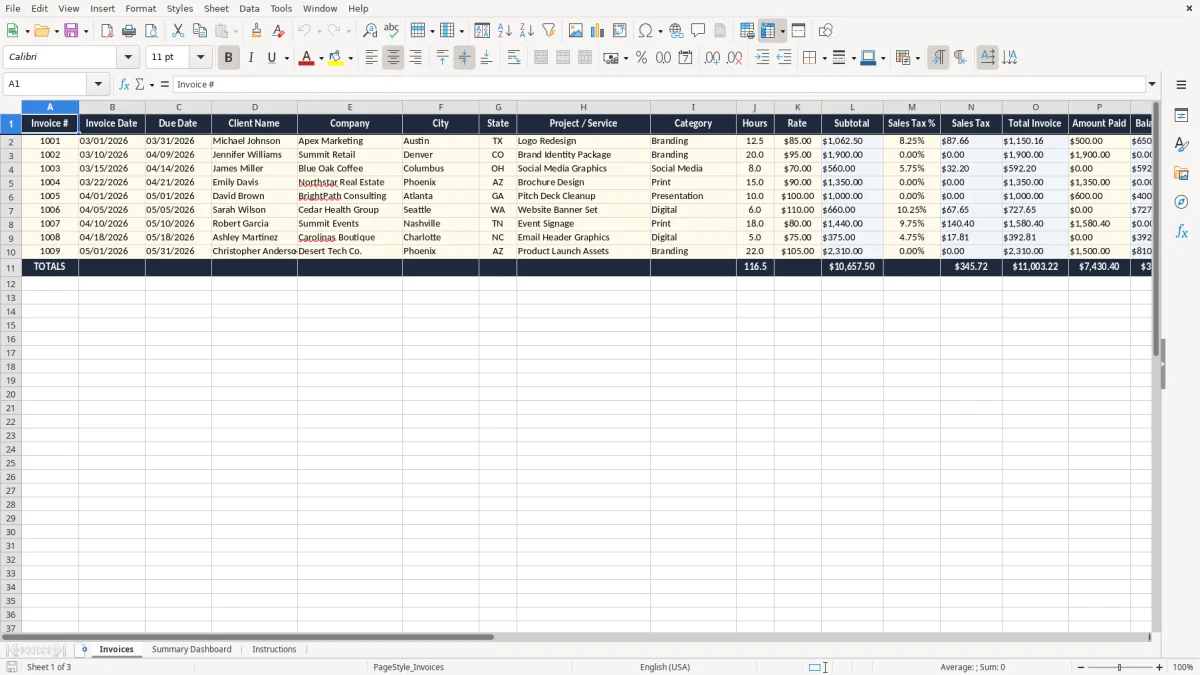
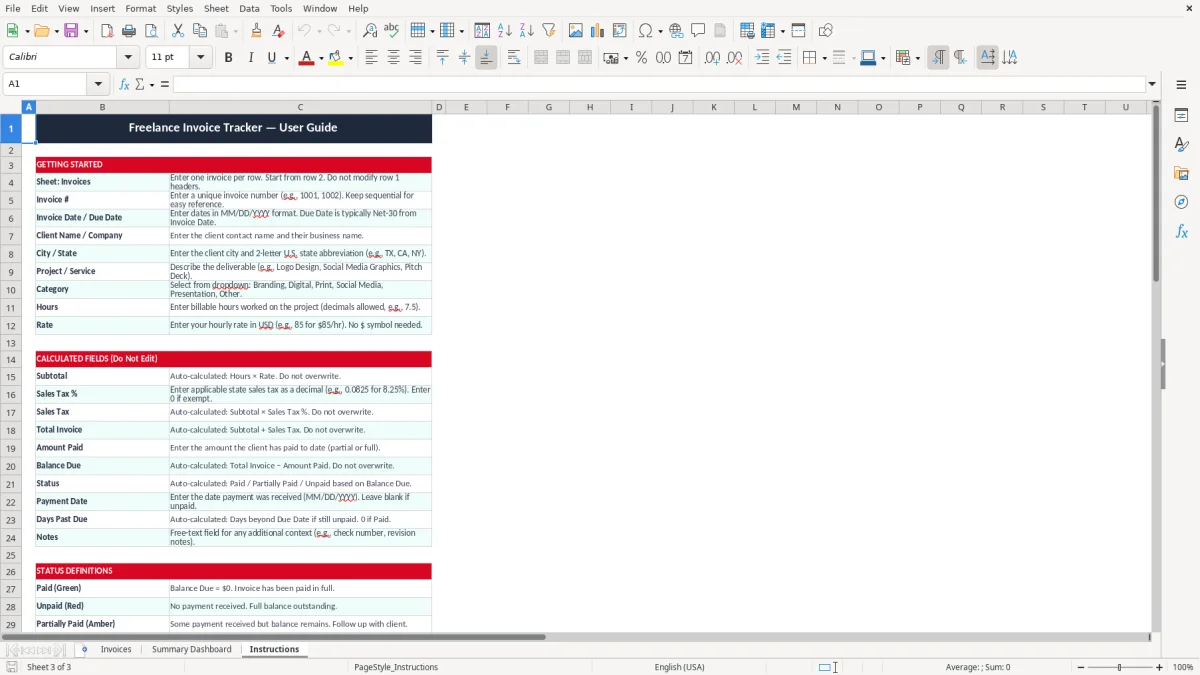
This freelance graphic designer invoice tracker Excel template helps you record each invoice, track due dates, and see what is still unpaid. It includes an Invoices tab, a Summary Dashboard, and an Instructions tab.
Use it when you bill by the hour, by project, or with sales tax added to the total. It keeps the client name, project, category, hours, rate, subtotal, tax, payment status, and days outstanding in one workbook.
The layout is built for a designer who needs clean billing records, not a full accounting system. You can enter a $1,250 logo project, a 12-hour brand refresh at $85 per hour, or a mixed month of retainers and one-off jobs without rebuilding the file each time.
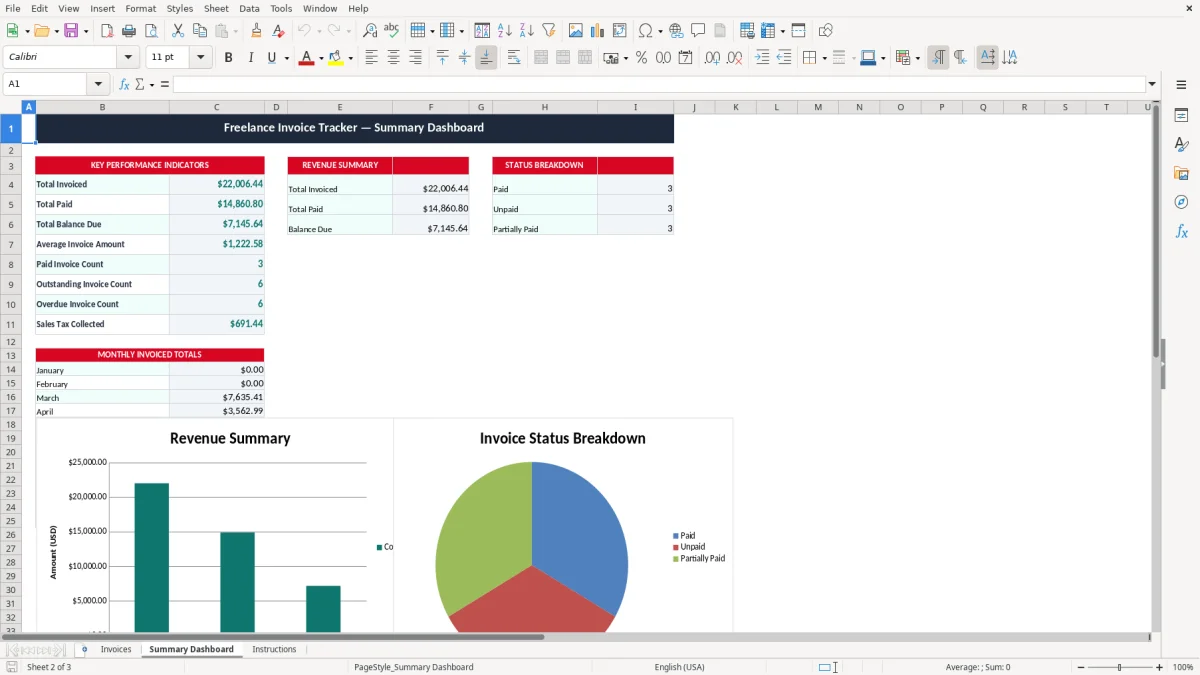
A freelance designer usually reaches for this workbook right after a client signs off on a logo, brand guide, social ad set, or website mockup. A solo sole proprietor with 18 invoices in a month can see which clients are slow-paying before cash flow gets tight.
The Invoices tab is the working list. In the code, it starts with invoice number, invoice date, due date, client name, company, city, state, project or service, category, hours, rate, subtotal, and tax fields, so you can bill both flat-fee and hourly jobs.
This is most useful during month-end billing, after a client review call, and during tax season when you want clean records for Schedule C. If you bill 12 clients at $450 each, or 6 clients at $1,200 each, you need a tracker that shows what is still waiting to be paid.
A spreadsheet beats memory when you are juggling a retainer, a rushed brochure project, and one invoice that went out 31 days ago. You can sort by due date, spot the oldest open balance, and keep the numbers in the same place every week.
For a freelance graphic designer, invoice tracking feeds your Form 1040 return through Schedule C. If you work as a one-person business, you usually need clean records for income, expenses, and any sales tax collected from clients.
The IRS generally expects you to keep tax records for 3 years, and longer in some cases. That makes invoice dates, client names, and payment proof worth storing now instead of reconstructing later from email threads.
If you charge $85 per hour for 14 hours, the invoice subtotal is $1,190 before any tax. Add a 7.5% local sales tax on taxable design work, and the tax column adds $89.25, which is exactly the kind of calculation this sheet keeps visible.
Late invoices are not just annoying; they distort your cash flow. A $2,400 branding project with a 30-day due date that slips to 60 days can delay rent, software subscriptions, and quarterly tax money at the same time.
For self-employed income, staying organized around billed work also helps when you estimate tax payments through 1040-ES. You do not need a full accounting system to see what came in this quarter, but you do need one reliable list of invoices and payment dates.
The most common failure is simple: you send the invoice, but you never record it. When that happens, a $975 package can disappear from your follow-up list and sit unpaid for 45 days because nobody owns the reminder.
Another problem is sloppy date handling. If the due date is wrong by even 7 days, you may chase a client too early or too late, and that changes how you manage your month-end balance sheet and expected receipts.
At $100 an hour, losing track of three half-day jobs means $1,200 of billable work sitting in limbo. If 5 invoices average $800 each and two of them are forgotten until the next month, your real-time revenue picture is off by $1,600.
“Sent” is not the same as “paid,” and “partial” is not the same as “cleared.” A tracker that keeps paid amount, balance due, and days outstanding separate prevents double-collection emails, duplicate entries, and embarrassing calls to clients who already paid.
For designers who work with agencies or small businesses, bad invoice records also create reconciliation headaches when the bank deposit is $1,143.50 but the invoice says $1,250 because of a fee or withheld amount. That is a nuisance now and a bookkeeping mess later.
Use this workbook on a fixed day, not whenever you remember it. Friday afternoon after the last client call, or Monday morning before new work starts, is better than trying to rebuild your billing trail at the end of the month.
If you are sending 40+ invoices a month, collecting online payments, and needing automatic reminders, it is time to move into a real invoicing system or accounting package. For a smaller design practice, though, this workbook is enough to stay organized without paying for software you do not yet need.
It includes an Invoices tab, a Summary Dashboard, and an Instructions tab. The invoice sheet tracks invoice number, dates, client details, project, hours, rate, subtotal, tax, total, paid amount, balance due, and days outstanding.
Yes. The file is built for both hourly billing and fixed-price projects, so you can use it for a $75/hour website task, a $1,500 logo package, or a mixed month with both types of work.
Yes. The invoice list is set up to show due dates, payment status, and days outstanding so you can see which client is late and how long the invoice has been open.
Yes. If you are a sole proprietor or single-member LLC, the invoice history gives you a clean income record for Schedule C and your year-end tax file.
If you charge sales tax on taxable design work, you can record it on the invoice line and keep the total visible. That makes your client billing clearer and helps separate tax collected from your actual service revenue.
Once you are juggling dozens of invoices, automatic reminders, online payments, and deeper reporting, a spreadsheet starts to feel thin. At that point, move to an invoicing or accounting system so you are not forcing Excel to act like full billing software.