TSP Contribution Allocation Excel – Free Template (2026)
0
Free download
Track FSA-eligible medical receipts, amounts paid, reimbursements, and receipt status in one Excel log and dashboard.


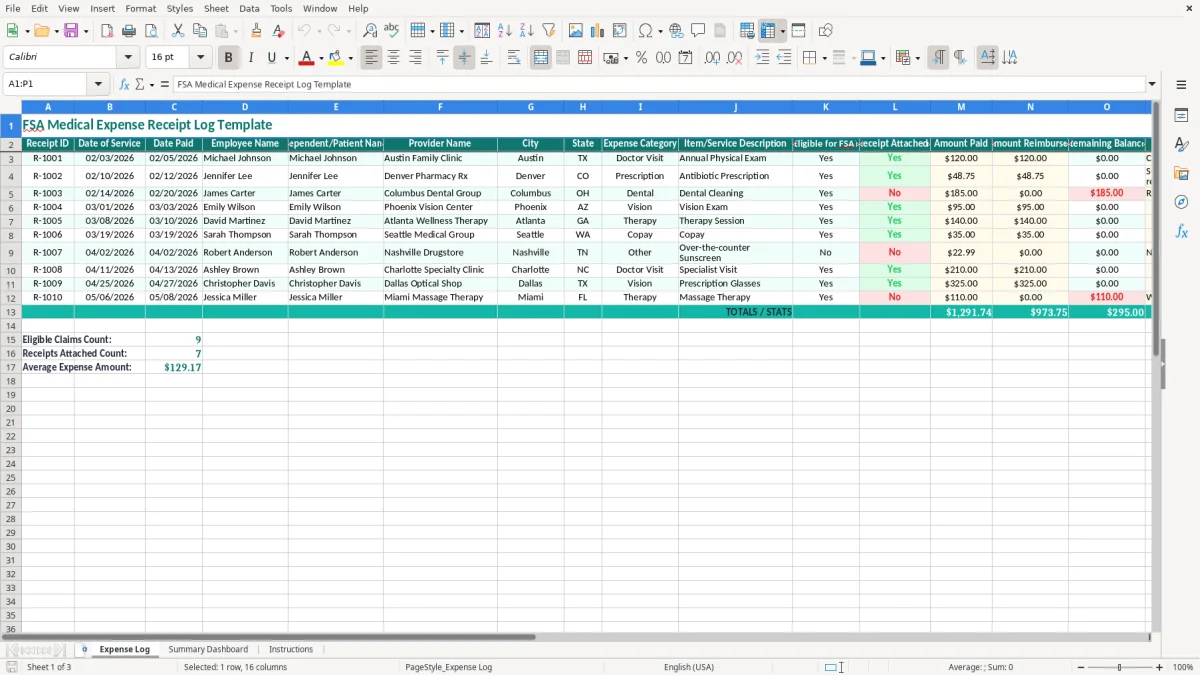
This FSA medical expense receipt log in Excel tracks each medical payment, receipt status, and reimbursement in one place. It includes an Expense Log, a Summary Dashboard, and Instructions so you can organize claims before the deadline.
The log is built for household medical spending: doctor visits, prescriptions, dental care, and vision expenses. You enter the date of service, date paid, provider, amount paid, amount reimbursed, and whether the receipt is attached.
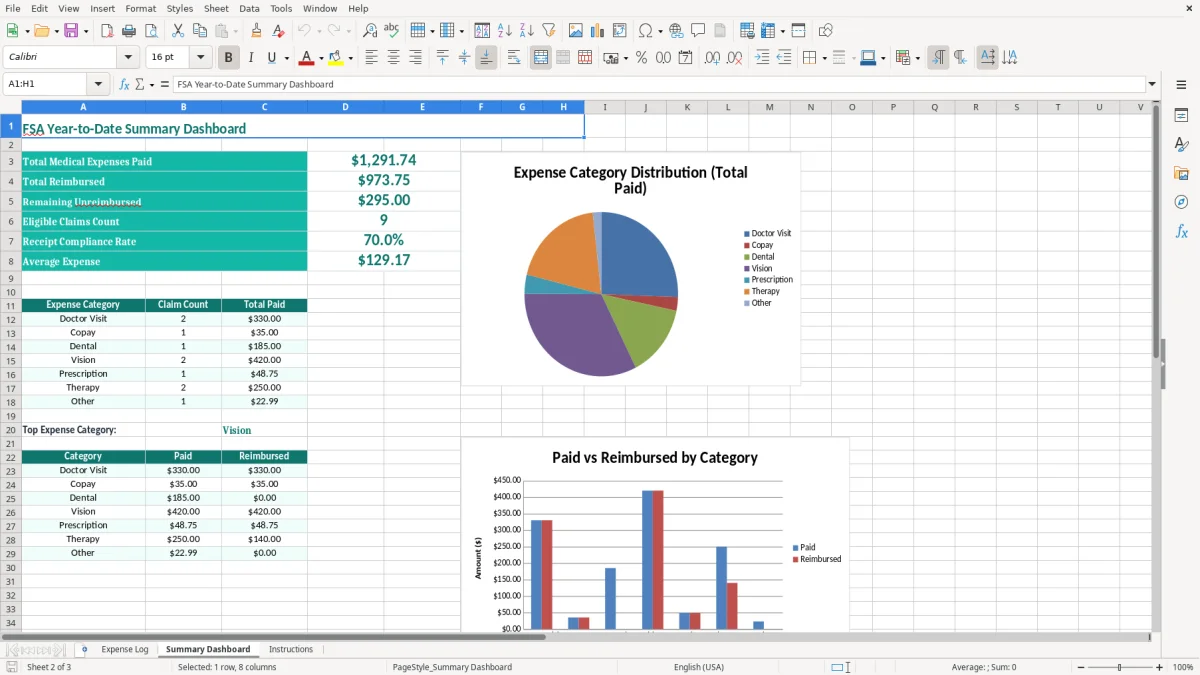
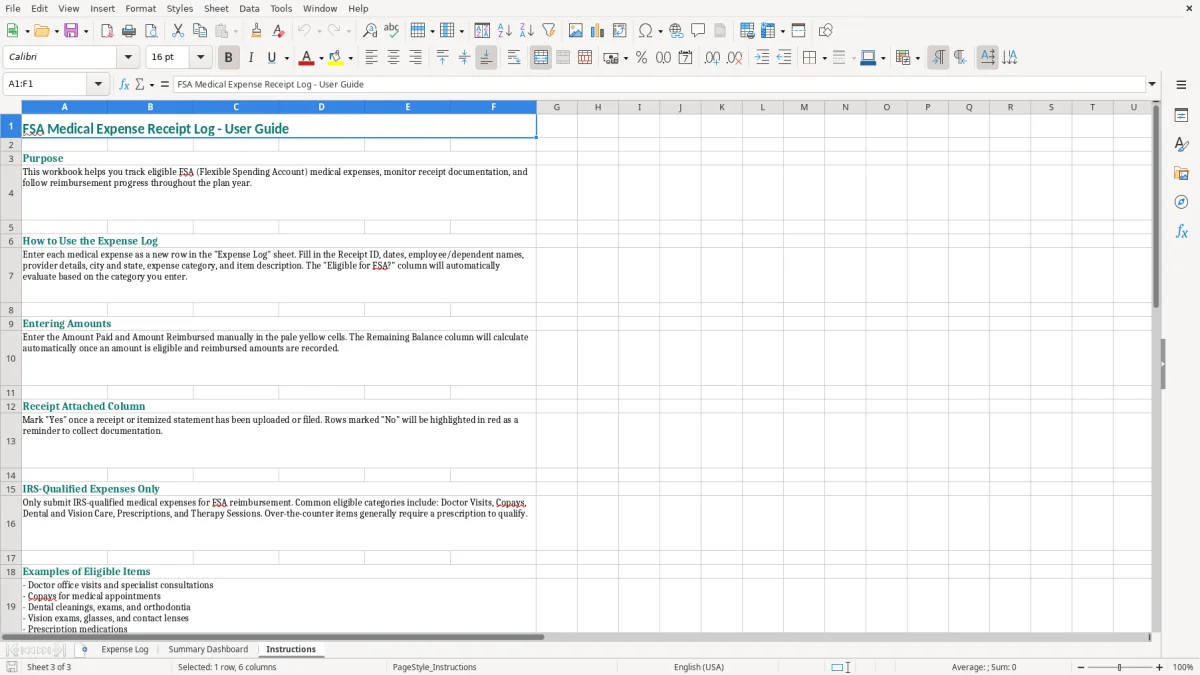
The dashboard gives you a fast running view of totals and remaining balance, which is the part people usually lose track of after a few claims. Image 1 shows the entry tab, image 2 shows the summary, and image 3 shows the instructions tab.
You use this log when you are paying out of pocket for eligible medical costs and need a clean record for reimbursement requests. It fits a household that has two incomes, a parent paying pediatric copays, or a spouse collecting dental and vision receipts during the same month.
In practice, this becomes useful the moment you have more than a few claims. A family with 12 receipts at $45 each is already juggling $540 in documentation, and a missing pharmacy slip can slow the whole packet down.
A sole proprietor with a spouse on an employer FSA plan may use a log to keep receipts straight for the family. An office manager at a small LLC may also keep one for employee benefit records, especially when multiple people submit claims during the same week.
The pressure usually builds at month-end, after a doctor visit, or right before a benefits submission. If you wait until you have 20 receipts, you end up spending an hour just matching dates, provider names, and reimbursement amounts that should have been captured in two minutes each.
This is not a tax form, but the recordkeeping logic is the same: keep proof, keep dates, and keep the amount tied to the service. For medical spending, the best habit is contemporaneous entry, which means you log the receipt while it is still in your hand, not three weeks later.
That matters because a clean file lets you answer questions fast. If one claim is $185 for a dental cleaning and another is $48.75 for a prescription, the spreadsheet gives you a simple support trail with no guessing.
Keep the receipt, the provider name, the date of service, and the amount paid together. If a claim is split across family members, this file helps you show exactly who the expense belongs to and what was already reimbursed.
The fields in this template are specific enough to support basic benefit review without turning into a full accounting system. You get the equivalent of a medical profit & loss by category, but without the overhead of a larger bookkeeping platform.
The biggest failure is missing backup. If a claim is marked reimbursed but the receipt column still says No, you have created a problem that takes time to fix and can delay the next batch of submissions by days.
Another common issue is mixing service dates and payment dates. A $120 visit on 02/03/2026 paid on 02/05/2026 is not the same thing as a prescription filled on 02/10/2026, and sloppy entry makes it harder to reconcile claims later.
One lost receipt can mean a denied reimbursement or a request for resubmission. If you miss just three $95 vision claims, that is $285 sitting outside the log until you hunt down new proof.
People rely on memory, text messages, and a stack of paper instead of one central file. Once the year gets busy, that turns into duplicate entries, wrong patient names, and reimbursement totals that no longer match the actual spending.
The best routine is simple: log receipts on the same day you get them, then review the file once a month. Tie that review to a fixed event like payroll, rent, or the first business day after the Form 1040 filing push so it becomes automatic.
When you get beyond a few dozen claims a year, a spreadsheet still works well. Once multiple people are editing the file at once or you need approvals and audit trails, it is time to move to a benefits system instead of stretching Excel past its job.
It tracks the receipt ID, dates, employee and patient names, provider, category, amount paid, amount reimbursed, and whether the receipt is attached. That gives you one clean row per expense.
Yes. The template is built for household use, so you can log expenses for yourself, a spouse, or a dependent as long as you keep the names and receipts matched correctly.
Those are not the same thing, and separating them helps you document the timing of the expense. A doctor visit on 02/03/2026 and payment on 02/05/2026 should not be treated as one field.
Mark Receipt Attached? as No and leave a note. That tells you the claim is not ready yet and helps you avoid submitting an incomplete packet.
The dashboard gives you a quick summary of the totals in the log so you can see spending and reimbursement activity without counting rows yourself. It is the fastest way to spot gaps in the file.
No. It is a recordkeeping tool for medical receipts and reimbursements. You still keep the supporting documents that go with your benefits claim or household records.