Goodwill Donation Value Log Template
12
Free download
Check each child’s 2026 CTC requirements with an Excel worksheet, eligibility indicators, credit totals, and a dashboard for tax preparation.


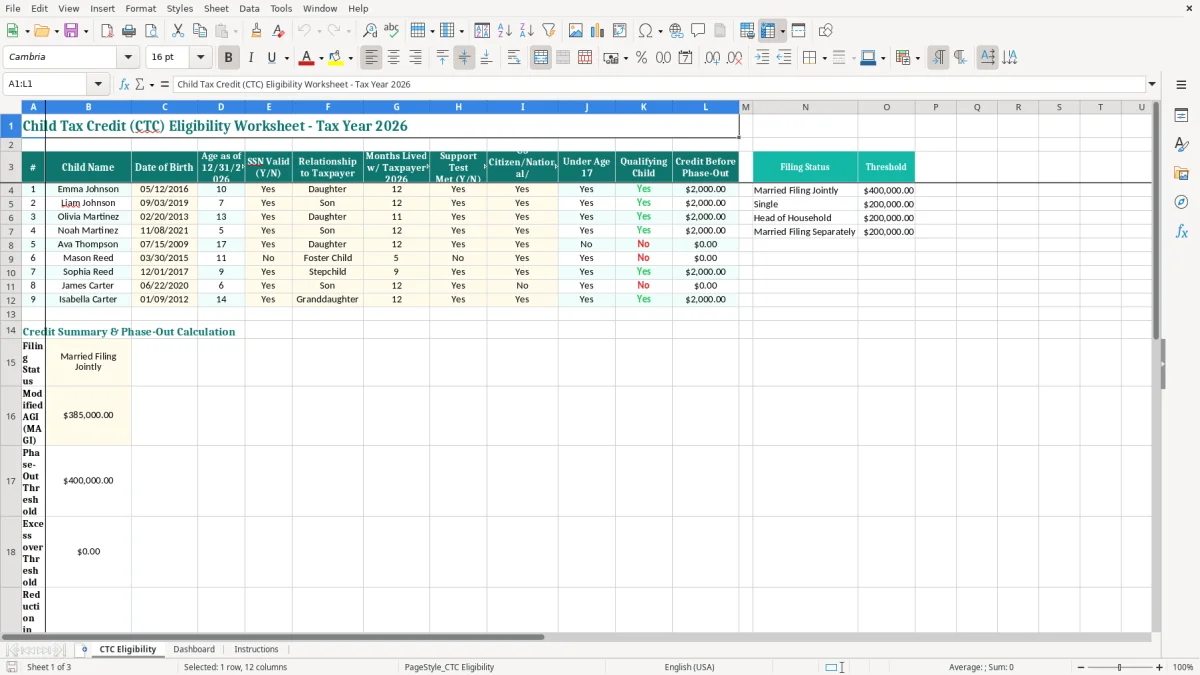
This Child Tax Credit (CTC) eligibility worksheet checks whether each child meets the 2026 age, Social Security number, relationship, residency, support, citizenship, and qualifying-child requirements. It includes a child-by-child worksheet, credit-before-phase-out calculation, dashboard, and instructions tab for preparing your federal tax return.
Enter one child per row on the CTC Eligibility tab. The worksheet records the child’s name, date of birth, age as of 12/31/2026, SSN response, relationship, months lived with you, support test, citizenship or residency status, age test, qualifying-child result, and credit before phase-out.
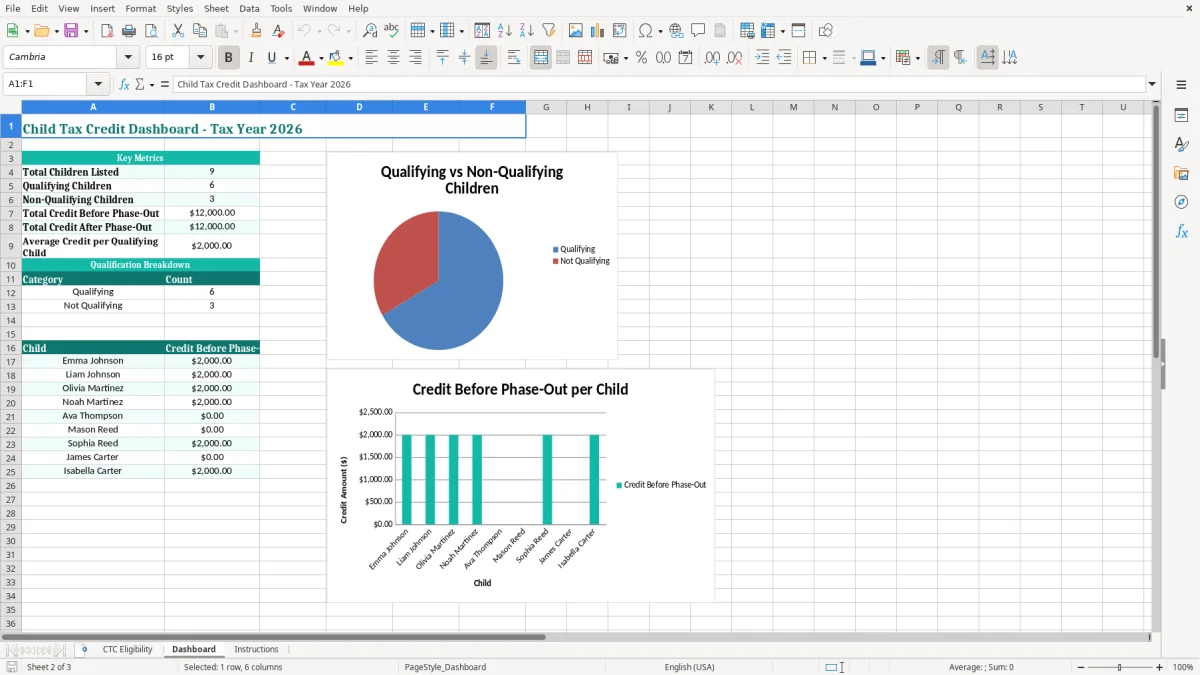
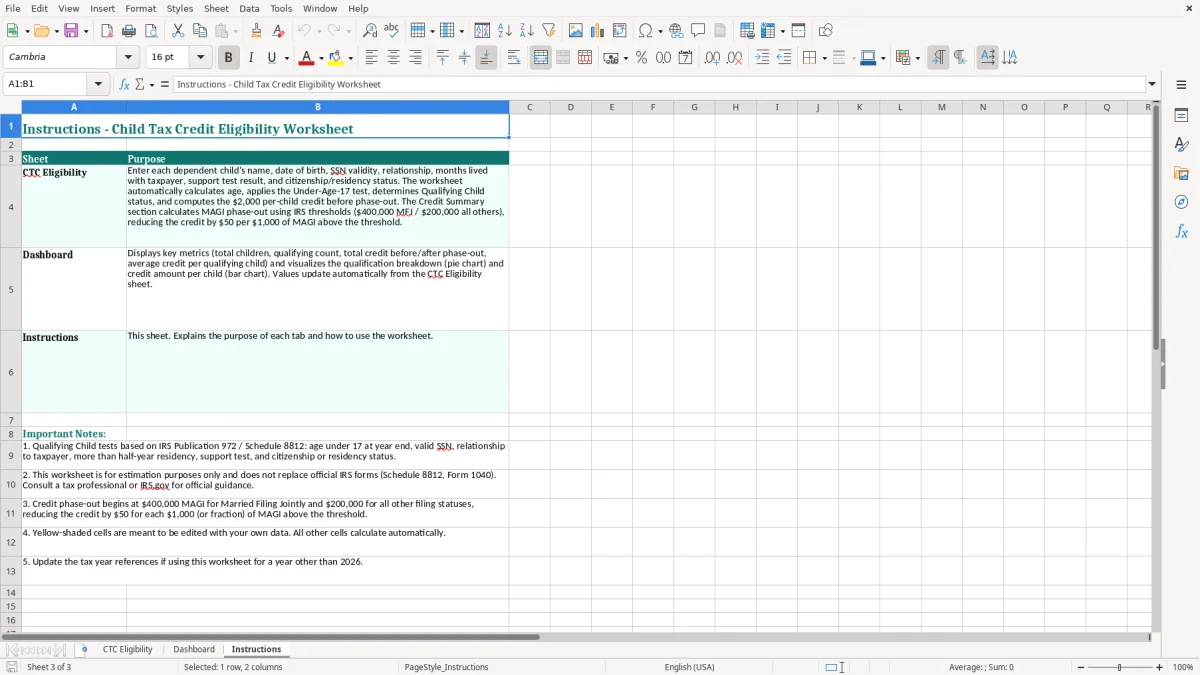
Image 1 shows the teal table layout and yellow input cells on CTC Eligibility. Image 2 shows the Dashboard, while image 3 shows the Instructions tab with guidance for completing the workbook.
A working parent usually opens this worksheet during tax-season document gathering, but the need begins earlier. A married couple with two children may use it while reconciling birth certificates, Social Security cards, school records, and their final 2026 address history; a separated parent may use it before deciding which parent has the stronger claim to a qualifying child.
The worksheet is also useful for a sole proprietor completing Schedule C. Business income does not determine whether a child is a qualifying child, but it can change household income and the eventual phase-out calculation. Entering the child facts separately from income keeps those two questions from getting mixed together.
With three children, a single missed detail can change the return by thousands of dollars. For example, if two children qualify for a $2,200 2026 credit before phase-out, the starting amount is $4,400; a third child with an invalid SSN or an unmet residency condition should not be included simply because the household paid most of that child’s expenses.
Image 1 shows why the row-by-row design matters. The table places the child’s date of birth beside Age as of 12/31/2026 and puts the practical tests—months lived with the taxpayer, support, citizenship or residency, and age—in the same record.
Use the file before filing Form 1040, after a move or custody change, and whenever a child turned 17 during 2026. A bookkeeper preparing a client’s organizer can complete the factual columns first, leave income phase-out work for the return preparation step, and give the taxpayer a clear list of unresolved Yes/No answers.
For 2026, the federal Child Tax Credit is generally up to $2,200 per qualifying child under the applicable law, subject to income limits and the refundable-credit rules. The worksheet’s Credit Before Phase-Out column is a starting amount; it does not replace the income-based calculation on the federal return.
The main age requirement is that the child be under age 17 at the end of 2026. The child generally must be your son, daughter, stepchild, foster child placed by an authorized agency, sibling, or a qualifying descendant; the relationship entry on the worksheet helps you document that test rather than relying on a nickname or household role.
The child generally needs a valid Social Security number issued by the required filing deadline, and must be a U.S. citizen, U.S. national, or U.S. resident alien as required for the credit. The child must generally live with you for more than half of 2026, so the worksheet’s 12-month field should agree with custody records, school information, or another reliable residency record.
A qualifying child also must not provide more than half of their own support during the year. The Support Test Met field is a review prompt, not a substitute for calculating actual support when the facts are close.
The credit begins to phase out above $400,000 of modified adjusted gross income for married taxpayers filing jointly and $200,000 for other filing statuses under the standard federal thresholds. A taxpayer claiming the credit reports it on Form 1040; the refundable portion is calculated through the additional child tax credit rules when the taxpayer qualifies.
Do not confuse the CTC with the Child and Dependent Care Credit or the Earned Income Tax Credit. They have different tests, and a child who appears on one worksheet may not satisfy every requirement for another credit.
The most expensive mistake is treating the household’s spending as the only test. A parent may pay $12,000 for food, clothing, and activities, yet still fail to claim the CTC for a child whose valid SSN requirement is not met or who did not live with that parent for more than half of 2026.
Typing “16” in a notes column is weaker than recording the date of birth and checking age at year-end. A child born on 12/31/2009 is 17 on 12/31/2026, while a child born on 01/01/2010 is 16; a one-day date error can change a $2,200 eligibility decision.
Another frequent problem is copying a prior-year SSN answer without checking the current document. A child may have a pending card correction, an incorrect number on a payroll or school form, or a name mismatch. The worksheet’s SSN Valid field forces that fact into the review instead of leaving it buried in email.
When parents live apart, both may have paid support, but the residency and release-of-claim rules still matter. If two taxpayers claim the same child, the IRS can reject one return, delay a refund, and require amended filings or correspondence; a $4,400 expected credit for two qualifying children can become a cash-flow problem when it is held for review.
Do not treat every No result as a spreadsheet error. Mason Reed’s sample-style record, for example, has a No SSN response, only 5 months of residence, and a No support response; changing those entries just to make the result green creates a tax-reporting problem rather than fixing one.
A family can correctly identify two qualifying children and still overstate the final credit by stopping at the pre-phase-out total. At $4,400 before phase-out, a taxpayer with modified adjusted gross income above the applicable threshold must complete the income calculation instead of carrying $4,400 directly to the return.
Do not wait until the last evening before filing. Set a 15-minute review in January 2027 for the 2026 facts, then revisit the file after any move, custody agreement, or Social Security number correction. The worksheet is most reliable when you update facts as they occur rather than reconstructing 12 months from memory.
Use the yellow input cells for facts and leave calculated or result columns untouched. Copying the workbook for each tax year is safer than overwriting the 2026 file, because the age calculation and residency heading are tied specifically to 12/31/2026.
This workbook is a strong review tool for a household with 1 to 9 children and one preparer. It becomes inefficient when a tax office is tracking 100 families, multiple custody arrangements, amended returns, and document status; at that point, use professional tax software with an audit trail and client portal.
Keep the workbook with the supporting records for at least the IRS’s general three-year recordkeeping period, and retain records longer when a return or claim requires it. Password-protect the file because names, dates of birth, and SSN status are sensitive information; do not email an unprotected copy to a broad distribution list.
It organizes the child’s name, date of birth, age as of 12/31/2026, SSN validity, relationship, months lived with the taxpayer, support test, citizenship or residency, age test, qualifying-child result, and credit before phase-out. It is a screening and documentation worksheet, not a replacement for Form 1040 instructions or tax software.
The visible CTC Eligibility table contains nine numbered child rows. If you need more rows, copy an existing formatted row carefully and verify that formulas, validation lists, and Dashboard references extend to the added row.
The child generally must be under age 17 at the end of 2026. Enter the full date of birth and review Age as of 12/31/2026; do not calculate eligibility from the child’s age on the filing date.
No. It shows Credit Before Phase-Out for qualifying-child review. For 2026, the credit generally begins phasing out above $400,000 of modified adjusted gross income for married filing jointly taxpayers and $200,000 for other filing statuses, so complete the applicable federal calculation separately.
Keep records that support the date of birth, SSN, relationship, residency, and citizenship or residency status. Custody orders, school or medical records, housing records, and other reliable documents may help establish where the child lived; retain tax records under the IRS’s general three-year rule and longer when required by the circumstances.
Both parents can record the facts for review, but they generally cannot both claim the same child for the same federal tax benefit. Compare the residency facts, custody documentation, and any applicable release of claim before filing; duplicate claims can delay a refund and require corrected returns.