Tithe Offering Excel – Free Template (2026)
0
Free download
Track 100 invoices, due dates, balances, payment status, priorities, vendor categories and dashboard totals in Excel.


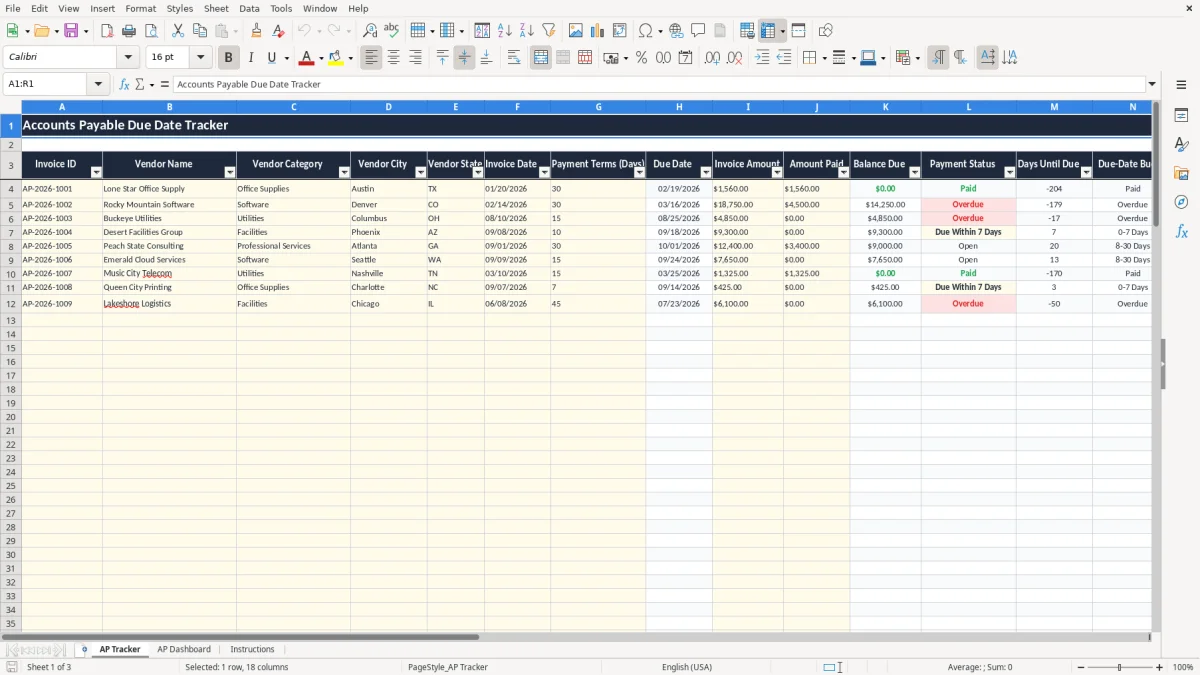
This accounts payable due date tracker Excel template records one invoice per row, calculates due dates from invoice dates and payment terms, and shows balances, payment status, days until due, aging buckets and priority. It includes an AP Tracker for 100 prepared invoice rows, an AP Dashboard with summaries and charts, and an Instructions tab.
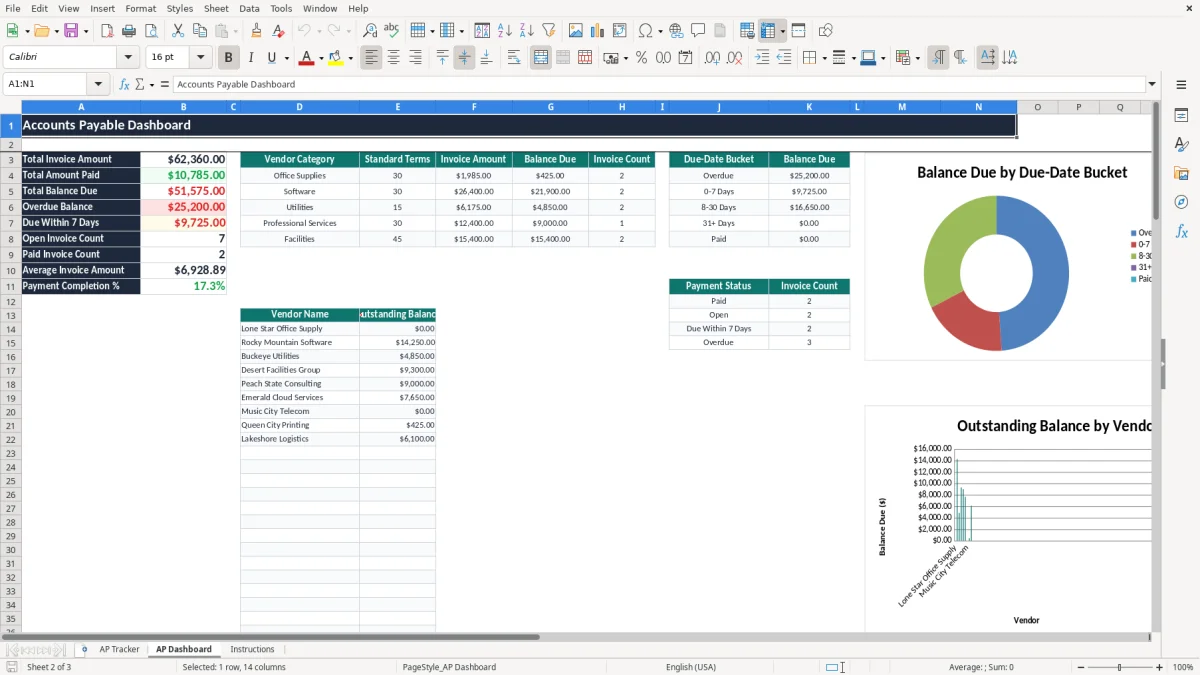
Enter vendor, invoice, payment and notes information in the AP Tracker. Image 1 shows the 18-column layout, while calculated fields such as Due Date, Balance Due, Payment Status, Due-Date Bucket and Priority update automatically. Image 2 shows dashboard totals by category, due-date bucket and payment status.
A small-business bookkeeper, office manager or controller can use this workbook during the weekly payment run to see which invoices need action. It is suited to a contractor with four employees, a professional-services LLC, a nonprofit treasurer or a growing office that has outgrown a folder of unpaid bills.
The AP Tracker has prepared operational rows 4 through 103, so it can hold 100 invoice records. That is capacity for a business receiving roughly 25 bills per week for one month, not a claim that every organization should keep its entire payables history in one file.
Suppose a plumbing company enters a $4,850 utility invoice dated 08/10/2026 with 15-day terms. The calculated Due Date is 08/25/2026, and the open balance remains $4,850 until Amount Paid is entered. A payment manager can sort or filter the tracker for Overdue, Due Within 7 Days or High priority before releasing cash.
At month-end, a bookkeeper can compare the workbook with the accounts payable ledger and bank activity. The dashboard separates total invoice amount, total paid, total balance due and overdue balance, then summarizes invoice amount, balance and count for five vendor categories.
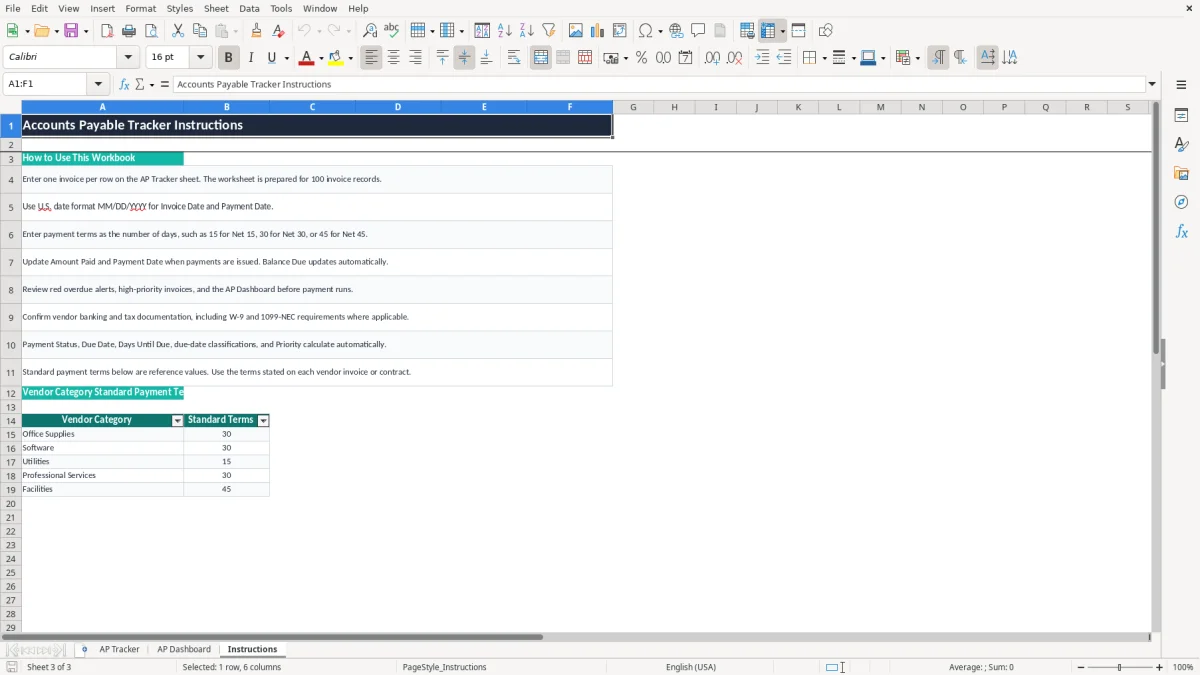
Software renewals, utility bills and facilities invoices often follow different terms. The Instructions tab lists reference terms of 30 days for Office Supplies and Software, 15 for Utilities, 30 for Professional Services and 45 for Facilities. Use the actual invoice or contract terms in the tracker; the reference list is not a substitute for those documents.
Accounts payable is not governed by one national payment deadline. Your obligation normally comes from the vendor invoice, purchase order or contract, while sales tax is state-level and payment terms such as Net 15 or Net 30 are commercial agreements. This workbook therefore calculates due dates from the terms you enter instead of assuming one universal rule.
For example, an invoice dated 02/14/2026 with 30-day terms produces a due date of 03/16/2026. If the invoice amount is $18,750 and Amount Paid is $4,500, Balance Due calculates to $14,250. The tracker records this operational balance; it does not determine whether the invoice is valid, deductible or subject to sales tax.
Before paying an independent contractor, collect a W-9 and retain the vendor's legal name and taxpayer identification information. A business generally issues 1099-NEC for qualifying nonemployee compensation of $600 or more during the year, subject to the applicable reporting rules. Vendor category and Notes can help you flag the relationship, but the workbook does not prepare tax forms.
Keep the invoice, approval, payment confirmation and related correspondence with the spreadsheet. The IRS generally expects tax records for three years, and some records may need to be kept up to seven years. Reconcile the AP Tracker to the general ledger and bank account; a paid status alone is not proof that the payment cleared.
A due date tells you when payment is expected, not whether cash is available. If five invoices totaling $42,000 fall into the 0-7 Days bucket, compare that amount with the bank balance, payroll, taxes and other commitments before approving the run.
The costliest AP failures usually begin with incomplete invoice entry. If a bookkeeper enters $1,250 but omits Payment Terms (Days), the formula cannot calculate Due Date, Days Until Due or the related classifications. The dashboard may then understate the practical workload even though the invoice row exists.
A partial payment is not a paid invoice. For an $18,750 software invoice, entering $4,500 in Amount Paid leaves a $14,250 Balance Due. If someone marks the invoice complete in another system without updating this row, the dashboard still reports an open liability while the payment team may stop following up.
Typing 30 into one row and 45 into another without checking the vendor agreement can move a $10,000 invoice's planned payment by 15 days. The workbook provides list validation for 7, 10, 15, 30, 45 and 60 days, but the allowed list does not prove that the selected term matches the contract.
The file does not automatically detect duplicate Invoice IDs. Entering the same $6,200 invoice twice inflates Total Invoice Amount and Balance Due by $6,200, potentially causing a double payment. Search the vendor, invoice number and amount before adding a row, and require approval evidence in Notes or your separate document system.
Waiting for a vendor reminder can create late fees, interrupted service or lost early-payment discounts. Review the High priority output and the 0-7 Days bucket every payment cycle; those fields are more useful when you act before the due date rather than merely documenting the miss.
Give one person ownership of the tracker and attach its update to an existing routine, such as Tuesday invoice intake and Friday payment approval. A business receiving 20 invoices each week should not wait until month-end to enter 80 rows; four short entry sessions produce a cleaner cash view and fewer forgotten bills.
Do not overwrite columns H and K through O. The formulas calculate Due Date, Balance Due, Payment Status, Days Until Due, Due-Date Bucket and Priority across the prepared rows. If you need a new category, update the reference list carefully and test one row before changing the production file.
Use the category table to spot concentration. If Software shows $30,000 outstanding while Utilities shows $4,000, review renewal dates and approval status rather than paying strictly in entry order. The dashboard's three charts can support a brief weekly review, but the underlying invoice documents remain the authority.
This workbook is practical for 100 prepared records. When you need approval routing, purchase orders, duplicate detection, multi-entity controls, recurring bills or a complete audit trail, move the process to an accounting system such as QuickBooks or an AP platform and retain this file as a controlled reference.
The AP Tracker is prepared for 100 invoice records in rows 4 through 103. The workbook has formulas and entry controls across those rows, but it does not claim unlimited capacity.
Enter Invoice ID, Vendor Name, Vendor Category, Vendor City, Vendor State, Invoice Date, Payment Terms (Days), Invoice Amount, Amount Paid, Payment Date, Payment Method and Notes. Due Date, Balance Due, Payment Status, Days Until Due, Due-Date Bucket and Priority are calculated.
Due Date equals Invoice Date plus Payment Terms (Days). For example, an invoice dated 08/10/2026 with 15-day terms calculates to 08/25/2026.
The Balance Due formula subtracts Amount Paid from Invoice Amount. A $10,000 invoice with $3,000 paid remains a $7,000 balance, so its status will not become Paid until the balance reaches zero or less.
Payment Method includes ACH, Check, Wire Transfer, Credit Card, Online Bill Pay and Cash. Vendor Category includes Office Supplies, Software, Utilities, Professional Services and Facilities; the Instructions tab lists reference terms for each category.
No. It helps you track invoices, balances and payment timing. Keep vendor tax documentation such as a W-9 and separately review applicable 1099-NEC reporting requirements with your accounting process.