TSP Contribution Allocation Excel – Free Template (2026)
0
Free download
Track 401(k) paycheck deferrals, employer match, taxes, and year-to-date totals for employees and payroll use.


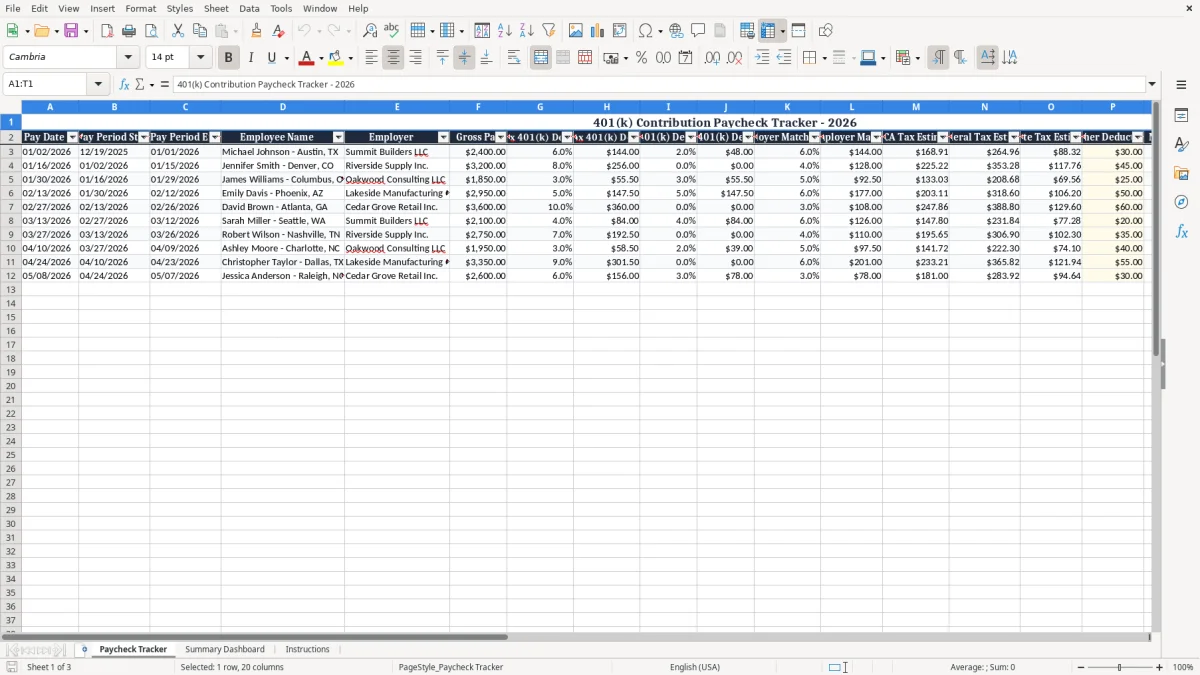
This 401(k) contribution paycheck tracker Excel template records each paycheck’s pre-tax and Roth deferrals, employer match, tax estimates, and year-to-date totals in one worksheet. It is built for payroll clerks, bookkeepers, and employees who want a clean check on every deposit and deduction.
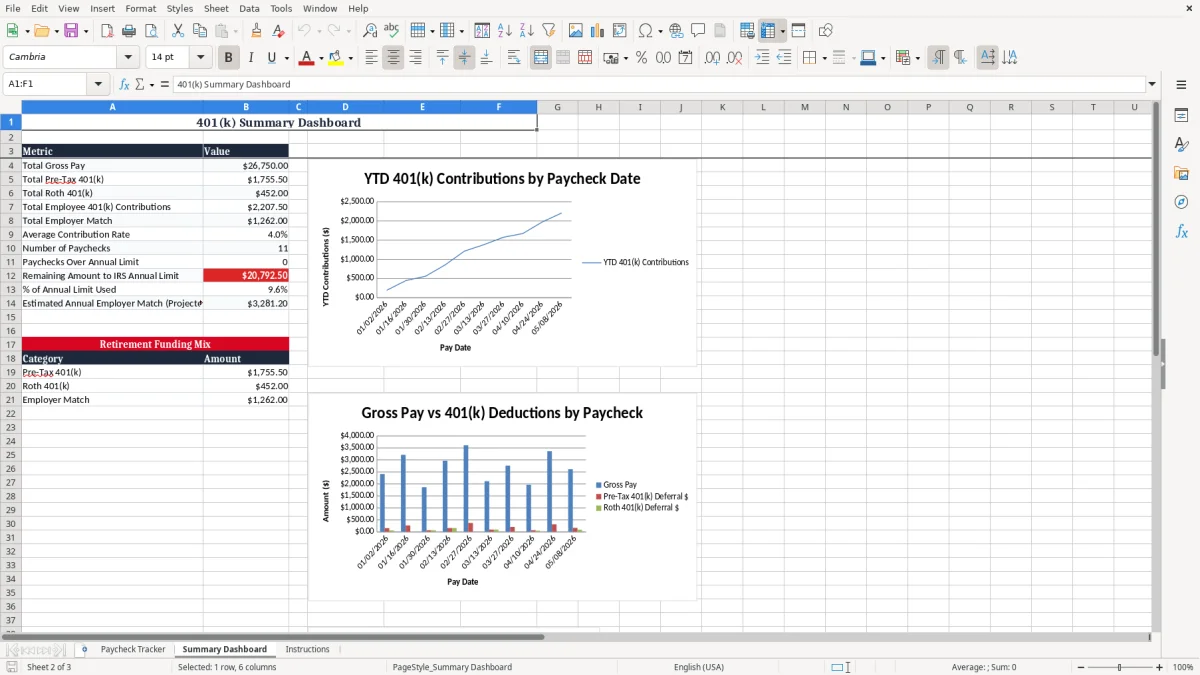
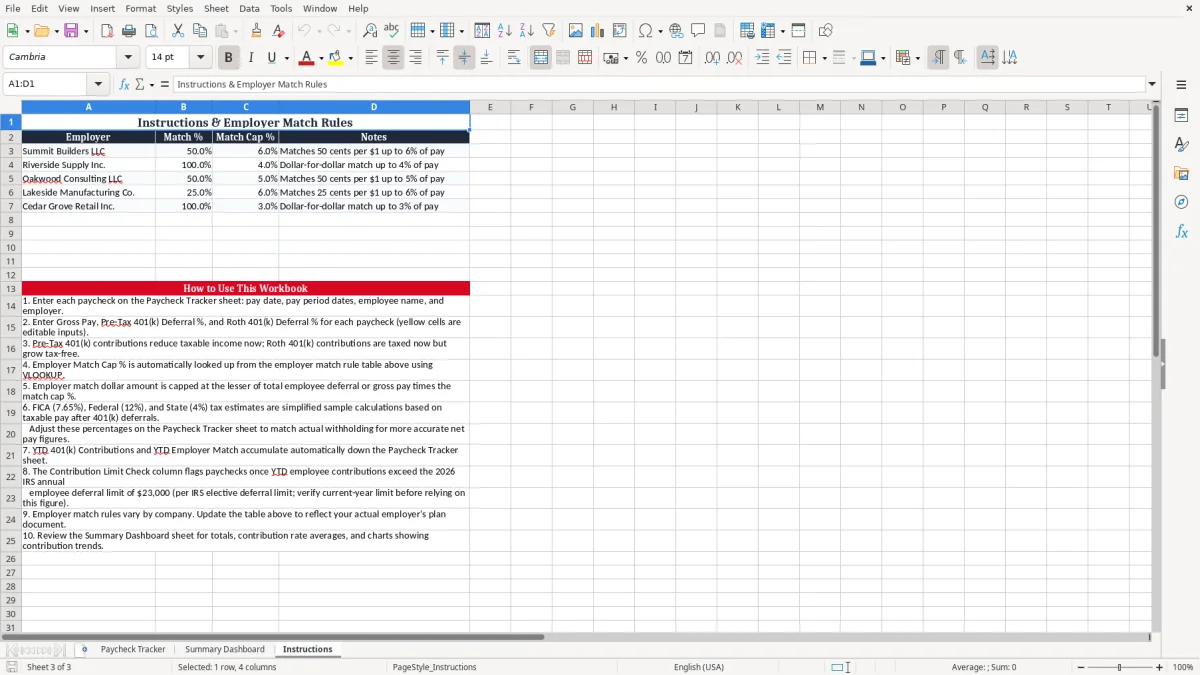
The workbook includes a Paycheck Tracker tab, a Summary Dashboard, and Instructions. Image 1 shows the paycheck entry grid, image 2 shows the summary charts, and image 3 gives setup guidance and how to read the columns.
Use it when you need to see whether a percentage election is being applied correctly, whether the employer match is hitting the cap, and whether a worker is close to the annual contribution limit.
This spreadsheet fits the people who touch payroll every two weeks. A payroll coordinator at an LLC, an office manager at a contractor with 4 employees, or a sole proprietor who pays herself through payroll can all use it to see deferrals before the money clears the bank.
In a real payroll run, one employee may defer 6% pre-tax, another may choose Roth, and a third may be at zero because of a temporary hold. On a $2,400 paycheck, a 6% election is $144.00, and that changes both the taxable wages and the take-home amount.
You usually need this during the payroll run, the month-end close, and the year-end reconciliation. It is also useful right before bonus payrolls, because a $5,000 bonus can push a worker much closer to the annual limit than a normal check.
A small construction company with 4 employees, an online store with 300 orders a month, or a household budgeting for two incomes all need the same thing: a clean record of what came out of each paycheck and where it went.
For employees, 401(k) deferrals reduce taxable wages for federal income tax when they are pre-tax, but they do not eliminate FICA on the employee side. That means Social Security is still 6.2% and Medicare is still 1.45%, with the employer matching the same amounts on wages.
For 2026 payroll planning, the annual employee deferral limit for a 401(k) is $24,000, and the catch-up limit for workers age 50 and older is $7,500. A paycheck tracker matters because a worker deferring $300 every biweekly check reaches $7,800 across 26 checks, so you need a year-to-date view to stop cleanly at the cap.
Pre-tax contributions lower current taxable income, while Roth contributions do not lower current taxable income but may give better after-tax retirement treatment later. If an employee earns $65,000 and defers 6% pre-tax, the annual deferral is $3,900, which reduces current taxable wages by that amount before the tax calculation is applied.
Many plans use a match like 100% of the first 3% of pay or 50% of the first 6%. The tracker’s employer match column lets you verify whether a $1,000 paycheck with a 3% match is producing $30.00 or whether the payroll setup is off by a decimal point.
The first failure is a percentage error. If a payroll file treats 6% as 0.6%, a $2,000 paycheck gets a $1,200 deduction instead of $120, which can wreck both pay and trust in one cycle.
The second failure is a missed year-to-date limit. If you do not stop a worker at $24,000, the excess deferral has to be corrected through payroll, and the cleanup often spills into W-2 reporting and employee complaints in January.
Employer match errors cost real money. On 20 employees, an extra $15 per paycheck is $300 per pay run, or $7,800 over 26 biweekly payrolls, and that is before you count the time spent fixing the ledger and answering questions.
If you leave out federal withholding, state withholding, or FICA, the net pay column becomes a fantasy number. That is how a worker expects $1,850 take-home and receives $1,620, then spends an hour with payroll trying to reconstruct the difference.
The spreadsheet works best when you tie it to the same payroll habit every time. Review it on the payroll-processing day, then again after the direct deposit file is released, so the numbers stay aligned with the actual paycheck.
If you manage more than a handful of employees, add conditional formatting to flag a blank deduction cell or a contribution total above the limit. Once you are running multi-state payroll, multiple pay groups, or 50+ employees, move the process into QuickBooks or a payroll provider so the math, tax filings, and W-2 reporting stay synchronized.
It records pay date, pay-period dates, gross pay, employee deferral percentages, employer match, tax estimates, net pay, and year-to-date contribution totals for each paycheck row.
Yes. It separates pre-tax deferrals from Roth deferrals so you can compare the two election types on the same paycheck.
Because the annual employee limit for 2026 is $24,000, and workers age 50 and older may add $7,500 in catch-up contributions. The YTD column shows when a worker is getting close.
It lets you verify that match dollars are following the plan formula, such as 100% of the first 3% of pay or 50% of the first 6%, so you do not overpay or underpay the company match.
Yes. It is especially useful for a small team where one person handles payroll, benefits, and bookkeeping, because you can see each paycheck without opening a full payroll system.
Move to a payroll system once you have multiple pay groups, multi-state withholding, or enough employees that manual updates start taking too long. At that point, the payroll provider becomes the safer place for tax calculations and filings.