Mileage Reimbursement Excel – Free Template (2026)
44
Free download
Track short-term rental cleaning fees, cleaner pay, supplies, profit, and payment status in one spreadsheet.


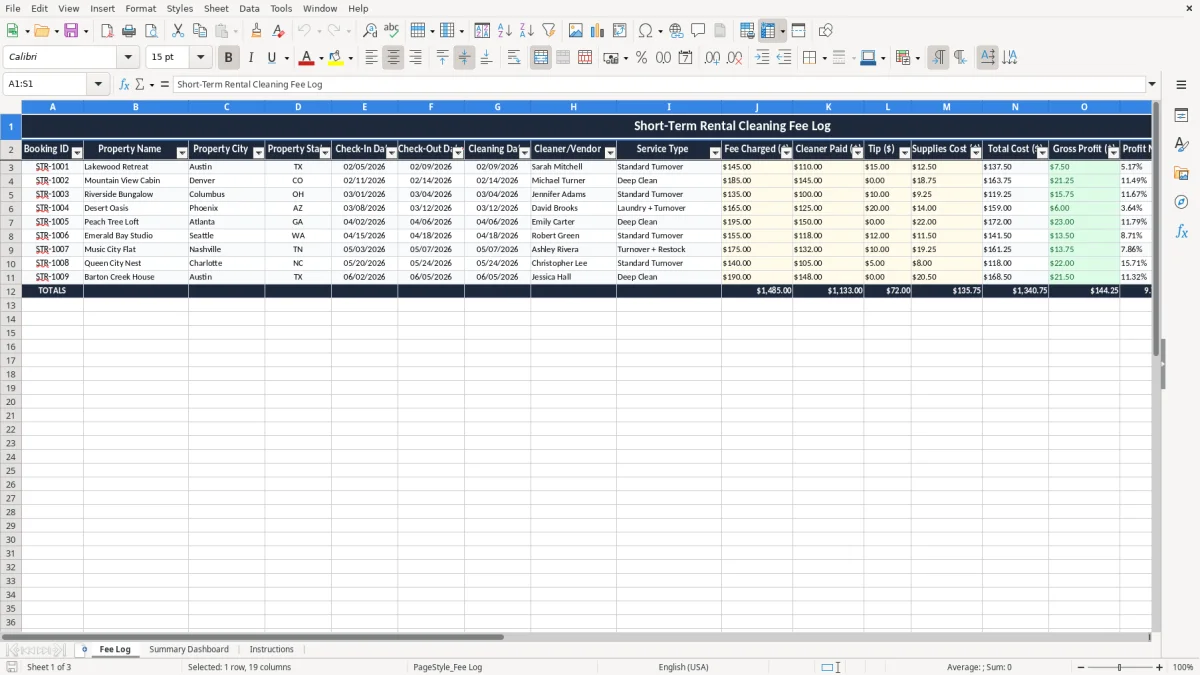
This short-term rental cleaning fee log is an Excel spreadsheet for tracking each booking’s cleaning charge, cleaner pay, supplies, tips, profit, and payment status. It includes a Fee Log tab, a Summary Dashboard tab, and an Instructions tab.
Use it when you manage one Airbnb or a small portfolio of units and need a clean record of what you billed versus what the turnover actually cost. The layout keeps the key numbers on one line per stay, so you can compare revenue and cost without digging through messages or receipts.
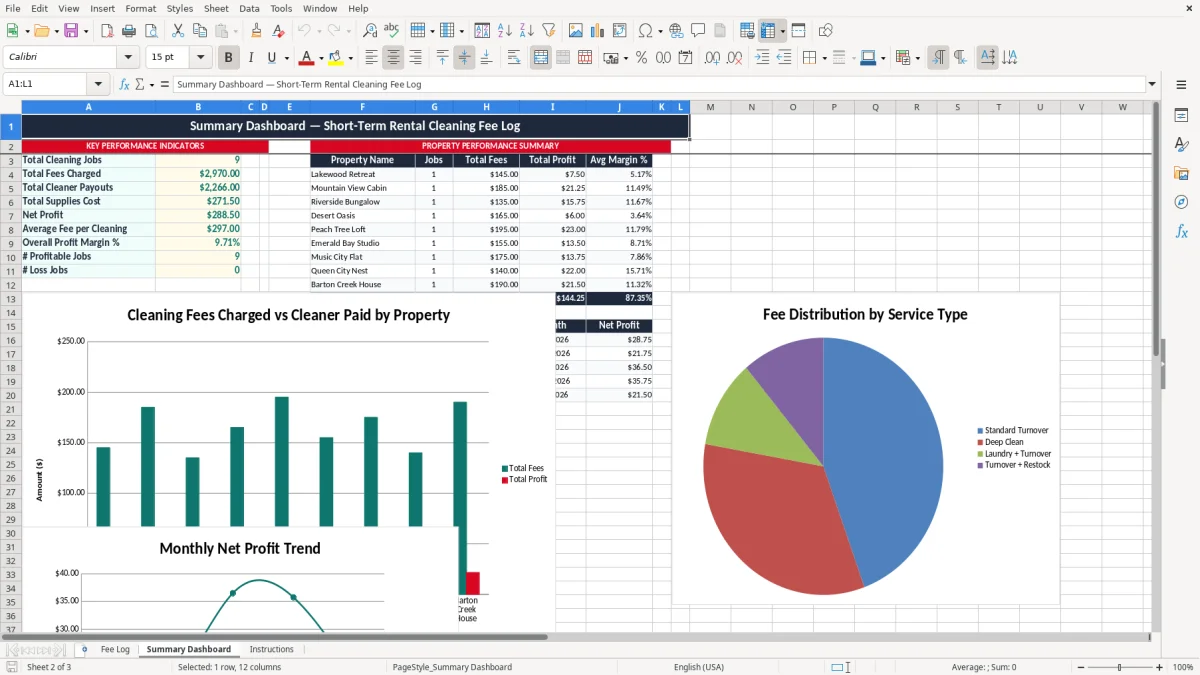
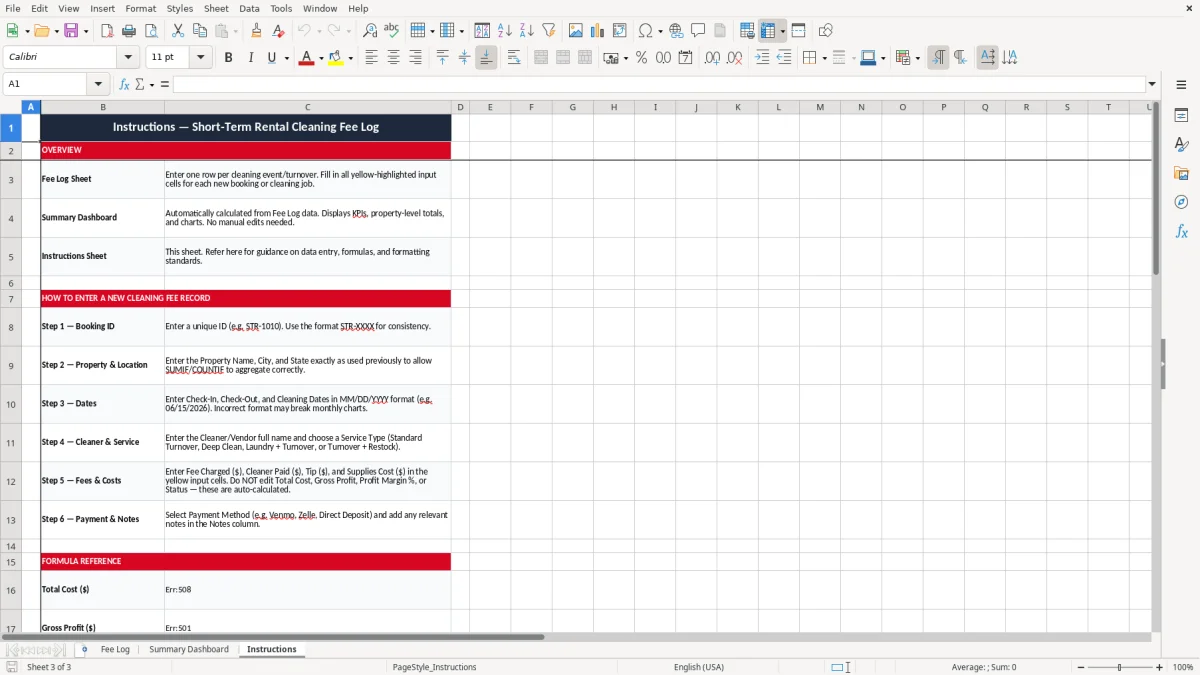
Image 1 shows the log sheet with date fields, payment fields, and margin columns. Image 2 shows the dashboard, and image 3 gives you the setup and use steps.
A host with one condo in Phoenix, a sole proprietor filing Schedule C, and a small LLC running six units all use this kind of log the same way: to match each reservation to the cleaning charge attached to it. If you collect a $135 turnover fee on 42 stays in a year, that is $5,670 of revenue you need to reconcile against cleaner pay, tips, and supplies.
This sheet is especially useful at month-end when you want to know whether a property is producing real margin or just passing money through. A cleaner paid $90, plus $12 in supplies, turns that $135 fee into $33 of gross profit before overhead. That is the kind of number you need before you decide whether to keep charging a separate cleaning fee or fold the cost into the nightly rate.
A property manager with 18 turnovers in a weekend needs a quick way to see which units were cleaned, which ones were paid, and which ones still need follow-up. A bookkeeper can use the same log to build the monthly profit & loss and keep the owner from guessing at cleaning expense.
If you manage 3 properties and each one averages 10 cleanings a month, you are reviewing 30 rows, not 300. That is exactly the scale where a spreadsheet still beats a clunky app, because you can sort by city, vendor, or status in seconds.
The IRS expects you to keep records that support income and deductions, and the practical rule is to keep them at least 3 years, with some records held up to 7. For a short-term rental operator, that means booking confirmations, vendor invoices, payment proof, and a log that shows the cleaning fee charged and the cost behind it.
If you report the activity on Schedule C, the cleaning fee is business income and the cleaner payment is a deductible expense. A $1,200 monthly total in cleaning fees with $820 in vendor pay and $96 in supplies leaves $284 of gross profit before any other rental expenses.
This log gives you the paper trail that connects the reservation to the transaction. If the cleaner is a contractor paid $600 or more during the year, you may need a 1099-NEC and an W-9 on file, so keeping vendor names and payment methods inside the sheet saves you a separate cleanup later.
Do not treat a one-off cleaner payment the same way you treat wages subject to FICA. A contractor paid $95 per turnover is tracked as vendor expense, not payroll tax, and the log should make that distinction obvious when you review the year-end numbers.
The first failure is simple: you charge a cleaning fee but never record the actual cost. If you billed 50 stays at $125 and your real average cost was $104, you think you made $6,250 in fee income when the true gross profit was only $1,050.
The second failure is paying different cleaners from memory instead of a log. One extra $20 tip on 40 stays is $800 a year, which is enough to wipe out the margin on a small unit if you never notice the drift.
If a contractor is paid $650 over the year and you cannot prove who it was or what service they performed, you may spend hours rebuilding the trail from text messages and bank statements. That is not just annoying; it delays your year-end close and can leave your books wrong by hundreds or thousands of dollars.
When you do not separate gross profit from total revenue, a property that charges $150 and costs $145 looks fine until you realize the spread is only $5. At 20 turnovers a month, that is $100 of profit before platform fees, laundry, and your time, which is too thin for most operators to accept.
Use the sheet on a fixed day, not whenever you remember it. The easiest routine is to update it right after the weekly turnover run or during month-end close, when you already have the cleaner invoices and payout records in front of you.
If you are running 25 or more units and cleaners are texting updates all day, a spreadsheet starts to feel tight and a property-management system or bookkeeping app becomes the better choice. Until then, this file is fast enough, transparent enough, and easy enough for an assistant to update without training.
It tracks each cleaning charge, what you paid the cleaner, any tip, supplies cost, and the resulting profit. You use it to see whether your cleaning fee actually covers the turnover cost.
The workbook has three tabs: Fee Log, Summary Dashboard, and Instructions. The first tab captures the transaction detail, the second gives a high-level view, and the third explains how to use the file.
The log includes Booking ID, property name, city, state, check-in date, check-out date, cleaning date, cleaner or vendor, service type, fee charged, cleaner paid, tip, supplies cost, total cost, gross profit, profit margin, status, payment method, and notes.
Yes. It separates revenue from cost and shows Gross Profit ($) and Profit Margin % so you can see the spread on every turnover. That makes it easy to spot underpriced cleaning fees.
Yes. The property name, city, and state fields let you sort and review several units in one file. A host with 2 units or 20 units can use the same layout.
Update it at least weekly, and ideally right after each turnover or payout. If you wait until month-end, you will spend extra time reconstructing fees, tips, and vendor payments from messages and bank records.