Mileage Reimbursement Excel – Free Template (2026)
44
Free download
Track EIN letters, licenses, permits, filings, expiration dates, responsible staff, and storage locations across multiple business entities.


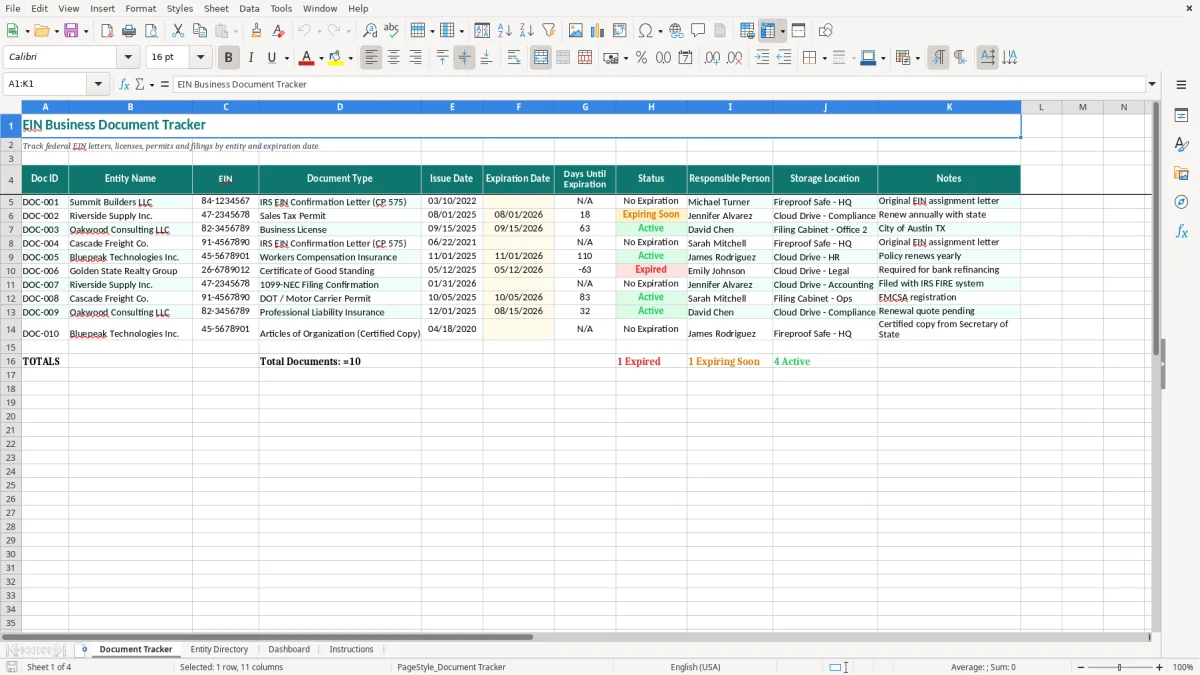
An EIN business document tracker is a central register for federal tax letters, licenses, permits, and filings belonging to one or more entities. This Excel template contains a Document Tracker, Entity Directory, Dashboard, and Instructions tab so you can record document IDs, EINs, dates, renewal status, owners, storage locations, and notes.
The main tracker uses columns for Entity Name, EIN, Document Type, Issue Date, Expiration Date, Days Until Expiration, Status, Responsible Person, Storage Location, and Notes. Image 1 shows the teal table layout, yellow input cells, wrapped headers, and sample records such as an IRS EIN Confirmation Letter, a sales tax permit, and a business license.
Use it when your bookkeeper, office manager, attorney, or tax preparer needs one reliable answer to a basic question: which entity owns this document, where is the original, and when must someone act?
A small-business owner usually notices the problem during a bank request, a state renewal, or tax-preparation season: the EIN assignment letter is somewhere in a file cabinet, the sales tax permit is in an email, and nobody knows who handles the annual license. This workbook gives each document a row tied to the correct legal entity instead of leaving the search to memory.
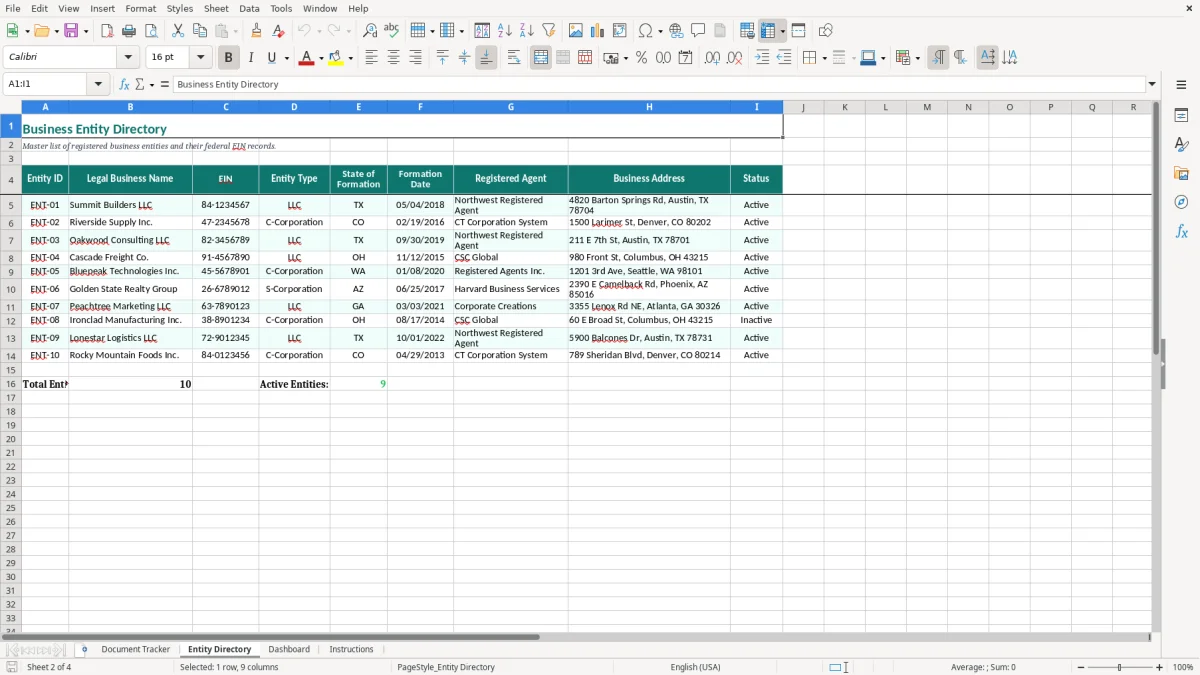
A bookkeeper serving three related companies can list Summit Builders LLC, Riverside Supply Inc., and Oakwood Consulting LLC in the Entity Directory. A general contractor might have a federal EIN letter with no expiration date, a state sales tax permit expiring 08/01/2026, and a city business license expiring 09/15/2026; those are different documents and should not be treated as one renewal.
Image 2 shows the Entity Directory tab, where you can separate legal names before entering documents. That distinction matters when two companies share an owner but file under different EINs, bank accounts, insurance policies, or state registrations.
Use the tracker before a new bank account is opened, during a registered-agent or license renewal, and before the year-end close. An office manager at a four-employee construction company can spend 15 minutes on the first Friday of each month checking expiration dates instead of discovering a missing permit when a customer or inspector asks for it.
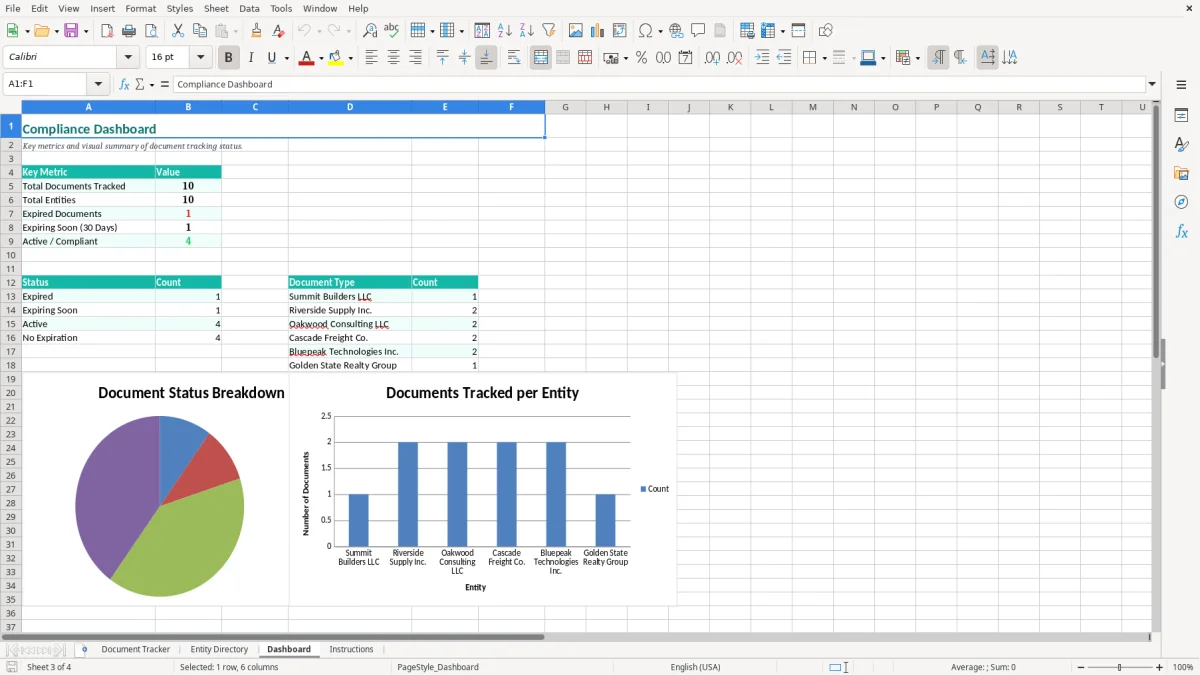
For a tax preparer, the row for an IRS EIN Confirmation Letter (CP 575) identifies the entity, responsible person, and storage location without putting the original document into circulation. For an owner, the Dashboard tab in image 3 supplies a quick review point, while the full row remains the source record.
The IRS issues an EIN after an entity applies, commonly through Form SS-4. An EIN itself generally does not expire, so an EIN Confirmation Letter such as CP 575 should be marked as a permanent reference document rather than given an invented renewal date. If the letter is lost, the IRS can provide confirmation through its business-tax support process; the tracker tells you where the original or replacement is stored.
A federal EIN does not replace a state sales tax permit, employer registration, local business license, or professional license. Sales tax is state-level, there is no national VAT, and some states have no general sales tax. A permit expiring 08/01/2026 should therefore have its own row, responsible person, and storage location even when the same company owns the EIN.
Keep supporting tax and entity records in line with the IRS recordkeeping baseline: records are generally retained for 3 years, with some situations requiring up to 7 years. The workbook is a register, not the legal record itself. Store the actual PDF, letter, certificate, or renewal receipt in the location written in Storage Location.
Enter dates as MM/DD/YYYY so a renewal such as 09/15/2026 is unambiguous. Do not use the Expiration Date field for an EIN that has no expiration; use Notes to say “Permanent reference—no expiration” and keep the row's Status meaningful.
The practical rule is simple: track every document that proves the entity may operate, collect tax, hire workers, or file. Keep federal letters, state permits, and local licenses as separate records because their issuing authorities and renewal cycles are different.
The costliest failures are usually not dramatic software problems. They are small identity errors: a permit is filed under the owner's name instead of the LLC, a renewal notice goes to a former employee, or a document is marked complete even though the original certificate is still missing.
Suppose Riverside Supply Inc. and Riverside Holdings LLC share an address. If a $600 state permit is attached to the wrong entity, a bank or auditor may reject the package and the bookkeeper may have to recreate the file. The EIN column and Entity Name column must be checked together; never identify a document by company nickname alone.
Another frequent problem is entering an EIN confirmation letter with a made-up expiration date. An EIN generally has no expiration, while a sales tax permit may expire annually. Treating both as renewable documents creates false alarms and can cause staff to overlook the permit that actually requires action.
A renewal discovered two days before a 09/15/2026 deadline can mean rush filing fees, interrupted sales, or a delayed customer payment. If a responsible person leaves and the row still lists that employee, the document is technically recorded but operationally lost.
Storage descriptions also fail when they say only “office.” A replacement search can take an hour across paper cabinets and shared drives. “Fireproof Safe - HQ” or “Cloud Drive - Compliance” gives the next reviewer a usable destination and reduces duplicate requests for the same IRS letter.
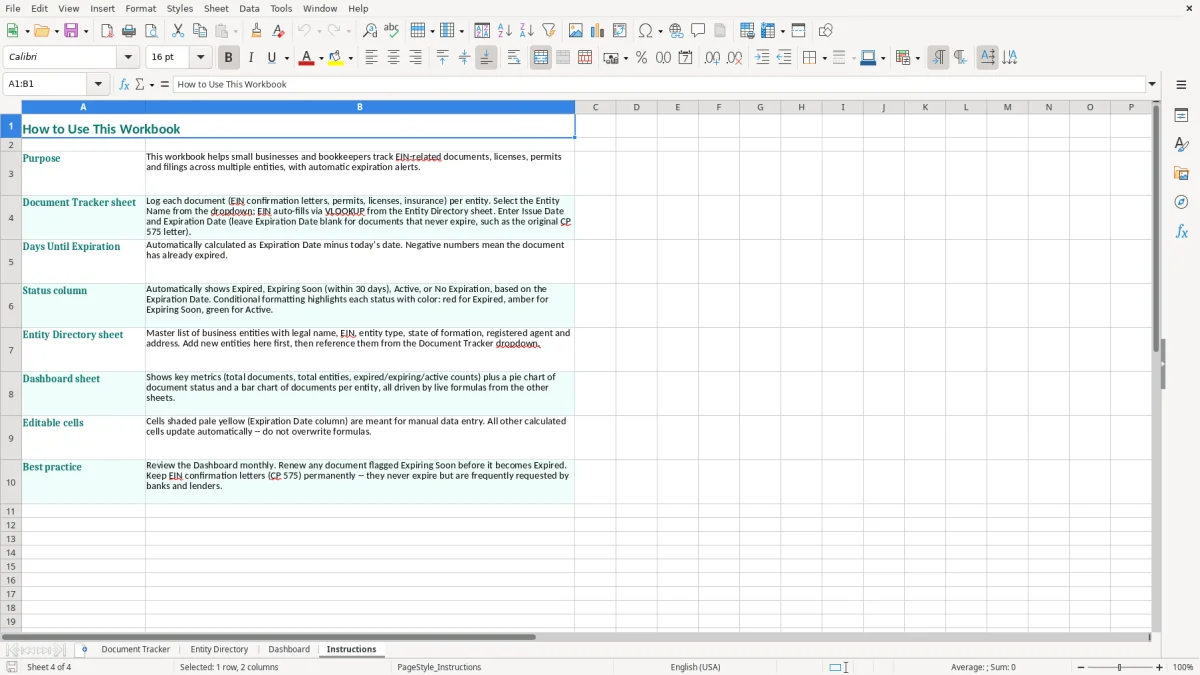
Long paragraphs in Notes are hard to review and easy to contradict. Put the date in Issue Date or Expiration Date, the owner in Responsible Person, and the location in Storage Location; reserve Notes for facts such as “Renew annually with state.” That structure makes the Dashboard and row-by-row review more dependable.
A tracker works when it is attached to a task that already happens. Set a recurring 15-minute review for the first Friday of each month, immediately after the bank reconciliation or bookkeeping close. The person who reviews bills and state notices is usually better placed to maintain this file than the owner who only sees it at tax time.
For example, if a permit expires 10/31/2026, review it on 09/01/2026, assign the filing to one person, and set a follow-up date in your calendar. Do not rely on the spreadsheet alone as a reminder system; the calendar alert supplies the deadline while the workbook supplies the evidence trail.
Use one naming convention for entities and document types. “Sales Tax Permit,” “State Sales Tax Permit,” and “Sales-tax license” should not become three labels for the same category. Copying an existing row as a starting point is faster than retyping the layout, but replace the Doc ID, entity, dates, owner, and location before saving.
Outgrow this workbook when several staff members edit it at once, you need automated renewal notices, or the business has hundreds of documents across many states. At that point, a document-management system or an accounting platform such as QuickBooks paired with compliance software is preferable; Excel remains useful as an export and review list.
Record the IRS EIN Confirmation Letter or CP 575, state sales tax permits, employer registrations, city or county business licenses, professional licenses, and important filings with an expiration or renewal date. Give each document its own row rather than combining several certificates in Notes.
An EIN generally does not expire, so do not assign an artificial expiration date to the EIN itself. Use the tracker to record the confirmation letter, write “Permanent reference—no expiration” in Notes, and separately track permits or licenses that actually renew.
Yes. Add each legal entity to the Entity Directory tab, then use the Entity Name field on Document Tracker for every related record. This keeps an LLC, corporation, sole proprietor operation, or nonprofit from being confused with another organization at the same address.
Enter a specific physical or digital destination, such as “Fireproof Safe - HQ,” “Filing Cabinet 2B,” or “Cloud Drive - Compliance.” Avoid vague entries such as “office,” because the goal is to let another employee find the original without searching every cabinet and folder.
Review it monthly, preferably during the first Friday bookkeeping close, and update it whenever a document is issued, renewed, replaced, or moved. A monthly review catches a permit approaching its deadline well before the final week.
No. It is an index and control list, not the legal record. Store the actual EIN letter, permit, license, or filing receipt in the location recorded in the workbook, and retain supporting records under your IRS, state, and internal retention policies.