Mileage Reimbursement Excel – Free Template (2026)
44
Free download
Mileage log with trip date, driver, vehicle, route, purpose, odometer, miles, round-trip flag, IRS rate, and total.


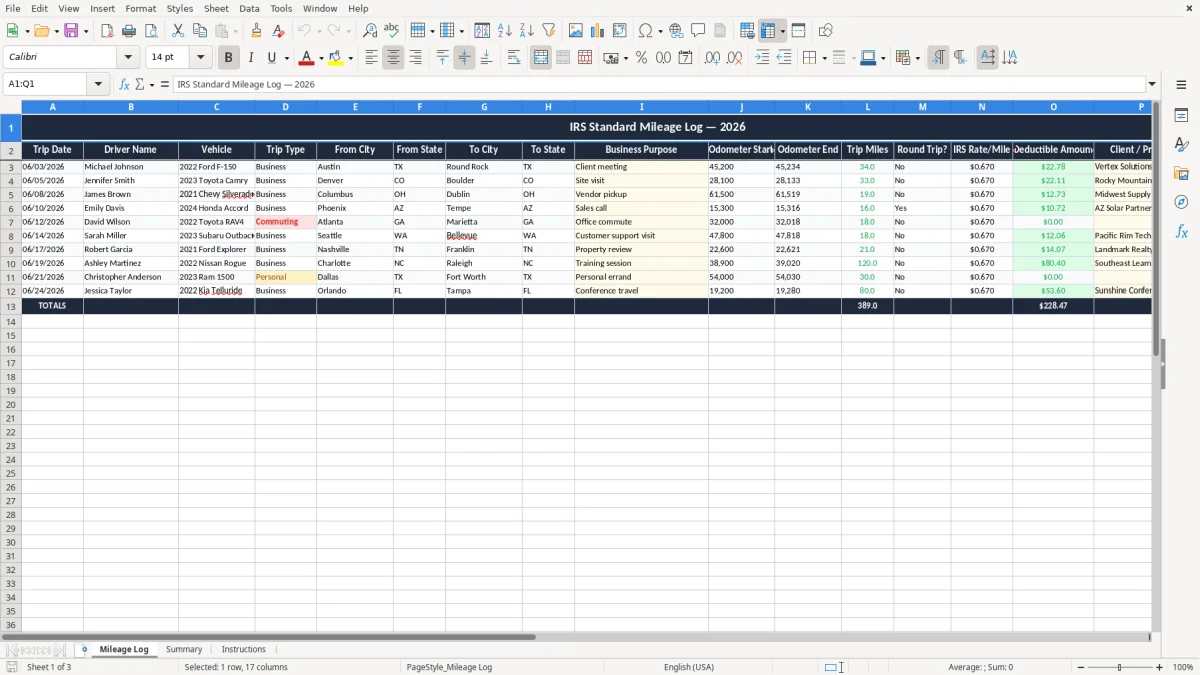
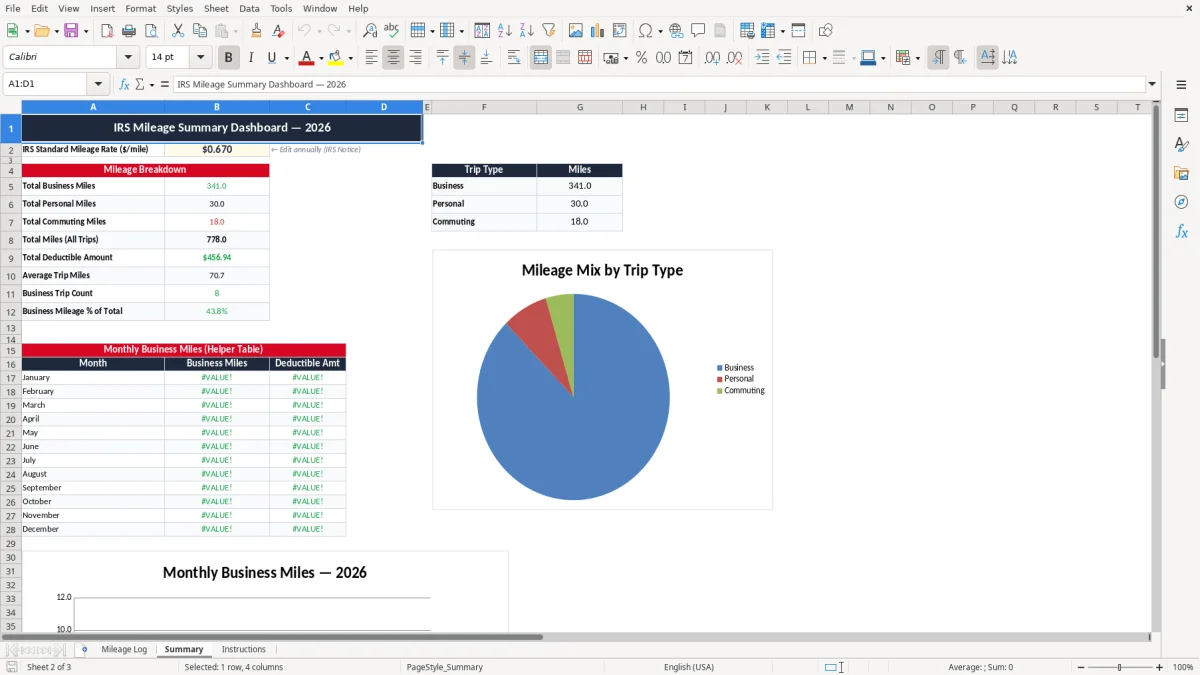
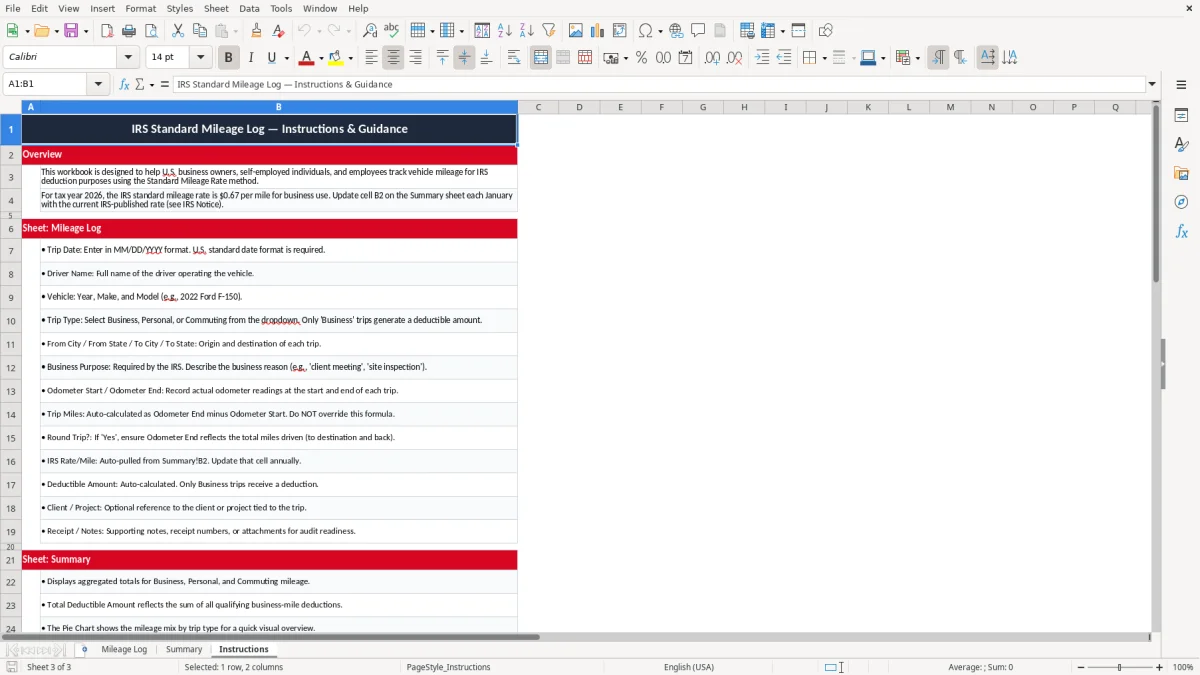
This IRS standard mileage log Excel template tracks business trips, odometer readings, miles, and the reimbursable amount in one worksheet. It includes a Mileage Log tab for entry, a Summary tab for totals, and an Instructions tab for setup.
Use it to document each drive the way the IRS expects: date, vehicle, from and to locations, business purpose, and ending miles. The summary helps you total business miles fast, so you can support a deduction, an employer reimbursement, or your own cash flow records.
The file is set up for day-by-day use, not year-end cleanup. You enter the trip once, and the workbook carries the mileage total forward with a clean layout you can keep with your tax records.
The Mileage Log tab is for the people who actually drive for business: a sole proprietor filing Schedule C, a bookkeeper at an LLC, an office manager at a plumbing company, or a household member who uses one car for work and errands. If you drive to a customer site Monday morning, pick up materials Tuesday, and make a sales call Friday, this is the sheet that keeps those miles separate from personal driving.
Image 1 shows the trip-entry sheet with a single row per drive, which is exactly how you want to work during the week. A general contractor with 4 employees might log 18 site visits in 5 business days, while a field service tech can rack up 900 business miles in a month without realizing it until the log is missing.
You feel the need for this spreadsheet at the end of each month, during payroll review, and again at tax time when you build the return. If you are reimbursing yourself or an employee, the log also gives you a clean support file for the payment, so you are not guessing later whether a 62-mile trip was one-way or round-trip.
The workbook is built around the exact fields you need to document: date, driver, vehicle, route, business purpose, odometer start, odometer end, trip miles, and IRS rate per mile. That is enough detail for a practical log, and it keeps you from wasting time on columns that do not change the deduction or reimbursement total.
The IRS expects mileage records that are written down as you drive, not recreated months later from memory. Keep the log with your tax file for at least 3 years after the return is filed, and longer if a claim stays open or the records support a depreciation issue on the vehicle.
The worksheet’s trip fields line up with the standard mileage method used by many self-employed taxpayers on Form 1040 with Schedule C. If you use the standard mileage rate, you multiply business miles by the rate; for example, 1,500 miles at a hypothetical $0.67 per mile equals $1,005.00 of mileage value.
For most service businesses with one primary vehicle, the standard mileage method is simpler than tracking every gallon of fuel, repair, and insurance payment. Once you start carrying higher repair costs, heavy depreciation, or multiple vehicles with different usage patterns, the actual-expense method can become the better ledger choice because it shows the full profit & loss effect.
The start and end odometer readings are not decoration. They give you the backbone of the record, and they let you spot impossible entries, like a 14-mile trip that somehow turns into 41 miles when you review the week.
The biggest mistake is writing down totals at the end of the month instead of logging each trip on the day you drove. That usually means missing small runs that add up fast: 3 supply trips at 18 miles each, 2 site visits at 27 miles each, and a client meeting 41 miles away already equals 149 miles before you count the return legs.
Another common problem is weak business purpose notes. If your log only says "meeting" or "delivery," you leave yourself open to a denied deduction, and a few hundred missed miles can cost real money; at 1,200 business miles, the standard mileage value can easily be over $800.00 depending on the rate used for the year.
People also forget to mark round trips, then double count the return drive later. That does not just inflate the deduction; it makes the record look careless, which is exactly the kind of file you do not want during an audit review or lender package cleanup.
A contractor who loses 4 months of mileage records may give up $2,000.00 or more in deductions on a busy year. That is the price of bad habits: lost tax savings, extra cleanup time, and a file you cannot trust when you are trying to close the books quickly.
Use the log on a fixed day, and attach it to a routine you already do, such as Friday payroll review or the estimated-tax check-in before 1040-ES deadlines. If you wait until quarter-end, you will spend the whole afternoon chasing addresses and odometer numbers instead of entering trips.
Image 2 shows the summary sheet, which is the place to check totals instead of scrolling through every trip. When your business has 2 drivers and 1 vehicle, a spreadsheet is fine; when you are managing 8 vehicles or a delivery route with hundreds of stops, you have outgrown the log and need a more complete system.
Log any business drive: client visits, supply runs, jobsite trips, bank deposits for the business, and travel between work locations. Do not mix in commuting from home to your regular work site, because that is a different category from business mileage.
At minimum, record the trip date, driver name, vehicle, from and to locations, business purpose, odometer start, odometer end, and trip miles. If you are using the standard mileage method, keep the rate-per-mile line too so the dollar value is easy to review.
Keep them with your tax files for at least 3 years after the return is filed. If the mileage supports a vehicle deduction, reimbursement, or a return still under review, keep the log longer so you can answer questions without rebuilding the file.
Yes. The log includes driver and vehicle fields, so you can separate entries for multiple people or trucks in the same workbook. That matters when a contractor has 4 employees using 3 vehicles and wants clean totals by unit.
For a service business with one main car, the standard mileage method is usually the simpler choice because you are tracking miles instead of every repair and fuel receipt. If the vehicle has high operating costs or heavy depreciation, actual expenses may give you a better result on the profit & loss statement.
Yes, because clean mileage records help you estimate business profit before you reach the quarterly estimated taxes deadlines on Form 1040-ES in April, June, September, and January. If your mileage total is off by even 500 miles, your deduction and tax estimate can swing by hundreds of dollars.