Goodwill Donation Value Log Template
12
Free download
Track purchase cost, fees, shipping, profit, and margin for eBay flips with a log, summary, reference list, and instructions.


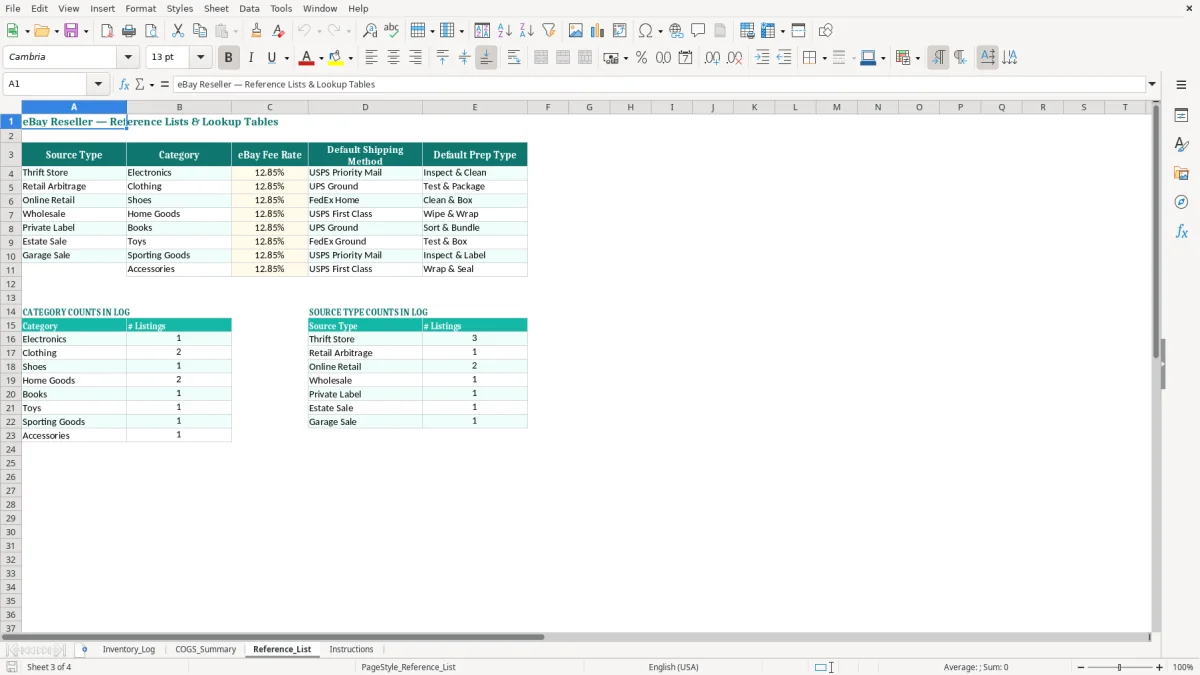
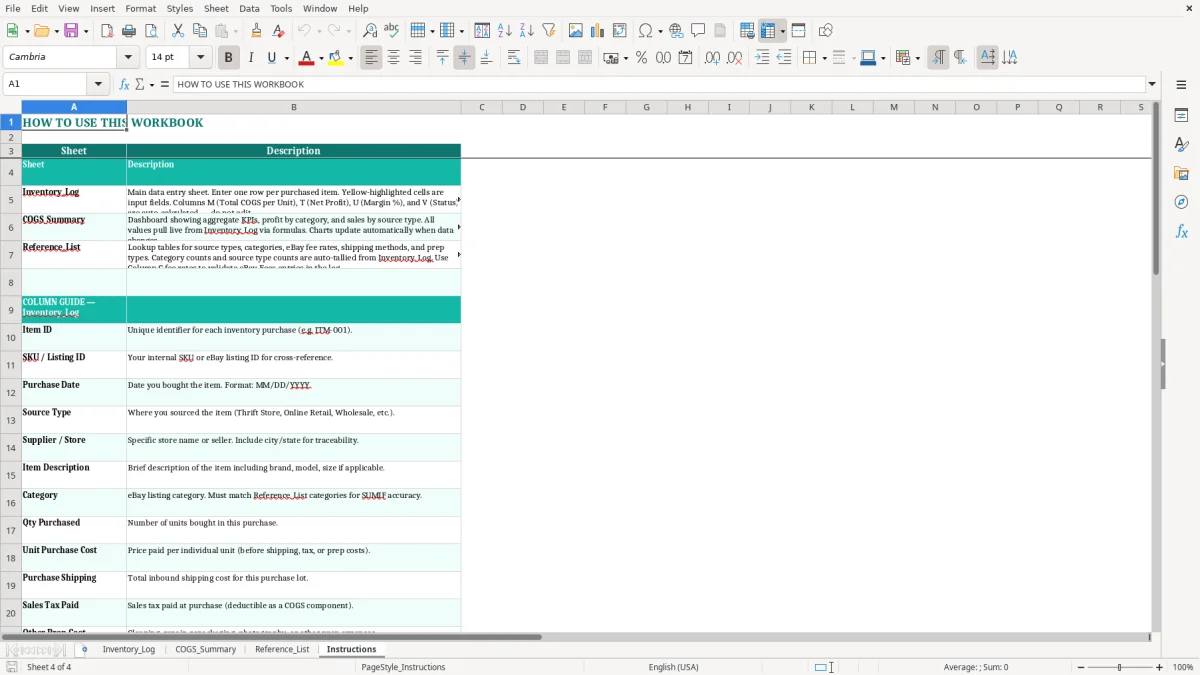
This eBay reseller cost of goods Excel template tracks what you paid, what you sold it for, and what you actually kept after eBay fees and shipping. It includes an Inventory_Log, COGS_Summary, Reference_List, and instructions so you can follow each flip from purchase to profit.
Use it when you source from thrift stores, retail arbitrage, estate sales, or liquidation lots and need a clean profit & loss view on each item. The workbook is built for item-level tracking, so you can see gross margin, net profit, and the cost pieces that get missed when you only look at sales total.
The sample entries show real reseller situations like a $45 jacket sale with $8.00 purchase cost plus shipping and prep, and a higher-ticket headphone flip where fees and shipping cut deeper into the spread. That makes it easier to judge whether a $60 buy is worth tying up cash flow.
Resellers use this workbook when they buy inventory in one place and sell it later through eBay, especially when the spread is thin and every fee matters. A sole proprietor reporting on Schedule C can use it to separate the item cost from the sale price, while a small LLC resale operation can use it to keep category totals clean for monthly review.
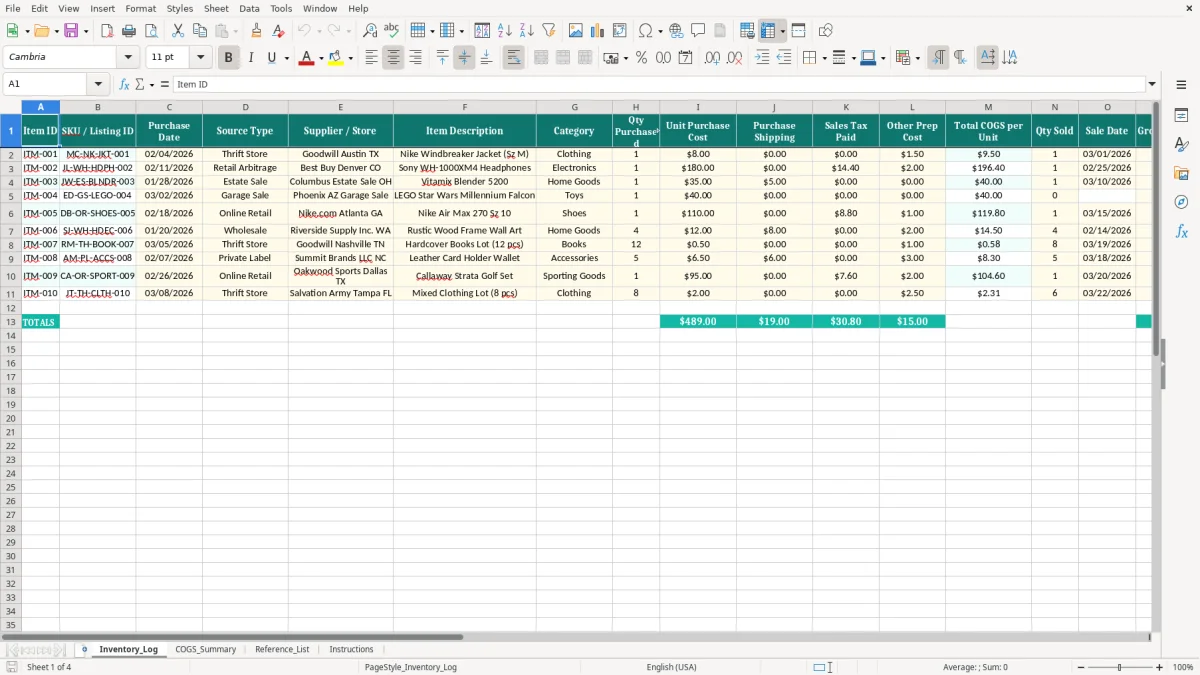
The Inventory_Log is the working tab. In image 1, you can see columns for Item ID, SKU / Listing ID, Purchase Date, Source Type, Supplier / Store, Item Description, Category, Qty Purchased, Unit Purchase Cost, Purchase Shipping, Sales Tax Paid, Other Prep Cost, Total COGS per Unit, Qty Sold, Sale Date, Gross Sale Price, eBay Fees, Shipping Charged to Buyer, Actual Shipping Cost, Net Profit, Margin %, and Status.
It matters most when you have enough volume that memory stops working. A reseller with 80 items in rotation, or a part-time seller clearing 25 orders a month, cannot reliably remember which pair of sneakers had $7.50 shipping, which jacket had $2.00 in prep cost, and which item got hit with $6.75 in fees.
The summary and reference tabs make that volume manageable. If you buy 40 units at $18 each, a separate cost log keeps you from treating $720 of inventory as one blurred number instead of 40 item-level decisions.
Item-level tracking gives you a real gross margin reading, not a store-level guess. That matters when one category produces $28 average profit per sale and another only produces $6 after postage and platform fees.
The IRS does not ask you to guess at cost of goods. For resale activity, your records should support purchase price, purchase date, sales price, shipping, and any direct prep cost; keep them with your business records for at least 3 years, and longer when inventory or basis issues remain open.
If you are a sole proprietor, the numbers from this sheet feed your Schedule C profit calculation and, when applicable, your Schedule SE self-employment tax base. If you are building estimated payments, the same net income informs 1040-ES installments due April 15, June 15, September 15, and January 15 in 2026.
For a reseller, a $50 sale is not $50 of profit. If you paid $18 for the item, $4.50 to ship it to you, $1.25 in prep supplies, and $7.10 in eBay fees, your real spread is built on a much smaller base than the sale total suggests.
That is why the template separates purchase shipping, sales tax paid, other prep cost, and actual shipping cost. It gives you a defensible paper trail if you ever need to explain why a listing that sold for $89.99 only produced $19.14 of net profit.
If you buy $12,000 of inventory over the year and sell it in batches, the workbook helps you keep the cost attached to the item until sale. That is cleaner than dumping all purchases into one expense line, which can distort your profit & loss and make tax estimates too low.
The worst mistake is counting all sale proceeds as income and forgetting the cost stack. On a $75 jacket flip, leaving out $8.00 purchase shipping, $2.00 prep supplies, and $11.25 in eBay fees can make a mediocre item look like a winner.
Another common problem is skipping contemporaneous entry. If you bought 60 items over a weekend and try to reconstruct the costs two months later, you will lose receipt detail, forget which items were bundled, and misstate the margin on the items that actually moved.
Small errors compound quickly. If you understate actual shipping cost by just $1.50 on 100 sold items, you are off by $150 before you even touch sales tax or prep cost.
The same happens with fees. A seller clearing 120 orders a year at an average $5.25 platform fee loses $630 if the fee is not tracked per transaction, and that is before you account for returns or damaged items.
Resellers often focus on gross sale price and ignore cash timing. You may have $2,400 of inventory sitting on the shelf while only $700 has sold, which means your cash is tied up in stock that has not converted to profit yet.
That is exactly where this workbook helps: it shows which items are sold, which are still listed, and which ones are still just inventory. If the same $200 buy sits unsold for 90 days, that is a cash flow problem, not just a bookkeeping issue.
The template works best when you use it at the same time every week. Most sellers do well with a Sunday evening update after sourcing or a Friday closeout after shipping, because you are already touching the items and the numbers are fresh.
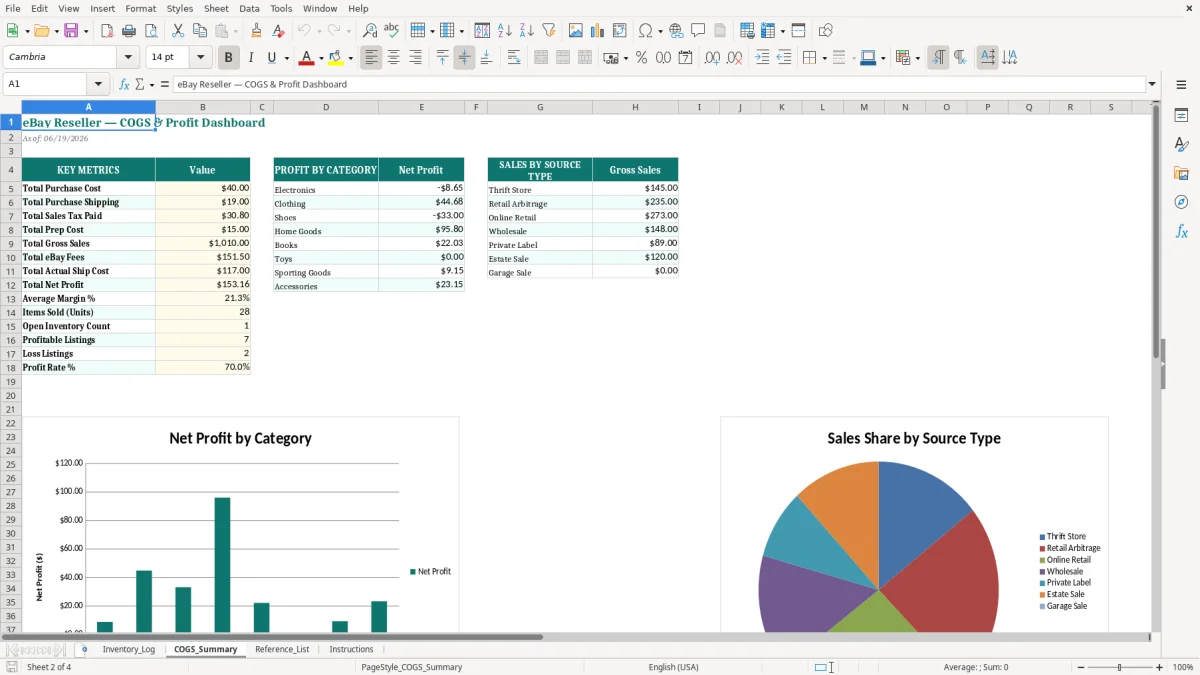
Use image 2, the COGS_Summary tab, to review totals by period and category. When you can see that electronics produced $312 of net profit on 14 sales while clothing produced $176 on 19 sales, you know where to focus your next sourcing trip.
If you are selling 300 orders a month, the workbook still helps, but you will probably want more automation for inventory sync and accounting entry. That is the point where a real system like QuickBooks plus a shipping or inventory tool starts saving time.
Until then, this template is enough to keep your margins honest. A seller making $20 net per order on 50 sales a month is looking at $1,000 of monthly profit, so a bad cost log can distort decisions fast.
It tracks each item from purchase to sale, including purchase cost, shipping, sales tax, prep cost, eBay fees, sale price, net profit, and margin. That gives you a clear item-level profit & loss view instead of a rough monthly guess.
Add the unit purchase cost, purchase shipping, sales tax paid, and other prep cost. If you buy a jacket for $8.00, pay $0.00 shipping, $0.00 tax, and $1.50 prep, your item cost base is $9.50 before sale-side fees.
Yes. A sole proprietor can use the log to support business income and cost of goods sold on Schedule C, and the same profit data helps with Schedule SE and estimated tax planning on 1040-ES.
Yes. It includes columns for eBay fees, shipping charged to the buyer, actual shipping cost, net profit, and margin percentage. That lets you see the difference between what the buyer paid and what you actually kept.
Because one belongs to the cost of acquiring inventory and the other belongs to the cost of delivering the sale. If you mix them together, a $24 flip can look like a $30 flip, and that will distort your margin analysis.
Use it if you flip goods on eBay as a side hustle or a small business, especially if you source from thrift stores, retail arbitrage, estate sales, or liquidation lots. It is built for anyone who needs to see item-level cost, sale value, and true profit in one place.