Tithe Offering Excel – Free Template (2026)
0
Free download
Plan a 2026 single-filer ordinary-income return with income, deductions, brackets, payments, estimated tax, dashboard totals, and instructions.


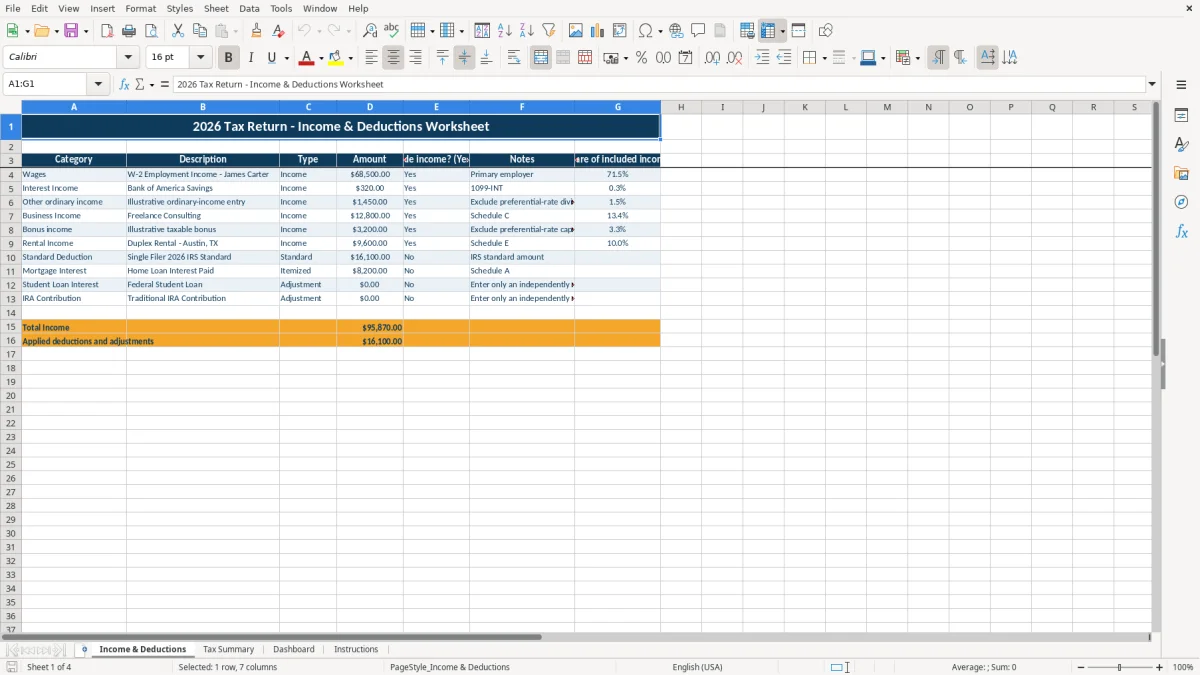
This tax return Excel template estimates a 2026 single-filer federal ordinary-income scenario. It contains an Income & Deductions worksheet, Tax Summary, Dashboard, and Instructions tab for organizing income, deductions, payments, credits, taxable income, and estimated tax.
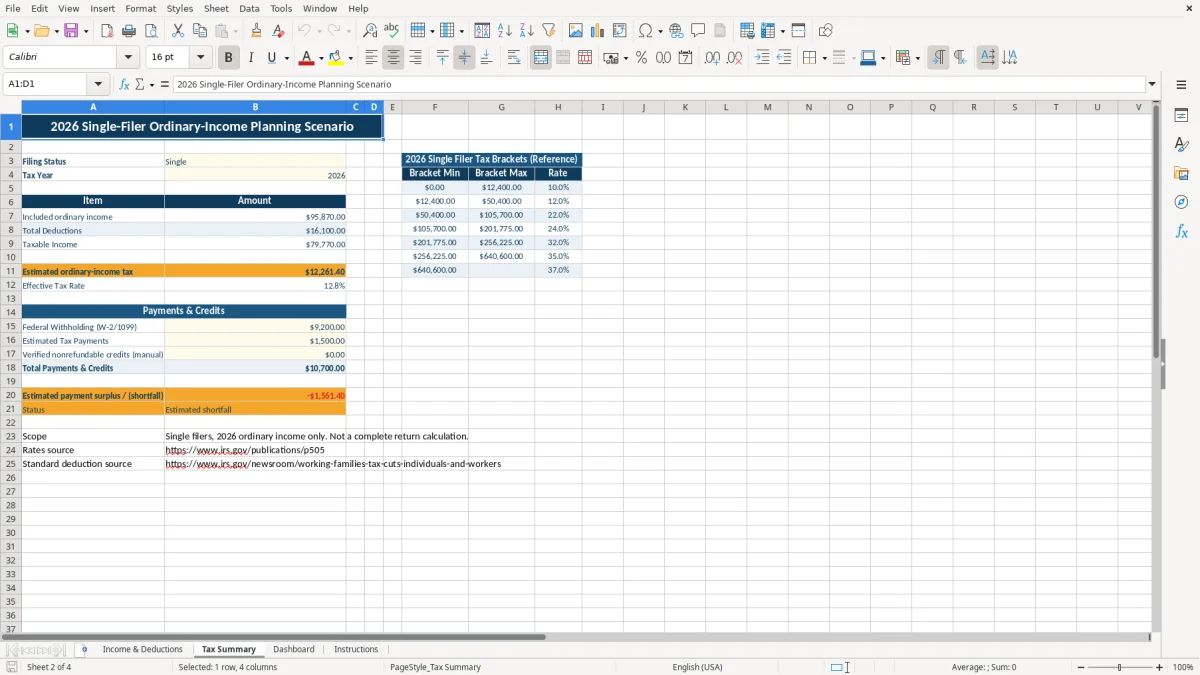
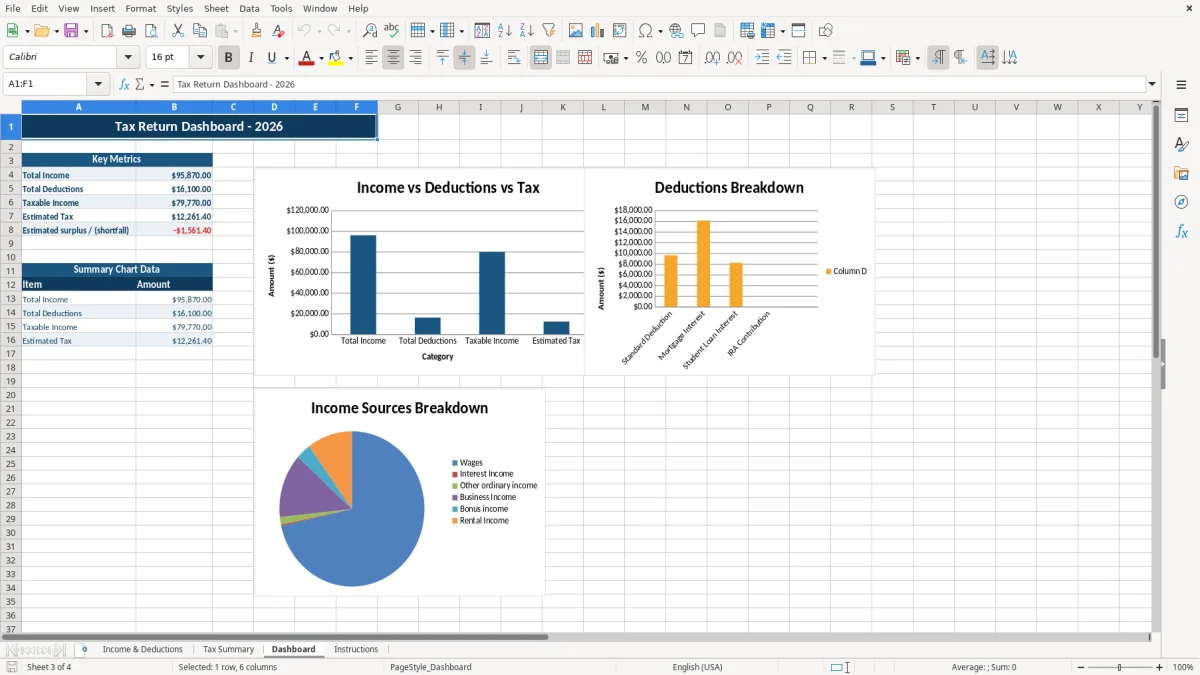
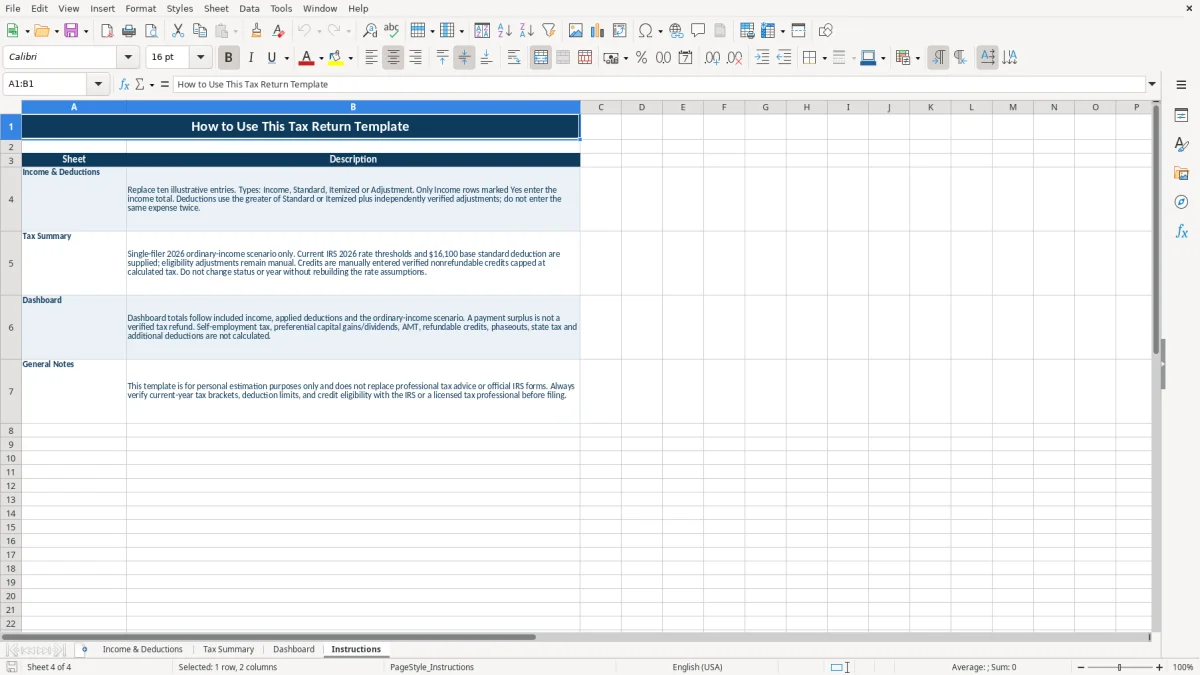
Image 1 shows the Income & Deductions tab with ten illustrative entries and columns for category, description, type, amount, inclusion status, notes, and income share. Image 2 shows the Tax Summary with the 2026 single-filer bracket reference, while images 3 and 4 show the dashboard metrics and workbook guidance.
This workbook fits an individual preparing a rough federal income-tax picture before completing official forms. A single filer can collect W-2 wages, 1099-INT interest, business income, bonus income, and rental income in the Income & Deductions tab instead of keeping separate calculations in email, notes, and bank statements.
The sample rows illustrate $68,500 of wages, $320 of interest, $1,450 of other ordinary income, $12,800 of business income, and $3,200 of bonus income. Those figures are populated examples, not a result for every taxpayer; replace them with verified records before reviewing the totals.
A household can use the file when gathering documents for tax preparation, checking whether withholding appears close to the estimated liability, or comparing deduction inputs. The Dashboard brings total income, deductions, taxable income, estimated tax, and estimated surplus or shortfall into one view.
For example, a taxpayer with W-2 wages and a small freelance activity can enter both sources as Income, mark eligible entries Yes, and then inspect the resulting ordinary-income estimate. The workbook does not prepare Schedule C, Schedule E, or Form 1040; it organizes planning inputs that may support a later review.
Image 1 shows the seven-column entry layout. Image 2 shows the Tax Summary, image 3 shows the five key Dashboard metrics, and image 4 shows the sheet-by-sheet Instructions. The practical sequence is entry first, summary second, dashboard review third.
The Tax Summary uses the supplied 2026 ordinary-income thresholds for a single filer: 10% up to $12,400, 12% from $12,400 to $50,400, 22% from $50,400 to $105,700, 24% from $105,700 to $201,775, 32% from $201,775 to $256,225, 35% from $256,225 to $640,600, and 37% above $640,600.
The workbook also supplies a $16,100 base standard deduction in the illustrative entry area. It compares the Standard and Itemized amounts and uses the larger amount, not both. Adjustments and credits remain user-verified inputs.
Only rows marked Income in the Type column and Yes in Include income? feed the included-income total. The Share of included income column divides each income amount by that total, while the deduction total combines Adjustment entries with the larger of Standard and Itemized entries.
Taxable income is calculated as included ordinary income minus total deductions, with a floor of zero. The estimated tax formula applies the bracket rates progressively, so $50,400 of taxable income does not mean every dollar is taxed at 12%.
This is ordinary-income planning for single filers. It excludes preferential gains and dividends, self-employment tax, AMT, refundable credits, phaseouts, and state tax, and it does not calculate a complete Form 1040.
The payment section accepts federal withholding, estimated tax payments, and verified nonrefundable credits. A positive payment difference is labeled Estimated surplus, but it is not a verified refund or a filing conclusion.
The most immediate error is leaving an illustrative amount in place. The sample includes $12,800 of Business Income and $9,600 of Rental Income, among other entries. If those amounts do not belong to you, they can inflate included income and estimated tax before you notice the source.
Do not overwrite a category while leaving an unrelated description or note behind. A row labeled W-2 Employment Income with a note for a primary employer should not be reused for interest or rental proceeds without changing all identifying fields.
A deduction entered as Income increases the income total. An income row marked No is excluded from the formula even when its Amount is populated, which can produce a deceptively low taxable-income estimate. The dropdowns reduce typing drift, but they cannot decide whether an item is legally deductible or taxable.
The standard-versus-itemized calculation is another frequent source of confusion. Entering $18,000 as Itemized and $16,100 as Standard causes the larger $18,000 amount to apply; entering both does not add them together.
The workbook subtracts estimated ordinary-income tax from payments and the limited credit input to show an estimated surplus or shortfall. For example, $9,200 of withholding plus $1,500 of estimated payments equals $10,700 before the verified credit field is considered, but that comparison is not a final tax calculation.
Self-employment tax, state tax, preferential income, AMT, phaseouts, and refundable credits can materially change a filed result. Treating the Dashboard number as a refund can therefore lead to an incorrect payment decision.
Set one review appointment after all expected W-2 and 1099 documents arrive. Start with source documents, enter each amount once, and use the Notes column to identify the payer, account, or schedule connection.
Use the Tax Summary only after confirming the 2026 tax year and Single filing status. Then compare the payment fields with actual withholding and estimated-payment records; do not use a favorable surplus to justify skipping a separate tax review.
The workbook has no tables, auto-filter, or live data feed. It contains ten illustrative input rows, so keep the file focused on the entries it provides rather than treating it as a full tax-preparation system.
Move to professional tax software or a preparer when you need complete Form 1040 reporting, multiple filing statuses, state returns, self-employment tax, capital gains, depreciation, credits, or phaseout calculations. A spreadsheet is useful for a controlled ordinary-income estimate; it is not a substitute for a complete return calculation.
It calculates a 2026 single-filer ordinary-income planning scenario: included income, deductions, taxable income, progressive estimated ordinary-income tax, effective tax rate, payments, verified nonrefundable credits, and estimated surplus or shortfall.
No. The workbook does not prepare a complete Form 1040. It excludes self-employment tax, preferential gains and dividends, AMT, refundable credits, phaseouts, and state tax.
Yes. The sample deduction area includes the supplied $16,100 base standard deduction for a 2026 single-filer scenario. Verify eligibility and any applicable adjustment before relying on the amount.
Use the Income & Deductions tab. Enter a description and amount, select Income, Standard, Itemized, or Adjustment in Type, and use Yes or No for whether an income row should be included. Standard, Itemized, and Adjustment entries are used in the deduction calculation.
Estimated surplus means the payment and credit inputs exceed the workbook's estimated ordinary-income tax. It is not a verified refund because the file does not calculate every item required for a filed return.
The Dashboard displays Total Income, Total Deductions, Taxable Income, Estimated Tax, and Estimated surplus or shortfall. It also contains summary data for three charts based on the workbook's income, deduction, taxable-income, and estimated-tax values.