Goodwill Donation Value Log Template
12
Free download
Track gig income, mileage, fees, and deductible expenses with a 4-tab Excel template for drivers, couriers, and contractors.


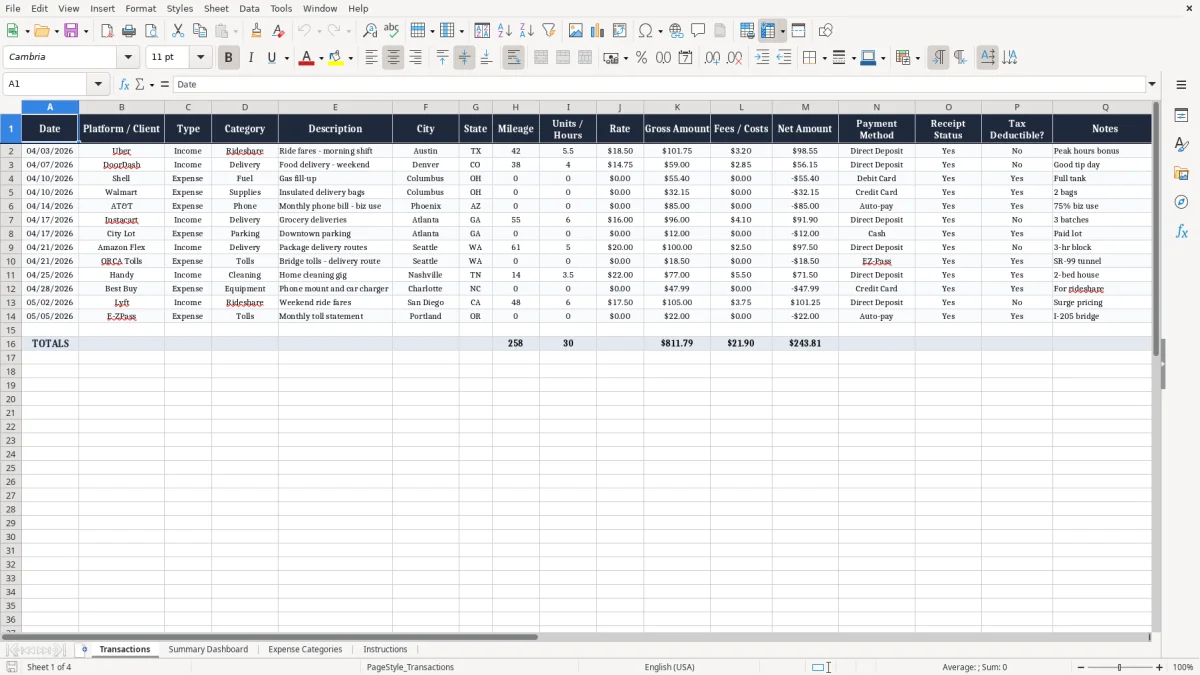
This gig worker income and expense Excel template tracks your rideshare, delivery, and contractor cash flow in one place. It includes a Transactions sheet, Summary Dashboard, Expense Categories, and Instructions so you can sort income, fees, mileage, and deductible costs without rebuilding the file every week.
If you drive for Uber or DoorDash, do side jobs as a sole proprietor, or report earnings on Schedule C, this workbook gives you a clean way to see gross pay, fees, net amount, and business expenses. The screenshots below show each tab and the columns you use to keep the numbers ready for tax time.
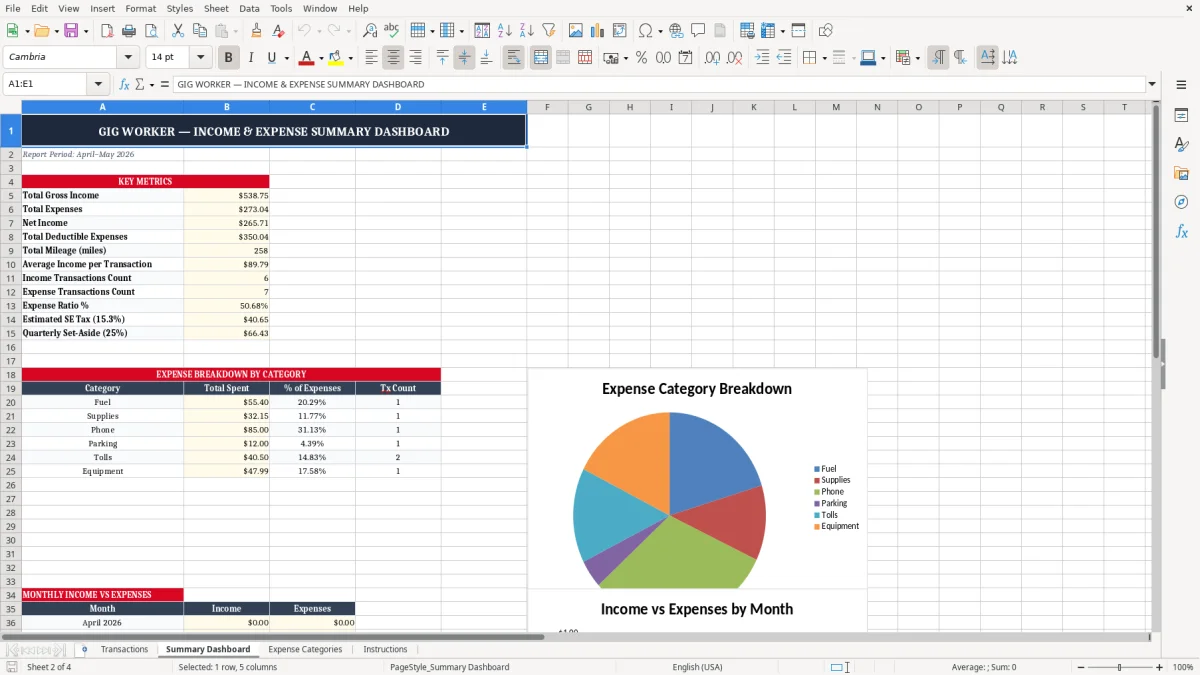
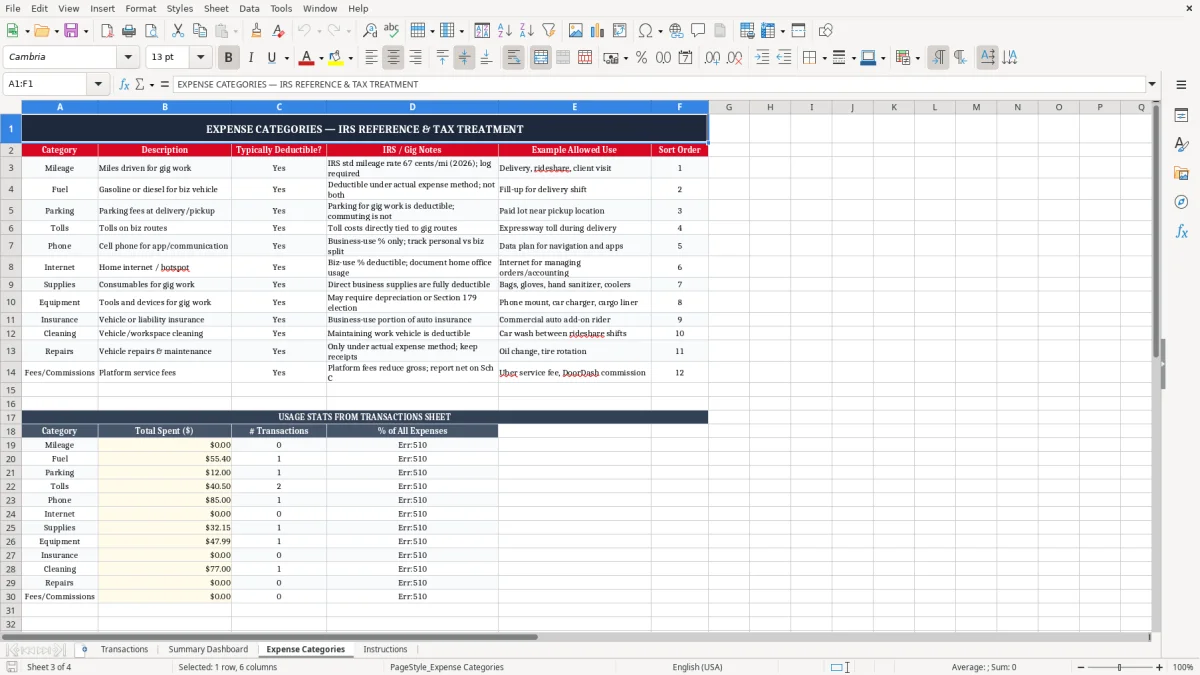
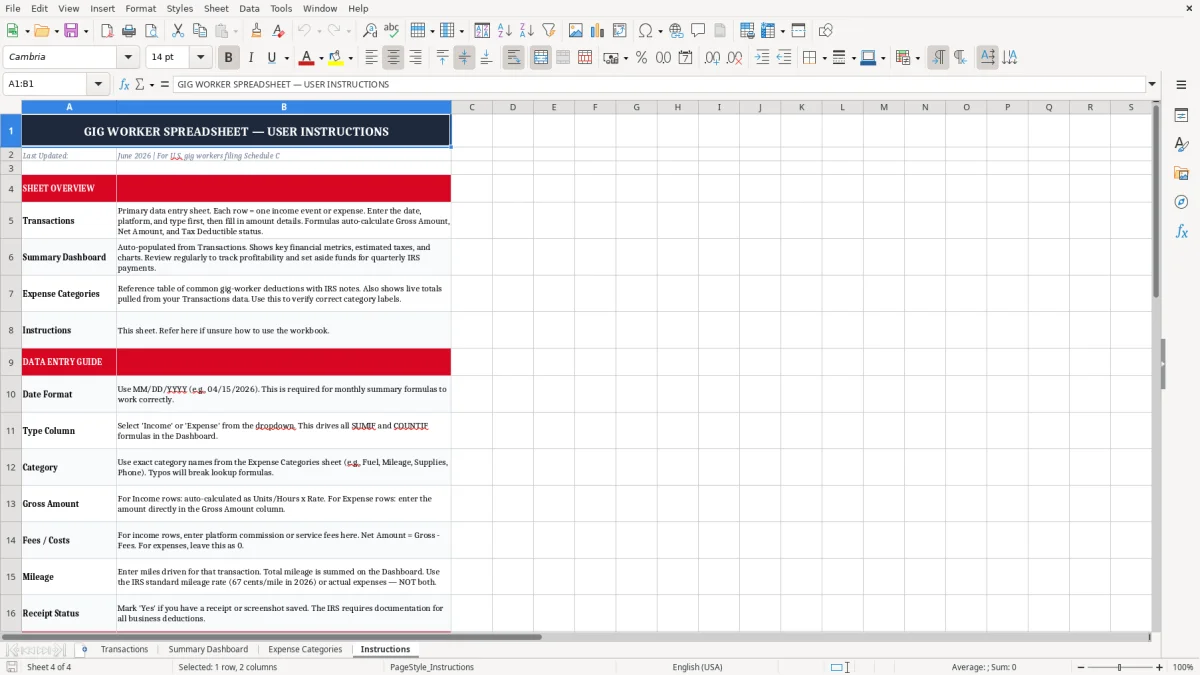
Image 1 shows the entry tab with line-item fields for date, platform, type, category, mileage, hours, rates, and receipt status. Image 2 shows the dashboard that pulls totals from the transaction data, while Images 3 and 4 show the category list and the instructions tab.
This workbook fits the person who gets paid in pieces: a rideshare driver with 40 trips this week, a delivery courier with $1,250 of app payouts, or a handyman who invoices three clients and buys supplies on the road. It also fits the sole proprietor who files Schedule C and wants a clean count of income, fuel, supplies, and platform fees before quarter-end.
Image 1 shows why this format works in real life. You can enter one row for a 5.5-hour Uber shift in Austin, another for a DoorDash weekend run in Denver, and another for a $55.40 fuel fill-up, then see the business pattern instead of a pile of card swipes.
The Summary Dashboard matters when you are trying to answer a simple question: did the week actually make money after fees, gas, and supplies? If a driver grosses $2,400 in a month and spends $410 on fuel, $120 on platform fees, and $85 on supplies, the dashboard shows the real margin instead of the headline payout.
The Expense Categories tab keeps you from creating six spellings of the same cost. That matters when you hand the file to a bookkeeper at an LLC, a spouse helping with records, or a contractor who wants the year clean before filing season.
The IRS expects you to keep records that support income and deductions, and that means dates, amounts, business purpose, and proof of payment. In practice, a mileage row with the date, city, state, and miles driven is stronger than a bank statement alone, because the statement never tells you why the trip was business.
For federal recordkeeping, the usual retention period is 3 years, and it can stretch to 7 years in some cases. If you are preparing Form 1040 with Schedule C and Schedule SE, you want the workbook to survive long enough to back up the return, not just until the next phone upgrade.
Platforms that pay contractors often report income on 1099-NEC when payments reach $600 or more. If you earn $18,000 from app work and $1,200 in fees are withheld by the platform, you still need the gross income number, because the deduction trail is separate from the payment trail.
For gig workers, mileage logs are not a nice-to-have. If you drive 8,000 business miles and use the IRS standard mileage method, even a 1-mile error per day can change your deduction by hundreds of dollars over a year, which then changes your estimated taxes on Form 1040-ES.
The most expensive mistake is mixing personal spending into business records and then trying to sort it out at tax time. A $32.15 delivery bag, a $85 phone bill with 75% business use, and a $55.40 fuel purchase all belong in different buckets, and if you miss that separation you understate your deduction or create a messy audit trail.
A mileage log with only a monthly total and no contemporaneous detail is weak when the return gets questioned. If you claim 9,600 business miles and later cannot show the date, route, or business purpose, you can lose a deduction worth thousands of dollars at the standard mileage rate.
Another common failure is booking only the net payout and ignoring the platform fee. If your app shows $1,000 gross income, $120 in service fees, and a $40 adjustment, entering only the bank deposit makes your revenue look smaller and your business expense totals incomplete.
Gig workers often get hit by underpayment penalties because they wait until April to think about tax. If you owe self-employment tax of 15.3% plus federal income tax on top of that, a $2,500 quarterly profit can leave you short by several hundred dollars if you never set aside cash.
The way to keep this sheet alive is to tie it to a fixed event, not to motivation. The best trigger is payout day or Sunday night, because that is when the trips, fees, and receipts are still fresh.
If you are managing several drivers, hundreds of transactions per month, or payroll plus contractor payments, this workbook starts to act like a holding tank rather than a system. At that point, move to QuickBooks or a dedicated bookkeeping app so you can stop re-keying data and start reconciling it.
Yes. The Transactions sheet is built for platform-by-platform entries, so you can separate Uber income, DoorDash delivery fees, and Instacart shopping costs in different rows.
Yes. It is set up to track the income and expenses you need for Schedule C, including fees, mileage, supplies, phone use, and other deductible costs tied to your business.
Record gross income first, then record fees and costs separately. If a platform shows $1,000 of earnings and keeps $120 in fees, you need both numbers so your books match the 1099 and your bank deposit.
Update it weekly at minimum, and after every payout if you work multiple apps. A 20-minute weekly cleanup is easier than sorting 80 rows the night before your estimated tax payment.
Typical deductible items include mileage, fuel, parking, tolls, phone use, delivery bags, supplies, and other costs used for the business. The template gives you a Tax Deductible? field so you can flag those rows while the receipt is still in front of you.
Yes, if you need business detail. A bank app may show the $55.40 charge, but this workbook also captures the category, business purpose, mileage, and receipt status that a tax return and year-end review actually need.