Tithe Offering Excel – Free Template (2026)
0
Free download
CBAM shipment register for U.S. exporters sharing supplier emissions and EUR cost scenarios with EU importers.


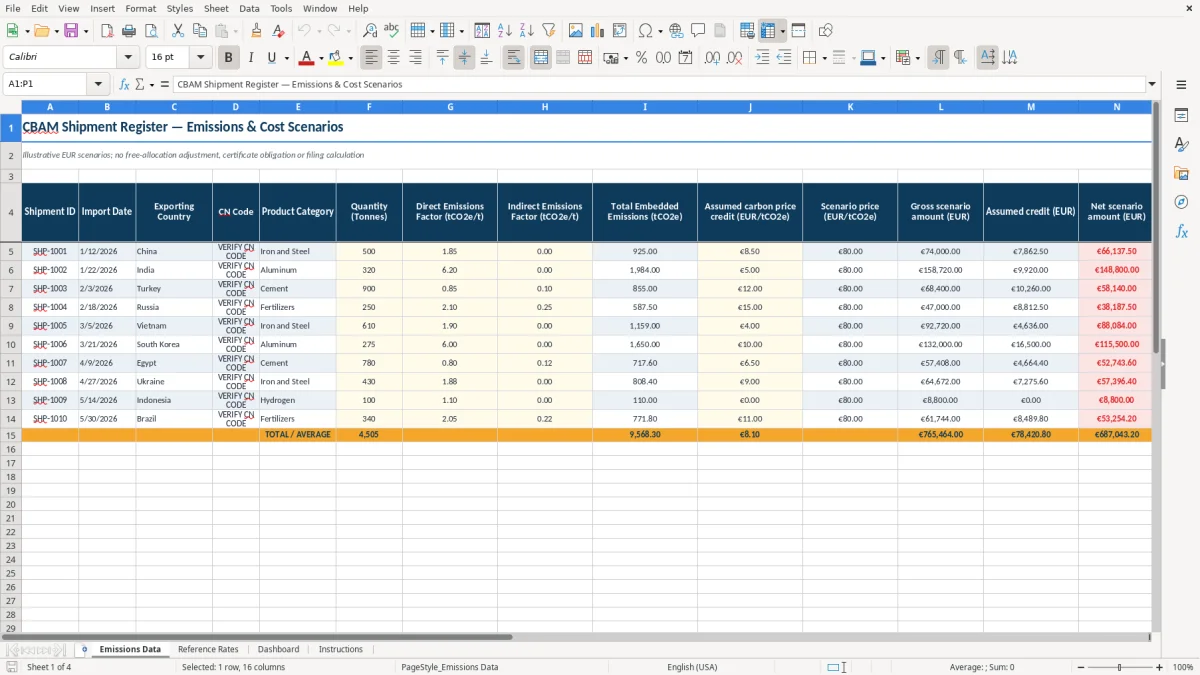
This CBAM workbook records shipments, supplier emissions factors, embedded emissions, and illustrative EUR cost scenarios for U.S. exporters working with EU importers. It includes ten prepared shipment rows, category-based scenario prices, evidence-review fields, and a summary dashboard.
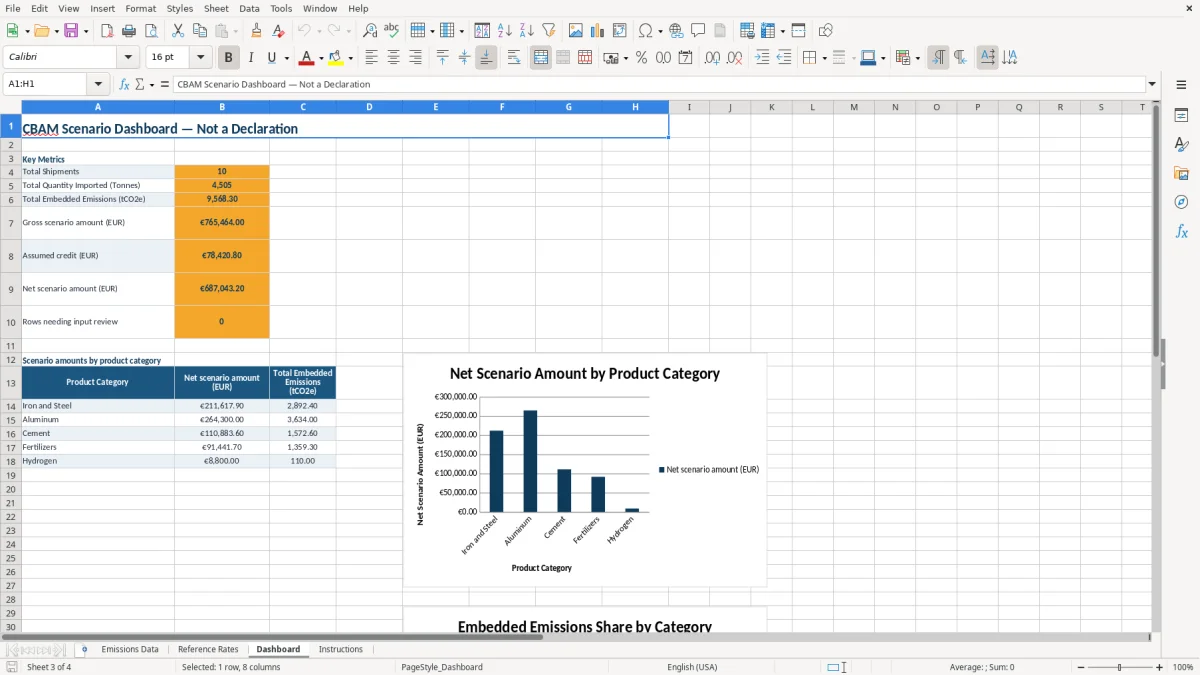
Use the Emissions Data tab for shipment-level inputs, Reference Rates for editable scenario assumptions, and Dashboard for totals by product category. The workbook is an information-sharing and planning aid, not an official EU declaration, certificate calculator, or compliance determination.
A U.S. exporter, freight coordinator, or supplier-account manager can use this CBAM register when an EU importer requests shipment-level information for covered goods. It is most useful during quotation review, monthly shipment reconciliation, or a year-end evidence request when several suppliers are providing different emissions formats.
For example, the sample register separates a 500-tonne Iron and Steel shipment from a 320-tonne Aluminum shipment and a 900-tonne Cement shipment. Each row keeps the origin, CN-code placeholder, emissions factors, scenario prices, and evidence status together instead of mixing supplier records in email attachments.
A purchasing team can use the Evidence review dropdown to show whether a supplier record is Verified, Pending Review, Flagged, or Under Audit. The Dashboard then summarizes five product categories, helping an exporter discuss which assumptions still need supporting documentation before sending information to an EU importer.
This workbook preserves the European scope and EUR inputs needed for a planning conversation, but it does not determine an official CBAM obligation. The Instructions tab expressly excludes threshold testing, free-allocation adjustments, eligibility decisions, verification, and official Registry submission.
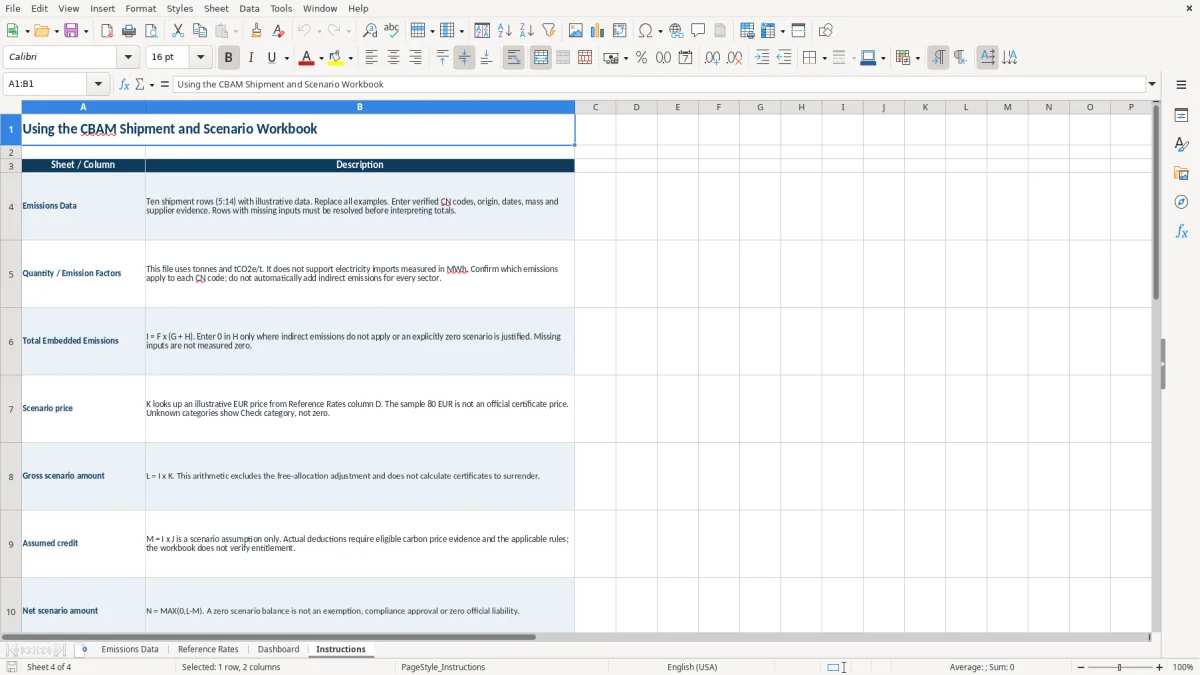
The embedded-emissions formula is I = F × (G + H), where F is tonnes, G is direct emissions in tCO2e/t, and H is indirect emissions in tCO2e/t. Gross scenario amount is L = I × K; assumed credit is M = I × J; net scenario amount is N = MAX(0,L-M). These are arithmetic scenarios, not regulatory conclusions.
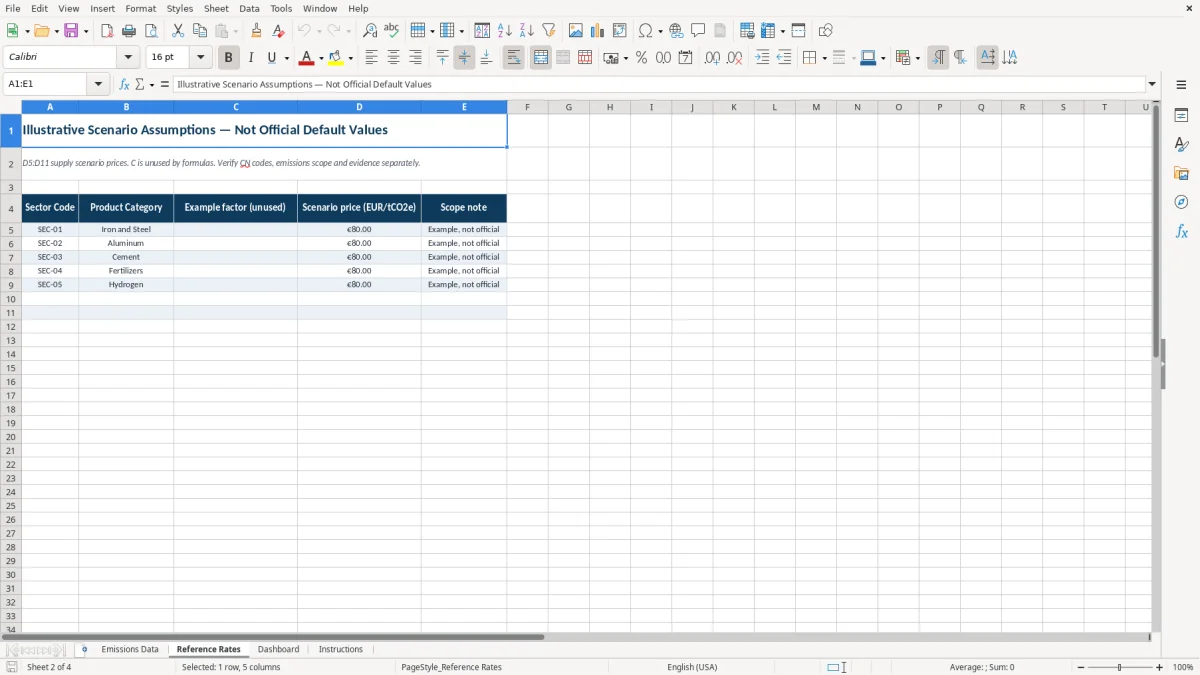
Reference Rates contains five categories and an illustrative scenario price of EUR 80/tCO2e in the populated examples. Column C is unused by formulas, and the workbook has no official factor library, live price feed, exchange conversion, or certificate calculation. Verify CN codes, emissions scope, evidence, and any applicable EU requirements outside this file.
The most damaging errors usually begin with a shipment record that looks complete but has an unverified CN code or unsupported emissions factor. The sample rows display VERIFY CN CODE, which is a warning to replace the placeholder, not a classification result.
If quantity or either emissions factor is missing, the total embedded-emissions formula stays blank because all three inputs are required. Entering 0 for indirect emissions without supplier support can understate the scenario; the Instructions tab says zero is appropriate only where indirect emissions do not apply or an explicitly zero scenario is justified.
The assumed credit column multiplies emissions by a user-entered EUR assumption. A net scenario amount of zero therefore does not prove an exemption, approved deduction, or zero official liability. The Scenario check labels such a row Zero scenario balance, while valid populated rows remain Scenario only.
The prepared register covers rows 5 through 14, and Dashboard formulas summarize those same rows. Adding an eleventh shipment without rebuilding formulas, chart ranges, and validation can leave the new record out of totals, so treat the ten-row design as a defined working range.
Use the workbook at a fixed point in your shipping process rather than waiting for an EU importer to request everything at once. A practical routine is to update shipment inputs after the monthly freight reconciliation, then hold a separate evidence review before sharing the file.
Change Reference Rates only when the team agrees on the scenario assumption and records its source. Keep EUR inputs in EUR; this workbook has no exchange-rate conversion. Do not overwrite calculated columns I and K:N unless you are intentionally redesigning the workbook and checking every dependent formula.
Once shipment volume exceeds the prepared ten-row range or several people need simultaneous updates, a controlled data system may be more reliable than a single XLSX file. Until then, keep one consistent scenario version, date your shared copies, and send the Dashboard together with the underlying shipment and evidence records.
No. It is a planning and information-sharing worksheet for supplier emissions and shipment scenarios. It does not submit an EU declaration, calculate certificates to surrender, verify eligibility, or determine an official obligation.
Enter Shipment ID, Import Date, Exporting Country, CN Code, Product Category, Quantity (Tonnes), direct and indirect emissions factors, EUR scenario assumptions, and Evidence review status. Calculated fields include embedded emissions, gross amount, assumed credit, net amount, and Scenario check.
It calculates Total Embedded Emissions as Quantity (Tonnes) × (Direct Emissions Factor + Indirect Emissions Factor). The workbook uses tonnes and tCO2e/t and does not support electricity imports measured in MWh.
No. The EUR 80 values in Reference Rates are illustrative assumptions marked Example, not official. You must replace or review them for your specific planning purpose; there is no live price feed or exchange conversion.
The Product Category in Emissions Data does not match a category listed in Reference Rates. Select one of the available categories or review the reference list, then confirm that the category and supplier evidence are appropriate.
The prepared register uses rows 5 through 14, providing ten shipment rows. Dashboard formulas, charts, and validation are built around that range, so adding more rows requires checking the related formulas and controls.