Tithe Offering Excel – Free Template (2026)
0
Free download
Track LLC formation, launch, and ongoing costs with receipt status, funding source, tax review flags, and a dashboard for 2026.


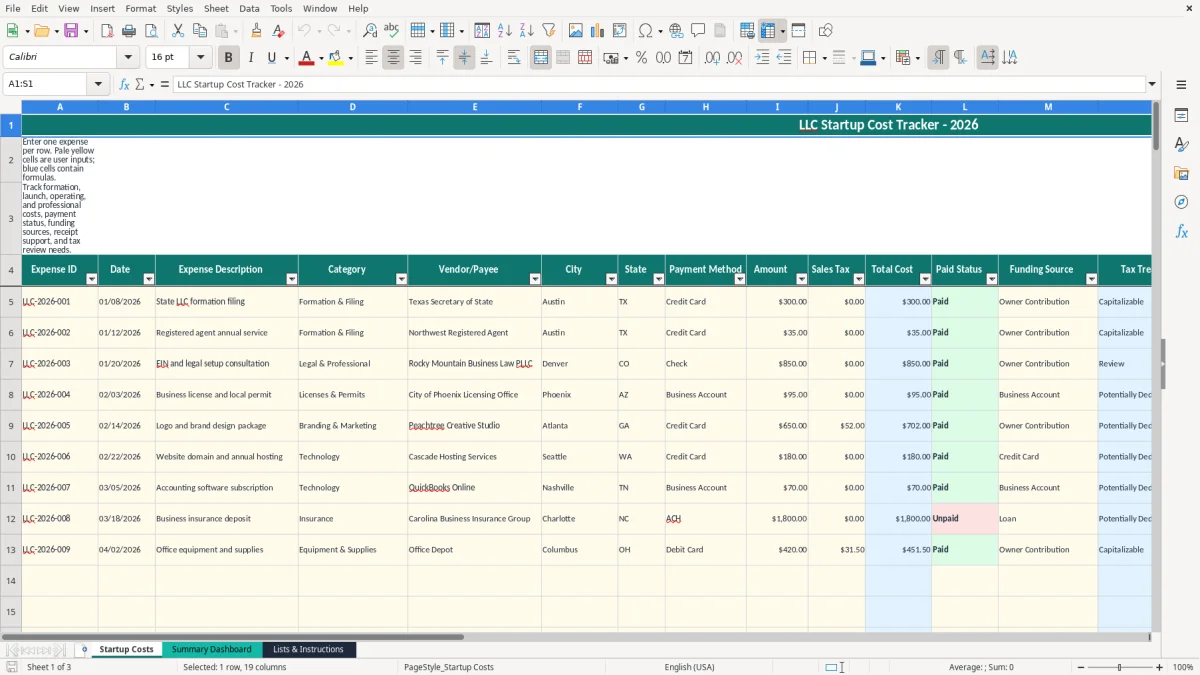
This LLC startup cost tracker records formation, launch, and ongoing expenses in Excel. It includes 100 prepared expense rows, calculated total costs, payment and funding details, receipt tracking, tax-treatment flags, and a dashboard that summarizes spending by category, payment status, and month.
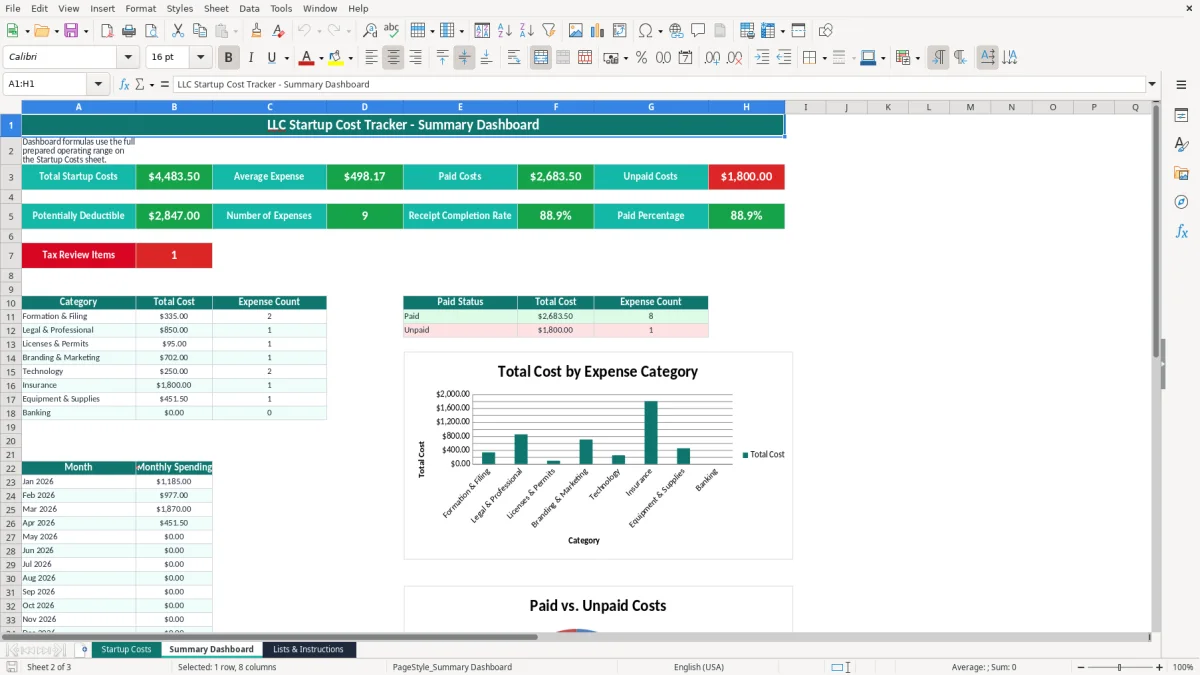
Enter one expense per row on the Startup Costs tab. The Summary Dashboard then uses SUM, SUMIF, COUNTIF, and AVERAGE formulas to show total costs, paid and unpaid amounts, receipt completion, tax-review items, category totals, and monthly spending.
A new LLC owner usually has expenses before the first customer pays: a state formation filing, registered-agent service, legal consultation, domain name, insurance deposit, equipment, and launch advertising. The Startup Costs tab gives each charge an Expense ID, date, description, vendor, city, state, payment method, funding source, and status instead of leaving those details in email or a credit-card statement.
This is especially useful for a sole owner who pays early costs personally. For example, an owner might record a $300 formation filing, a $35 registered-agent charge, and an $850 legal consultation as separate rows. Marking Funding Source as Owner Contribution lets the bookkeeper identify the $1,185 that must be reconciled to the LLC books.
The Notes field can explain that an owner paid a charge before the business account opened. Receipt/Invoice Available? and Tax Review Flag then make missing support visible rather than forcing you to search through a personal card statement at tax time.
A home-based consultant may enter a $1,200 website project, $600 of professional insurance, and $240 of software subscriptions. A small online store may have 30 launch purchases across equipment, packaging, permits, branding, and technology. The dashboard groups those entries by categories such as Formation & Filing, Legal & Professional, Technology, Insurance, and Banking.
Use the file during the weekly launch review, the monthly bookkeeping close, and the year-end handoff to your tax preparer. The workbook has 100 prepared operating rows, so it fits a small launch ledger; a business with more than 100 entries should move older records to a separate file or accounting system rather than extending formulas without checking the ranges.
Image 1 shows the wide Startup Costs entry sheet with frozen headings, filters, yellow input cells, and blue calculated cells. Image 2 shows the Summary Dashboard with headline totals, category and payment-status summaries, monthly rows from Jan 2026 through Dec 2026, and three charts. Image 3 shows the instructions and lookup tables that control the dropdown categories and default tax treatments.
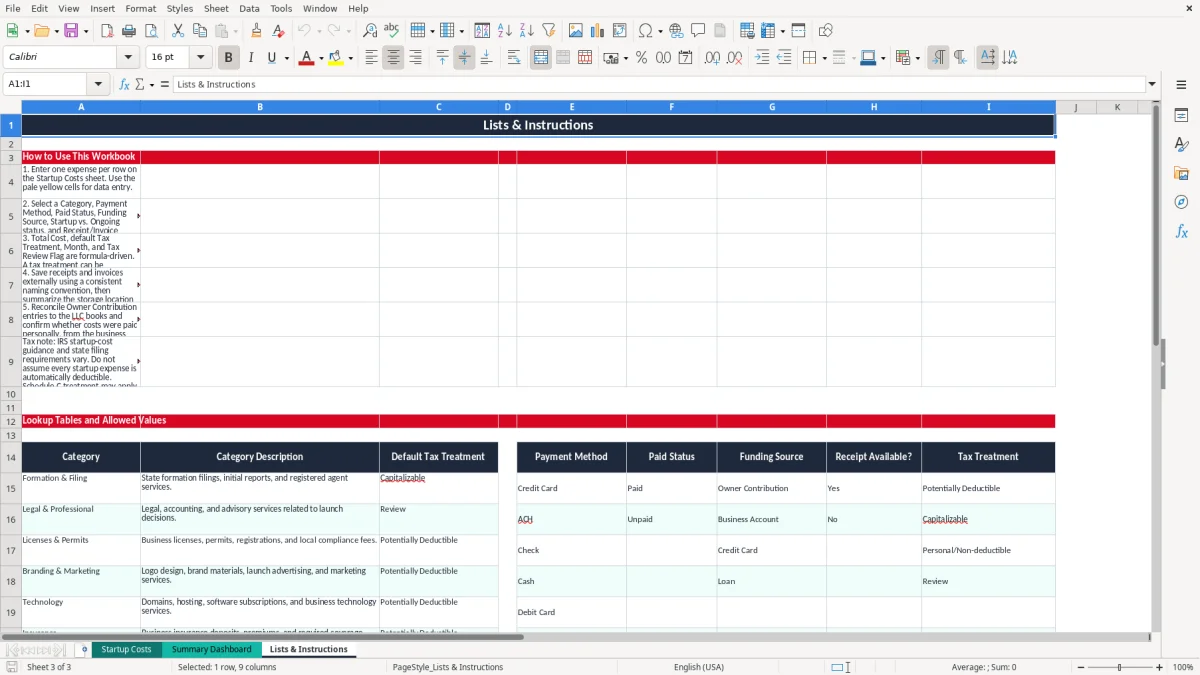
The workbook's Tax Treatment labels are bookkeeping prompts, not automatic tax conclusions. The Lists & Instructions tab maps categories to defaults such as Capitalizable, Potentially Deductible, and Review, while the Startup Costs tab allows a tax treatment value to be selected or reviewed. A state filing fee, legal invoice, computer, and advertising campaign can have different federal tax treatment.
For federal purposes, the IRS rules for business startup costs commonly involve a limited immediate deduction and amortization of remaining eligible costs; the commonly cited threshold is up to $5,000 of qualifying startup costs, reduced when total startup costs exceed $50,000. Organizational costs have a separate analysis. Do not classify every formation charge as an ordinary deduction simply because it occurred before opening.
For example, suppose an owner records $4,000 of qualifying investigation and launch costs, $1,200 of organizational costs, and a $2,500 computer. The $7,700 total is not one uniform deduction: the computer may be a depreciable business asset, while startup and organizational costs require their own analysis and documentation.
A single-member LLC commonly reports business activity on the owner's Schedule C with Form 1040, unless the entity makes another tax election. Net earnings may also flow to Schedule SE, where self-employment tax is generally 15.3% before applicable wage-base and deduction rules. A multi-member LLC generally files Form 1065, while an LLC taxed as an S-corp has payroll and reasonable-compensation obligations.
Keep the legal formation document, state receipts, invoices, and payment evidence with the ledger. The IRS generally expects records to be retained for 3 years, and some records may need to remain available for up to 7 years. The spreadsheet's receipt flag helps you locate gaps, but it does not prove deductibility or replace the source document.
Annual reports, franchise taxes, local licenses, and sales-tax registrations are state or local matters. Sales tax is state-level; there is no national U.S. VAT, and several states have no general sales tax. Enter sales tax separately in column J so the $300 purchase plus $24 tax appears as a $324 Total Cost, while the tax question remains available for review.
The most expensive errors in a new LLC ledger are usually small entries repeated without a control. A $35 registered-agent renewal, a $19 software subscription, or a $60 permit fee can disappear in a bank feed; 12 missed charges at an average of $50 create a $600 gap before you even consider tax classification.
An owner may enter a $2,000 equipment purchase as a business expense even though it was paid with a personal card and never recorded as an owner contribution or liability. The cash left the owner's pocket, but the books do not show who funded the asset. That creates reconciliation work and can distort the owner's basis or capital account.
The Funding Source dropdown is designed to prevent that ambiguity. Mark the entry as Owner Contribution, Credit Card, Business Account, or Loan, then explain the payment in Notes. Do not use Paid Status to describe who funded the cost; Paid means the vendor balance is settled, not that the LLC reimbursed the owner.
A bank or credit-card statement proves that money moved, but it may not show what was purchased or why it was business-related. If 8 of 40 entries lack receipts, the dashboard's receipt completion rate is 80%, and the Tax Review Flag marks each row with No as Review. At $150 per unsupported expense, that is $1,200 of documentation needing attention.
The category lookup returns a default treatment from Lists & Instructions. That is useful for sorting, but a default of Potentially Deductible is not a tax decision. A $4,500 website build, $3,000 equipment purchase, and $900 legal invoice may all sit in different federal categories even if they were purchased during the same week.
Another frequent problem is entering sales tax inside Amount and again in Sales Tax. A $1,000 purchase with $80 tax should be Amount $1,000, Sales Tax $80, and Total Cost $1,080. Duplicating the $80 makes the dashboard overstate spending and can affect category totals, paid totals, and monthly cash planning.
Use the workbook at a fixed time rather than waiting for tax season. For a one-owner LLC, Friday afternoon is practical: download the week's receipts, enter new charges, and compare Paid Status with the business bank and credit-card activity. For a four-person operation, assign the entry work to the office manager and have the owner review Tax Review Items once a month.
At the end of a month with 18 entries totaling $6,400, compare the dashboard's paid and unpaid totals to the bank and vendor list. If $5,900 is paid and $500 is unpaid, the difference should have an explanation before you close the period.
Do not overwrite formula cells in Total Cost, Month, or Tax Review Flag. If you need a different tax conclusion, change the selected Tax Treatment after review and preserve the supporting explanation in Notes. Copy the workbook before making major changes so the original 100-row structure remains available.
The Summary Dashboard has no user-entry validation, so treat it as an output page. Enter data on Startup Costs, where the filters, frozen header row, and dropdown lists reduce inconsistent entries. Image 2 is most useful after the current month's rows are complete, not as a substitute for entering the underlying transactions.
Move to QuickBooks or another accounting system when you exceed the prepared 100-row range, need bank feeds, manage accounts payable, issue invoices, or run payroll. A tracker is appropriate for a short launch period; it is not a general ledger, payroll system, or multi-user audit trail.
Record formation filings, registered-agent services, legal and accounting work, licenses, permits, branding, marketing, technology, insurance, equipment, supplies, and banking costs. Enter one expense per row and use the Category dropdown to classify it.
The Startup Costs tab has 100 prepared operating rows, from row 5 through row 104. The dashboard formulas use that prepared range, so review or extend the formulas carefully before adding more than 100 expenses.
No. The Tax Treatment column uses category-based defaults such as Potentially Deductible, Capitalizable, Personal/Non-deductible, or Review. Treat those labels as bookkeeping prompts and retain the invoice and tax analysis supporting the final treatment.
The flag shows Review when the category lookup returns Review or when Receipt/Invoice Available? is set to No. It shows OK when those two checks do not trigger. A tax professional still needs to evaluate the underlying expense.
Total Startup Costs uses the SUM of the Total Cost column. Total Cost is calculated as Amount plus Sales Tax for each populated row, while the dashboard also uses SUMIF, COUNTIF, and AVERAGE for paid status, categories, counts, and average expense values.
Yes. Enter the expense and select Owner Contribution as the Funding Source when the owner paid personally. Add an explanation in Notes and reconcile the entry to the LLC books so the business expense and the owner's funding are both recorded correctly.