Tithe Offering Excel – Free Template (2026)
0
Free download
Track sole proprietor income, expenses, deductions, Schedule C lines, receipts, payments, miles, and monthly totals in a 2026 Excel ledger.


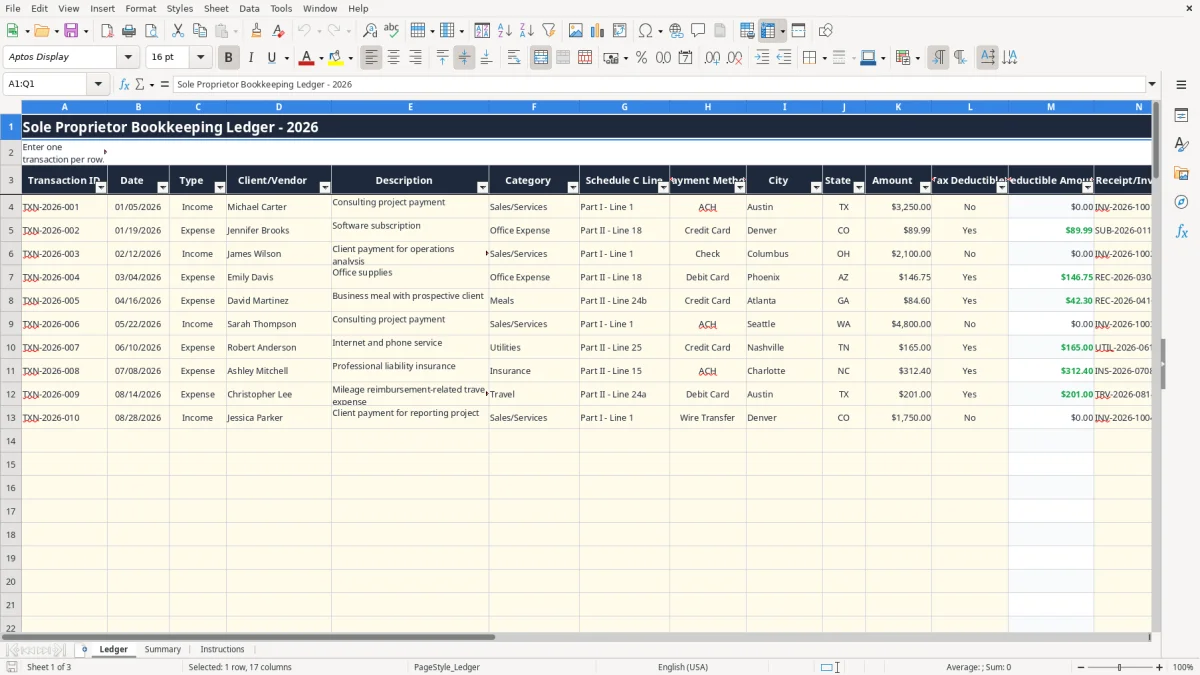
This sole proprietor bookkeeping ledger Excel template records income and expenses one transaction per row, assigns categories and Schedule C lines, calculates deductible amounts, and summarizes profit, tax-planning reserves, and business miles. It includes Ledger, Summary, and Instructions tabs with 100 prepared transaction rows.
Use the Ledger tab for daily entries, then review the Summary dashboard during your month-end bookkeeping routine. Image 1 shows fields for dates, clients or vendors, categories, payment methods, receipts, deductions, signed amounts, and miles.
A sole proprietor usually needs a transaction ledger at the moment money moves, not just at tax time. A freelance designer may enter a $1,800 client payment on 03/05/2026, while a plumber records a $240 supply purchase and a $96 fuel expense after the same job.
The Ledger tab suits a consultant, photographer, home-repair professional, or 1099 contractor who wants one row for every deposit and purchase. Enter the client or vendor, description, payment method, city, state, invoice or receipt number, and business purpose while the information is still available.
For example, a consultant with $7,500 of monthly receipts and $1,250 of operating expenses can see $6,250 of net profit before other adjustments. The Signed Amount column makes the direction clear: a $7,500 Income row contributes $7,500, and a $1,250 Expense row contributes ($1,250).
Use it after a weekly bank review, after each payroll or client billing cycle, and before the monthly close. At year-end, the categories and Schedule C Line column give you an organized starting point for reviewing business revenue and expenses.
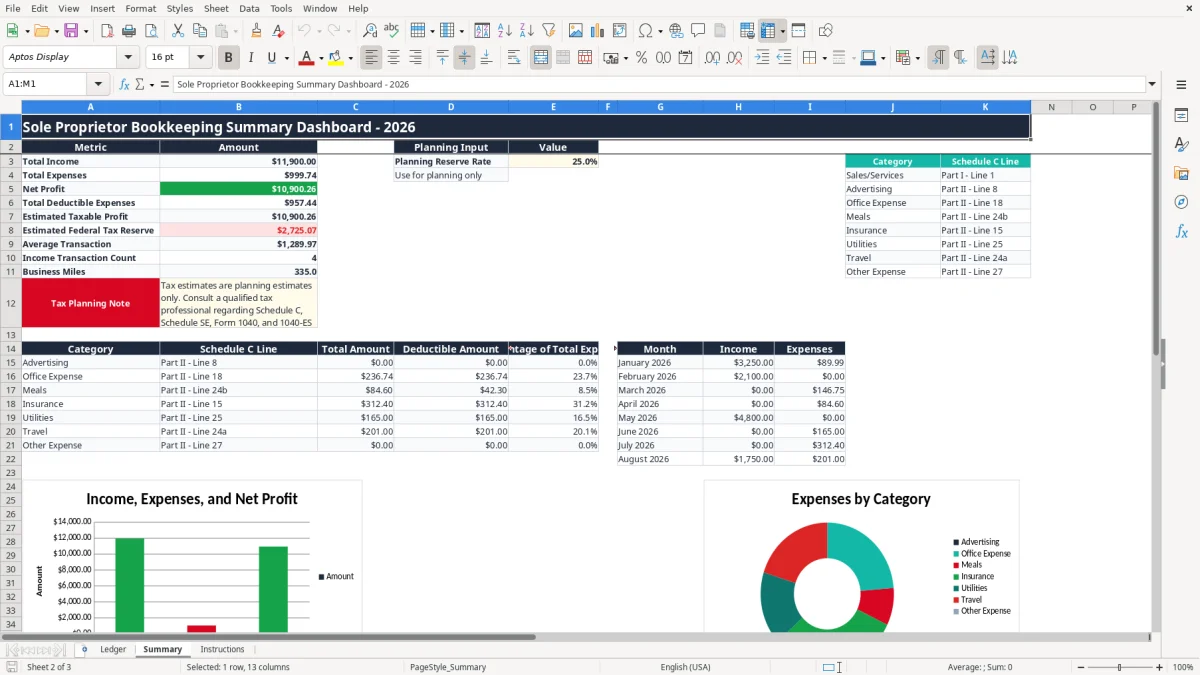
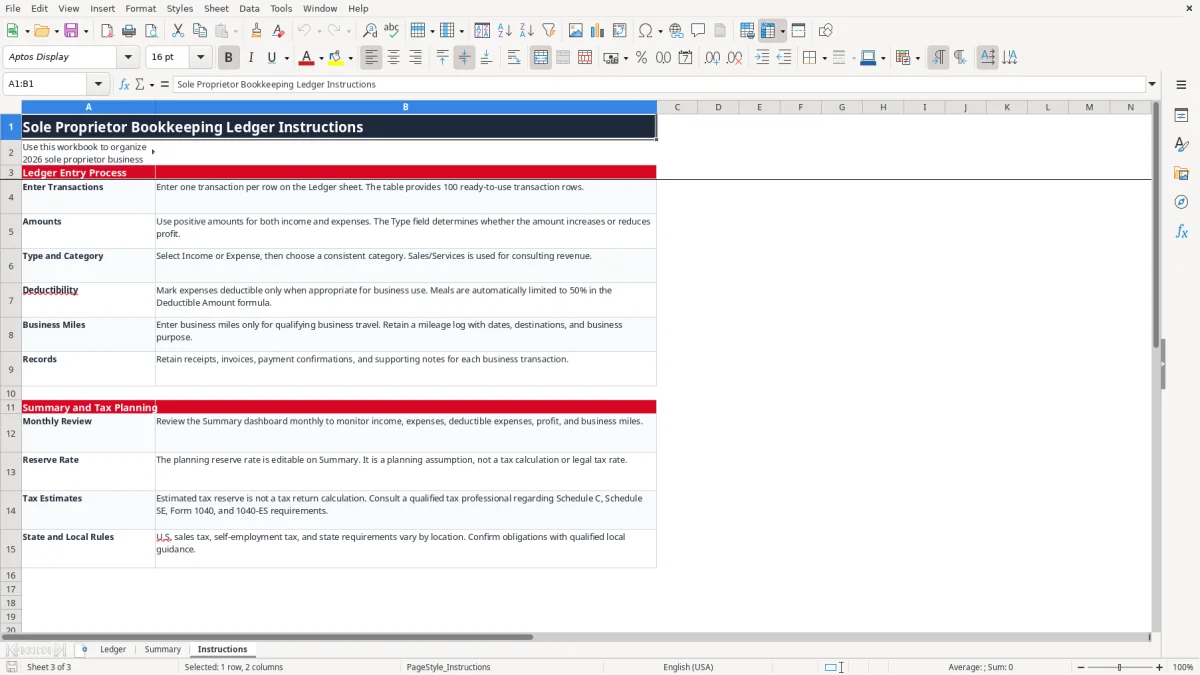
Image 1 shows the 17 Ledger columns, including Business Miles in column Q. Image 2 shows the Summary dashboard with headline metrics, category analysis, monthly totals, and charts. Image 3 shows the written workflow on the Instructions tab.
A sole proprietor does not need corporate accounting software to begin, but you do need a reliable distinction between business and personal activity. Record only business transactions in this ledger, and keep personal withdrawals out of income and expense totals.
This workbook organizes information commonly reviewed for Schedule C, but it does not prepare a tax return. The Summary note specifically identifies Schedule C, Schedule SE, Form 1040, and Form 1040-ES; its estimated federal tax reserve is a planning estimate only.
The workbook maps Sales/Services to Part I - Line 1 and common expense categories to Schedule C lines such as Advertising, Office Expense, Meals, Insurance, Utilities, Travel, and Other Expense. A $400 qualifying meal entered with Tax Deductible? set to Yes produces a $200 Deductible Amount because the formula applies a 50% limit to Meals.
Do not treat every expense as deductible merely because it appears in the ledger. The business connection, documentation, and applicable limitation still matter. The Instructions tab tells you to retain receipts, invoices, payment confirmations, and supporting notes.
Self-employment tax is generally calculated on Schedule SE and includes Social Security and Medicare components; the commonly cited combined rate is 15.3%, subject to the rules and wage-base limits applicable to the filing year. Estimated payments use Form 1040-ES, with the regular federal due dates of April 15, June 15, September 15, and January 15 of the following year.
The 25% value in Summary!E3 is editable and is not the 2026 federal tax rate. For instance, applying 25% to $6,250 of estimated taxable profit gives $1,562.50 as a planning reserve, not a final income-tax or self-employment-tax liability.
Enter qualifying business miles in column Q and maintain a contemporaneous mileage log with dates, destinations, and business purpose. Sales tax is imposed at the state and local level, not through a national VAT, so this workbook does not calculate sales-tax nexus or payments.
The most expensive ledger errors usually begin with a small entry shortcut. A contractor who enters a $900 supplier bill as Income instead of Expense can inflate reported revenue and profit by $1,800 in the comparison: the correct result is negative $900, while the mistaken result is positive $900.
Because Amount must be positive, the Type field controls the financial direction. Entering a negative expense and selecting Expense reverses the intended logic in Signed Amount and can make a $350 purchase appear to increase profit.
Duplicates are just as damaging. If a $2,400 client deposit is entered from both the bank feed and the invoice list, monthly income is overstated by $2,400. Compare Transaction ID, date, amount, and Receipt/Invoice # before adding a second row.
Marking every purchase Yes in Tax Deductible? creates a misleading Summary total. A $1,000 mixed personal and business purchase is not automatically a $1,000 business deduction, and the workbook does not determine business-use percentages, depreciation, or substantiation.
The Meals formula is narrow: it halves an amount only when Category is exactly Meals and Tax Deductible? is Yes. If you type Food, Client Lunch, or another label, the formula will not recognize it as Meals, so inconsistent category names can change the deductible total.
A mileage total without dates, destinations, and business purpose is weak documentation. If 600 miles are entered but the supporting log cannot explain the trips, the deduction may be challenged even though Summary reports the miles accurately.
Finally, do not confuse the planning reserve with tax due. Reserving 25% of $20,000 of estimated taxable profit produces $5,000, but filing obligations also involve federal income tax, Schedule SE, state rules, withholding, and other facts the workbook does not calculate.
A bookkeeping ledger works when entry becomes part of an existing business habit. Set a recurring Friday review for 15 minutes, then perform a fuller close on the last business day of each month. For a business with 40 transactions per month, entering eight rows each Friday is easier than reconstructing all 40 in January.
Keep category spelling consistent because Summary uses formulas such as SUMIF, SUMIFS, COUNTIF, AVERAGE, and VLOOKUP. Changing Office Expense to Office costs can prevent the category analysis from grouping the entry as intended.
Review the three charts after each close rather than waiting for tax season. If monthly expenses suddenly show $4,800 instead of the usual $1,600, investigate duplicate entries, a missing Type selection, or a genuine large purchase before relying on the trend.
Update the planning reserve rate only as a deliberate cash-planning assumption. Do not change it to make the estimated reserve look comfortable; a 25% reserve on $8,000 is $2,000, while a 30% assumption is $2,400.
This workbook provides 100 prepared transaction rows. Move to QuickBooks or another bookkeeping system when you regularly exceed that range, need bank feeds, accounts receivable aging, inventory, payroll, audit trails, or multi-user access.
The Ledger tab has 100 prepared operational rows, from row 4 through row 103, inside the LedgerTable. If your 2026 activity regularly exceeds 100 rows, move to a larger workbook or accounting system rather than overwriting records.
Yes. Enter positive numbers in Amount for both types. Select Income or Expense in Type; the Signed Amount formula adds income and subtracts expenses.
When Tax Deductible? is Yes and Category is Meals, the formula calculates 50% of Amount. A $120 meal therefore shows $60 as Deductible Amount; confirm the expense and limitation before using it for tax reporting.
No. It organizes transactions by category and Schedule C Line and provides planning totals. It does not prepare Schedule C, Schedule SE, Form 1040, or Form 1040-ES, and the estimated reserve is not a tax calculation.
Enter qualifying business miles in column Q. Keep a separate contemporaneous mileage log showing the date, destination, and business purpose; the workbook records the total but does not create those supporting details.
The Ledger dropdown includes ACH, Check, Credit Card, Debit Card, Cash, PayPal, and Wire Transfer. Use the closest available choice consistently, and identify the underlying bank or card record in Notes when needed.