Tithe Offering Excel – Free Template (2026)
0
Free download
Forecast startup inflows, expenses, taxes, runway, and cash status across 100 monthly rows with an Excel dashboard and editable assumptions.


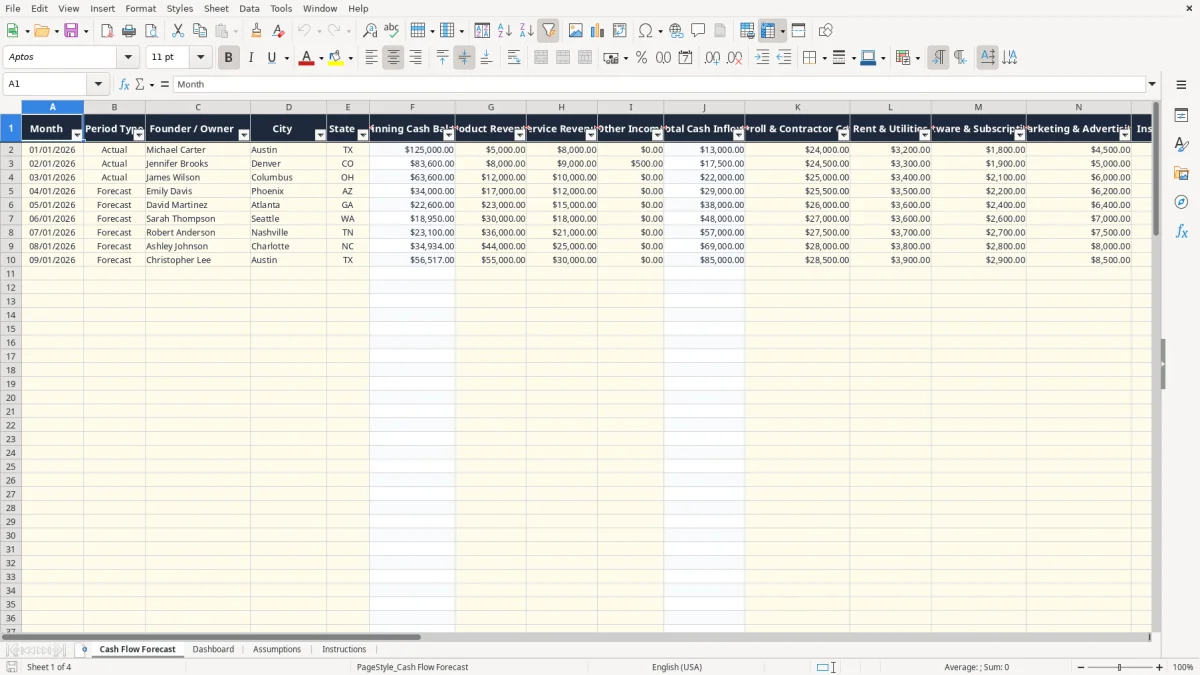
A startup business cash flow forecast Excel spreadsheet tracks monthly revenue, operating costs, taxes, startup purchases, ending cash, burn rate, and runway. This workbook contains a 100-row Cash Flow Forecast, a Dashboard, editable Assumptions, and an Instructions tab for planning and reviewing liquidity.
Enter dates, Actual or Forecast status, owner, city, state, revenue, and expenses in the pale yellow input cells. The workbook calculates total inflows, total outflows, net cash flow, ending cash, cash runway, and a cash status such as Healthy, Watch, At Risk, or Critical.
A founder preparing a funding request, a bookkeeper supporting an LLC, and an operations manager deciding whether to hire all need the same answer: how much cash will remain after the next several months of receipts and payments? A startup can show a profit on paper and still miss payroll when customer invoices arrive late.
Use the workbook before opening a business bank account to model the cash needed for equipment, deposits, payroll, software, insurance, and marketing. The Cash Flow Forecast tab separates Product Revenue, Service Revenue, and Other Income, which is useful when a company sells a physical item while also billing implementation or consulting work.
For example, a software startup might forecast $18,000 of service revenue and $4,000 of product revenue in one month, then enter $22,000 of payroll and contractor costs, $3,000 of marketing, and $2,500 of software. The resulting negative net cash flow is more useful than a vague statement that expenses are high.
A founder can use the monthly rows to decide whether a $12,000 equipment purchase belongs in the current period or should wait. A bookkeeper can replace Forecast periods with Actual periods after bank activity is reconciled. A manager at a four-person startup can compare recurring payroll with one-time startup costs instead of mixing both into one unexplained total.
Image 1 shows the Cash Flow Forecast layout: the first columns identify the month and business context, the middle columns capture inflows and outflows, and the right side displays ending cash, burn rate, runway, and cash status. The prepared range runs from row 2 through row 101, so you can plan 100 monthly records without adding formulas.
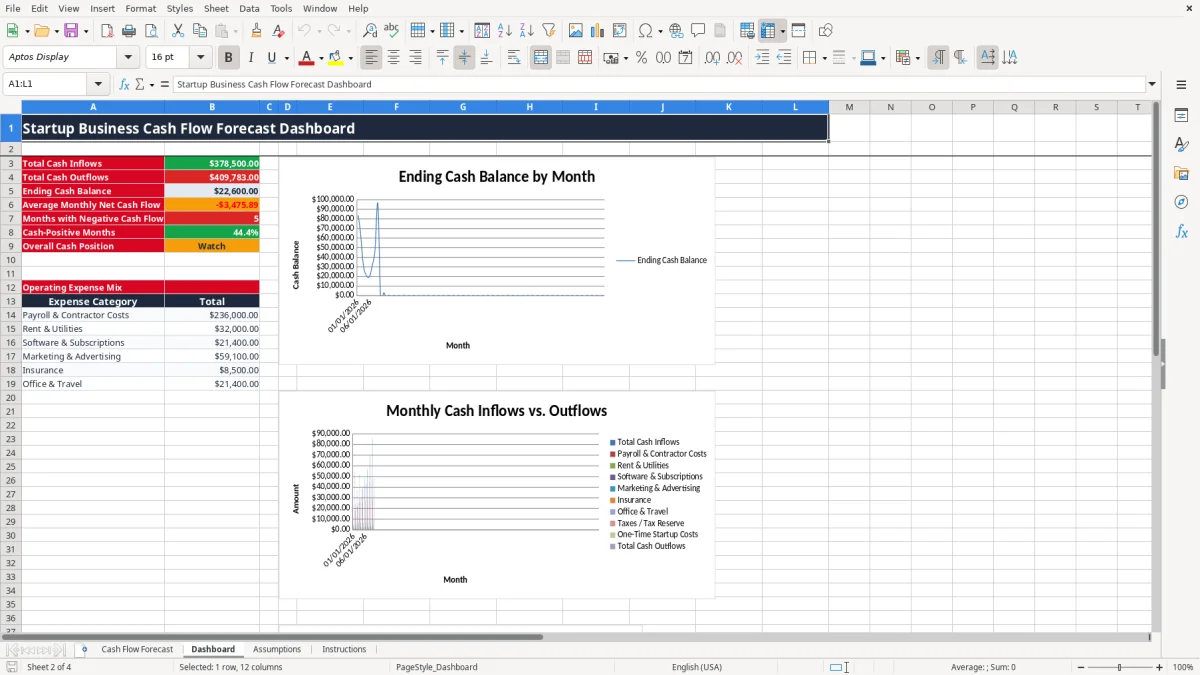
Image 2 shows the Dashboard summary and charts. Review it before a payroll run, a funding conversation, or a large vendor commitment. If a startup has $125,000 of opening cash and spends $35,000 more than it receives each month, the runway is not an abstract concern: the cash balance can fall below a $25,000 reserve in roughly three months.
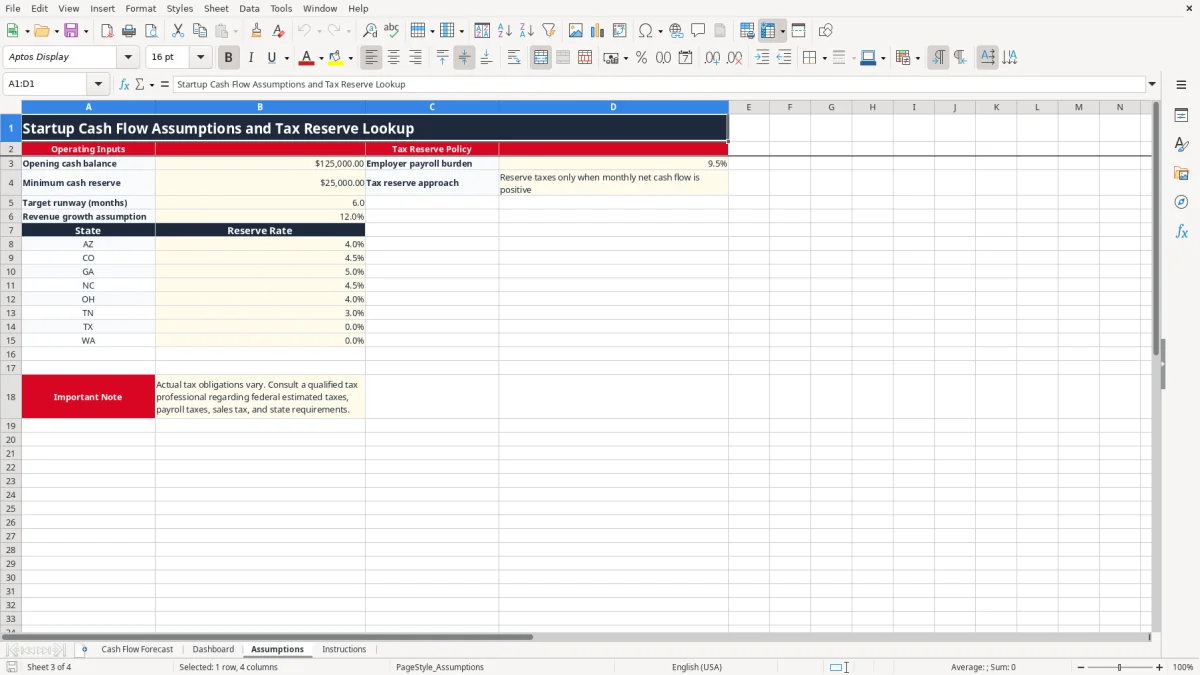
The Tax Reserve column is a planning mechanism, not a complete tax calculation. In the workbook, it calculates a reserve only when monthly cash flow before the reserve is positive and applies the selected state's rate through the Assumptions lookup. Texas and Washington are entered with a 0% state reserve rate in the sample assumptions, but that does not eliminate federal income tax, payroll tax, sales tax, or other obligations.
A self-employed owner may owe federal income tax and self-employment tax reported through Schedule C, Schedule SE, and Form 1040. The self-employment tax rate is generally 15.3%, combining 12.4% Social Security and 2.9% Medicare before applicable limits and adjustments. A $60,000 net profit does not mean the owner can spend all $60,000; cash must also cover tax payments and personal draws.
Estimated payments are generally handled with Form 1040-ES on the recurring quarterly schedule of April 15, June 15, September 15, and January 15. The forecast should reserve cash before those payments, not after the bank account has already dropped. The workbook's state-rate table is therefore best treated as an additional planning layer, not a substitute for a federal estimate.
If the startup has employees, FICA generally includes 6.2% Social Security and 1.45% Medicare withheld from wages, with a matching employer share. A $10,000 payroll run therefore costs the employer about $10,765 before other payroll costs when the 7.65% employer FICA share applies. The Assumptions tab includes an employer payroll burden input of 9.5% as a planning assumption; replace it with your complete budget.
Sales tax is state-level, not a national VAT, and nexus can create collection obligations. A startup paying a contractor $600 or more for qualifying services may need a 1099-NEC; employees generally receive a W-2, while contractors provide a W-9. Image 3 shows the editable Assumptions layout, including the reserve rates and the note that actual obligations require separate review.
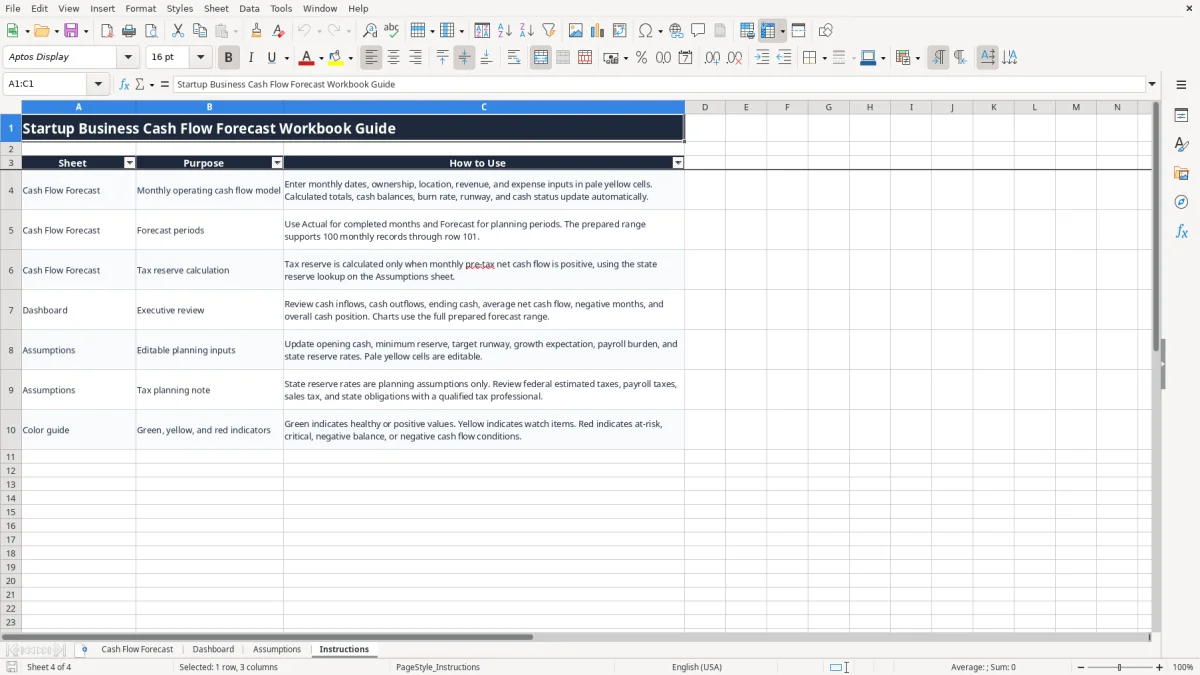
Image 4 shows the Instructions tab's sheet-purpose table and color guide. Keep tax reserves in the forecast, but reconcile them to payroll reports, sales-tax filings, bank activity, and federal estimates. For a startup with $30,000 of positive monthly pre-tax cash flow, a 5% planning reserve produces $1,500; that figure is a cash cushion, not a final tax bill.
The first failure is confusing booked revenue with collected cash. A founder may enter a $40,000 customer contract in March even though the customer pays $20,000 in April and $20,000 in May. If the forecast records the full amount in March, the business may authorize spending that the bank account cannot support.
Another failure is treating a sales pipeline as revenue. A startup forecasting 10 subscriptions at $2,000 each has a $20,000 opportunity, not $20,000 of cash inflow, until the customer commits and payment timing is known. Use Product Revenue, Service Revenue, and Other Income for expected receipts rather than optimistic proposals.
Expense omissions are just as damaging. A team may enter $24,000 of payroll but forget employer FICA, contractor invoices, insurance, software renewals, or a one-time $18,000 equipment purchase. In the sample structure, those categories are separate because a $6,000 recurring monthly gap and an $18,000 one-time outlay require different decisions.
Runway is useful only when the inputs are complete. The worksheet calculates Monthly Burn Rate from negative net cash flow and Cash Runway (Months) from available ending cash divided by that burn rate. If net cash flow is positive, the formula returns a high placeholder value rather than pretending that the company has a meaningful burn rate.
Do not ignore a Watch or At Risk result because the ending balance is still positive. A startup with $50,000 of cash and $15,000 of monthly outflows has about 3.3 months of gross coverage before considering new revenue. If a $25,000 minimum reserve is required, only $25,000 is practically available for operating decisions.
Typing over a calculated cell can break the link between periods. Beginning Cash Balance flows from the prior row's Ending Cash Balance, while Total Cash Inflows and Total Cash Outflows use SUM. Entering text such as $5,000 instead of the numeric value 5000 can also distort totals and charts.
Finally, an unsupported state abbreviation can prevent the tax lookup from finding a rate. The state validation list is limited to AZ, CO, GA, NC, OH, TN, TX, and WA. Do not silently add a state and assume its rate; update the planning logic deliberately and document the change.
A forecast works when one person owns the update and a recurring calendar event protects the time. Set a monthly review after bank reconciliation and before the next payroll run. During that meeting, replace the prior month's Forecast status with Actual, enter collected receipts and paid costs, and compare the variance with the original plan.
Use the validation lists instead of typing different versions of Actual, Forecast, or state abbreviations. Keep revenue and expense entries numeric, enter zero for a known category with no activity, and update Assumptions when the minimum reserve or target runway changes. For example, raising the reserve from $25,000 to $40,000 should change the decision threshold even if the bank balance does not move.
Image 3 is useful during this review because the operating inputs and state reserve rates are grouped in one place. Image 4 gives a quick reminder of which cells are inputs and which outputs are calculated.
This workbook is a strong planning file, not a bank-feed, invoicing, payroll, or accounting system. Move to QuickBooks or another accounting platform when you need transaction-level reconciliation, accounts receivable aging, inventory, multiple bank feeds, or a formal profit & loss and balance sheet. Use a payroll provider when wage filings, withholding, and employee tax deposits exceed what you can reliably control in a spreadsheet.
The Cash Flow Forecast tab has prepared formulas and input validation from row 2 through row 101, supporting 100 monthly records. Rows do not represent a transaction table; each populated row represents one monthly period.
Enter the date, Period Type, owner, city, state, revenue fields, and expense fields in Cash Flow Forecast. Update the editable planning inputs on Assumptions, including opening cash, minimum reserve, target runway, growth assumption, payroll burden, and state reserve rates. Calculated columns should remain unchanged.
The Tax Reserve formula first calculates cash remaining after inflows, operating outflows, and one-time startup costs. When that amount is positive, it applies the selected state's rate from the Assumptions lookup; when it is not positive, the calculated reserve is zero. This is a planning estimate, not a complete federal, payroll, or sales-tax calculation.
Cash Runway (Months) compares available ending cash with the monthly burn rate when the period has negative net cash flow. If the period is not burning cash, the formula uses a high placeholder value rather than presenting a misleading negative-burn calculation.
Yes. Use Actual for completed months and Forecast for future planning periods. Beginning cash flows from the prior row's ending cash, so keep the periods in chronological order and replace forecast inputs with actual results as the months close.
No. It provides a cash reserve planning mechanism based on the state lookup and positive monthly cash flow. Federal income tax, self-employment tax, FICA, payroll filings, sales tax, and entity-specific obligations require separate calculations using the applicable records and forms.