TSP Contribution Allocation Excel – Free Template (2026)
0
Free download
Organize medical expenses, reimbursements, receipts, and potentially deductible costs with this practical Excel worksheet.


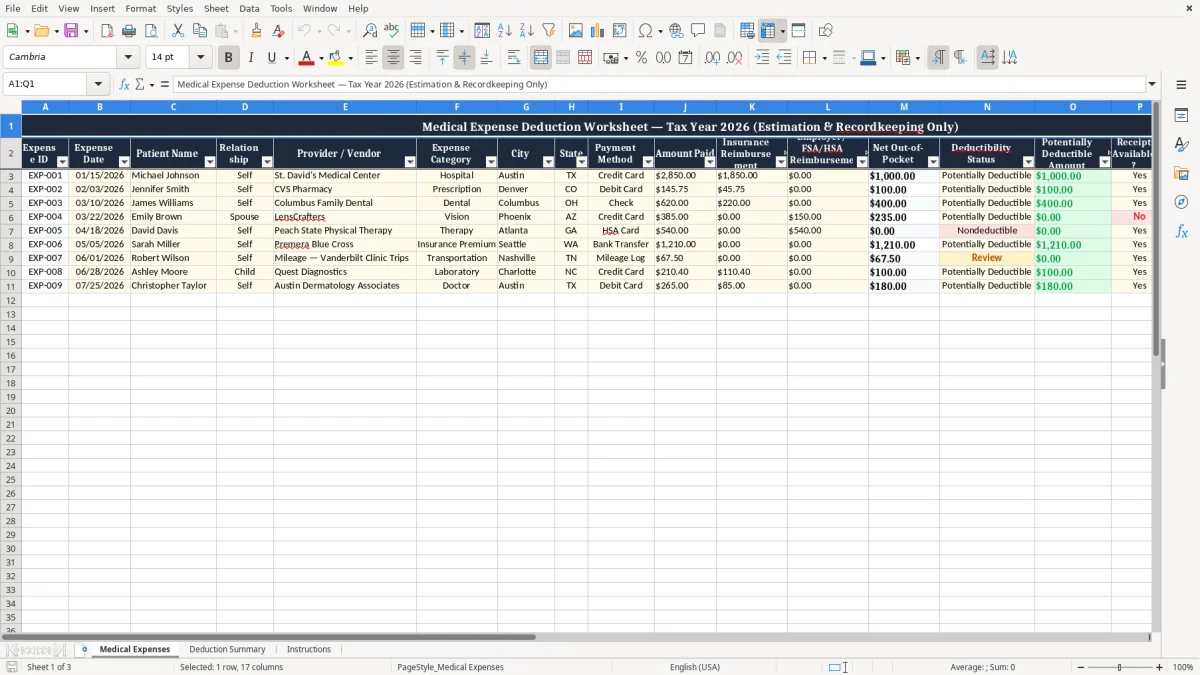
The Medical Expense Deduction Worksheet Excel Spreadsheet helps individuals and households organize healthcare spending throughout the tax year. Use it to record dates, patients, providers, expense categories, payment methods, amounts paid, insurance reimbursements, employer reimbursements, receipt availability, and notes. The worksheet is designed for estimation and recordkeeping only, giving you a clearer view of net out-of-pocket costs and expenses that may require further tax review.
By keeping complete information in one place, you can reduce the time spent searching through statements and receipts when preparing tax documents or meeting with a qualified tax professional. Save a separate copy for each tax year and update the file regularly as expenses occur.
Start by saving a new copy of the workbook for the applicable tax year. Enter one expense per row and assign a unique Expense ID so individual transactions can be located easily. Add the expense date, patient name, relationship, provider or vendor, category, city, state, and payment method.
Enter the full amount paid, then record any insurance reimbursement and any employer, FSA, or HSA reimbursement in their separate fields. Review the net out-of-pocket amount to understand the portion not reimbursed. Use the deductibility status and potentially deductible amount fields as preliminary recordkeeping tools, not as a final tax determination.
Mark whether a receipt is available and use the Notes field to describe treatment, documentation, payment references, or follow-up items. Retain receipts, invoices, explanations of benefits, prescriptions, and payment confirmations with your tax records. Review the completed worksheet before filing and ask a qualified tax professional about current rules, eligible expenses, reimbursement treatment, and any applicable limitations.
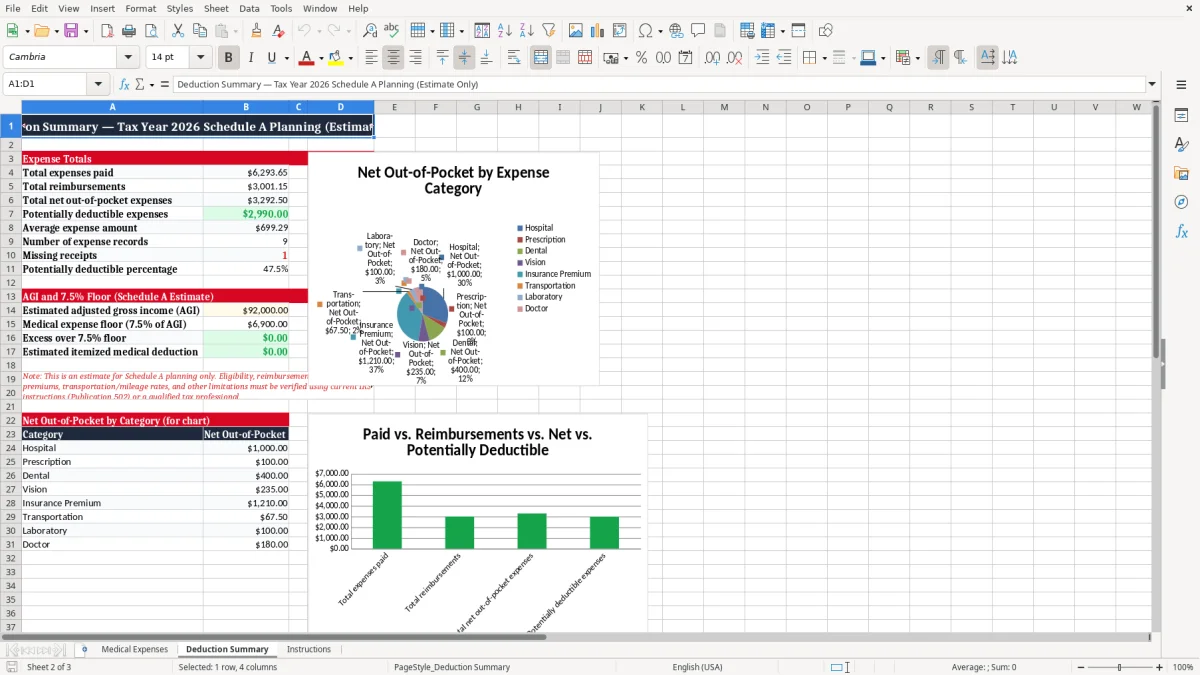
Medical costs can accumulate across many providers, pharmacies, treatment dates, and payment methods. A medical expense deduction worksheet provides a central place to record those transactions as they occur instead of reconstructing them months later from bank statements and email confirmations. Add each expense on its own row, including the expense date, patient name, relationship, provider or vendor, expense category, city, state, payment method, and amount paid.
Categories such as hospital, prescription, dental, vision, therapy, laboratory, medical equipment, insurance premium, and transportation can make later review more efficient. The worksheet can also help separate expenses for yourself from expenses for a spouse, child, dependent, or another potentially eligible individual. Consistent entry habits are important.
Record an expense soon after payment, use the actual payment date, and avoid combining unrelated transactions in one line. If a provider submits several bills, consider keeping the bills separate so each amount can be matched to a receipt or statement. The Notes column can identify a treatment, service period, prescription, invoice number, or documentation location.
This organization does not establish that an expense qualifies for a tax deduction, but it can create a clearer record for reviewing possible eligibility. A complete annual log may also help identify duplicate entries, unusually large costs, missing information, and payments that were later reimbursed.
Whether you are tracking routine prescriptions or significant hospital and dental expenses, the Excel format gives you a practical system for maintaining a year-to-date healthcare spending record. Update the file regularly and review unusual entries before they are forgotten.
Understanding the difference between an amount paid and the amount personally borne is an important part of medical expense recordkeeping. This worksheet includes separate fields for the original amount paid, insurance reimbursement, and employer, FSA, or HSA reimbursement. Enter the total paid to the provider or vendor first.
Then enter each reimbursement in the appropriate field rather than reducing the original amount manually. This approach preserves the transaction history and makes it easier to see how the net out-of-pocket amount was determined. For example, a medical bill may be paid in full by a credit card, followed later by an insurance payment.
Recording both events separately creates a more accurate record than entering only the final personal cost. Employer-sponsored plans, flexible spending accounts, and health savings accounts may also affect how an expense is treated for tax purposes, so those payments should be documented carefully. Keep explanation of benefits statements, reimbursement notices, account records, and payment confirmations with the worksheet.
The net out-of-pocket field is useful for budgeting and preliminary review, but it should not be treated as a final deduction calculation. Some expenses may have special eligibility requirements, timing rules, limitations, or interactions with reimbursements. A tax professional can help determine how current rules apply to your circumstances.
By preserving the gross amount and each reimbursement separately, the spreadsheet supports transparency, easier verification, and more reliable preparation of information for your tax records. Review reimbursements periodically so delayed payments are added to the correct expense.
A well-maintained medical expense spreadsheet works best when every important entry can be supported by documentation. Use the Receipt Available? field to indicate whether you have a receipt, invoice, provider statement, explanation of benefits, prescription record, mileage record, or another relevant document.
This simple status check helps you find missing paperwork before tax preparation begins. The Notes column can record where a document is stored, such as a digital folder, paper file, patient portal, or monthly statement archive. You can also note an invoice number, payment confirmation, claim reference, treatment description, or reason an expense needs follow-up.
Keep documentation organized using a consistent naming system that includes the expense date, patient, and provider when practical. If a receipt is not available, do not assume that the expense is automatically disallowed or deductible; instead, flag the item for research and seek appropriate guidance. It is also useful to compare credit card statements and bank records with the worksheet periodically.
This review can identify expenses that were entered twice, omitted, entered under the wrong patient, or recorded with an incorrect reimbursement amount. Store the workbook securely because it may contain sensitive personal and health-related information. Consider protecting the file with an appropriate password and limiting access to people who need it.
The spreadsheet is a recordkeeping aid and does not replace original documentation or official tax forms. Maintaining both the worksheet and supporting records gives you a more complete information set for reviewing possible deductions and responding to questions from a tax preparer.
At the end of the tax year, the medical expense worksheet can provide an organized summary of healthcare spending for preliminary review. Sort or filter the entries by patient, category, provider, date, reimbursement status, deductibility status, or receipt availability. Look for incomplete rows, negative or unusual amounts, missing receipts, and reimbursements that have not been entered.
Review potentially deductible amounts carefully and compare them with applicable current tax guidance. A medical expense entry may require more analysis based on the type of service, the person receiving care, how the expense was paid, whether it was reimbursed, and other taxpayer-specific conditions. The worksheet does not calculate a final legal deduction, determine eligibility, or replace tax forms.
Its purpose is to make the underlying records easier to understand and discuss. Before filing, provide your tax professional with the completed worksheet and relevant supporting documents, or use it as a reference while following official instructions. Keep a preserved copy of the completed file for the applicable year and create a fresh copy for the next year so prior records remain unchanged.
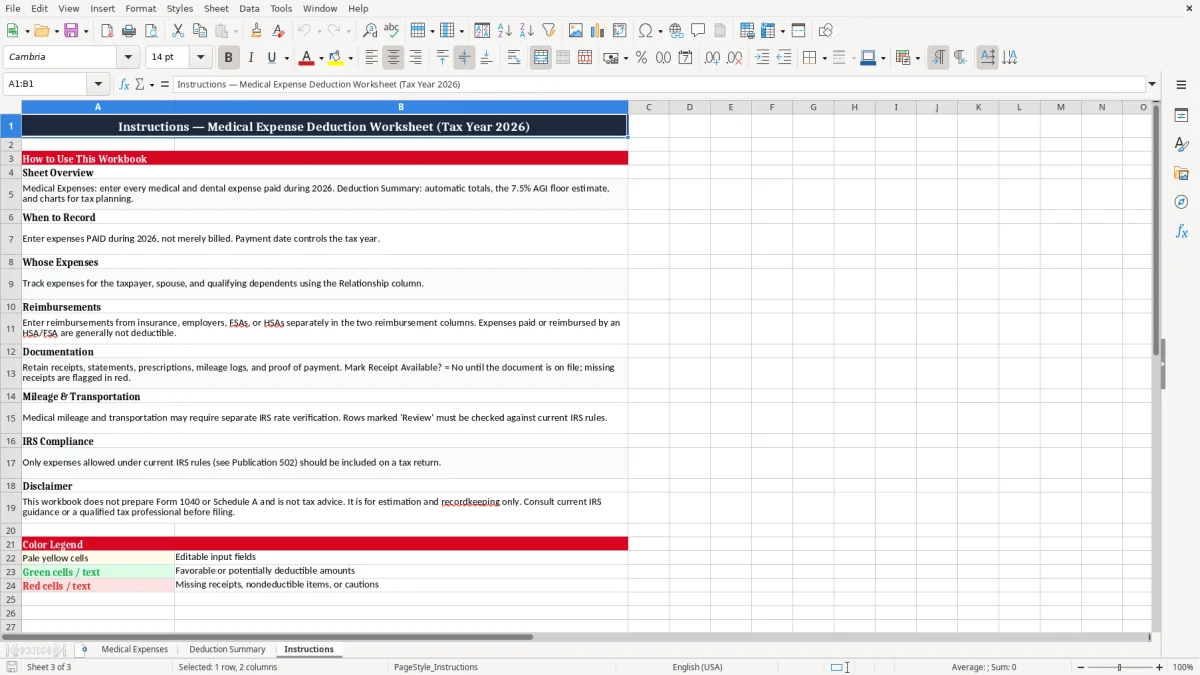
The title identifies Tax Year 2026 in the template context, but users should update the year when creating a new annual copy. Because tax rules and thresholds can change, confirm requirements using current official guidance or professional advice.
A consistent review process can save time, improve accuracy, and reveal questions before a return is submitted. Used this way, the Excel spreadsheet becomes a practical bridge between everyday medical payment records and organized tax preparation information.
It is an Excel recordkeeping tool for listing medical expenses, reimbursements, patients, providers, categories, receipts, and potentially deductible amounts. It helps organize information for review but does not determine the final deduction.
Yes. Enter the original amount paid and record insurance, employer, FSA, or HSA reimbursements separately. Keeping both amounts visible helps you review the net out-of-pocket cost and identify items requiring tax guidance.
Yes. Enter each patient on a separate row and use the Relationship column to identify whether the person is yourself, a spouse, child, dependent, or another relationship that may require review.
Keep receipts, invoices, provider statements, explanations of benefits, prescriptions, payment confirmations, reimbursement records, and other supporting documents that explain the expense and payment.
No. It supports organization and estimation only. Eligibility can depend on current tax law, filing circumstances, reimbursement treatment, expense type, and applicable limitations, so consult a qualified tax professional.
Yes. Save a separate copy for each tax year, update the year and dates, and preserve completed prior-year files according to your preferred record-retention practices.