TSP Contribution Allocation Excel – Free Template (2026)
0
Free download
Track dependent care FSA expenses, provider details, claims, reimbursements, and plan-year totals in Excel for 2026.


A dependent care FSA expense log is a 2026 Excel worksheet for recording eligible daycare and care-provider payments, tracking claim status, and comparing reimbursements with your annual election. This template contains an Expense Log, Provider Summary, Dashboard, and Instructions tab.
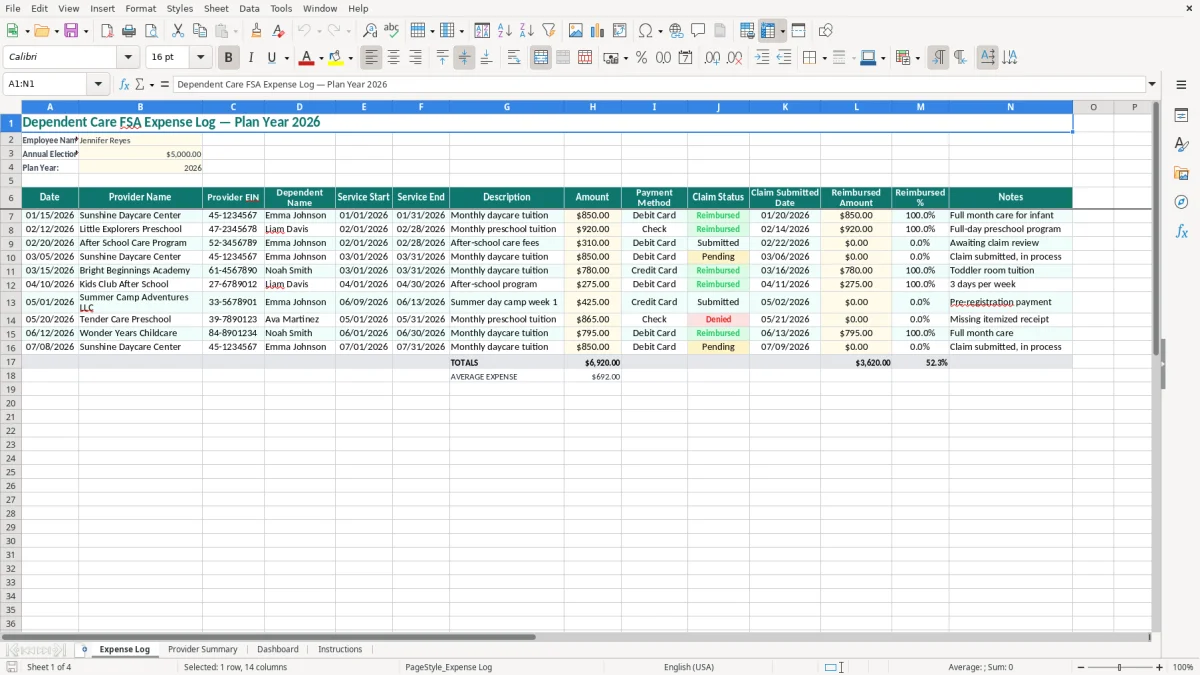
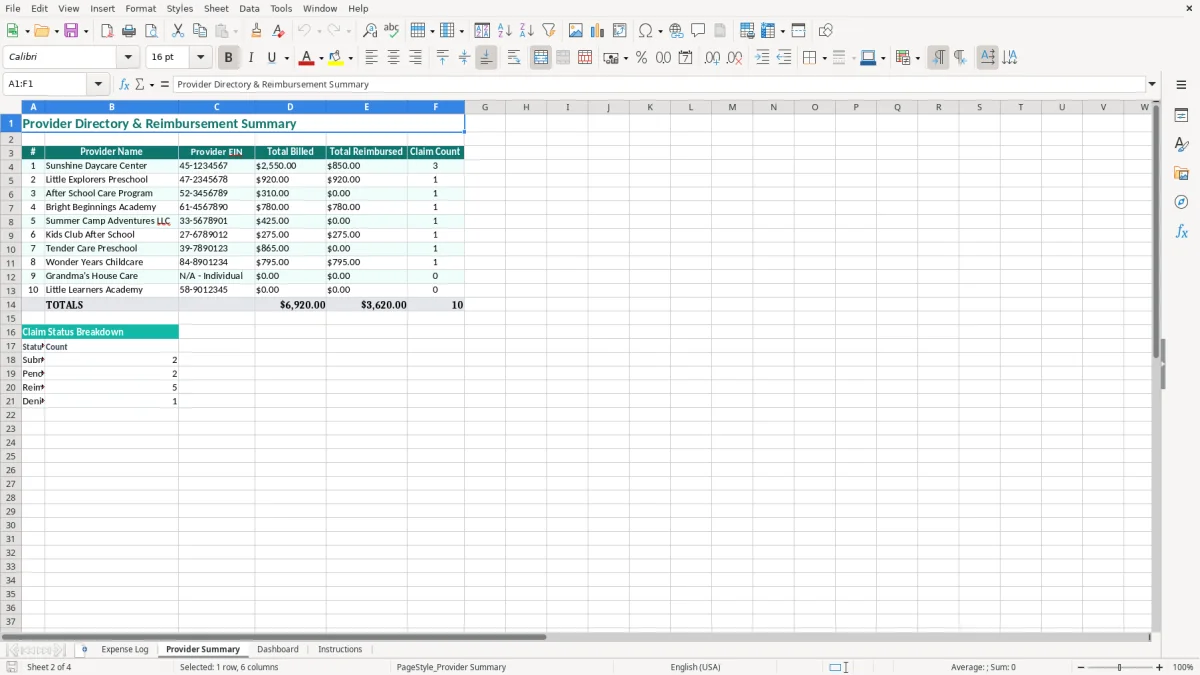
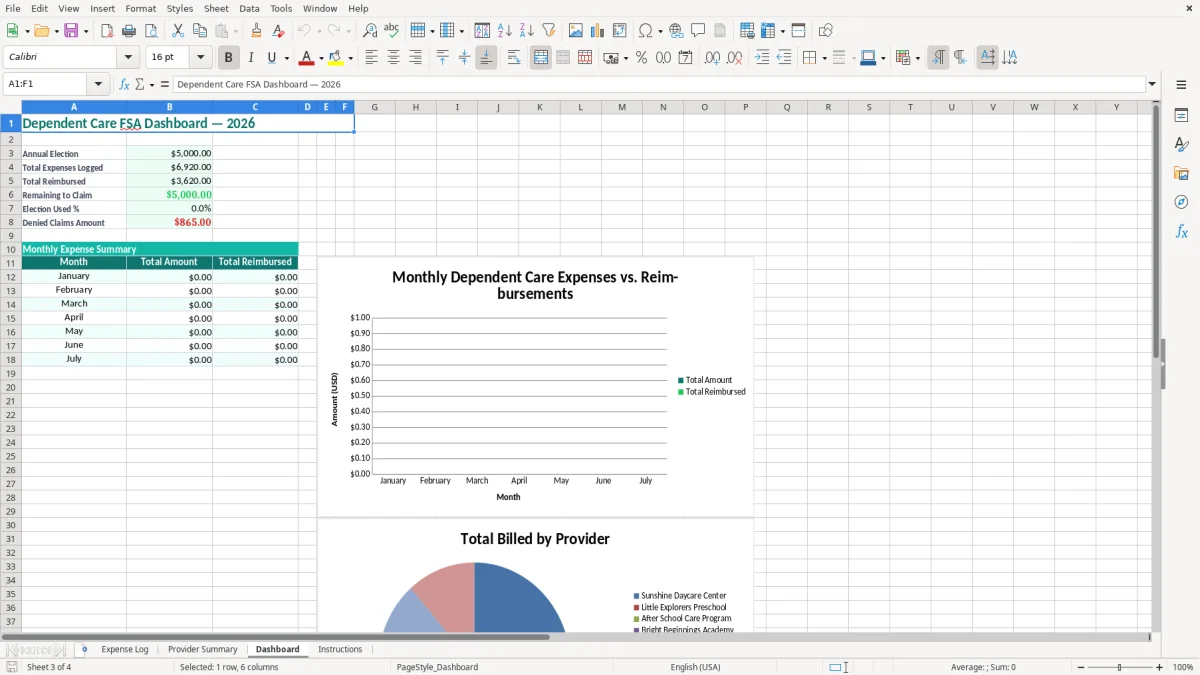
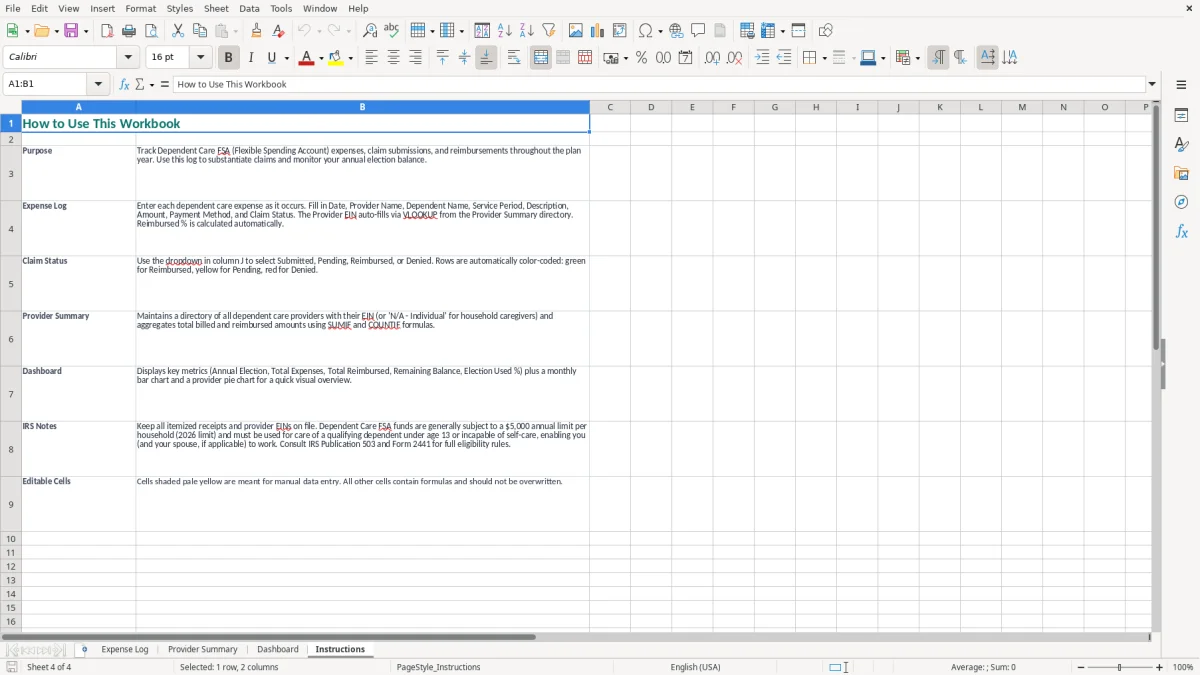
Enter each payment with the date, provider name, provider EIN, dependent, service dates, description, amount, payment method, claim status, submission date, reimbursement, percentage, and notes. Image 1 shows the Expense Log layout, while images 2 through 4 show the provider summary, dashboard, and instructions tabs.
You usually need this spreadsheet when daycare invoices arrive, not when tax season begins. A household with two working parents might pay a daycare center $850 each month and an after-school provider $240 each month; entering both payments as separate rows gives you a running $1,090 monthly record instead of a stack of receipts.
The employee enters the provider's legal name, EIN, dependent, service dates, and amount in the Expense Log. A payroll or benefits coordinator can then compare the employee's claim paperwork with the same fields before approving reimbursement. Image 1 shows the 14-column log, including the claim and reimbursement fields that are often missing from a simple household ledger.
Use it after every payment or at a fixed weekly time. Monthly daycare tuition, summer day camp, preschool charges, and before- or after-school care can otherwise be mixed together, especially when two providers serve one child. A $1,090 monthly pattern becomes $13,080 over 12 months, so a few missed entries can make the account look materially underused.
At the end of each month, review the Provider Summary tab shown in image 2. That view is useful when one provider sends a monthly invoice and another bills by attendance. The Dashboard in image 3 gives you a faster plan-year review, while the Instructions tab in image 4 helps a new employee understand the workbook before entering records.
This log also fits a family that changes providers during the year, adds a summer program, or has more than one qualifying dependent. Keep one row for each invoice or payment period rather than combining six months into one total; the service start and end dates make the record much easier to match to a claim.
For 2026, the federal dependent care assistance exclusion is up to $7,500 for most taxpayers and $3,750 for a married person filing separately, subject to the employer plan and the employee's earned-income limits. A plan can impose a lower election, so the Annual Election Amount field must reflect the amount your employer actually permits. The workbook's $5,000 sample is an example, not a universal 2026 limit.
Eligible care generally must enable you and your spouse to work or look for work. Qualifying expenses commonly include daycare, preschool, before- or after-school care, and day camp for a qualifying person. Overnight camp, school tuition for kindergarten or higher, and ordinary medical care do not become eligible merely because you paid them through a provider.
Use your records when completing Form 2441, Child and Dependent Care Expenses, with Form 1040. You generally need the provider's name, address, and EIN or Social Security number, the dependent's information, the amount paid, and the period of care. The Provider EIN column and service-date fields in image 1 are practical prompts for those details.
Your employer reports dependent care benefits on Form W-2, box 10. You cannot use the same $850 daycare payment for both tax-free FSA reimbursement and a separate child and dependent care credit calculation. The expense also cannot exceed the applicable earned income, and married couples generally apply the lower-earning spouse's income limit unless a special student or incapacity rule applies.
Save invoices, receipts, payment confirmations, and provider statements with the workbook. The IRS generally expects tax records to be retained for 3 years, with records kept up to 7 years in situations involving substantial underreported income; your employer's plan may require documents sooner for claims or forfeiture deadlines.
The most expensive problem is often not the amount—it is an incomplete claim. An employee enters $850 for January daycare but leaves the provider EIN and service dates blank. The administrator sends the claim back, and the employee spends 20 minutes searching email for a corrected invoice while reimbursement remains pending.
Another failure occurs when a parent records the payment date as 01/31/2026 but describes the service as February care. The Date, Service Start, and Service End columns serve different purposes. If you collapse them into one note, you make it harder to prove which care period the payment covered.
Suppose six rows total $5,400, but only $4,950 has been reimbursed. Treating the entire $5,400 as paid creates a false impression that the claim balance is zero. Enter the actual reimbursement in the Reimbursed Amount column and use Claim Status and Claim Submitted Date to identify the $450 still awaiting payment.
Partial payments create a second trap. A $1,000 invoice reimbursed at $750 should show the $750 actually received, not a manually edited expense amount of $750. Otherwise your expense total understates care costs and your reimbursement percentage becomes meaningless.
Some households export a daycare total to a tax worksheet and also include the same amount in a dependent care credit calculation. For example, using $3,600 of tax-free FSA benefits and then claiming that same $3,600 as an eligible credit expense can overstate the tax benefit. Reconcile the Expense Log to Form W-2, box 10, and Form 2441 before filing.
Do not assume every child-related charge qualifies. A $600 private-school tuition bill for a first-grade student is not the same type of expense as $600 paid to a qualifying after-school care provider. Keep the description specific enough to show the nature and period of care; vague entries such as “child costs” are poor evidence.
Choose one repeatable trigger: update the log immediately after paying the provider, or enter every Friday after reviewing your bank transactions. Five weekly entries take less time than reconstructing 20 payments before a claim deadline. For a family making four $850 daycare payments and four $240 after-school payments in a month, the routine captures $4,360 without relying on memory.
Keep provider names and dependent names consistent from row to row. “Sunshine Daycare Center” and “Sunshine Day Care” may look like the same provider to you but can fragment a summary. Use a stable naming convention, enter dates as MM/DD/YYYY, and record the exact reimbursed amount when the administrator pays a claim.
This workbook is a good fit for one household with a manageable number of monthly invoices. If you are an HR team processing 75 employees, or a benefits administrator reconciling hundreds of claims, move to a benefits platform with employee access, document storage, audit trails, and deadline controls.
For personal use, do not replace the spreadsheet merely because the year contains 100 rows. Replace it when you need automated payroll feeds, multiple plan years, shared access, or approval controls. Until then, a monthly review of the Provider Summary and Dashboard is more reliable than opening the file only during tax preparation.
Enter the provider's employer identification number from the invoice, provider statement, or Form W-10 information. If the provider is an individual who does not have an EIN, the tax form may require a Social Security number instead; keep the identifying information with your records and follow your plan administrator's claim instructions.
No. The workbook's sample election is $5,000, but the 2026 federal exclusion is up to $7,500 for most taxpayers and $3,750 for married filing separately, subject to the employer plan and earned-income limits. Replace the sample with your actual election.
Record work-related care such as daycare, preschool, before- or after-school care, and qualifying day camp. Do not assume overnight camp, kindergarten-or-higher tuition, or ordinary medical care qualifies; verify the expense against your plan rules before submitting it.
Date identifies the payment or transaction date. Service Start and Service End identify the period of care covered by that payment, which helps you match a monthly invoice to a claim and avoid describing January care as February care.
Leave the original expense in Amount and enter only the payment actually received in Reimbursed Amount. For a $1,000 care expense with a $750 reimbursement, enter $1,000 and $750; then update Claim Status and Claim Submitted Date as appropriate.
Often, yes. Your employer generally reports benefits in Form W-2, box 10, and Form 2441 is used with Form 1040 to report dependent care benefits and calculate the taxable or excludable amount. Do not claim the same expenses for both tax-free FSA reimbursement and a dependent care credit.