TSP Contribution Allocation Excel – Free Template (2026)
0
Free download
Track 2026 Solo 401(k) employee and employer contributions by date, tax year, amount, payment method, and month.


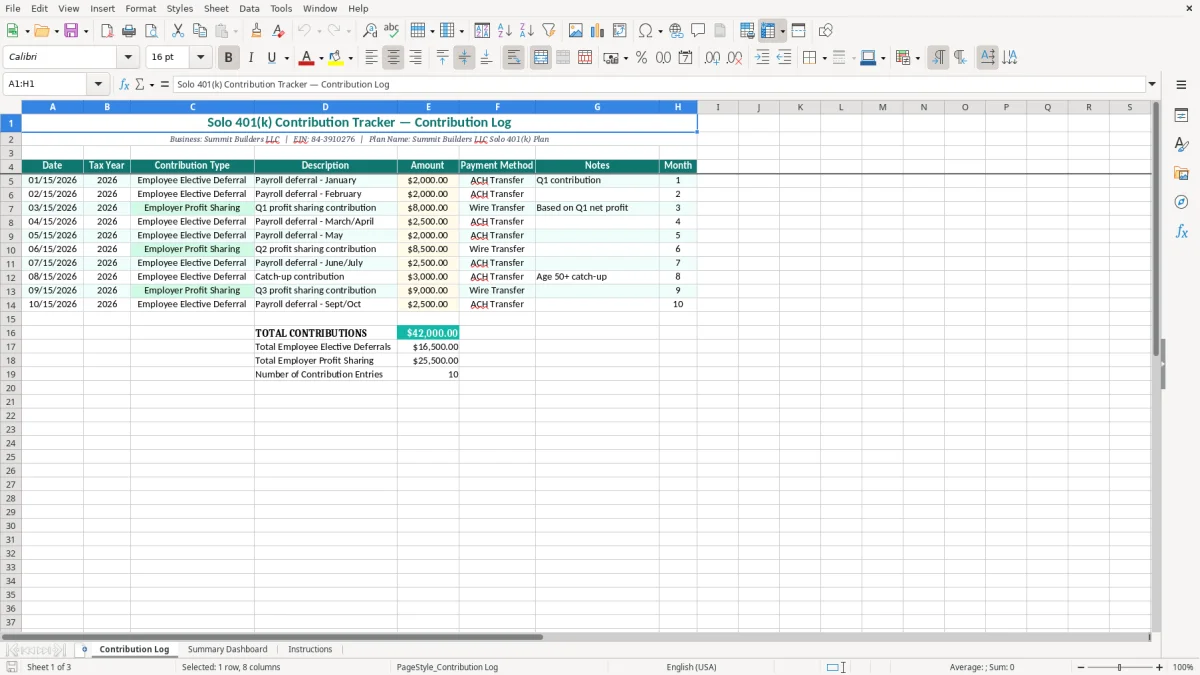
A Solo 401(k) contribution tracker records employee elective deferrals and employer profit-sharing deposits for one business owner. This workbook includes a Contribution Log with dates, tax years, contribution types, descriptions, amounts, payment methods, notes, and months, plus a Summary Dashboard and Instructions tab.
Use the sample entries as a starting point, then replace the business information and transactions with your own. The Contribution Log shown in image 1 uses teal headers, pale input formatting, currency amounts, and a clear row-by-row audit trail.
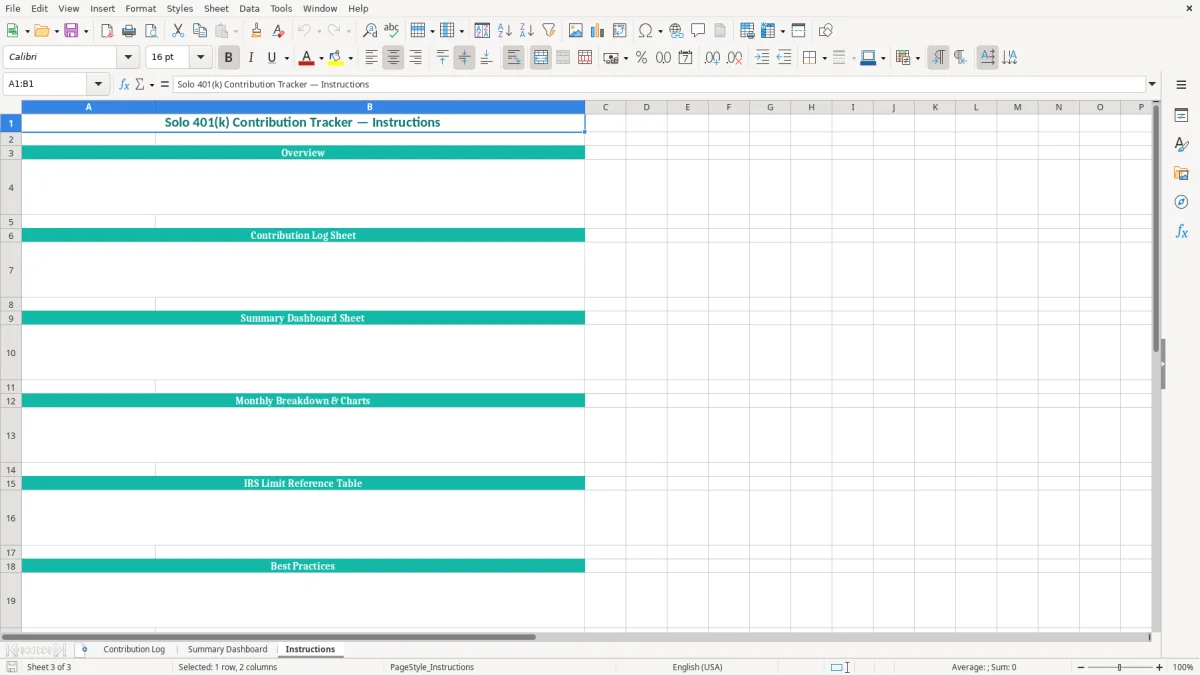
The Summary Dashboard and Instructions tabs give you a place to review the totals and understand the intended workflow. Keep the file with your payroll records, bank confirmations, and plan documents rather than treating it as a substitute for those source records.
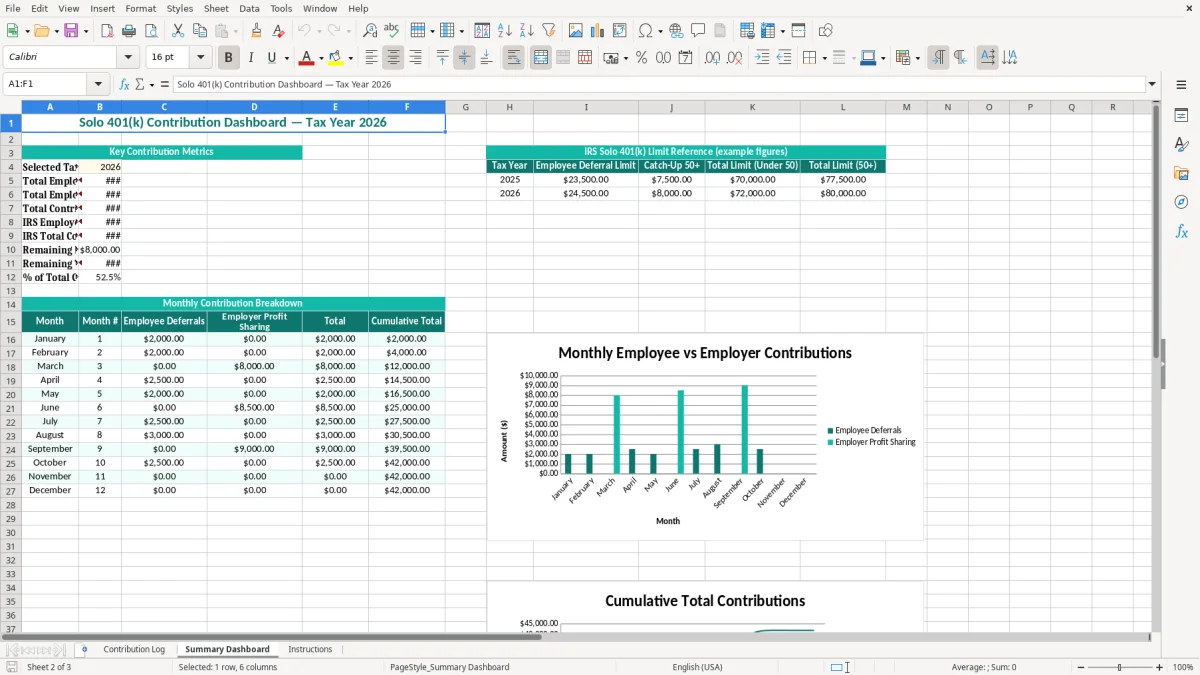
A self-employed contractor, consultant, or owner of a single-member LLC often makes two different kinds of retirement deposits: an employee elective deferral from personal compensation and an employer profit-sharing contribution from the business. Those deposits may occur on different dates and come from different bank accounts, which is why a single annual total is not enough for a clean record.
Consider a general contractor who operates Summit Builders LLC. The sample log records $2,000 employee deferrals in January and February, an $8,000 employer profit-sharing deposit in March, and additional payroll-related deposits later in the year. That structure mirrors the real problem: the owner needs to see both the transaction history and the contribution category before calculating the final amount.
A business owner can update the Contribution Log immediately after each payroll run or bank transfer. An office manager handling the books for a one-owner construction company can enter the date, amount, ACH Transfer or Wire Transfer method, and a note such as Q1 contribution while the source document is still open.
Quarterly planning is useful even when the employer contribution is finalized after year-end. For example, $2,000 per month of employee deferrals produces $24,000 over 12 months, leaving only $500 below the 2026 regular elective-deferral limit of $24,500. That calculation tells the owner to review the next payroll before making another deferral.
Your bookkeeper can use the log during the year-end close to tie deposits to the business checking account and payroll reports. A sole proprietor filing Schedule C can also give the completed schedule to the tax preparer with the plan name and supporting confirmations clearly identified.
This workbook is most useful when the entry is made close to the deposit date. It turns scattered trustee receipts and bank transactions into a chronological record without forcing you to reconstruct the entire year in January.
For 2026, the regular employee elective-deferral limit for a Solo 401(k) is $24,500. If you are age 50 or older, the regular catch-up contribution is $8,000, and the higher catch-up amount for ages 60 through 63 is $11,250. The annual-additions limit for combined employee and employer contributions is $72,000, before catch-up contributions.
These limits apply by person, not separately to every business. If you defer $12,000 into a day-job 401(k), only $12,500 of your $24,500 regular employee-deferral limit remains for your Solo 401(k). The Contribution Log's Tax Year and Contribution Type columns make that coordination visible, but you must include outside-plan contributions in your own calculation.
An employee elective deferral is generally based on an election from compensation and can be pre-tax or designated Roth if the plan permits it. An employer profit-sharing contribution is calculated from compensation and business income; for a sole proprietor, the calculation uses adjusted net earnings from self-employment rather than simply multiplying gross receipts by a percentage.
A sole proprietor generally calculates the self-employment component through Schedule SE and reports the business profit on Schedule C and Form 1040. A corporation uses payroll compensation instead. For an S-corp owner, employer contributions are based on W-2 wages, not shareholder distributions, so labeling every deposit as an employee deferral creates a serious error.
Employee deferrals must follow the plan document and applicable deposit rules. Employer contributions may often be made by the business tax-return due date, including extensions, but the exact treatment depends on the plan and entity. Record the actual deposit date in the workbook and retain the trustee confirmation.
Use the tracker as a control schedule, not as the authority for a limit. Compare the running totals with the 2026 IRS limits, your plan document, payroll records, and any other employer plan before submitting the final contribution.
The most expensive mistakes usually begin with a category error. An owner enters a $10,000 transfer as an employee deferral even though it was an employer profit-sharing contribution, then continues payroll deferrals until the employee limit is exceeded. The bank account shows $10,000 either way, but the tax and plan treatment is not interchangeable.
Another failure occurs when the owner records a planned amount instead of the amount actually sent to the trustee. A scheduled $2,500 ACH that clears for $2,450 because of an adjustment leaves a $50 difference. Twelve unreconciled differences of $50 become $600, enough to distort the year-end schedule and trigger a tedious search through bank statements.
Do not combine several months into one vague line such as “retirement.” If March and April payroll deferrals total $5,000, a reviewer cannot tell whether both payroll elections were processed correctly. The Description and Notes columns should identify the payroll period, quarter, or profit-sharing calculation.
An owner who contributes $20,000 to an employer plan at a part-time job and then defers $10,000 into the Solo 401(k) has $30,000 of regular employee deferrals, exceeding the 2026 $24,500 limit by $5,500. Correcting an excess contribution can require plan-administrator instructions, amended reporting, and tax-form cleanup; it is far more work than checking the combined total before year-end.
Using gross business revenue to calculate an employer contribution is also dangerous. A sole proprietor with $100,000 of receipts and $30,000 of deductible expenses does not calculate the contribution from $100,000. An S-corporation owner who uses a $60,000 distribution instead of $60,000 of W-2 wages has a different problem: the distribution does not create eligible compensation for the employer contribution.
These errors cost more than spreadsheet time. They can produce excess contributions, missed deductions, corrected payroll filings, and a plan record that does not agree with the trustee's ledger.
The easiest routine is to update the file when the money moves. Set a recurring task for the day after each payroll run or trustee transfer, enter the transaction while the bank confirmation is available, and save the confirmation with a matching filename such as 2026-03-15-employer-profit-sharing.pdf.
Use the Month column consistently instead of typing variations such as Mar, March, and 03. Consistent labels make a monthly review reliable and prevent a dashboard or manual summary from splitting one month into three categories.
For example, an owner who enters six $2,000 deferrals has recorded $12,000. Adding a $9,500 deposit brings the employee total to $21,500, leaving $3,000 of the regular 2026 limit. That quick calculation is more useful before the next payroll than after the final deposit.
This workbook is a strong control schedule for one owner and a manageable number of transactions. Move to payroll software or an accounting system when you have several participants, multiple businesses, frequent corrections, automatic payroll deferrals, or more than 10,000 rows of related bookkeeping data.
Keep the spreadsheet even after you adopt a system if it serves as a review report. The system should be the source of truth; the workbook should not become a second ledger that drifts from the trustee account.
It records each contribution's date, tax year, contribution type, description, amount, payment method, notes, and month. The two sample contribution types are Employee Elective Deferral and Employer Profit Sharing.
The regular 2026 employee elective-deferral limit is $24,500. The catch-up amount is $8,000 for participants age 50 or older, with an $11,250 higher catch-up for participants ages 60 through 63.
Yes. Select or enter Employer Profit Sharing in the Contribution Type column and describe the related quarter or calculation in Description or Notes. The employer amount must still be calculated under your business entity's compensation rules.
Yes. Employee elective-deferral limits are generally shared across your eligible employer plans. If you defer $12,000 into another 401(k), only $12,500 of the regular $24,500 2026 limit remains for the Solo 401(k).
No. For an S-corp, employer retirement contributions are generally based on eligible W-2 compensation, not shareholder distributions. Record the deposit in the workbook, but use payroll records and the plan document to determine the allowable amount.
Keep trustee confirmations, cleared bank statements, payroll reports, compensation calculations, plan documents, and any contribution-limit worksheet with the file. The spreadsheet is a tracking schedule; those source records support the amounts if your tax preparer or plan administrator reviews them.