TSP Contribution Allocation Excel – Free Template (2026)
0
Free download
Calculate 2026 SEP IRA contributions with employee eligibility, compensation caps, IRS limits, final contributions, and a summary dashboard.


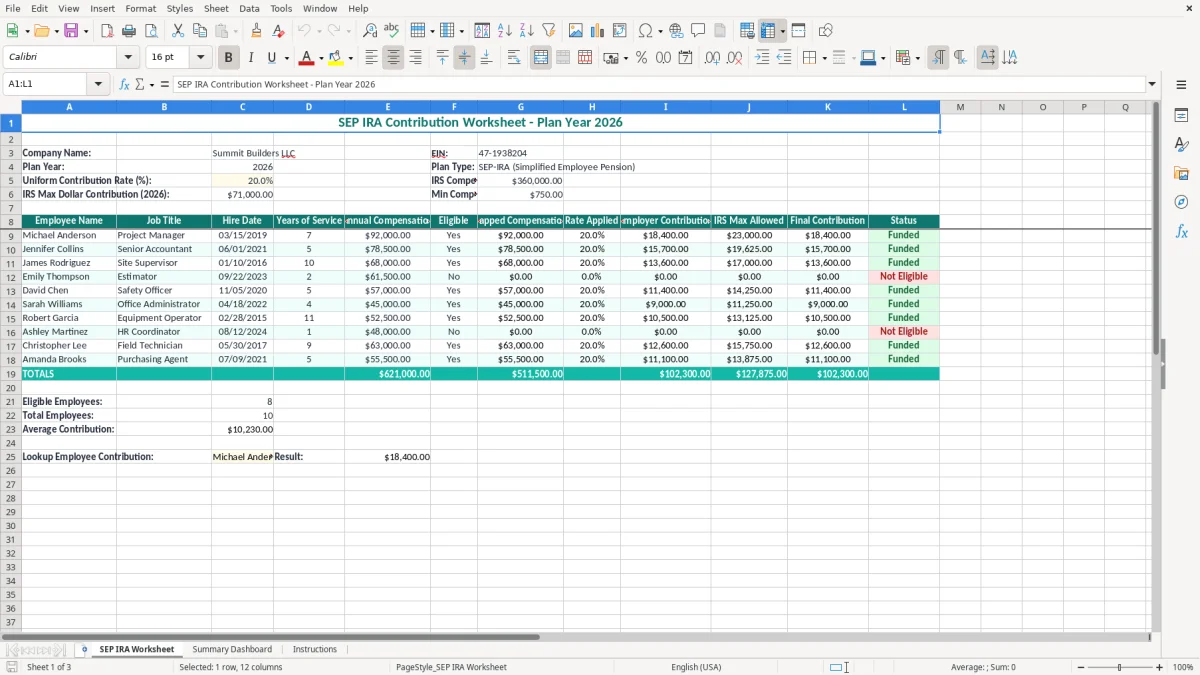
This SEP IRA contribution worksheet calculates employer contributions for a 2026 Simplified Employee Pension plan. It contains company details, the uniform contribution rate, compensation limits, employee eligibility, capped compensation, IRS maximums, final contributions, and status results.
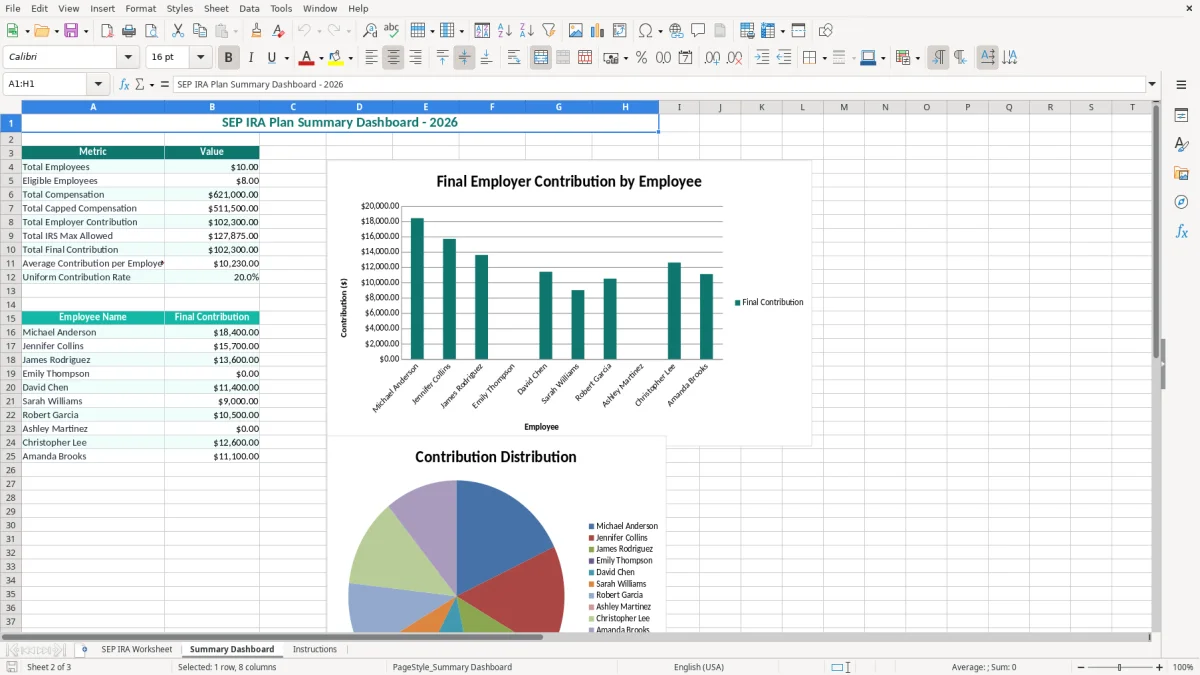
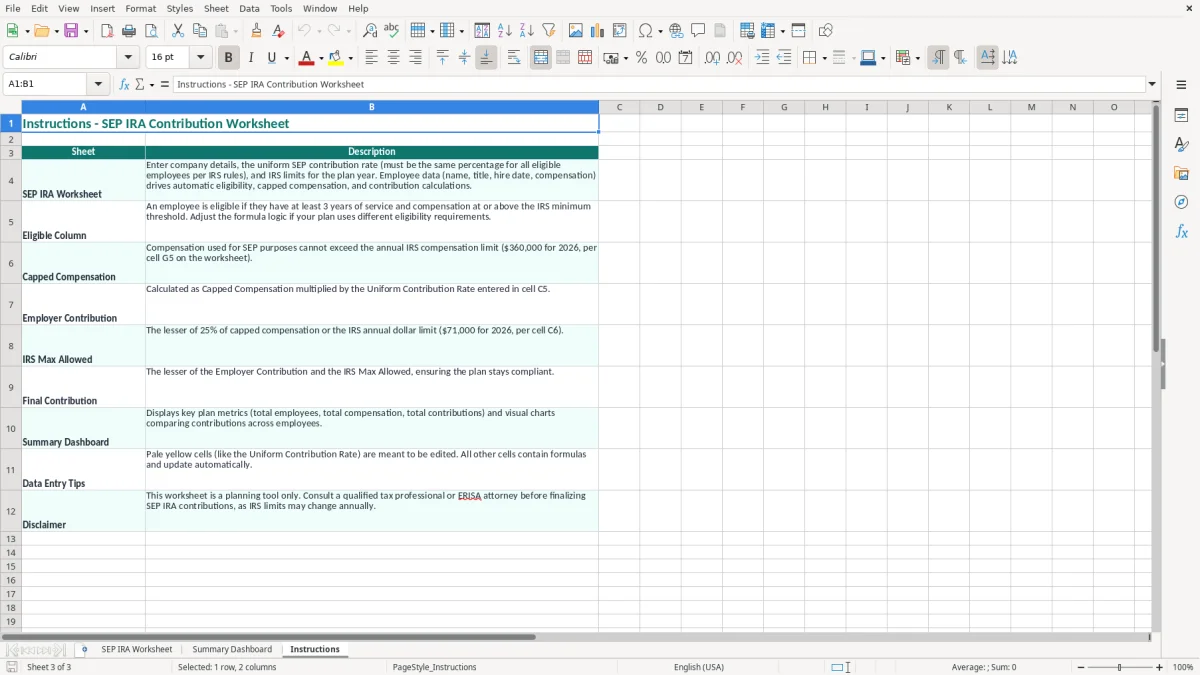
Enter your business and employee data on the SEP IRA Worksheet tab. The Summary Dashboard gives you a quick view of the planned contribution totals, while the Instructions tab explains the main inputs and workflow; images 1, 2, and 3 show those tabs in order.
A SEP IRA worksheet is most useful when a business owner has to turn payroll records into a consistent employer contribution decision. A sole proprietor may use it after calculating business profit for Schedule C, while the bookkeeper for an LLC may use it during year-end close after confirming each employee's compensation and hire date.
The file is also practical for an owner who employs a small crew but does not want a retirement-plan calculation buried in a payroll report. A general contractor with four employees, for example, can list each worker's annual compensation, compare eligibility, and see the funding amount before the company transfers money to the SEP IRA custodian.
Self-employed owners need a separate calculation because their eligible compensation is based on self-employment earnings rather than an ordinary W-2 salary. If the owner's allowable compensation produces a $60,000 contribution at the selected rate, the worksheet gives you a visible planning figure, but you still need to complete the self-employed calculation correctly before treating that amount as final.
When a business has employees, the same contribution percentage generally applies to every eligible participant. At a 20% rate, $80,000 of capped compensation creates a $16,000 employer contribution; four employees with that same compensation would require $64,000, subject to the applicable limits.
Image 1 shows the main worksheet's wide layout: company fields appear at the top, followed by the employee table with twelve labeled columns. Image 2 shows the Summary Dashboard for reviewing the aggregate result, and image 3 shows the Instructions tab for the data-entry sequence.
Use the worksheet after the final payroll run, before the employer contribution deadline, or during tax-season preparation. It is especially helpful when your payroll provider reports wages but does not present the exact employee-by-employee SEP funding calculation you need.
The worksheet is configured for the 2026 figures shown in the file: a $360,000 compensation limit, a $71,000 maximum dollar contribution, and a $750 minimum compensation threshold. A 20% rate applied to $360,000 equals $72,000, so the $71,000 maximum controls the final contribution for that employee.
SEP contributions are employer contributions, not employee salary deferrals. For an employee, the contribution is generally limited to the lesser of the employer's uniform percentage of eligible compensation or the annual dollar limit. The worksheet displays both the calculated employer contribution and IRS Max Allowed so you can see which ceiling controls.
For a standard SEP arrangement, an employee generally must be at least age 21, have worked for the employer in at least 3 of the preceding 5 years, and receive at least $750 in compensation for 2026. A plan may use less restrictive eligibility terms, but it cannot use terms that are more restrictive than the permitted SEP rules.
The file includes Hire Date, Years of Service, Annual Compensation, and Eligible columns to support this review. Do not treat the hire date alone as the final legal test: confirm the service history and the actual plan document, especially for seasonal workers, rehired employees, and employees covered by permitted exclusions.
A sole proprietor does not simply multiply Schedule C net profit by the employee percentage. The calculation uses net earnings from self-employment, the deductible portion of self-employment tax, and the applicable contribution formula, so a $100,000 Schedule C profit will not automatically produce a $20,000 owner contribution at a stated 20% rate.
You report the business income on Form 1040 and generally calculate self-employment tax on Schedule SE. The self-employment tax rate is 15.3%—12.4% Social Security plus 2.9% Medicare—before considering the Social Security wage base and other limits. Use this workbook for planning and employee comparisons, then reconcile the owner's result to the final tax return calculation.
Keep the worksheet with plan records. The IRS generally expects tax records to be retained for 3 years, with records sometimes needed for up to 7 years. The SEP contribution deadline commonly follows the employer's tax-return due date, including extensions, so record the actual funding date and retain the custodian confirmation.
The most expensive errors usually start with a payroll number that looks reasonable but is not the number the SEP rules use. I have seen owners copy total payroll into a worksheet without removing excluded compensation, then multiply it by 20%. On $300,000 of overstated compensation, that mistake creates a $60,000 funding target before anyone notices the source.
A business owner may want to reward a key employee with 20% while giving another eligible employee 10%. That is not a harmless spreadsheet adjustment: SEP contributions generally require the same percentage of eligible compensation for all eligible employees. If three qualifying employees earn $90,000, $60,000, and $40,000, a 20% rate means $38,000 total—not a discretionary mix of percentages.
At 20%, an employee earning $400,000 would appear to generate an $80,000 contribution if you multiply without a cap. The 2026 compensation limit reduces the calculation base to $360,000, and the $71,000 dollar limit reduces the permitted contribution further. Paying $80,000 instead of $71,000 overfunds that employee by $9,000 and creates a correction problem.
Another failure occurs when an owner checks Eligible based only on whether someone is currently employed. A worker who has not met the plan's service requirement, a former employee who satisfied the service rule, or someone below the $750 compensation threshold can change the required participant list. A wrong eligibility decision can force a retroactive contribution and an uncomfortable explanation to affected employees.
Do not confuse a SEP IRA with a 401(k). Employees do not make elective deferrals into a SEP in the same way they do through a 401(k), and the employer contribution is not the same as an employee's W-2 withholding. A $25,000 contribution sent under the wrong plan type can require corrected instructions, amended records, and additional professional fees.
Finally, do not fund from the dashboard total until you have checked the final contribution and status columns row by row. A single blank compensation cell, text-formatted dollar amount, or copied formula can change a four-employee contribution total by thousands of dollars.
The worksheet works best as a short control procedure, not as a file you open once in April. Set a calendar appointment for the final payroll review, then make a second appointment before the employer contribution deadline. For a business with four employees and a planned $38,000 contribution, those two checkpoints give you time to correct a missing hire date or compensation entry before money moves.
Use consistent employee names and dates every year so you can compare the current file with the prior file. Keep the input cells visibly distinct, and do not paste over formulas in Capped Compensation, Employer Contribution, IRS Max Allowed, or Final Contribution. If you add rows, copy the complete row structure and verify references before relying on the totals.
A practical shortcut is to maintain a separate payroll export with employee name, hire date, and annual compensation, then paste only the reviewed values into the worksheet. At 25 employees, saving 2 minutes per row saves about 50 minutes, but that time is worthwhile only if you still review the rate and eligibility results.
A spreadsheet is appropriate for a small, stable payroll. Move to a payroll provider or integrated accounting system when you have more than roughly 25 employees, multiple entities, frequent rehiring, or several benefit plans. Once payroll changes weekly and the funding calculation must connect to a general ledger, manual copy-and-paste creates more control risk than it saves in software cost.
It organizes employee data and calculates capped compensation, the applied contribution rate, employer contribution, IRS maximum allowed, final contribution, and status. The 2026 worksheet displays a $360,000 compensation limit, a $71,000 maximum contribution, and a $750 minimum compensation threshold.
Enter the uniform percentage your business will use for eligible employees. The file starts with 20.0% as an example. At that rate, $100,000 of eligible compensation produces $20,000 before the applicable dollar limit is considered.
For 2026, the worksheet uses a $360,000 compensation limit and a $71,000 maximum dollar contribution. At a 20% rate, $360,000 produces $72,000, so the $71,000 maximum limits the final contribution.
It can help you plan the contribution, but a sole proprietor's calculation requires net earnings from self-employment and the deductible portion of self-employment tax. Reconcile the owner calculation to Schedule C, Schedule SE, and Form 1040 rather than treating an ordinary employee percentage calculation as final.
Under standard SEP eligibility rules, an employee generally must be at least 21, have worked for the employer in at least 3 of the preceding 5 years, and receive at least $750 in 2026 compensation. Review the plan document because it may use less restrictive terms.
The workbook contains SEP IRA Worksheet, Summary Dashboard, and Instructions. The first tab holds company inputs and the employee table, the second summarizes results, and the third explains how to complete the file.