TSP Contribution Allocation Excel – Free Template (2026)
0
Free download
Track nondeductible IRA contributions, Roth conversions, pro-rata calculations, Form 8606 basis, taxable amounts, and filing status in Excel.


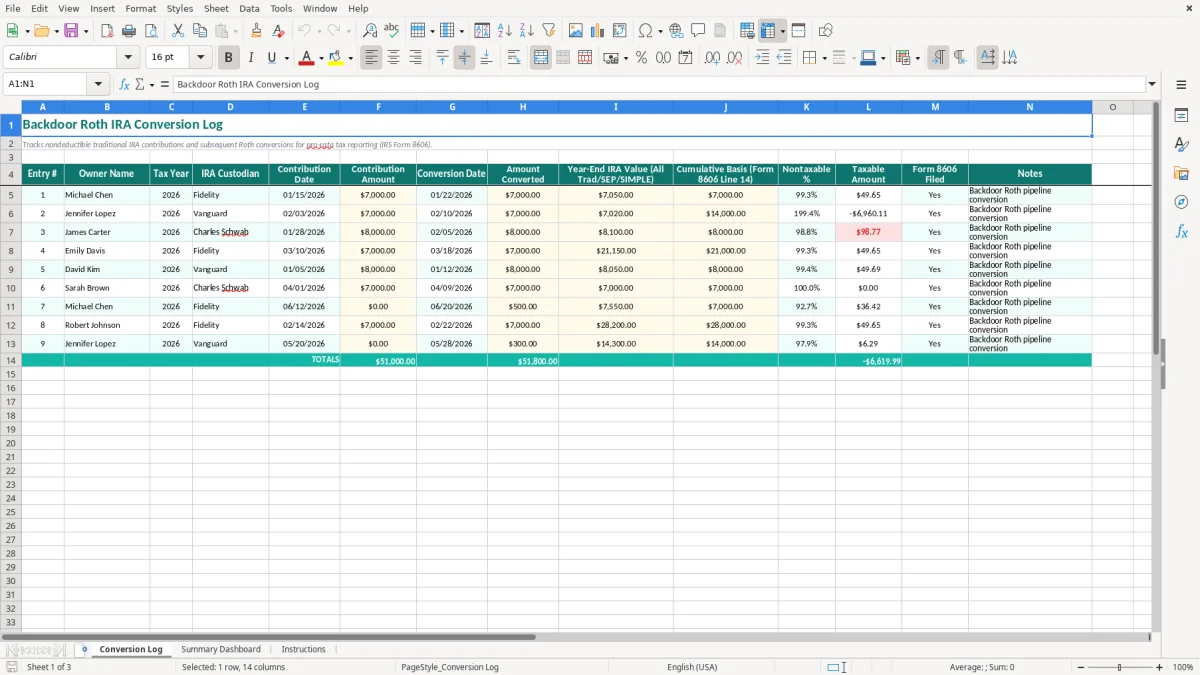
A backdoor Roth conversion log records nondeductible traditional IRA contributions and later Roth conversions so you can calculate the pro-rata rule and prepare IRS Form 8606. This Excel template includes a Conversion Log with dates, amounts, year-end IRA value, cumulative basis, nontaxable percentage, taxable amount, and filing status.
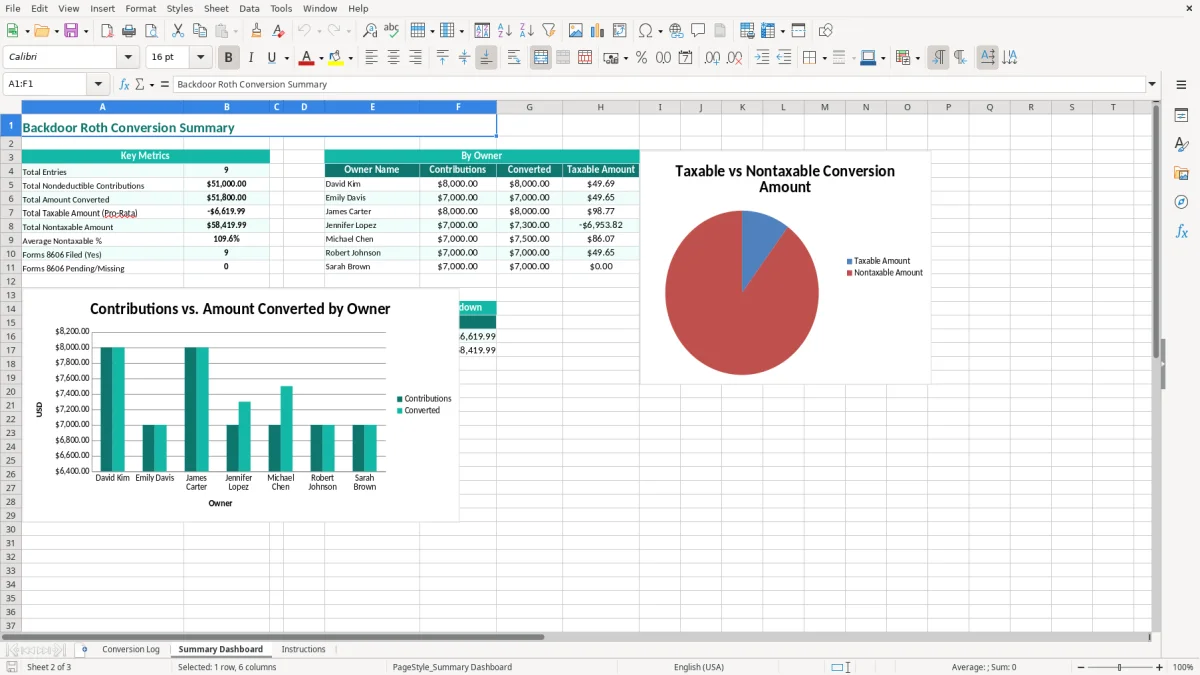
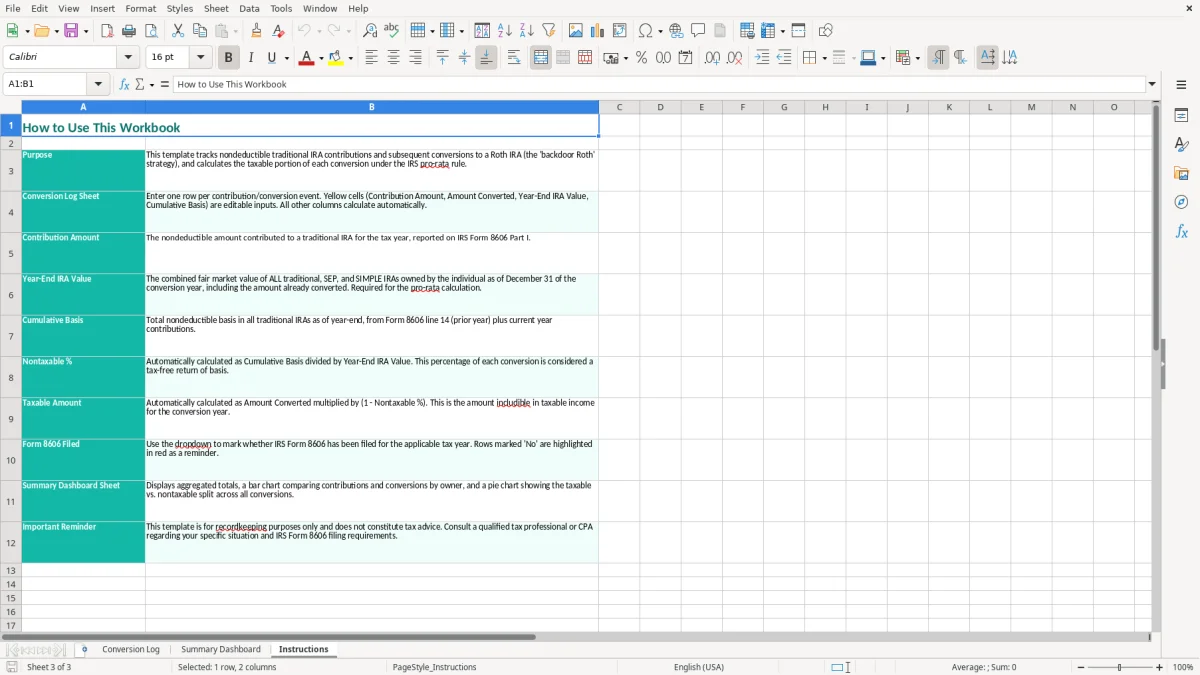
Use it when you make contributions through one or more traditional, SEP, or SIMPLE IRAs and then move money into a Roth IRA. The Summary Dashboard gives you a quick view of contributions, conversions, taxable amounts, and filing completion, while the Instructions tab explains the intended workflow.
A backdoor Roth conversion log is useful for a high-income employee, a self-employed consultant, or a tax preparer handling several IRA owners. The typical user makes a nondeductible traditional IRA contribution, converts some or all of it to a Roth IRA, and then needs to prove how much basis was already taxed. A brokerage statement alone usually does not show that complete history.
For example, Michael contributes $7,000 to a traditional IRA on 01/15/2026 and converts $7,000 on 01/22/2026. If his year-end value across all traditional, SEP, and SIMPLE IRAs is $7,050, the $50 of earnings and the pro-rata calculation can affect the taxable amount. The Conversion Log captures the dates, custodian, contribution, conversion, and year-end value in one row.
An employee may have an old traditional IRA at Vanguard, a rollover IRA at Fidelity, and a new contribution at Charles Schwab. The pro-rata rule looks at the combined year-end balance, not just the account from which the Roth conversion was made. Entering each relevant owner and custodian prevents the common mistake of treating a clean conversion account as isolated from other IRAs.
A sole proprietor or single-member LLC owner may use a SEP IRA, while a spouse has a traditional IRA. The workbook makes the owner and custodian visible, which helps a preparer reconcile Forms 5498 and 1099-R before completing Form 8606. James, for example, contributes $8,000 and converts $8,000; the $8,100 year-end value shown in the sample demonstrates why the year-end field matters even when the contribution and conversion amounts match.
Use the log during the tax-season review rather than reconstructing the transaction from memory. The Summary Dashboard is useful when a household has several entries, but the Conversion Log remains the source record for the dates, amounts, basis, taxable calculation, and Form 8606 filed status.
The federal tax issue in a backdoor Roth conversion is not simply whether you contributed $7,000 and converted $7,000. Form 8606 reports nondeductible traditional IRA contributions and calculates the taxable and nontaxable portions of distributions or conversions. The calculation uses your basis together with the year-end value of all traditional, SEP, and SIMPLE IRAs.
Suppose your cumulative basis is $7,000, your total relevant year-end IRA value is $14,000, and you convert $7,000. The simplified nontaxable ratio is 50%, so about $3,500 of the conversion is nontaxable and about $3,500 is taxable before considering the complete Form 8606 calculation. That is why the template includes both Cumulative Basis and Year-End IRA Value rather than tracking only the Roth transfer.
Keep the traditional IRA contribution confirmation, custodian statement, Form 5498, Roth conversion confirmation, and Form 1099-R with the workbook. The IRS generally expects tax records to be retained for 3 years, with records kept up to 7 years in situations involving substantial underreported income. A spreadsheet is a tracking aid; it does not replace the filed form or source documents.
Enter the actual contribution and conversion dates in MM/DD/YYYY format. A contribution designated for one tax year may be made during the following filing season, while a conversion is reported for the calendar year in which the conversion occurs. Do not infer the tax year from the transfer date; verify the designation on the custodian confirmation and enter the correct 2026 tax year.
The pro-rata calculation includes traditional, SEP, and SIMPLE IRA balances. A $7,000 conversion from a newly opened IRA can still be partly taxable if an existing SEP IRA has a $50,000 balance at year-end. The template's long Year-End IRA Value label is deliberate: use the combined value, not an account balance selected for convenience.
Form 8606 is filed with Form 1040 when required, and the Form 8606 Filed column gives you a direct completion check. Enter the taxable result from the completed tax calculation rather than assuming the entire conversion is tax-free.
The most expensive error is entering only the IRA used for the Roth transfer. A taxpayer may convert $7,000 from an empty traditional IRA while carrying a $70,000 rollover IRA elsewhere. Treating the transfer as entirely nontaxable can understate taxable income by thousands of dollars and force a correction after the return has been prepared.
Another problem is entering the balance immediately after the conversion instead of the required year-end value for all relevant IRAs. For example, an account may show $0 after a December conversion, but a separate SEP IRA may still hold $40,000 on the final day of the year. A blank or incomplete year-end figure makes the nontaxable percentage unreliable even when every transaction date is correct.
Basis is not automatically equal to this year's contribution. If you made $6,000 of nondeductible contributions in an earlier year and converted only part of the account, that remaining basis must carry forward. Replacing cumulative basis with the new $7,000 contribution can cause the same dollars to be taxed twice or can produce an overstated tax-free amount.
Custodians report contributions and distributions on different forms. Form 5498 helps document IRA contributions, while Form 1099-R reports the conversion distribution. If the log says “filed” without a matching Form 8606, you may discover the omission only after the return is accepted and need to amend the filing.
Do not rely on rounded percentages copied from an online calculator. A $7,000 basis divided by $14,050 of combined year-end value is approximately 49.8%, not 50.0%; rounding too early can change the taxable amount by several dollars and make the worksheet disagree with Form 8606. Preserve the underlying dollar figures and compare the final result with the tax return.
Finally, do not mix spouses or accounts in one unexplained row. If Jennifer has $14,000 of cumulative basis and a separate custodian from Michael, combining them can make both records look plausible while making neither one auditable.
The log works best when you update it immediately after the contribution and again after the Roth conversion, not during a rushed filing-week review. Save the custodian confirmation with a matching file name such as “2026-Fidelity-01-22-Roth-Conversion” and place that reference in Notes. A two-minute update after each transfer is easier than rebuilding six transactions in April.
Keep one workbook for a household or client only when the Owner Name field clearly separates the records. For a tax practice with 40 clients, use a controlled naming convention and a separate saved copy per client rather than placing confidential IRA data in a shared folder without access controls.
Open Summary Dashboard after each batch of entries and investigate totals that do not match the custodian statements. The sample data includes $7,000, $7,000, and $8,000 contributions across three owners, so a quick total check should produce $22,000 before any additional rows are entered. Use the Instructions tab when another person will review the file.
This workbook is a strong tracking tool for a household or a small number of clients. Move to a practice-management or tax workflow system when you are managing hundreds of accounts, need user permissions, require an audit trail for every edit, or must import custodian files automatically. Excel remains useful as the reconciliation schedule, but it should not be the only control for a high-volume tax process.
It tracks nondeductible traditional IRA contributions and subsequent Roth conversions. This template records the owner, tax year, custodian, contribution and conversion dates, dollar amounts, combined year-end traditional, SEP, and SIMPLE IRA value, cumulative basis, nontaxable percentage, taxable amount, and Form 8606 filing status.
The pro-rata rule generally considers your combined traditional, SEP, and SIMPLE IRA balances at year-end. A $7,000 conversion can be partly taxable if you also have a $40,000 SEP IRA, even when the account used for the conversion was empty before the contribution.
Cumulative basis is the portion of traditional IRA contributions that was not deducted and has not yet been recovered through prior distributions or conversions. The template labels this field “Cumulative Basis (Form 8606 Line 14)” so you can carry forward prior nondeductible contributions instead of entering only the current contribution.
No. If your cumulative nondeductible basis is smaller than the proportion of your total traditional, SEP, and SIMPLE IRA value represented by the conversion, part of the conversion is taxable. For example, with $7,000 of basis and $14,000 of total year-end IRA value, a $7,000 conversion is approximately 50% nontaxable before the complete Form 8606 calculation.
Keep contribution confirmations, Forms 5498, the Roth conversion confirmation, Form 1099-R, account statements showing year-end values, and the filed Form 8606. The log organizes those records, but the official tax forms and custodian statements support the amounts reported with Form 1040.
Yes. Enter each owner in the Owner Name column and keep that person's custodians, basis, year-end IRA value, and conversion records together. Review the Summary Dashboard for totals, then verify each owner's entries separately because the pro-rata calculation applies to that individual's IRA balances.