TSP Contribution Allocation Excel – Free Template (2026)
0
Free download
Track traditional IRA RMDs by year, divisor, withdrawals, and shortfalls with dashboard and tracker tabs.


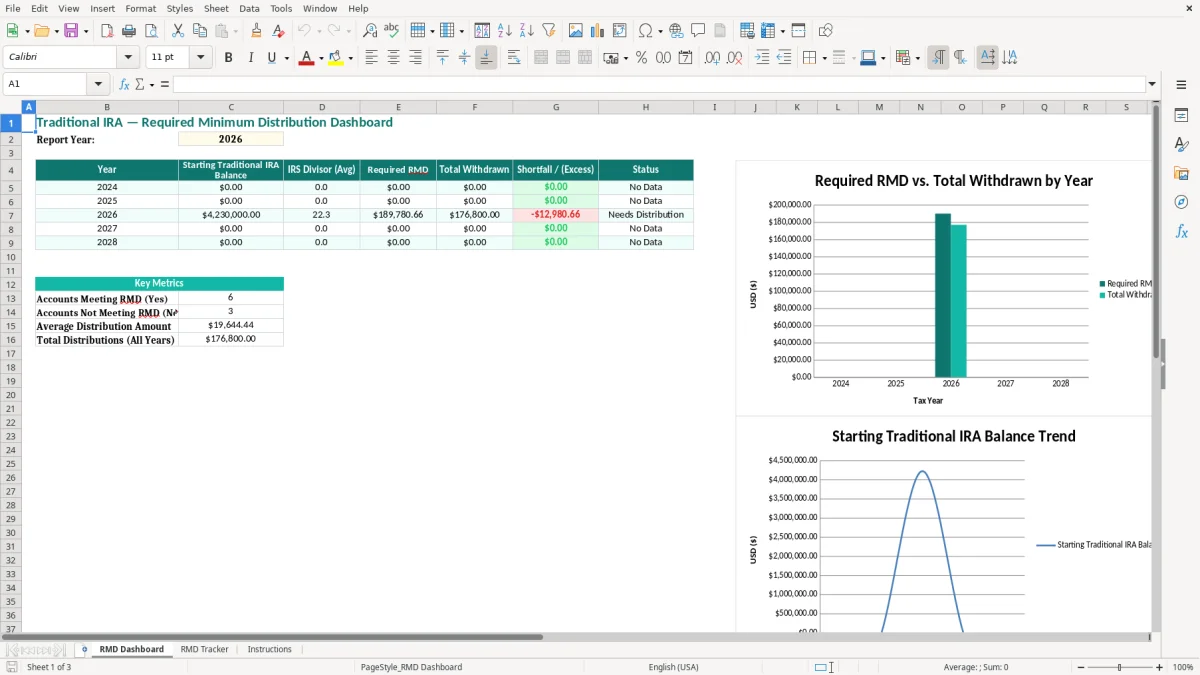
This traditional IRA required minimum distribution Excel template tracks your annual RMD, actual withdrawals, and any shortfall for 2026 and beyond. It includes an RMD Dashboard, an RMD Tracker, and an Instructions tab.
Use it to see, at a glance, whether you met the IRS withdrawal target for each year. The workbook is set up for year-by-year tracking, dividend-style calculations from the IRS divisor, and a simple status check that shows whether you still need a distribution.
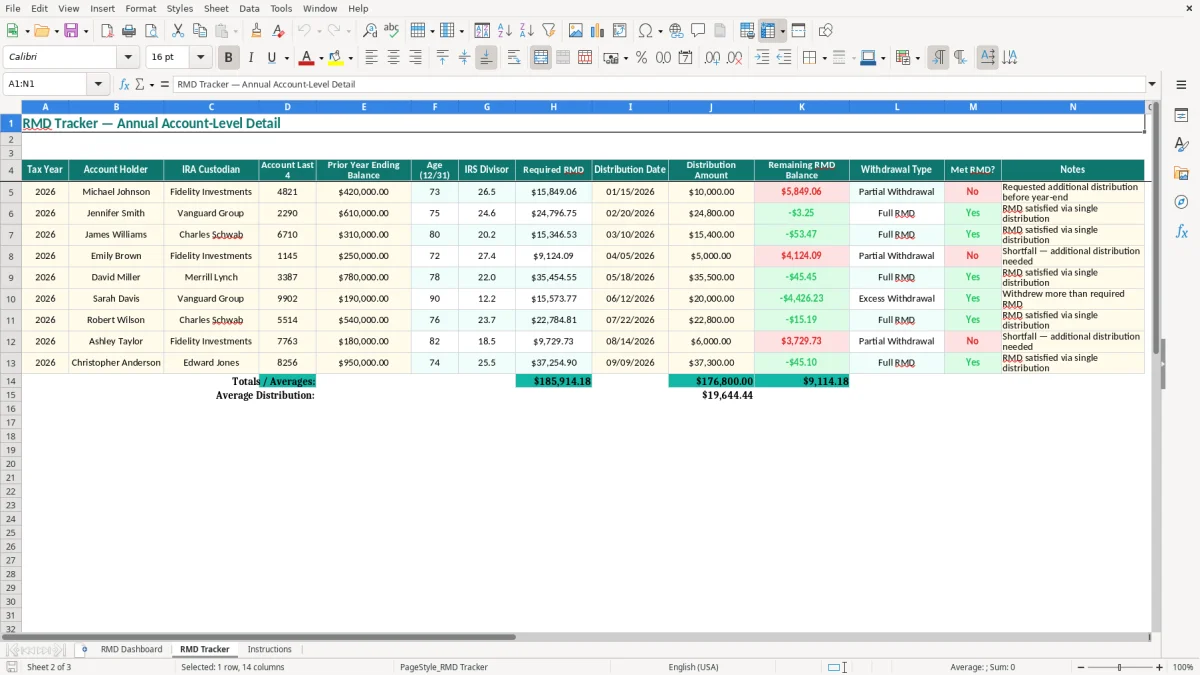
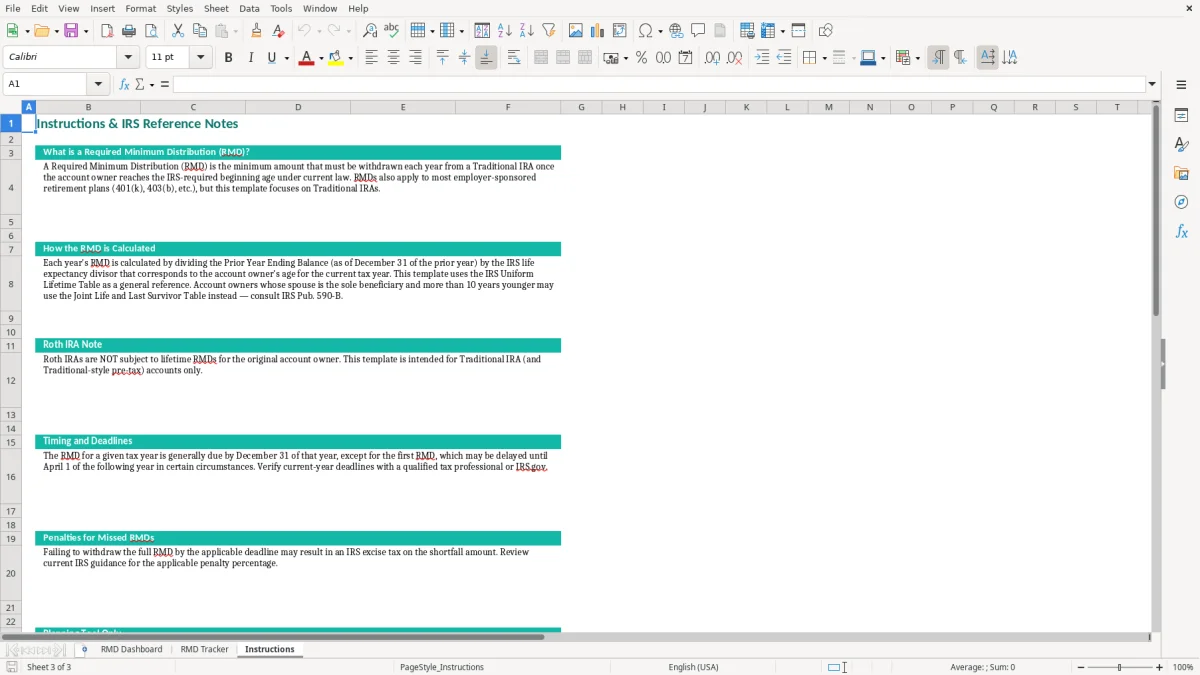
Image 1 shows the dashboard summary. Image 2 shows the transaction-level tracker where you enter balances, divisors, and withdrawals. Image 3 gives setup notes so you can keep the file consistent year after year.
You use this file when you need to follow a required minimum distribution from a traditional IRA and you want the math visible, not buried in a custodian statement. A retiree with a $500,000 account and a divisor of 26.5 would expect a $18,867.92 RMD before taxes, and the dashboard makes that number obvious.
This is also practical for a spouse handling family finances, a tax preparer checking a client’s withdrawal history, or a bookkeeper tracking distributions across a year-end close. If you wait until the last week of December and discover only $15,000 was withdrawn against a $18,867.92 target, you still have a clear shortfall to fix.
Most users are retirees, trustees, or adult children helping a parent keep records straight. It is especially useful when you have multiple withdrawals spread across the year and you want one running total instead of three or four bank PDFs.
The summary tab compares the calculated RMD to actual withdrawals for each year. That means you can see, in one line, whether the account is on track or whether you are carrying a gap into year-end.
For traditional IRAs, the IRS requires annual distributions once you reach the applicable RMD age, and you must calculate the withdrawal using the account balance and the IRS life expectancy divisor. The workbook reflects that logic by storing a divisor and dividing the starting balance by that figure.
Recordkeeping matters. The IRS generally expects you to keep supporting records for at least 3 years, and longer in some situations, so a year-by-year worksheet is better than a pile of statements with no summary.
The file uses SUMIF to total withdrawals by year and AVERAGEIF to pull the divisor for that year. That structure is useful because one $7,500 withdrawal in June and another $4,000 in November still count as one annual total.
If your year-end balance is $320,000 and the divisor is 24.7, your RMD is $12,955.47. If you only took $10,000 by December 31, the worksheet shows a $2,955.47 shortfall so you can correct it before filing.
The most common failure is simple: you forget to total every withdrawal, so your records show $12,000 taken but the bank trail only proves $9,500. That missing $2,500 can leave you with an under-distribution on paper, which is exactly the kind of error that creates stress at filing time.
Another problem is using the wrong year’s balance or divisor. If you calculate from a stale $280,000 balance when the real starting balance is $310,000, your RMD is understated by roughly $1,200 to $1,400 depending on the divisor, and that gap does not disappear just because the year ended.
An RMD shortfall can also force last-minute withdrawals that push taxable income higher than expected. If you were planning to stay around a $48,000 retirement-income target and then discover a $6,000 gap in December, you may end up with a larger tax bill and a less controlled cash flow.
People also overwrite formulas, enter withdrawals in the wrong year, or track one IRA in a notebook and another in a separate file. This template avoids that by keeping the summary and detail on separate tabs, which makes it much harder to lose the trail.
Use the workbook on a fixed schedule instead of only at tax time. The cleanest routine is to update it the same day you take a distribution, then review the dashboard at month-end or during your December tax check.
A spreadsheet is enough when you have one or two IRAs and a handful of withdrawals. If you are managing multiple accounts, inherited IRAs, or repeated beneficiary calculations, move to a more formal system and have the reporting reviewed before the year closes.
It tracks the annual starting IRA balance, the IRS divisor, the required distribution, total withdrawals, and any shortfall or excess. The dashboard then shows a year-by-year status so you can see whether you met the target.
You should use it if you are retired, helping a parent manage retirement accounts, or reconciling distributions for a tax return. It is especially useful when you want one clean record instead of scattered statements.
It divides the starting traditional IRA balance by the IRS divisor for that year. If the balance is $400,000 and the divisor is 25.6, the required distribution is $15,625.00.
The dashboard shows a Needs Distribution status and a negative variance. That tells you exactly how much is still missing before the year closes.
Not without checking the inherited-account rules first. The file is built for a traditional IRA RMD workflow, and inherited accounts often follow a different distribution pattern.
The workbook uses SUMIF, AVERAGEIF, IFERROR, and IF to summarize annual balances and withdrawals. That keeps the dashboard automatic once you enter the tracker data.