TSP Contribution Allocation Excel – Free Template (2026)
0
Free download
Track Roth IRA contributions, limits, MAGI, excess amounts, and withdrawal needs for 2026 in Excel.


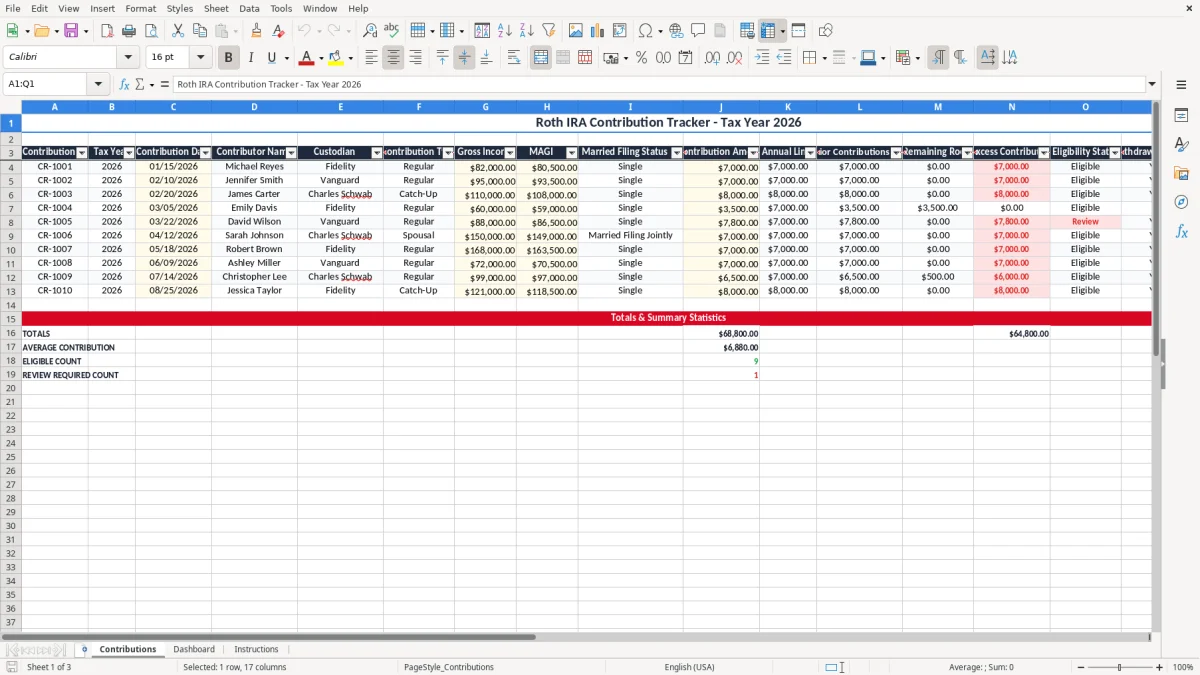
This Roth IRA contribution tracker Excel template helps you log each deposit, check your annual limit, and flag excess contributions before they create tax trouble. It includes a Contributions tab, a Dashboard tab, and an Instructions tab for tax year 2026.
Use it to compare your contribution amount against your income limits and keep a clean record for the IRS and your own year-end review. The workbook is built for people who want one place to track dates, custodians, MAGI, remaining room, and whether a withdrawal is needed.
If you make multiple deposits during the year, this sheet shows the running total so you do not overshoot the Roth IRA limit by $1, even on a split contribution schedule.
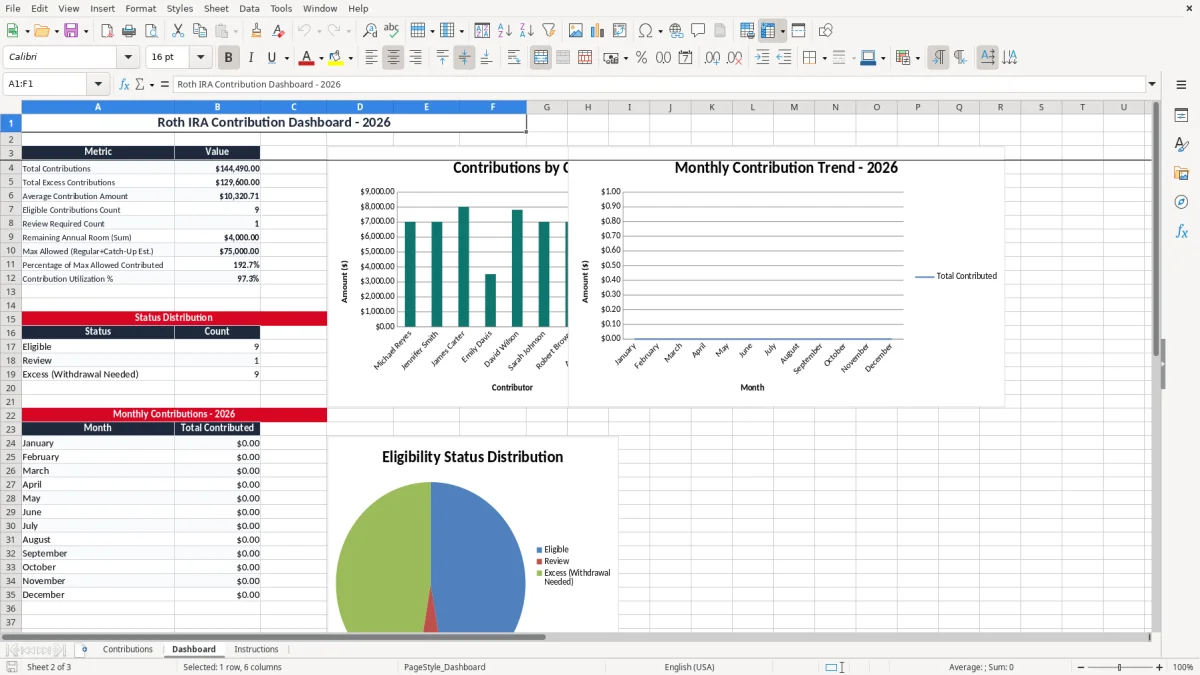
This spreadsheet is for anyone who wants to stay within the Roth IRA limit while making deposits through the year. A W-2 employee with bonuses, a married household with two earners, or a self-employed person with uneven income can all use it to see whether a $7,000 contribution still fits before December.
It is especially useful when income changes midyear. If you expected $78,000 of income in March and end up closer to $96,000 by October, you need a clean way to compare your deposits against your MAGI and filing status before you create an excess contribution.
People usually notice Roth IRA issues at tax time, but the better time is right after each deposit posts. If you contribute $583.33 a month for 12 months, you will land at $7,000 exactly; if one extra transfer slips in, you are over the line and have to fix it.
A bookkeeper at an LLC can keep a client’s contribution history in one place, while a household with two IRAs can use separate rows to avoid double counting. The point is simple: you want the running total visible before the year closes, not after the custodian sends statements.
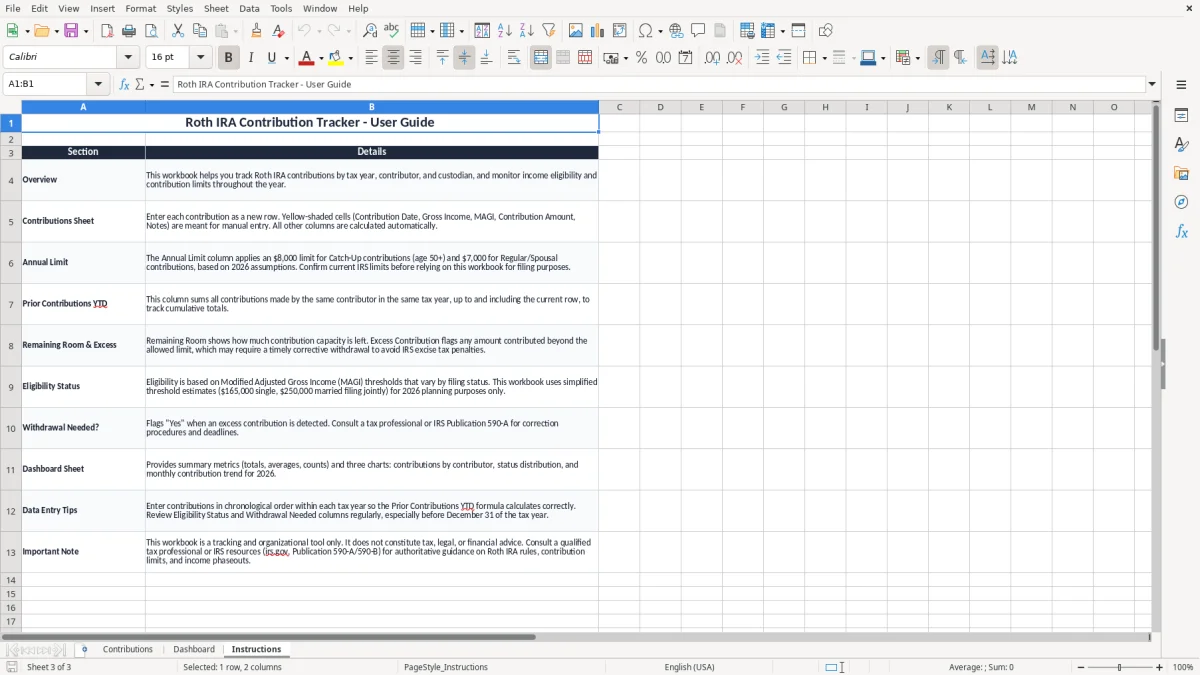
For 2026, Roth IRA contributions are still governed by income and filing status, not just by cash on hand. You can contribute up to the annual limit only if your MAGI stays within the allowed phaseout range for your tax situation, and the spreadsheet helps you compare the number you are tracking against the number your return will show on Form 1040.
The practical rule is that excess Roth contributions do not disappear on their own. If you leave the overage in the account, the IRS can assess a 6% excise tax each year the excess remains, so a $1,000 overcontribution can become a repeating problem instead of a one-time mistake.
If you aim for $7,000 and accidentally contribute $7,250, the difference is only $250 on paper, but it is still an excess contribution. That is why the tracker includes annual limit, prior contributions YTD, remaining room, and withdrawal-needed fields on the same line.
The IRS generally expects you to keep records that support contribution timing and eligibility, and a spreadsheet like this is the easiest way to keep those details together. Keep custodian statements, deposit confirmations, and your tax return notes with the file so you can prove what happened if you ever have to correct the account.
The most expensive mistake is contributing as if your income is lower than it really is. A household that puts in $7,000 each for two spouses but later learns the phaseout rules were missed may have to remove part of the deposit and deal with earnings on the excess.
Another common error is poor timing. If you make six deposits during the year and never update the total, it is easy to hit $7,000 on paper and then sneak in one more $500 transfer in December, turning a clean record into a correction job.
Fixing an overage often means calling the custodian, tracking the contribution date, and documenting any earnings removed with the excess. That is much easier when your sheet already shows the deposit sequence, because a correction on a $250 overfunding can take an afternoon if your records are messy.
If you cannot tell which deposit was regular and which one was a catch-up or correction, you waste time reconstructing bank transfers, 1099s, and tax software entries. That is the kind of cleanup that turns a 5-minute review into a multi-hour year-end chase.
Use this file at the same time every month, ideally right after your paycheck, bookkeeping close, or bill-pay session. If you update it on the 1st and 15th, you are far less likely to miss a contribution that posts late in the month.
If you are still managing a small number of deposits, a spreadsheet is enough. Once you are coordinating multiple accounts, a spouse’s IRA, or a larger household with recurring transfers, the file still works well, but you may want to pair it with a dedicated bookkeeping or tax workflow.
It tracks contribution dates, amounts, running totals, annual limit usage, remaining room, and excess contributions. That gives you one place to see whether you are still within the 2026 limit.
MAGI is part of the Roth IRA eligibility test, so you need it beside the deposit history. If your income changes during the year, the tracker helps you compare the contribution amount with the number that matters for filing.
An excess contribution can trigger a 6% excise tax each year it stays in the account. The template gives you a place to flag the problem and note whether a withdrawal is needed.
Yes. You can use separate rows or separate workbooks for each spouse and still compare the totals against the annual limit. That is the cleanest way to avoid mixing deposits between accounts.
Yes. The spreadsheet is your working record, but statements and deposit confirmations are the backup that support the numbers if you ever need to correct an excess contribution or answer a tax question.
Update it every time a contribution posts. If you wait until year-end, you lose the whole point of the tracker, because the error may already be in the account.