Personal Finance

HSA Contribution Excel - Free Template

Track HSA contributions, qualified expenses, reimbursements, and IRS limits with summary tabs and transaction logs.


Jul 6, 2026 260 downloads 4.8/5 average rating
Download template

This HSA contribution and reimbursement tracker Excel spreadsheet helps you log deposits, qualified medical expenses, and reimbursements in one place. It includes a transaction register, a summary tab, and a limits-and-guidance tab so you can see your HSA balance and spending at a glance.

The workbook is built for anyone who uses a Health Savings Account: an employee with payroll contributions, a household paying out-of-pocket medical bills, or a bookkeeper tracking reimbursements during the year. The layout is simple enough for monthly use, but detailed enough to support clean records at tax time.

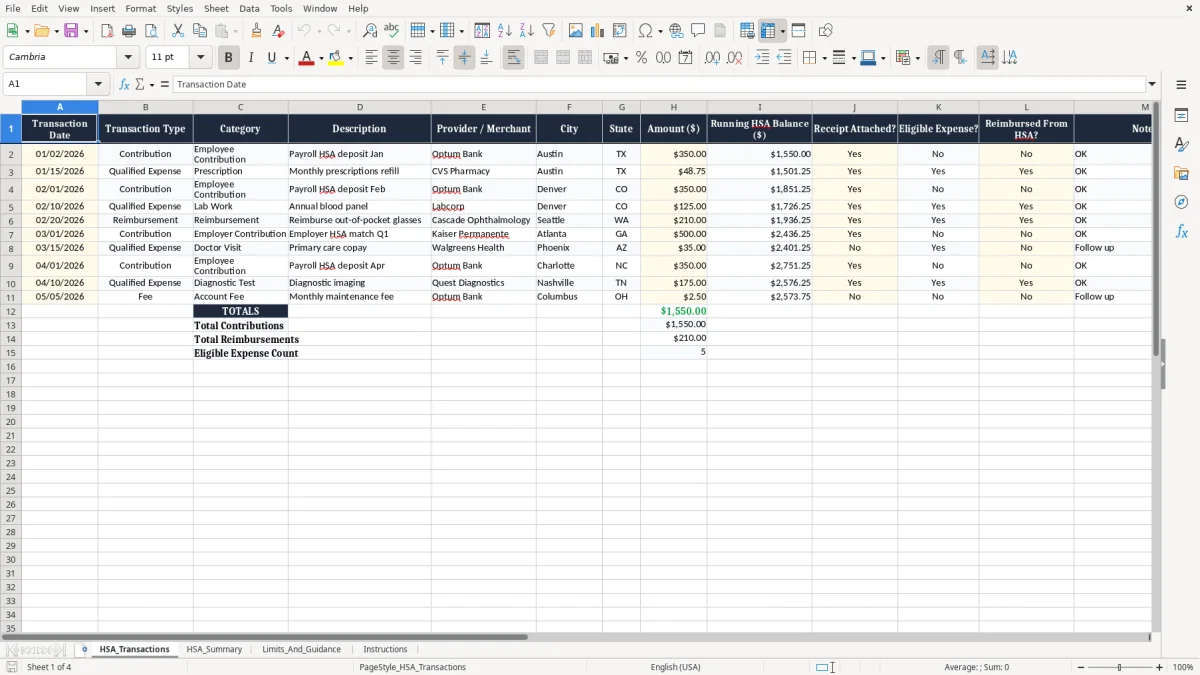
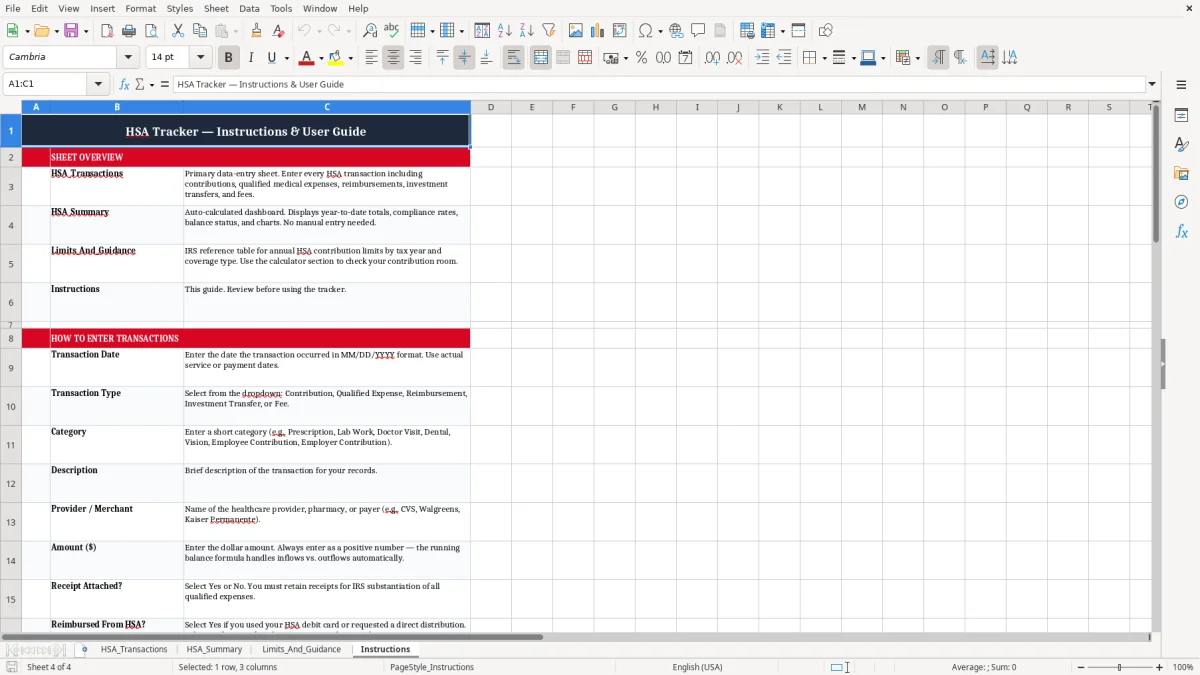
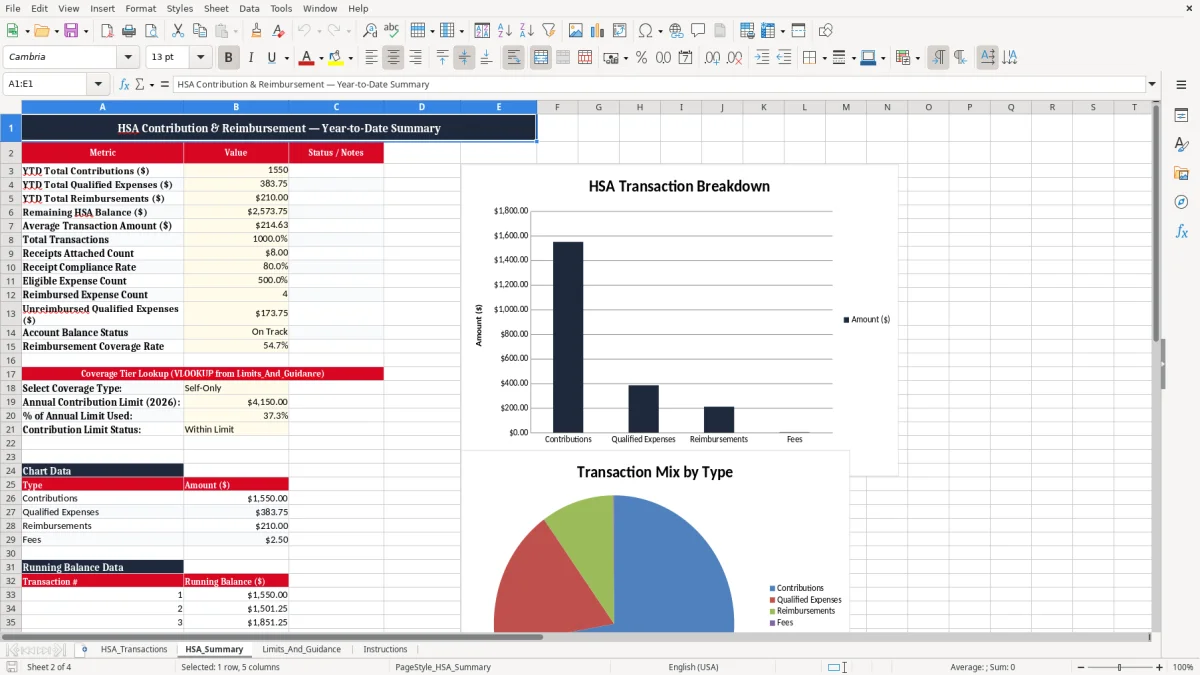
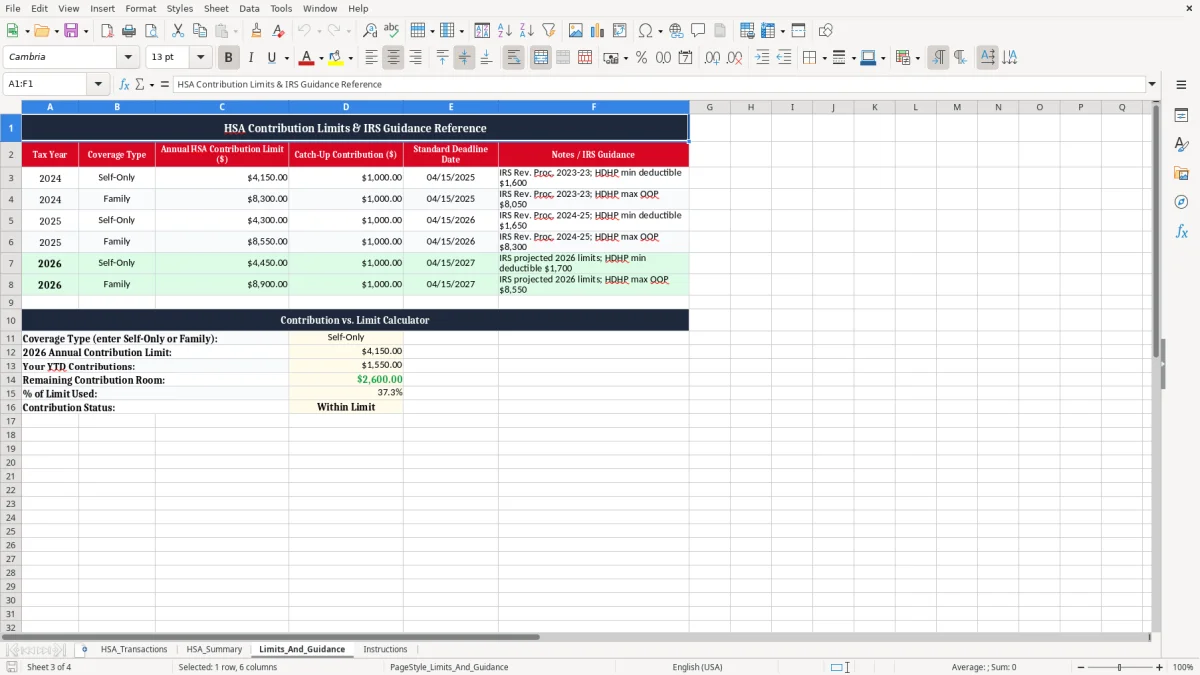
Image 1 shows the HSA_Transactions tab, where you enter each contribution or medical expense. Image 2 shows the HSA_Summary tab, and image 3 and image 4 cover the limits and instructions tabs.
Screenshot 1: HSA_Transactions tab - Excel template hsa contribution and reimbursement tracker excel spreadsheet
Figure 1: "HSA_Transactions" worksheet

Key benefits of this Excel template

  • Keeps every HSA contribution and reimbursement in one register, so you are not searching through receipts later.
  • Shows a running HSA balance after each entry, which helps you avoid overspending the account.
  • Separates contributions, qualified expenses, and reimbursements so your records stay clear for IRS support.
  • Lets you attach receipt status and eligibility flags to each line, which reduces missed documentation.
  • Gives you a summary view for totals by category, useful when you want a quick monthly check.
  • Supports clean year-end tax records for an employee, a household, or a small business owner with HSA activity.
  • Helps you spot the difference between money deposited and money reimbursed, which is the part people usually mix up.

Step-by-step guide

  1. Start on HSA_Transactions and enter each contribution, expense, or reimbursement on a new row. Use the transaction date, amount, merchant, and notes so the line is complete.
  2. Mark whether the item has a receipt, whether the expense is eligible, and whether it has already been reimbursed. Those three checks are the fastest way to keep the file audit-ready.
  3. Use the HSA_Summary tab to review totals and compare contributions against reimbursements. This is the tab you check before you decide whether to withdraw more cash or hold it in the account.
  4. Review Limits_And_Guidance before you contribute for the year. That tab is where you confirm the contribution ceiling and any catch-up amount that applies to you.
  5. Read the Instructions tab once, then keep the workbook open as you add new items. A five-minute weekly update is easier than rebuilding a whole year in April.
  6. If you reimburse yourself from the HSA, log the reimbursement the same day you move the money. That keeps the balance accurate and avoids double counting the same medical bill.
Screenshot 2: HSA_Summary tab - Excel template hsa contribution and reimbursement tracker excel spreadsheet
Figure 2: "HSA_Summary" worksheet

Included features

Transaction log with columns for date, type, category, description, merchant, city, state, amount, and notes.
Running HSA balance field so you can see the account level after each contribution or payment.
Receipt, eligibility, and reimbursement flags that make recordkeeping more disciplined.
Summary sheet for a quick view of totals instead of forcing you to add lines manually.
Limits and guidance sheet for year-specific HSA rules and contribution context.
Formatted dollar cells and date cells that match normal U.S. bookkeeping entry.
Frozen header row on the main tab so you can scroll through a long list without losing the column names.

Who Uses an HSA Tracker During The Year

Screenshot 3: Limits_And_Guidance tab - Excel template hsa contribution and reimbursement tracker excel spreadsheet
Figure 3: "Limits_And_Guidance" worksheet

What The IRS Records Are Really For

The HSA Mistakes That Create Real Cleanup Work

Screenshot 4: Instructions tab - Excel template hsa contribution and reimbursement tracker excel spreadsheet
Figure 4: "Instructions" worksheet

How To Keep The HSA File Working All Year

Frequently asked questions

Who made this template

Michael Carter, CPA
Michael Carter, CPA
Builds & checks the templates

Michael is a U.S. Certified Public Accountant. He builds each Excel file and verifies the formulas, totals, and tax assumptions before it goes live.

Jessica Brooks
Jessica Brooks
Writes the step-by-step guides

Jessica writes the plain-English walkthroughs that show how to put each template to work, from the first cell to the final total.

Download
File format Excel (.xlsx)
Works with Excel, Google Sheets, LibreOffice
Price Free
Download now
This template is provided for general use and is not tax, legal, or financial advice. For important decisions, consult a licensed CPA or advisor.