Goodwill Donation Value Log Template
12
Free download
Track contractor names, W-9 status, 1099 eligibility, tax year, and address details for year-end reporting.


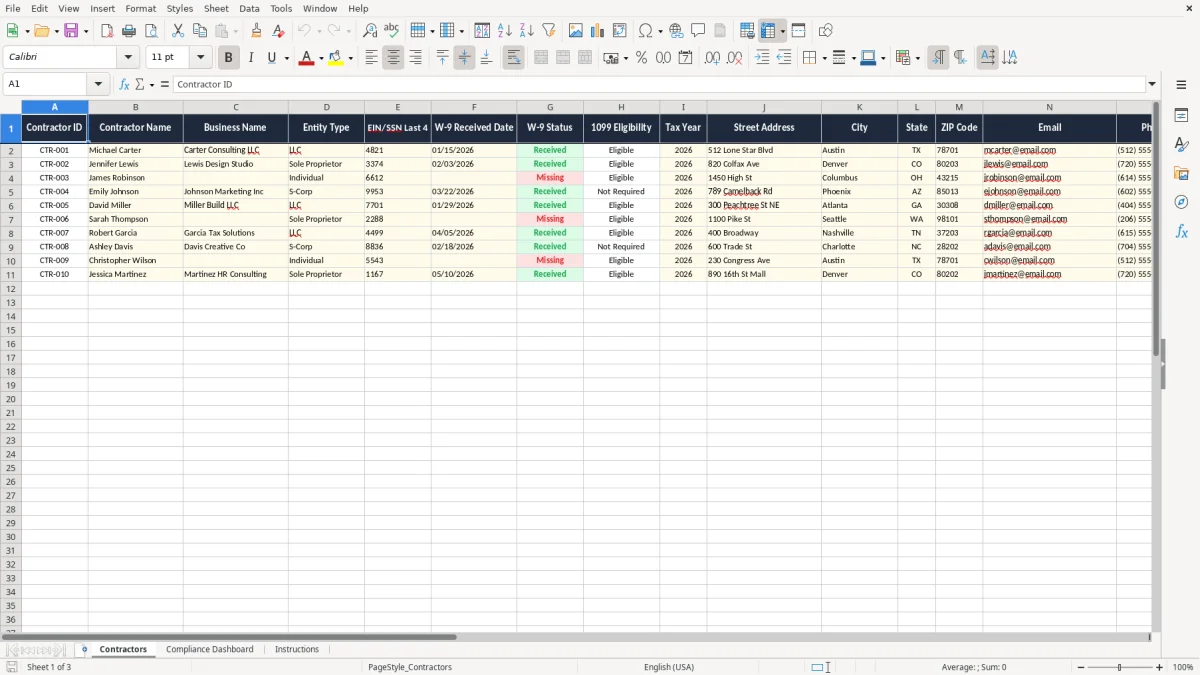
This W-9 contractor information tracker is an Excel template for collecting contractor names, business details, W-9 receipt dates, and 1099 eligibility in one place. It includes three tabs: Contractors, Compliance Dashboard, and Instructions.
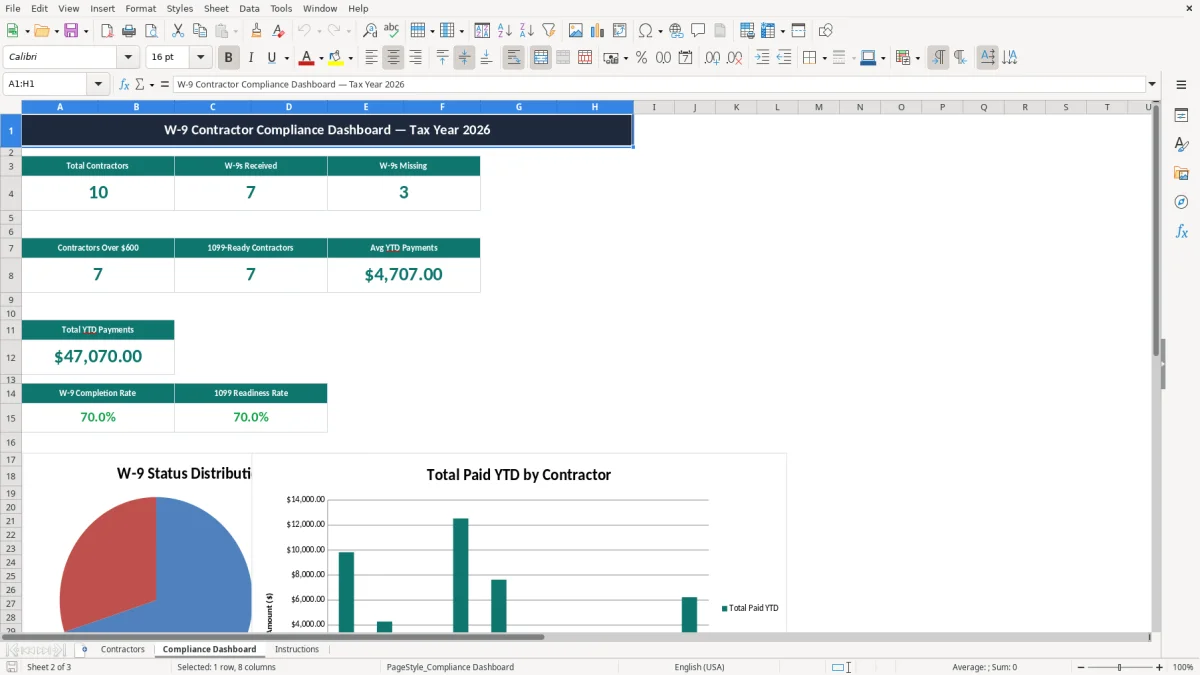
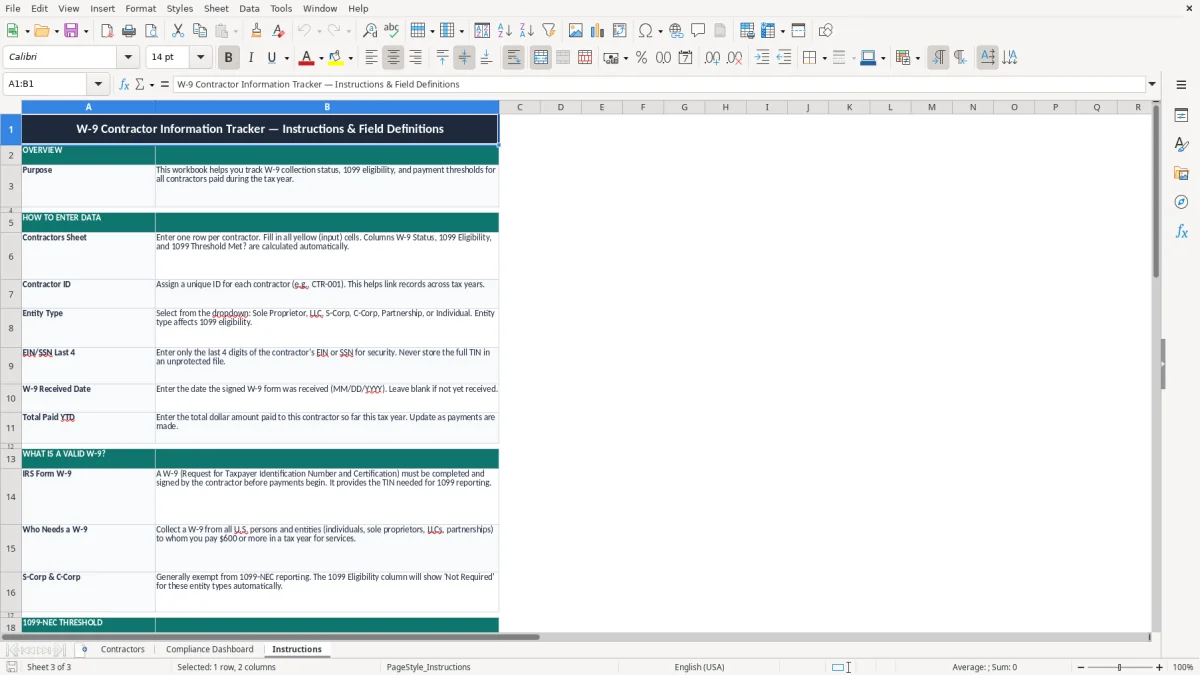
Use it to keep your contractor file clean before year-end reporting, when you need fast answers on who sent a W-9, who still needs follow-up, and which vendors may receive a 1099-NEC. Image 1 shows the Contractors tab with the main data entry table, image 2 shows the dashboard, and image 3 shows the Instructions tab.
If you pay subcontractors, freelancers, or temporary help, this tracker gives you one place to store the facts you need before year-end reporting. A sole proprietor with five 1099 vendors, a plumbing LLC with 18 subcontractors, or an e-commerce shop using outside designers can all use the same sheet to stay organized.
Image 1 shows the Contractors tab, which is built for day-to-day data entry. You can capture contractor ID, contractor name, business name, entity type, EIN/SSN last 4, W-9 received date, W-9 status, 1099 eligibility, tax year, street address, and city without bouncing between files.
Most users open this file when a new vendor is onboarded, when a W-9 is missing, or during the January rush before information returns go out. If you have 40 vendors and only 12 are active, you still want the inactive ones in the file because they may be back next quarter.
A bookkeeper at a contractor with 4 employees can use the dashboard to spot missing paperwork in minutes instead of rechecking the vendor list line by line. A small firm with 300 monthly invoices can also use the tracker to separate people who should get a 1099-NEC from those who should not.
The combination of tax-year labeling and address fields matters because year-end reporting is where sloppy records become expensive. If you spend 15 minutes per vendor hunting for missing data across 25 vendors, that is more than 6 hours of cleanup before you even start printing forms.
The IRS expects you to keep enough backup to support vendor payments, taxpayer identity, and information returns. In practice, that means a completed W-9, the contractor’s legal name or business name, address, taxpayer identification number, and the payment history that supports whether a return was required.
For reporting, the common trigger is $600 or more paid for services in a calendar year, which is why the 1099 eligibility field is useful. If you pay a contractor $8,400 for repairs and maintenance, you need a clean record trail; if you pay three designers $275 each for one-time work, the file still helps you prove why they were treated differently.
The IRS recordkeeping rule is generally 3 years, and it can reach 7 years in some situations. That is long enough that a missing address today can become a problem long after the invoice is paid, so storing the contractor’s details in a structured workbook is the practical move.
Use the W-9 to collect the taxpayer details before payment becomes messy. Use the 1099-NEC decision after the year closes, when you compare what you paid to each contractor and decide who crossed the reporting line.
Image 2 shows the Compliance Dashboard, which gives you a quick view instead of forcing you to open every vendor record. That matters when you are closing the books in January and you need to answer, in one minute, whether the contractor list is ready for filing.
The most expensive mistake is missing a W-9 until after the checks are already cut. If you paid 14 contractors and 4 of them never returned a form, you may spend hours chasing down legal names, tax IDs, and addresses at the exact moment you should be finishing year-end close.
A second problem is mixing up entity types, especially when a vendor uses a personal name on invoices but a business name on the W-9. That can lead to bad payee setup, mismatched reporting, and rework when you discover the file says one thing and the tax form says another.
A contractor paid $12,000 for the year who is incorrectly marked non-eligible can create a missed filing, while a vendor who should not receive a 1099-NEC can clutter your filings and waste time. Either way, the cost is not just bookkeeping; it is the cleanup time, correction work, and the chance of a rejected filing if the taxpayer details are wrong.
Late cleanup also hits your cash flow indirectly because you and your team spend paid hours on admin instead of invoicing or collections. If two staff members spend 3 hours each fixing contractor records at $28 per hour, that is $168 gone to avoidable cleanup on one reporting cycle.
Addresses look minor until you need to mail a corrected form or verify a vendor record against the payment file. A missing city or street line can force manual research, and with 50 contractors in the system that becomes a real delay, not a minor inconvenience.
The easiest way to keep this workbook alive is to tie it to a fixed event, like your monthly bill run or payroll review. If you review vendors on the last business day of each month, you catch missing W-9 forms before they become a January emergency.
If you are handling more than 50 active vendors, the spreadsheet still works, but only if the entry process stays disciplined. Once you need approval routing, attachment storage, and user permissions, a real system like QuickBooks or a vendor portal is a better fit than a standalone sheet.
Image 3 shows the Instructions tab, which helps when someone else needs to enter the next batch of contractor data. That is useful in a small office where one person prepares payments and another person handles year-end forms.
It is used to store contractor identity and tax details in one Excel file, including name, business name, entity type, EIN/SSN last 4, W-9 received date, and 1099 eligibility. That makes year-end reporting faster and reduces the chance of missing a required record.
If you are a bookkeeper, office manager, sole proprietor, or small business owner who pays outside contractors, this file fits your workflow. It is especially useful when you have more than a handful of vendors and need a clean way to track W-9 status.
The workbook includes three tabs: Contractors, Compliance Dashboard, and Instructions. The Contractors tab stores the vendor records, the dashboard summarizes compliance, and the Instructions tab explains how to use the file.
The common reporting trigger is $600 or more paid for services in a calendar year. That is why the 1099 eligibility field matters; it helps you identify who needs reporting before you start preparing forms.
The receipt date gives you a clear audit trail showing when you collected the form. If a contractor’s details change later, you can tell which version was on file when you set up the vendor.
It puts the contractor file, tax details, and address data in one place so you can review everything before filing season. That saves time during January close and makes it easier to see which vendors still need follow-up.