Goodwill Donation Value Log Template
12
Free download
Track Uber trips, mileage, fares, tips, bonuses, tolls, parking, fuel, and profit by trip in Excel.


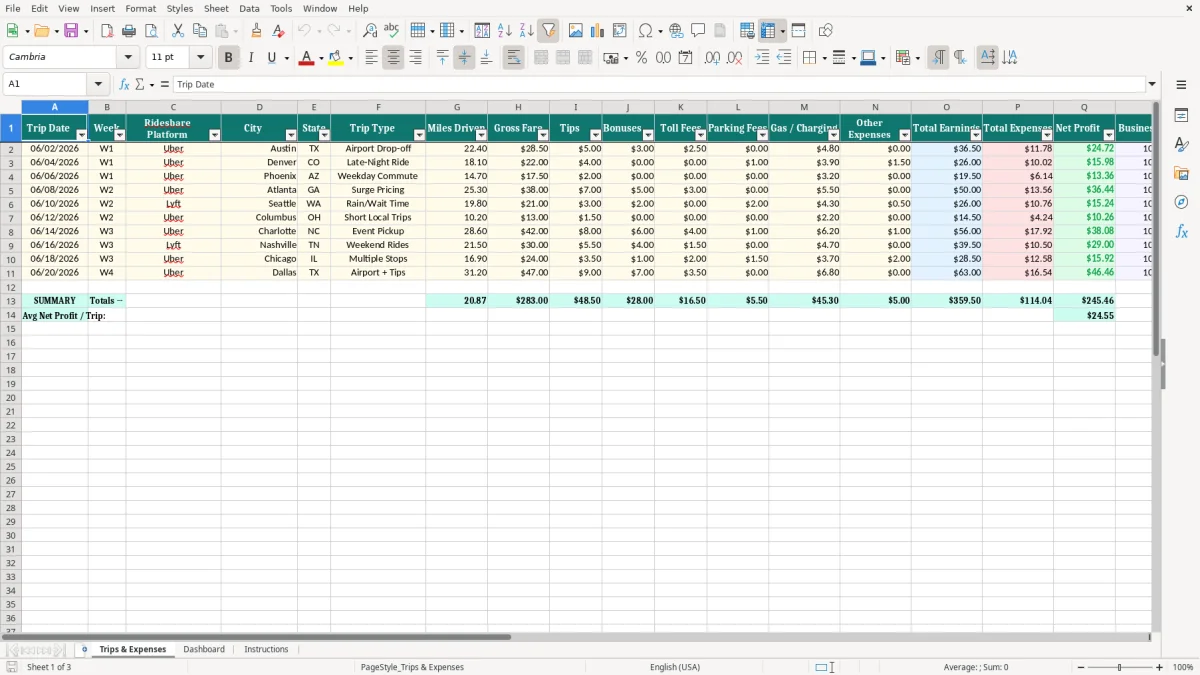
This Excel template tracks each Uber trip, your mileage, fares, tips, bonuses, and trip expenses in one workbook. It gives you a trip-by-trip record, a dashboard, and instructions so you can see net earnings and cash flow without rebuilding the same spreadsheet every week.
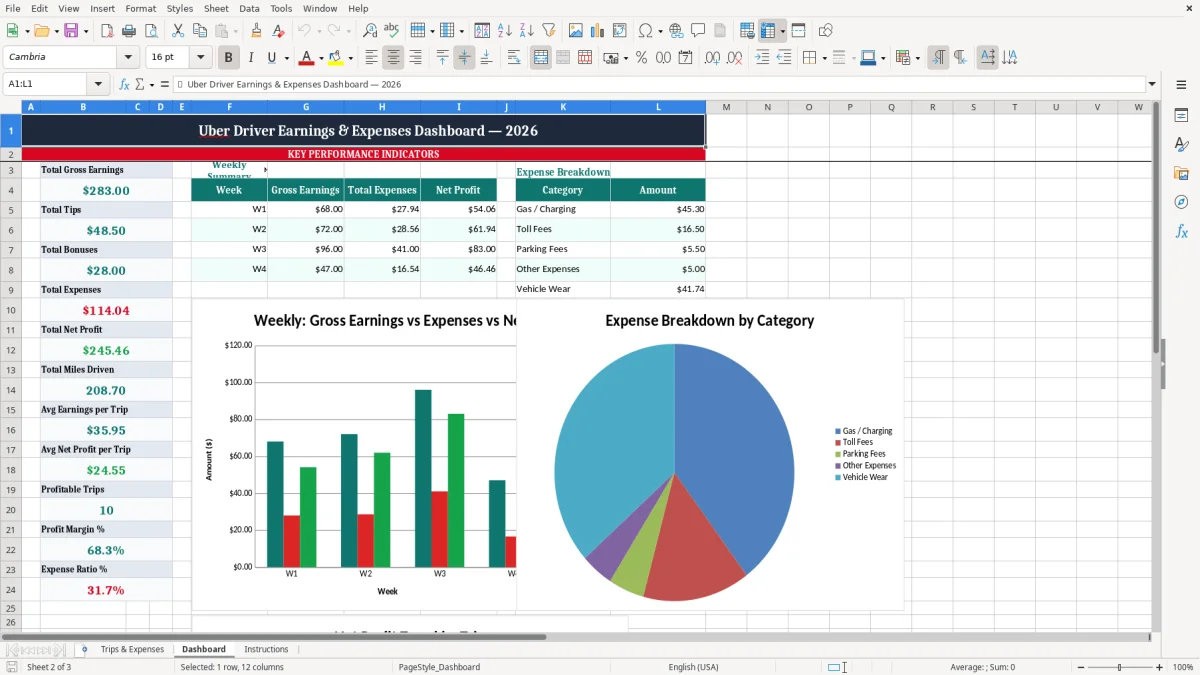
Image 1 shows the Trips & Expenses tab with columns for trip date, week, platform, city, state, trip type, miles driven, gross fare, tips, bonuses, tolls, parking, gas or charging, and other expenses. Image 2 shows the dashboard, where totals and charts turn raw trip data into a clear view of profit and mileage.
This is the kind of sheet a sole proprietor driving full-time or part-time can use for tax season, weekly review, or quarterly estimated taxes. If you also track a second platform or multiple cities, the workbook keeps those details in separate fields instead of burying them in notes.
Drivers usually need this sheet at the end of a shift, after a weekend rush, or when they sit down to estimate quarterly estimated taxes. A 1099 contractor who drives 25 to 40 trips a week can enter rows in batches instead of waiting until April, which is how mileage gets lost.
The workbook fits the way gig work is actually run: a morning airport run, a lunch delivery block, then a late-night surge period. If you drive in two cities and cover 900 miles a month, one file with trip-level detail is better than three scattered app exports.
A part-time driver making $450 on Friday and Saturday should record the work before the numbers blur together. Two $18 tolls and $26 in parking can change the real profit on a busy night more than most people expect.
At month-end, a driver with $4,200 in gross fares and $620 in fuel, tolls, and parking can see whether the week’s extra driving actually helped. That kind of review is what keeps your profit & loss from turning into guesswork.
The IRS does not reward vague totals. For your records, you want dates, trip counts, mileage, and expenses tied to each ride, because mileage is often the biggest deduction for a rideshare driver filing Schedule C with Form 1040.
Self-employment tax on Schedule SE is 15.3% before income tax, so clean records matter. If you owe $2,400 for the year and skip Form 1040-ES payments due April 15, June 15, Sept. 15, and Jan. 15, you can pick up penalties that eat into already-thin driver margins.
In practice, a driver who logs 12,000 business miles and 1,800 personal miles can separate business use clearly. That is much stronger than a single yearly estimate scribbled from memory after 20,000 mixed miles.
Most drivers are better off using a cash-basis record of money actually received and paid, not a complicated accrual setup. You care about when Uber deposits arrive, when fuel leaves your account, and how that affects cash flow week by week.
The most expensive mistake is undercounting mileage or forgetting reimbursable trip costs. If you miss 2,000 business miles and use a 67¢ standard mileage benchmark, that is $1,340 in deductions you never captured.
Another common error is mixing personal and business fuel purchases without noting the trip. A driver who fills up for $58 twice a week can easily misclassify $150 to $200 a month, and that makes the monthly balance sheet or profit review useless.
A toll receipt with no trip date, city, or route is hard to match to a ride. If you ever need to defend a deduction, clean contemporaneous notes are worth far more than a box of random screenshots.
Drivers also leave money off the sheet when they ignore in-app bonuses or cash tips. Missing $75 a week in bonuses is nearly $3,900 over a year, which is real income even before you count the tax impact.
Use the workbook at the same time every week, ideally after your last shift and before you cash out mentally. If you wait until tax season, you will spend hours reconstructing rides that should have taken 10 minutes to enter.
For a driver who works Friday through Sunday, the best routine is a Sunday night update plus a Monday morning check. That habit keeps your mileage, tolls, and parking from slipping through the cracks when you are tired.
If you are running multiple vehicles, helpers, or a side business with inventory and invoices, you may outgrow a simple workbook. At that point, QuickBooks or a dedicated fleet system is a better fit than forcing one sheet to do everything.
It tracks trip date, week, platform, city, state, trip type, miles driven, gross fare, tips, bonuses, toll fees, parking fees, gas or charging, and other expenses. That gives you a trip-level record instead of a monthly guess.
Yes. If you file as a sole proprietor, the sheet gives you the support you need to summarize business income and expenses for Schedule C and related mileage records.
Update it daily if you drive often, or at least once a week. A weekly habit is enough for many drivers, but the more often you enter the rows, the less you lose to memory.
Yes. When you can see net earnings after trip costs, you can estimate what to set aside for estimated taxes and avoid scrambling before the quarterly due dates on Form 1040-ES.
Include direct trip costs such as tolls, parking, gas, charging, and other out-of-pocket expenses connected to driving. Keep the entries tied to the trip date so you can explain them later if needed.
No. You can use it for any rideshare or delivery driving work where you need mileage, earnings, and expense tracking in one place. The column structure is built for trip-based income, not just one app.