Goodwill Donation Value Log Template
12
Free download
Track deductible business expenses, receipt status, and Schedule C categories for 2026 in one Excel log with a summary dashboard.


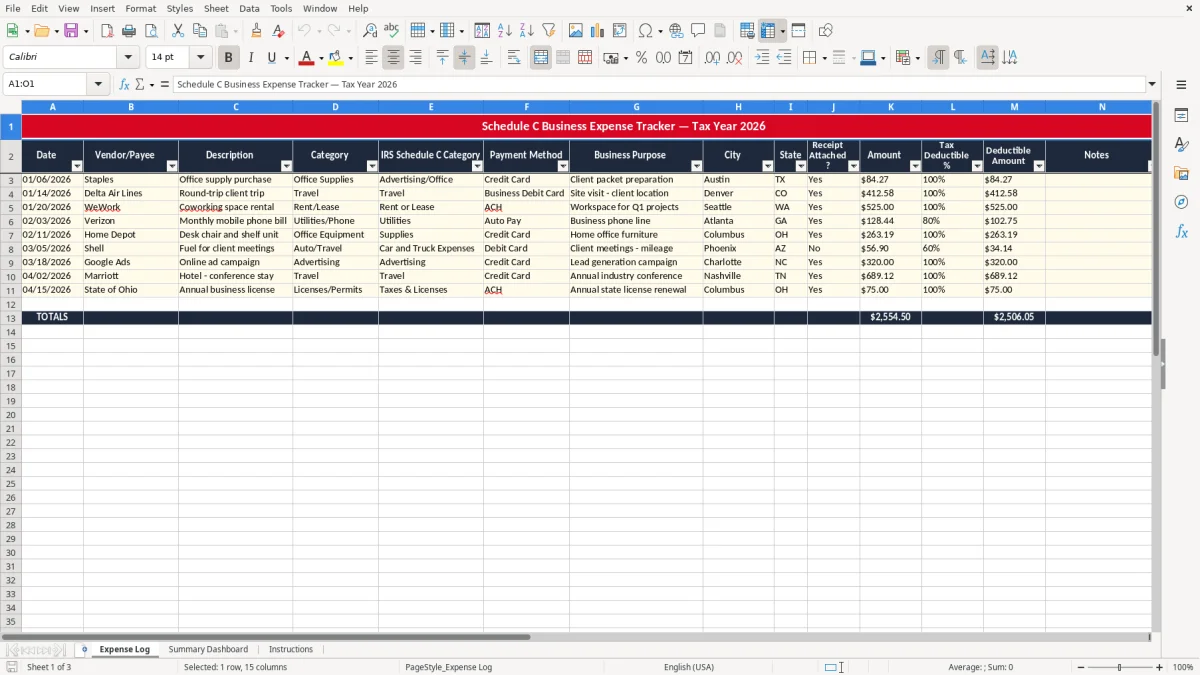
This Schedule C expense tracker Excel template is a business log for a sole proprietor or single-member LLC that records deductible expenses for Schedule C and shows the total deductible amount. It includes an Expense Log, a Summary Dashboard, and Instructions.
Use it to organize each purchase by date, vendor, category, payment method, business purpose, receipt status, and deductible percentage. The workbook is set up for Tax Year 2026, so you can keep your records clean before you file Form 1040 and Schedule SE.
The template also helps you separate the full charge from the deductible portion when an expense is only partly business use. That matters when you want a clean profit & loss trail instead of a pile of bank transactions with no support.
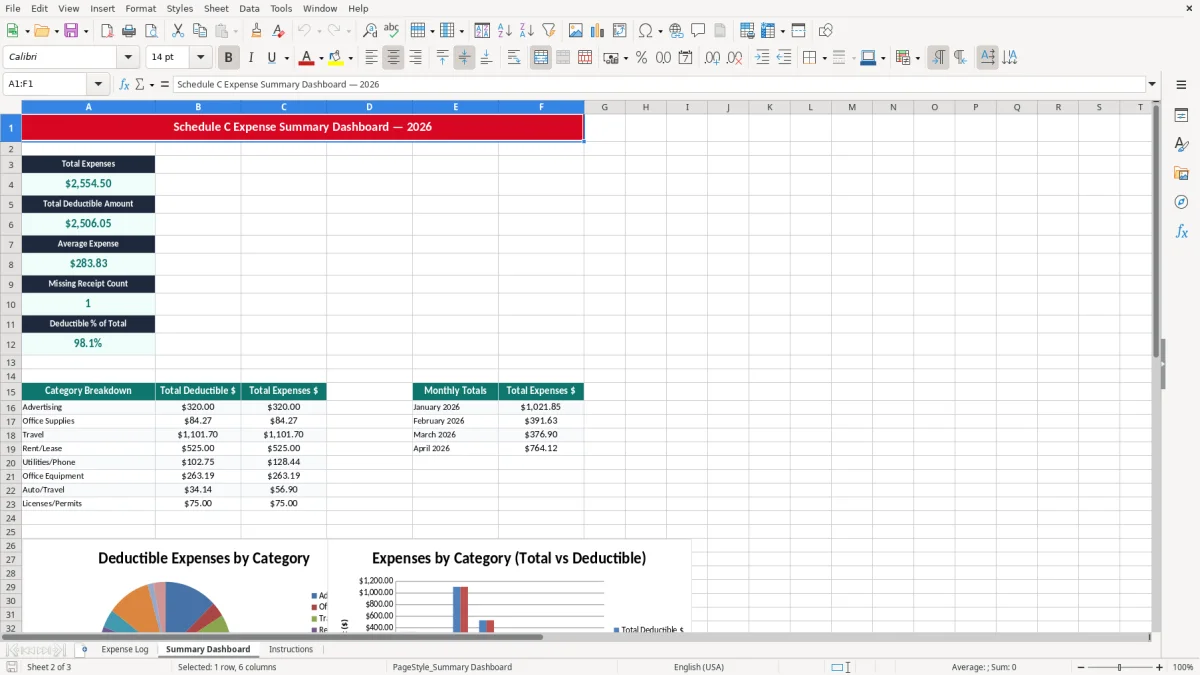
This workbook is built for the person who is doing the books while also doing the work: a solo Schedule C filer, a bookkeeper at an LLC, or an office manager who needs one clean list before year-end. It is also practical for a 1099 contractor who has 40 receipts in a glove box and wants a single place to sort them before the tax return.
Image 1 shows the Expense Log tab, and the layout is straightforward: Date, Vendor/Payee, Description, Category, IRS Schedule C Category, Payment Method, Business Purpose, City, State, Receipt Attached?, Amount, Tax Deductible %, Deductible Amount, Notes, and Receipt Flag. If you spend $2,400 a month across fuel, supplies, and subcontract work, this structure keeps each dollar tied to a field you can actually review later.
The timing matters. Most small businesses do this cleanup at month-end, after the bank feed is reconciled, or right before the quarterly estimated tax review. A contractor with 75 expense lines in a month can finish the log in under an hour if the data is entered as the charges happen instead of recreated from memory.
By January, you want a record you can hand to your tax preparer without sorting through emails and PDFs. A stack of 120 receipts is not the problem; the problem is when none of them are assigned to the right category or business purpose, which turns a simple Schedule C review into a slow cleanup job.
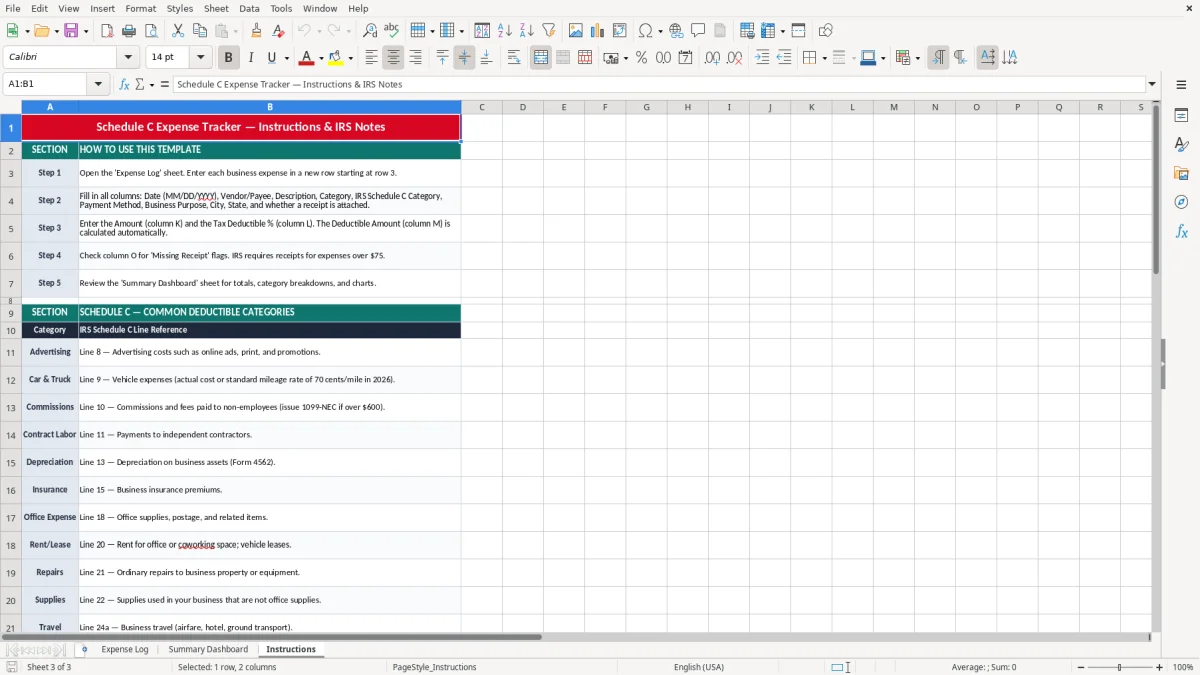
The point of the log is documentation. The IRS generally expects you to keep tax records for 3 years, and in some cases up to 7 years, so a one-year folder of receipts is not enough if you cannot tie the cost to the entry on your return.
For self-employed filers, these expenses feed into Schedule C, and the net profit flows to Schedule SE for self-employment tax. That tax is 15.3% total, made up of 12.4% Social Security and 2.9% Medicare, so a $10,000 reduction in deductible expenses can change the tax bill by roughly $1,530 before federal income tax is even considered.
The template includes Tax Deductible % because many real expenses are not 100% business. If a phone bill is $120 and 75% is business use, the deductible amount is $90, not the full $120. That is cleaner than guessing later and helps you line up the record with the actual business-use claim.
For a service business with no inventory, cash-basis tracking is usually the simplest way to manage Schedule C expenses. You record the expense when you pay it, which matches how the bank account moves and keeps the tracker aligned with the year-end tax filing instead of with a complicated accrual ledger.
The biggest problem is a log that looks complete but cannot survive review. If you enter $4,800 of office supplies, food, and repairs with no business purpose and no receipt flags, you may lose deductions because the support is too thin to defend.
Another common mistake is putting every charge into one broad category. If you mix software, postage, and subcontract labor together, you cannot tell whether your gross margin is being squeezed by direct job costs or by overhead, and that makes the monthly numbers close to useless.
A receipt that is not attached when the transaction is fresh often becomes a lost deduction later. If you miss just $6,000 of legitimate business expenses in a year and you are in a combined federal and self-employment tax range that would have benefited from the write-off, that oversight can easily cost more than $1,000 in avoidable tax.
When a contractor drops every charge into “miscellaneous,” the tax preparer has to rebuild the file from scratch. A cleanup that should take 30 minutes can turn into 3 hours, and at a modest $150 hourly advisory rate, that is $375 in extra professional time before you even discuss the tax return itself.
The log works best when you use it on the same day you review the bank feed or run payroll. If you set aside 20 minutes every Friday and enter 10 to 15 transactions at once, you stop the pile from becoming a quarter-end mess.
If you are past 300 transactions a month, or you need invoices, accounts receivable, and bank reconciliation in the same workflow, you have outgrown a simple tracker. At that point, a bookkeeping system like QuickBooks is the better home, but this workbook is still a clean starting point for expense control and tax prep.
Use it for ordinary and necessary business expenses tied to your trade or business, such as supplies, software, advertising, travel, repairs, and subcontract labor. If an expense is only partly business, enter the business-use percentage so the deductible amount is calculated separately.
Yes. The Amount field captures the full purchase price, and the Tax Deductible % and Deductible Amount fields let you separate the business portion from the personal portion. That is the right way to handle mixed-use items like a phone bill or home utility charge.
Because the category matters at tax time. A software subscription, an office supply purchase, and a subcontractor payment do not all land in the same place on your return, and sorting them early makes the Schedule C review much faster.
Use the Receipt Attached? and Receipt Flag fields to mark whether you have proof for the transaction. If the receipt is missing, you know to follow up while the purchase is still recent instead of discovering the gap during tax prep.
Yes. A single-member LLC taxed as a disregarded entity still reports business profit and expenses on Schedule C, so the workbook works the same way for that filing setup.
Weekly is the practical minimum, and daily is better if you have frequent purchases. If you wait until the quarter ends, you will spend more time chasing receipts, and you are more likely to miss the kind of small expense that adds up over a full year.