Goodwill Donation Value Log Template
12
Free download
Track taxable sales, state codes, combined tax rates, tax collected, and payment status across states with a 2026 Excel workbook.


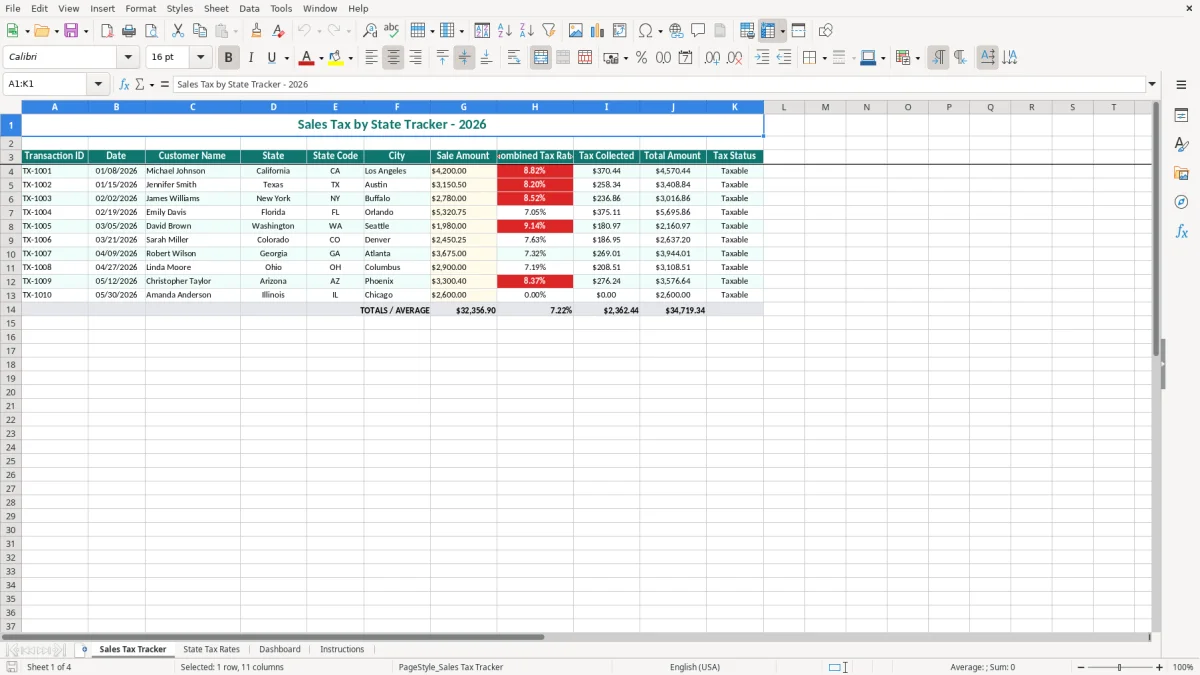
A sales tax by state tracker Excel spreadsheet records each transaction, customer location, sale amount, combined tax rate, tax collected, total amount, and tax status. The workbook includes a Sales Tax Tracker, State Tax Rates reference, Dashboard, and Instructions tab for organizing 2026 filing data.
Enter one transaction per row on the Sales Tax Tracker tab. Image 1 shows the teal header row with Transaction ID, Date, Customer Name, State, State Code, City, Sale Amount, Combined Tax Rate, Tax Collected, Total Amount, and Tax Status.
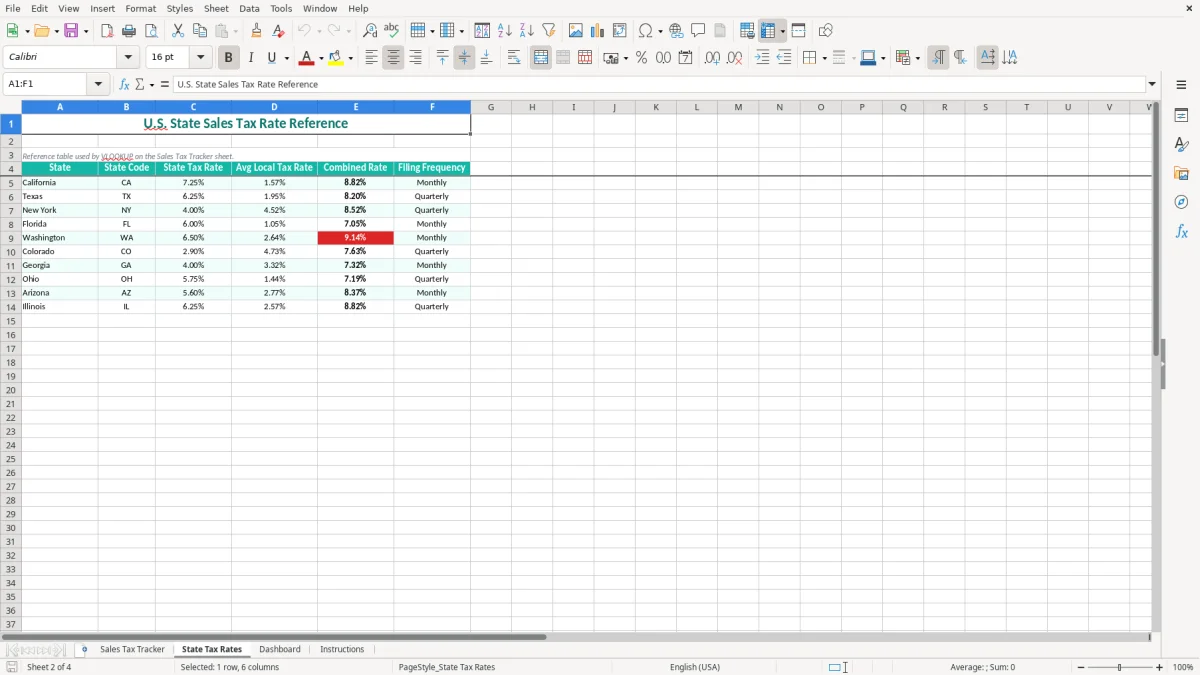
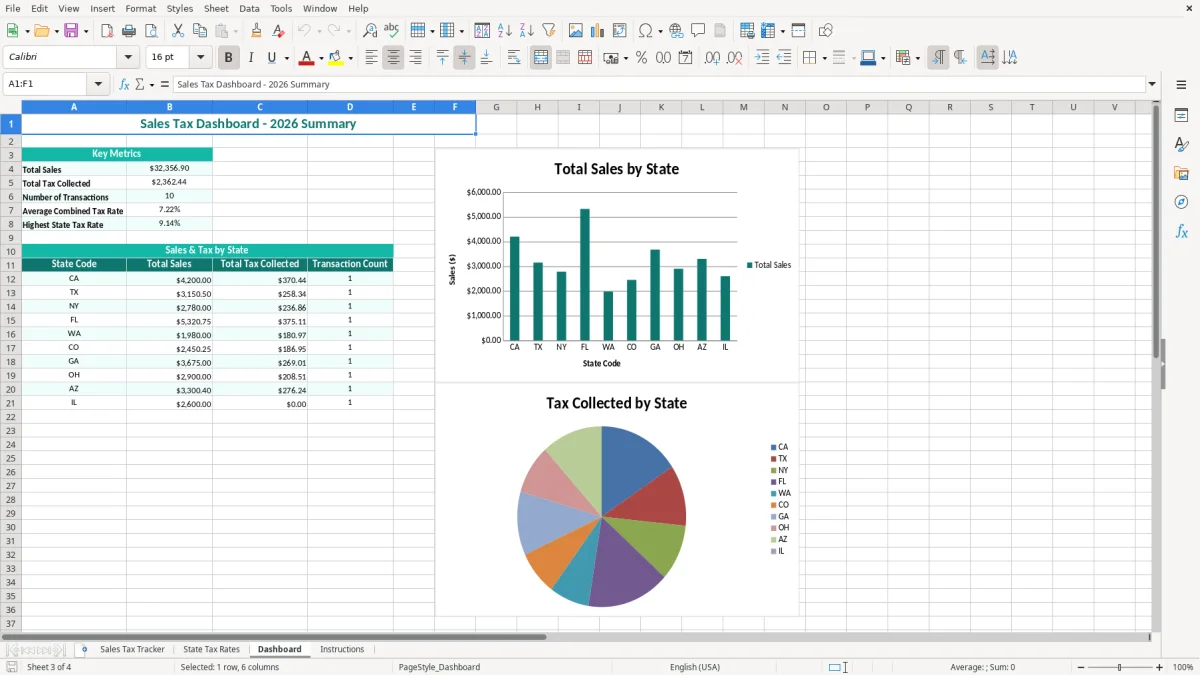
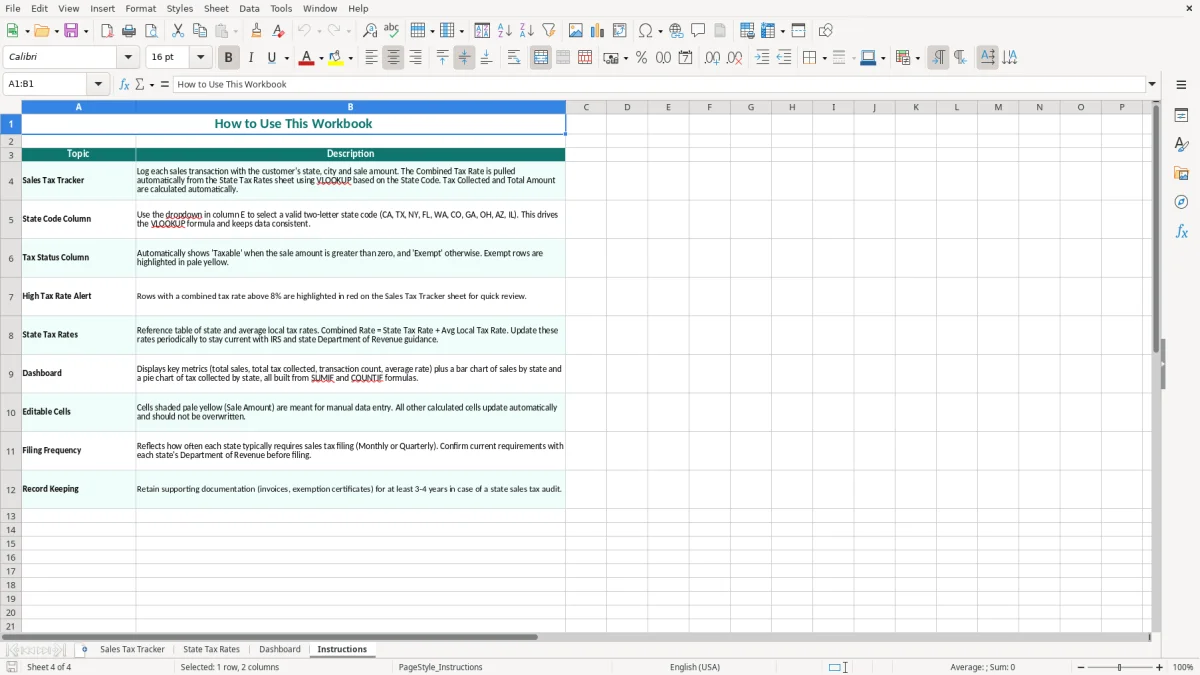
Use the State Tax Rates tab in image 2 to compare reference information, then review the workbook summary on the Dashboard in image 3. Image 4 explains the setup and workflow in the Instructions tab, so you can keep sales tax records with your monthly bookkeeping.
An online store with 300 orders a month can accumulate more than 3,600 transaction rows in a year, especially when customers live in several states. The owner needs the customer location, state code, sale amount, combined rate, and tax collected together so a payment-processor report can be checked against the bookkeeping file.
For that business, the Sales Tax Tracker tab is most useful during the weekly order review and the month-end close. A $180 order at a 7.50% combined rate carries $13.50 of sales tax and a $193.50 customer total; keeping those values visible prevents tax from being mistaken for revenue.
A bookkeeper at a single-member LLC may use the workbook before each state filing to group transactions by state and city. A contractor with 4 employees may also need it when materials are sold alongside installation work, because the sale and the service can receive different treatment.
The State Tax Rates tab, shown in image 2, keeps reference information separate from the transaction list. That is a better arrangement than typing a rate into an invoice note and hoping it is still correct six months later.
Most users enter transactions continuously, reconcile them at month-end, and prepare a state-by-state review before each remittance. During year-end close, the Dashboard in image 3 gives management a starting point for comparing the sales-tax liability account with recorded transactions.
This spreadsheet is especially useful when you have outgrown a simple sales journal but do not yet need a full sales-tax platform. It provides a clear audit trail without forcing a 20-person company to maintain an expensive system for a few hundred monthly transactions.
Sales tax is imposed at the state and local level; the United States has no national value-added tax. Some states do not impose a broad state sales tax, while others combine state, county, city, and special-district charges. Your rate therefore depends on the taxable item, customer location, delivery terms, and jurisdiction—not merely the state abbreviation.
Nexus is the connection that can create a registration and collection obligation. Physical presence, employees, inventory, and economic activity can matter, and many states use an economic threshold based on sales or transaction counts. Because thresholds and filing rules are state-specific in 2026, use the State Tax Rates tab as a reference and verify the current department-of-revenue instructions before filing.
Use the Sales Tax Tracker to tie gross receipts to the liability you owe. For example, 80 taxable orders at $125 each produce $10,000 of sales; at a 6.875% combined rate, tax collected is $687.50 before exempt sales, returns, discounts, or marketplace adjustments.
Do not treat tax collected as business income on a profit & loss statement. Post it to a sales-tax payable liability account, then compare the workbook total with the account balance and the state return.
Keep invoices, exemption certificates, shipping records, marketplace facilitator reports, resale certificates, filed returns, and payment confirmations with the workbook. The IRS generally expects business records to be retained for 3 years, and some situations call for up to 7 years; state sales-tax agencies can set their own retention expectations.
Record corrections as traceable adjustments rather than overwriting the original row. A return of $200 with $14.00 of tax should be documented as a negative adjustment or credit memo, with the supporting transaction reference preserved.
The most expensive error is often a correct-looking rate applied to the wrong jurisdiction. An order shipped to a city with a 1.00% local add-on can be understated by $10 on a $1,000 sale; 200 similar orders create a $2,000 gap before interest, penalties, or correction work.
Typing only the state name is not enough when local taxes apply. If the customer address, shipping destination, or city field is missing, you may not be able to explain why the combined rate was used during an agency review.
Many small businesses deposit the full customer payment into sales revenue. That turns a $5,000 sale with $375 of tax into overstated income by $375 and leaves the liability account understated by the same amount. The error then spreads into management reports and cash-flow planning.
Another failure occurs when refunds are removed from the bank feed but the original tax remains in the tracker. A $600 refund at a 6.25% rate requires a $37.50 tax adjustment; ignoring it can make the next remittance appear short or the books appear unreconciled.
Duplicate Transaction IDs, blank Tax Status cells, and rates entered as whole numbers create silent problems. Entering 7.25 instead of 7.25% can produce a $7,250 tax calculation on a $1,000 sale rather than $72.50, while a duplicated $2,400 order can overstate both sales and tax.
Do not overwrite a prior month because the customer changed an address. Preserve the original record, add a documented correction, and reconcile the revised total to the payment processor and sales-tax payable account. That takes minutes; rebuilding a quarter of transactions can take a full workday.
Choose one owner for transaction entry and one reviewer for the close. For a shop with 300 monthly orders, enter or import sales every Friday, then spend 30 minutes on the last business day comparing the tracker with the payment-processor settlement and the general ledger.
Use the Instructions tab as the handoff point when a bookkeeper or office manager takes over. Keep state names and codes consistent, enter dates as MM/DD/YYYY, and avoid inserting totals or notes inside the transaction table.
For example, if the Dashboard shows $18,000 of tax collected but the ledger shows $17,250, stop and locate the $750 difference before submitting a return. A $750 unexplained variance is a control issue, not a rounding detail.
This workbook is a good fit while transaction volume is manageable and one person can review the rows. Move to QuickBooks sales-tax tools, an integrated ecommerce system, or a specialized tax provider when you exceed roughly 10,000 rows, sell through several marketplaces, or need automated address-based jurisdiction sourcing and filing.
Keep the spreadsheet as an export and review file even after automation. It gives you a readable exception list and a practical backup when a system integration fails during a filing month.
It tracks Transaction ID, Date, Customer Name, State, State Code, City, Sale Amount, Combined Tax Rate, Tax Collected, Total Amount, and Tax Status on the Sales Tax Tracker tab. The workbook also includes State Tax Rates, Dashboard, and Instructions tabs.
Multiply the Sale Amount by the Combined Tax Rate. For a $2,000 sale at 8.25%, the calculation is $2,000.00 × 0.0825 = $165.00 tax, making the Total Amount $2,165.00. Enter percentage values as percentages, not whole numbers.
No. It organizes transactions after you determine your collection obligation. Nexus and economic thresholds are state-specific in 2026, so review the applicable state department-of-revenue rules before registering, collecting, or filing.
Generally, sales tax collected for a state is recorded as a liability rather than revenue. Reconcile the Tax Collected column to a sales-tax payable account, then reduce that liability when you remit the tax or record an approved adjustment.
Yes, the State and City columns help you record local information, and the Combined Tax Rate field can include applicable state and local components. Confirm destination-based sourcing, city rules, exemptions, and filing requirements for each jurisdiction before relying on the recorded rate.
Update it weekly when you have regular online or point-of-sale activity, then reconcile it at month-end. Before each state filing, compare the tracker with invoices, payment-processor reports, the sales-tax payable account, and the return you are preparing.