Goodwill Donation Value Log Template
12
Free download
Track GSA per diem meals, lodging, mileage, and totals by trip with an expense report for employees and travelers.


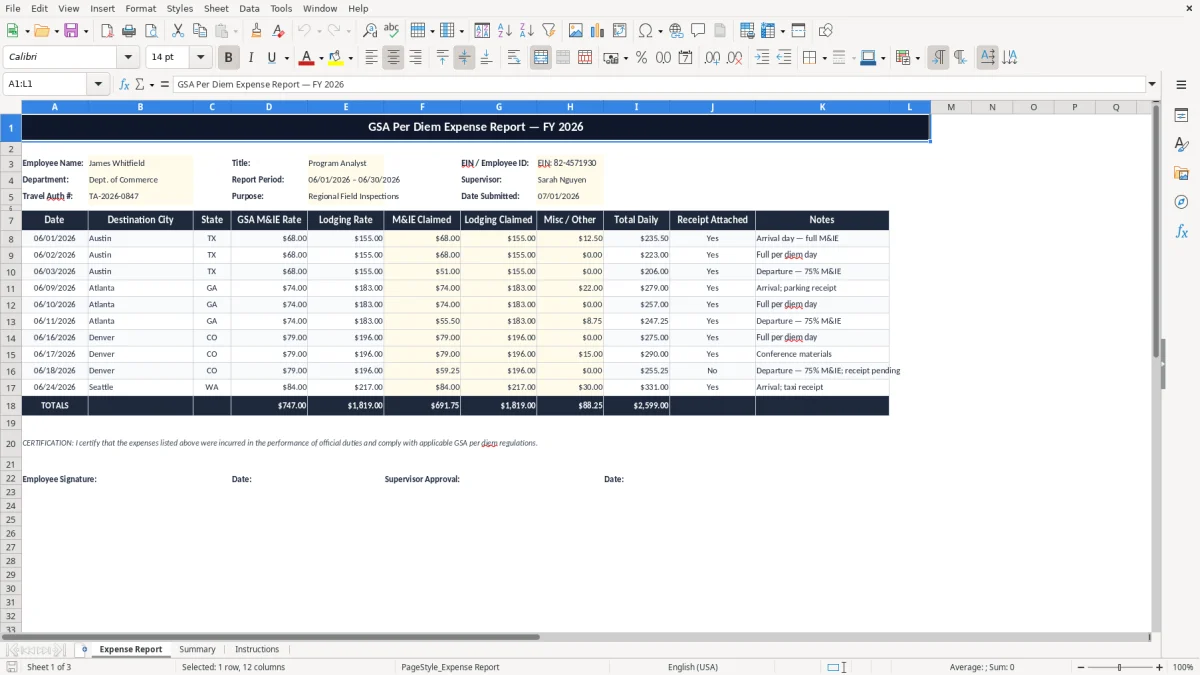
This GSA per diem expense report Excel template tracks travel dates, trip details, daily allowances, reimbursable expenses, and the total amount due. It is built for employees, contractors, and travel coordinators who need a clean record of per diem meals, lodging, and incidentals.
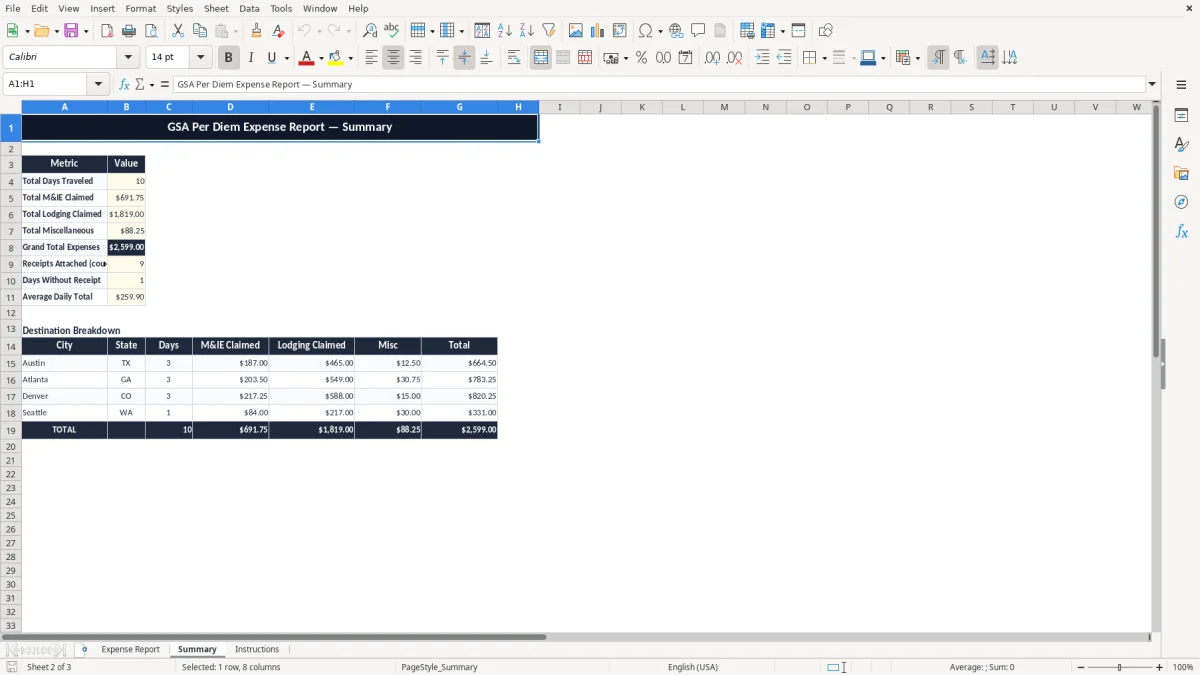
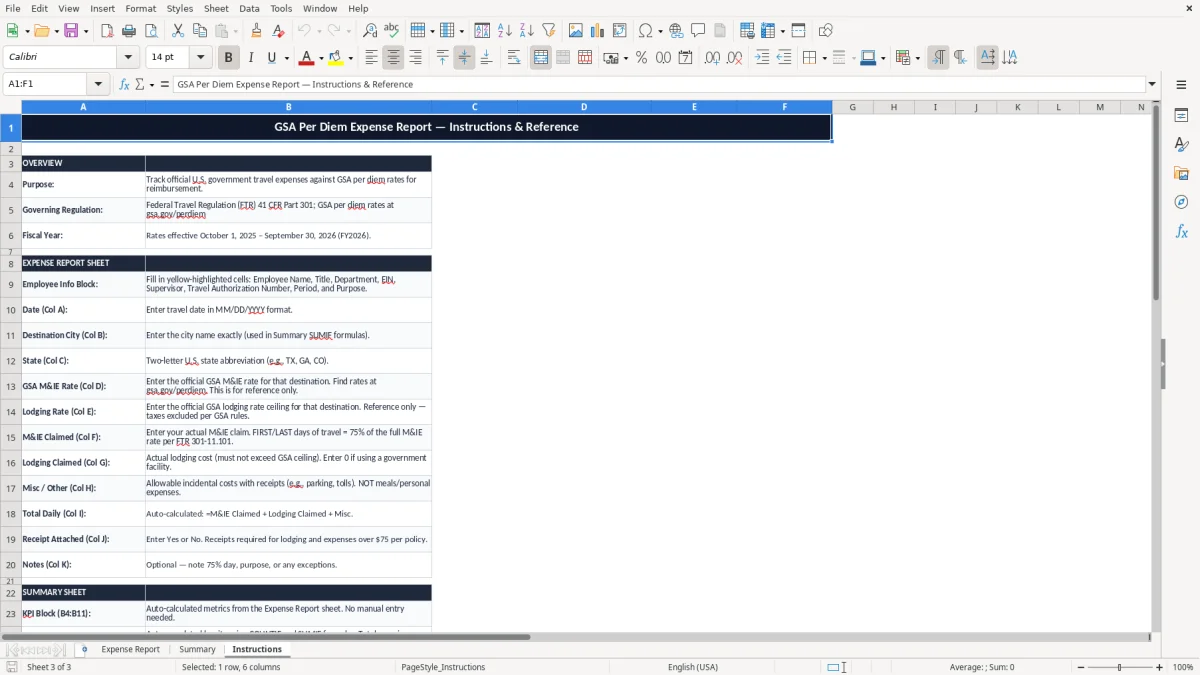
The workbook includes three tabs: Expense Report for entry, Summary for totals, and Instructions for setup and use. You get a practical layout for documenting a trip from the first travel day to the final reimbursement figure.
This spreadsheet fits the person who has to turn a business trip into a clean reimbursement request: a sole proprietor on a federal contract, a bookkeeper at an LLC, a field supervisor at a construction company, or a nonprofit employee who travels to conferences. If you are tracking a 4-day trip with $74 meals, $189 lodging, and $32 in incidentals, you need the totals in one place before you submit the packet.
The most common use case is a month-end or trip-end close. A travel coordinator who processes 12 reports a week can see the difference immediately when each report has dates, purpose, and authorization number at the top instead of scattered across emails.
Employees use the form to request reimbursement. Approvers use it to compare the claim against the travel order and avoid paying a wrong day or duplicate hotel bill.
You usually finish it right after the trip, before the receipts get buried. If you wait until the next payroll run or the next monthly close, you lose time and the totals get harder to verify.
The IRS expects business travel records to support the deduction: date, place, business purpose, and amount. Keep the supporting records for at least 3 years after the return is filed, and longer when the file connects to asset records or a disputed item.
For federal travel, the per diem framework comes from the GSA. That matters because a per diem report should show the approved rate by day instead of relying on a vague estimate; if the trip covers 6 days at $68 per day for meals and incidentals, your base allowance is $408 before any lodging or reductions.
Per diem is cleaner when the company allows it because you can avoid stapling a pile of small meal receipts to the report. Actual-expense reporting works better when lodging or transportation runs outside the standard allowance and you need line-by-line backup.
A report with dates, purpose, and amounts makes later review much easier for accounting, the supervisor, and the tax file. A missing business purpose on a $215 hotel stay can turn a valid expense into a cleanup job at year-end.
The biggest problem is not math; it is incomplete support. A traveler who skips one travel day, enters the wrong hotel amount, or forgets to mark a personal meal can force accounting to send the report back, which delays payment by days or even a full pay cycle.
Another common failure is mixing reimbursable travel costs with non-travel spending. If a 3-day report includes $96 of meals, $214 of lodging, and $58 of personal items, only the eligible portion should hit the reimbursement total; otherwise the approver has to split the claim by hand.
A missing receipt for a $147 taxi ride is not just annoying. It can mean the expense is disallowed, the traveler absorbs the cost, or the bookkeeper spends 20 minutes chasing proof instead of closing the books.
When the report keeps the trip dates, purpose, and total visible, you catch a mismatch before submission. That is faster than fixing a rejected claim after payroll has already posted reimbursements.
The best routine is simple: enter the trip on the same day you return, then review it with receipts before the next accounting cutoff. If you handle travel every week, a standing Friday check takes less time than rebuilding the report from memory two weeks later.
If your team is processing dozens of trips, or if approvals, receipts, and reimbursements keep crossing in email, you have outgrown a file. At that point a travel management system or accounting platform such as QuickBooks is the cleaner move.
It tracks the trip dates, traveler details, travel purpose, daily allowances, reimbursable costs, and the total reimbursement request. The point is to show a complete travel packet in one workbook.
Use it if you travel for work and need to document per diem or other reimbursable expenses for approval. It works for employees, contractors, and small-business owners who need a simple record before submitting a claim.
Enter each day separately and use the approved rate for that day. If one day is $74 and another is $86, keep them split so the total is easy to verify.
Keep support for any item the company requires and for any expense that is reimbursed at actual cost instead of a flat allowance. The workbook is the summary, not the only record.
Keep the report and backup records for at least 3 years after filing the related return, and longer if the file connects to an asset or a disputed reimbursement. That keeps you covered during review.
Yes. A monthly reimbursement cycle is one of the best uses for this workbook because you can group all trips into one clean summary and submit them at the same time.