Goodwill Donation Value Log Template
12
Free download
Track fuel, insurance, repairs, registration, business use, and deductible vehicle costs for Schedule C using four organized Excel tabs.


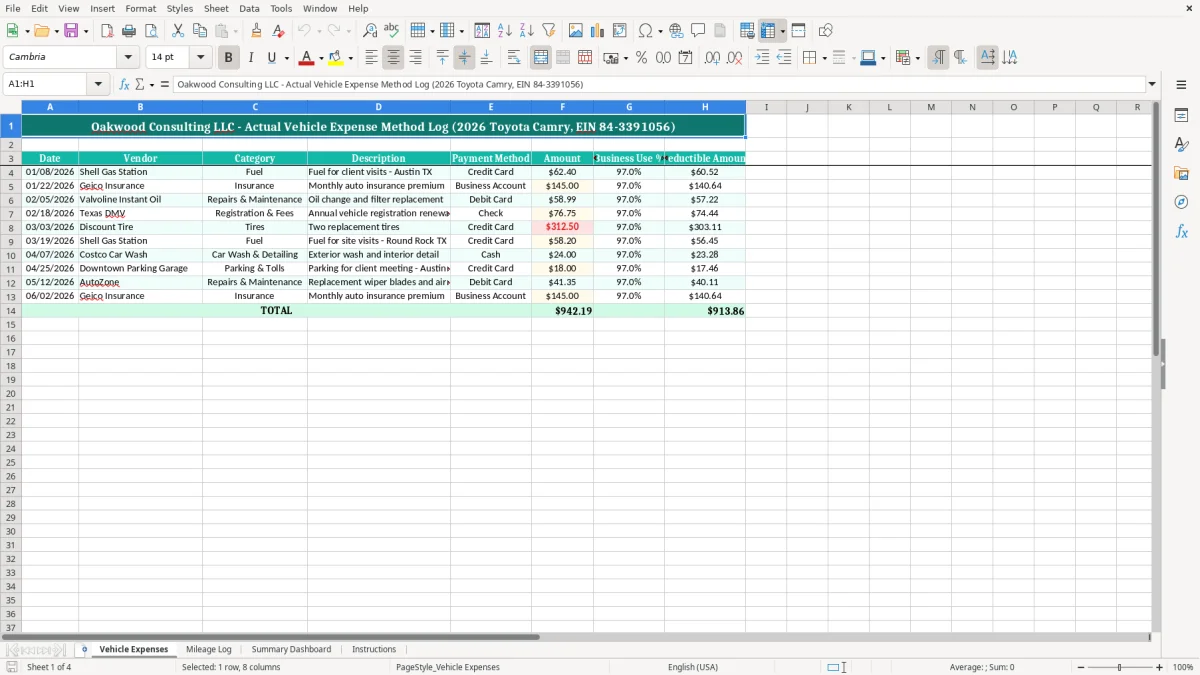
The Actual Vehicle Expense Excel spreadsheet records your vehicle costs by date, vendor, category, description, payment method, amount, and business-use percentage. It calculates the deductible portion of each entry and organizes the results in Vehicle Expenses, Mileage Log, Summary Dashboard, and Instructions tabs for tax-time review.
Use the actual vehicle expense method when you want to track the costs of operating the vehicle rather than applying the IRS standard mileage method. The Vehicle Expenses tab includes fields for fuel, insurance, repairs and maintenance, registration and fees, tires, and other operating costs.
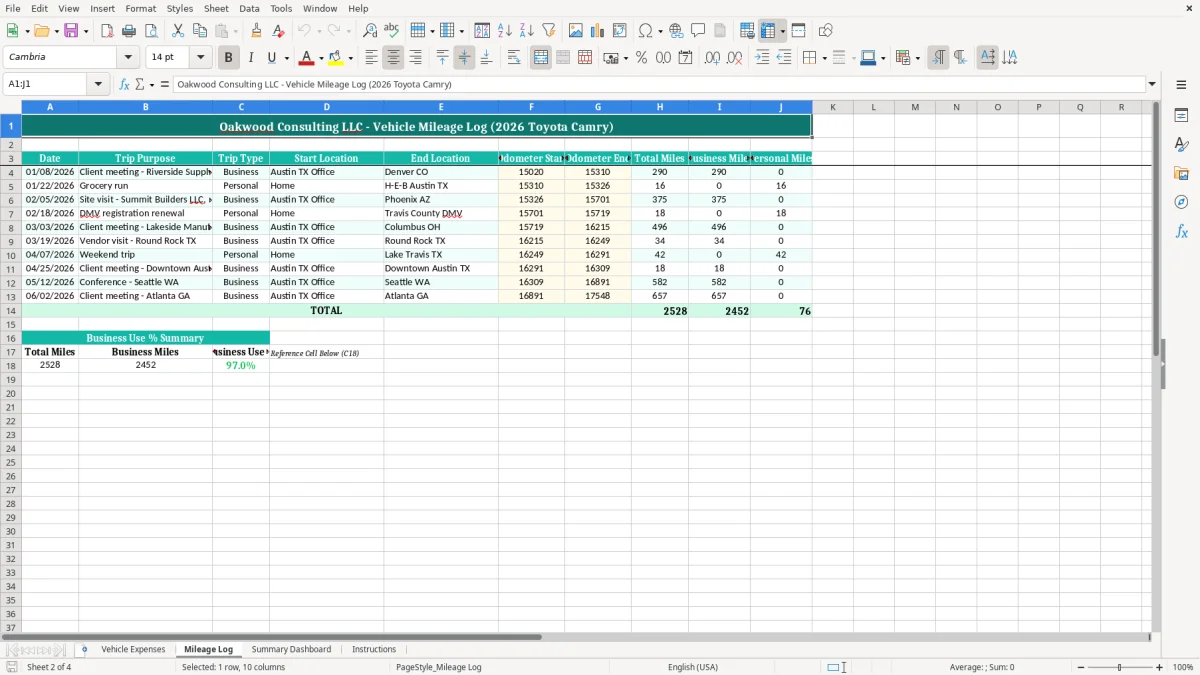
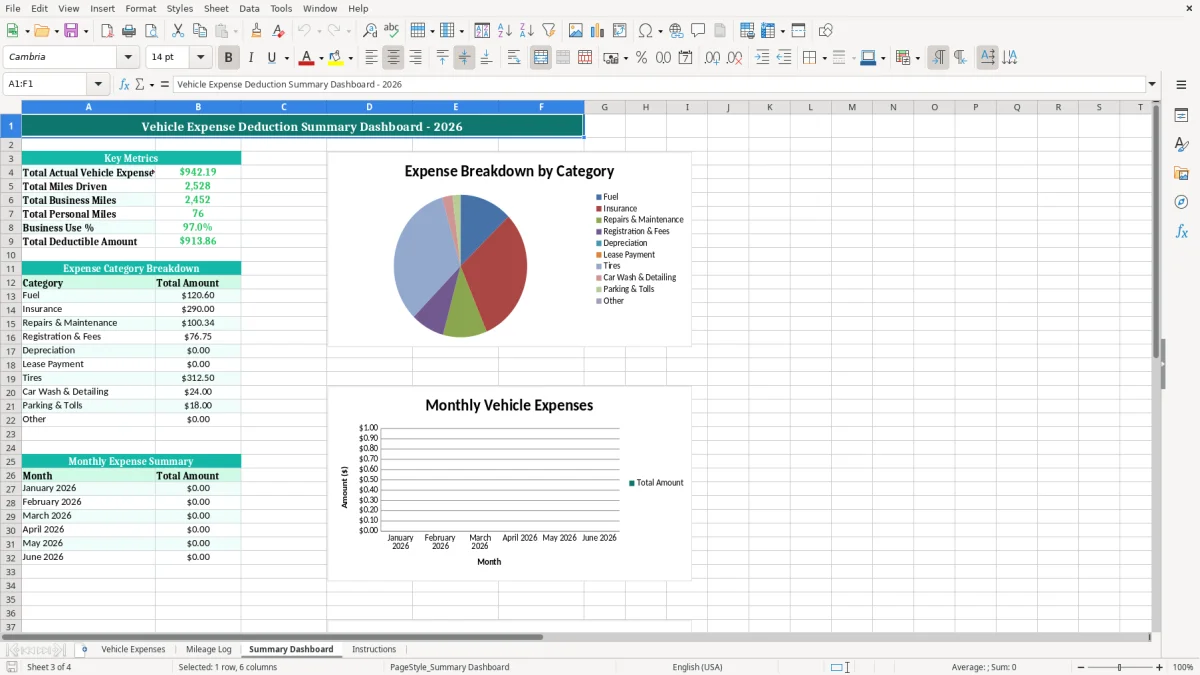
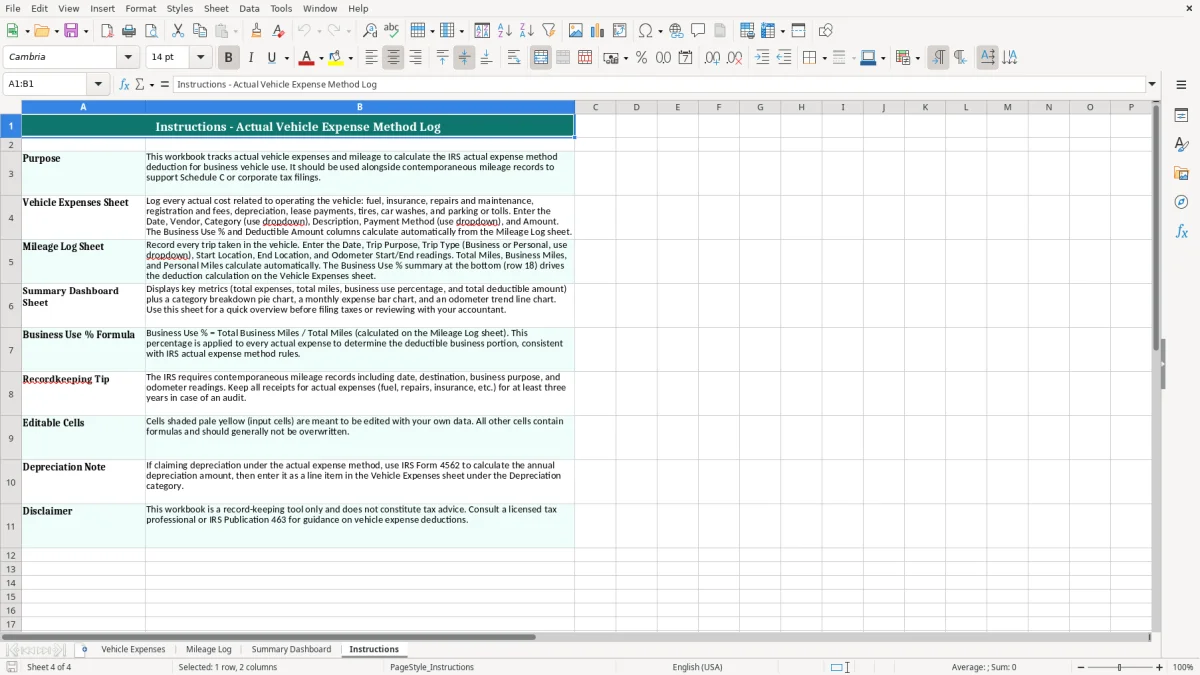
Image 1 shows the main expense-entry layout, while image 2 shows the separate mileage records. The Summary Dashboard and Instructions tabs help you review totals and follow the workbook's intended workflow.
The actual vehicle expense method is useful when a vehicle has substantial operating costs and you want your records to reflect what you actually spent. A sole proprietor making client visits, a consultant driving between job sites, and a single-member LLC with one company-used car can all use this type of log while preparing Schedule C.
The workbook is especially practical during a monthly bookkeeping close. If a consultant pays $1,200 for fuel, $1,740 for insurance, $900 for repairs, and $600 for registration and tires during the year, the recorded operating cost is $4,440 before applying business use. At 75% business use, the business portion is $3,330.
A 1099 contractor often has receipts scattered across a personal card, business checking account, and email inbox. The Vehicle Expenses tab gives you one place to enter the date, vendor, category, description, payment method, amount, and business-use percentage. Image 1 shows those eight columns across the worksheet, including the deductible amount at the far right.
A bookkeeper supporting a small LLC can enter transactions after the bank reconciliation and compare the vendor list with card activity. A $145 Geico premium, a $58.99 oil change, and a $312.50 tire purchase should appear as distinct records rather than one unexplained annual total.
The Mileage Log serves a different purpose from the expense register. Image 2 shows the mileage-recording tab, which lets you preserve trip information while the expense tab documents the money paid. The Summary Dashboard then gives you a review point before the numbers move into tax software or a preparer’s workpapers.
For a self-employed person, actual vehicle costs generally flow into the business records used for Schedule C, and the resulting business profit affects Schedule SE and Form 1040. The spreadsheet is a bookkeeping aid, not a substitute for determining whether a particular cost is deductible under current IRS guidance.
Your calculation must separate personal and business use. If total documented vehicle costs are $8,000 and the business-use percentage is 65%, the business portion is $5,200. The percentage should be supported by mileage records or another reasonable allocation method, not selected simply because it produces a larger deduction.
The IRS generally expects taxpayers to retain supporting records for 3 years, with records sometimes needed for up to 7 years. Keep invoices, receipts, bank or credit-card statements, and a business-purpose explanation that agrees with the Date, Vendor, Description, and Amount columns in Vehicle Expenses.
The actual method records fuel, insurance, repairs, registration fees, tires, and other allowable operating costs. The standard mileage method uses the applicable IRS rate for qualifying business miles instead. You should choose a method only after comparing the documentation burden and likely deduction; switching methods can have specific consequences when depreciation is involved.
If you track two vehicles, identify them in the Description field or maintain separate workbooks. Do not combine a family SUV and a service vehicle under one percentage. For a 2026 tax file, label the backup folder clearly and retain the source documents with the completed workbook.
The most expensive mistake is recording the full receipt as deductible without applying business use. A $1,500 repair on a vehicle used 40% for work has a business portion of $600, not $1,500. The remaining $900 is personal and should not inflate the business deduction.
A line that says “gas” is weak evidence when you review the file six months later. The template’s Description field gives you room for a useful note such as “Fuel for three client visits in Austin,” while Vendor and Payment Method help you locate the original transaction. A $62.40 Shell purchase is much easier to verify than a generic monthly total of $400.
Users sometimes enter a repair once from the vendor receipt and again from the credit-card statement. That turns a $312.50 tire purchase into $625.00 of reported cost. Reconcile entries to the payment account and mark the source document after entry; the payment method column makes this check faster.
A mileage record and a fuel receipt are not automatically two deductions for the same use. The standard mileage method and actual expense method have different mechanics, so entering both as if they were additive can overstate the claim. Use Mileage Log to support business use and Vehicle Expenses to document the chosen actual-cost records.
A blank Business Use % makes the deductible amount impossible to review. Even when a vehicle is used almost entirely for work, enter the supported percentage and retain the mileage basis. A missing allocation can delay tax preparation and force you to reconstruct trips, dates, and personal use under deadline pressure.
The workbook works best when you update it on a fixed schedule instead of waiting for tax season. Set aside 15 minutes after the monthly credit-card reconciliation: enter each vehicle transaction, attach or scan the receipt, and compare the month’s total with the account statement.
Record one transaction per row and use the same category names throughout 2026. For example, do not alternate between “Oil,” “Oil Change,” and “Repairs” when the cost belongs under Repairs & Maintenance. Consistent labels make the Summary Dashboard easier to interpret and prevent a $58.99 service from disappearing into an unclear category.
At quarter-end, review the workbook before calculating estimated taxes through Form 1040-ES. Vehicle costs affect business profit, but they are only one part of the calculation; do not treat the dashboard total as your tax payment amount.
This spreadsheet is a strong fit for one vehicle and a manageable transaction volume. If you have 10 vehicles, hundreds of monthly fuel and repair entries, or multiple users editing the file, move the source records into QuickBooks or a fleet system and retain this workbook as a review export. A four-employee contractor with 600 vehicle transactions a year should not rely on manual duplicate checks forever.
The actual vehicle expense method calculates the business portion of documented operating costs such as fuel, insurance, repairs, registration, and tires. You multiply an allowable cost by the supported business-use percentage instead of multiplying business miles by the applicable standard mileage rate.
It contains Date, Vendor, Category, Description, Payment Method, Amount, Business Use %, and Deductible Amount columns. Use one row for each transaction and enter enough description detail to connect the entry to its receipt and business purpose.
Yes. A sole proprietor can use it to organize vehicle records that support the business expenses reported on Schedule C. The workbook does not decide which costs are legally deductible, so review the completed records before entering them on Form 1040.
Use the Mileage Log to document business trips and the Vehicle Expenses tab to record actual costs. Do not automatically add a standard-mileage deduction to actual operating costs for the same vehicle use; those are separate deduction methods with different rules.
Multiply the total expense by the business-use percentage. For example, $200.00 of fuel at 70% business use produces a $140.00 business portion. Retain the mileage or other allocation records supporting the 70% figure.
The IRS generally expects tax records to be kept for 3 years, and some records should be retained for up to 7 years. Keep the completed workbook, receipts, payment statements, and mileage evidence together in a dated 2026 folder.