Goodwill Donation Value Log Template
12
Free download
Reconcile 1099-K Box 1a amounts with book revenue across processors using summary, monthly detail, dashboard, and instructions tabs.


A 1099-K payment processor reconciliation spreadsheet compares each processor's Box 1a gross amount with the revenue recorded in your books. This template includes a Processor Summary, Monthly Detail, Dashboard, and Instructions tab so you can identify differences before preparing your 2026 business tax return.
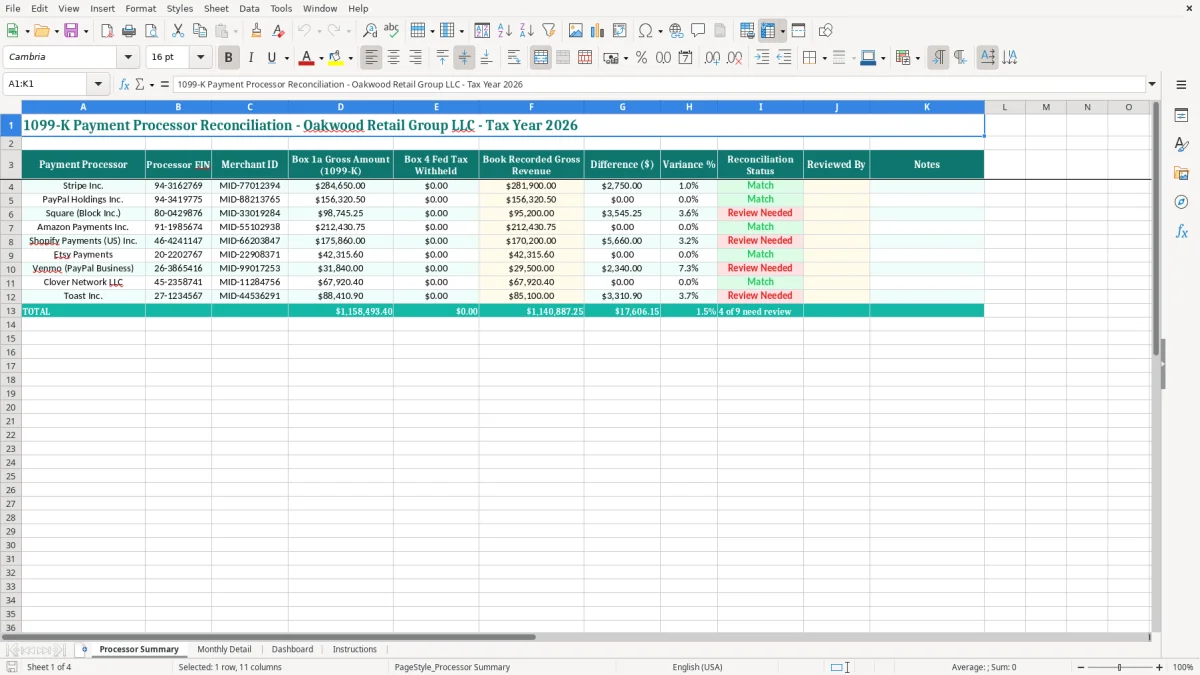
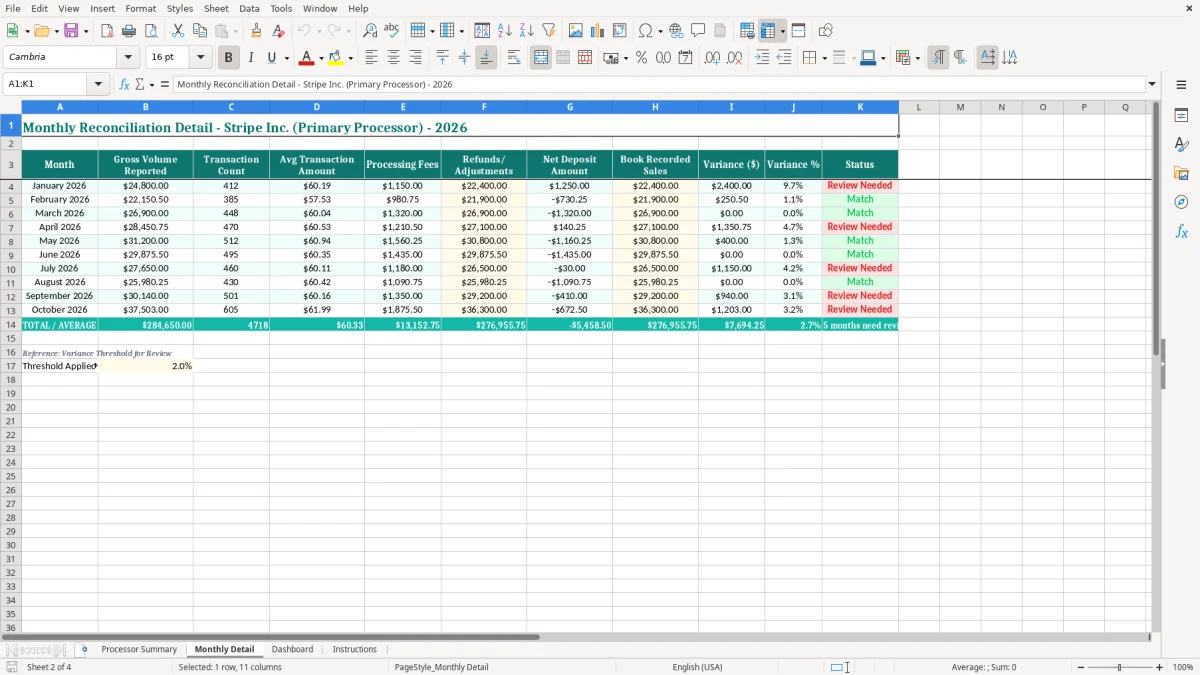
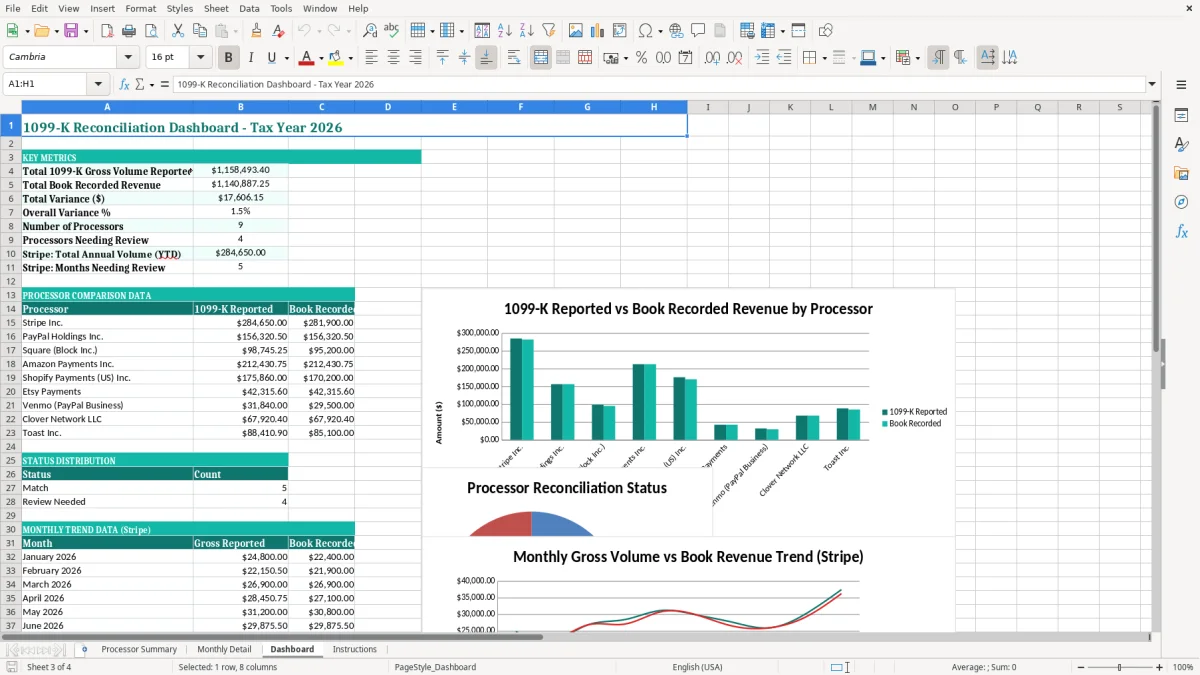
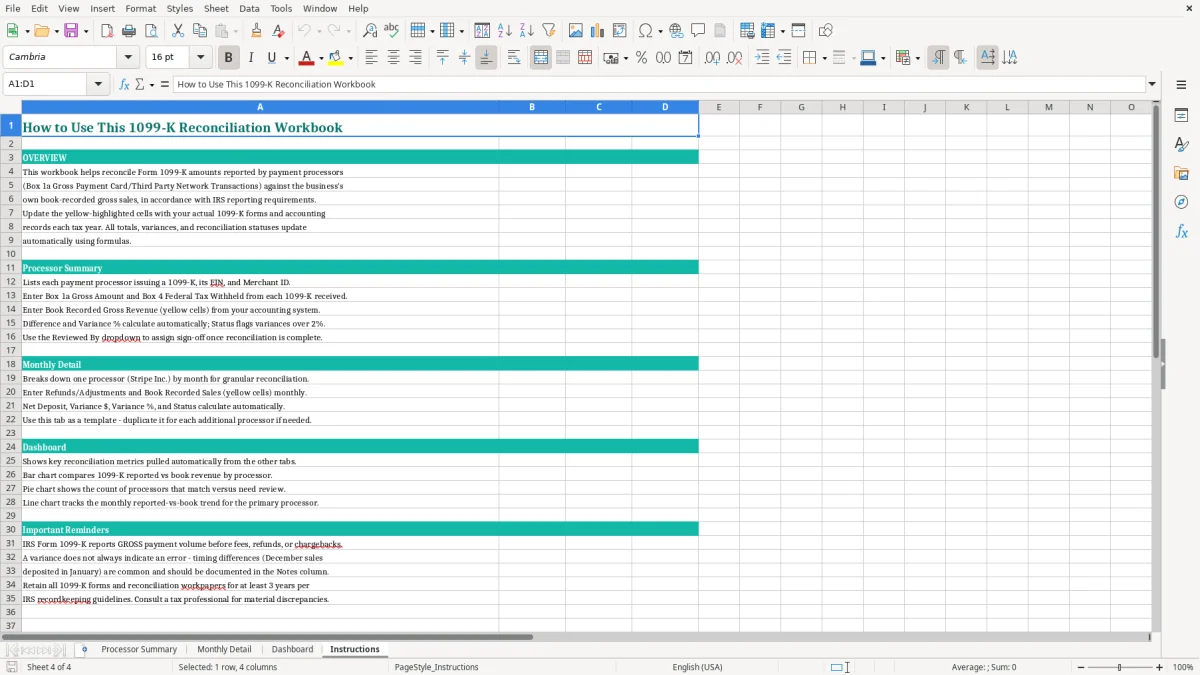
Use it for Stripe, PayPal, Square, Amazon Payments, Shopify Payments, Etsy, Venmo, and other platforms that settle customer payments. Image 1 shows the processor-level review table, while images 2 through 4 show the monthly detail, dashboard, and instructions layouts.
The person opening this workbook is usually a bookkeeper, owner, or controller trying to explain why processor statements do not match the general ledger. An online store with 300 orders a month may have Stripe, PayPal, Amazon, and Shopify deposits arriving net of fees, refunds, reserves, and chargebacks. The bank statement shows cash; the 1099-K shows reportable payment volume. Those are different numbers.
For a small retail LLC, the reconciliation belongs in the year-end close after December deposits are posted but before the accountant prepares the business return. A bookkeeper can enter each merchant account on Processor Summary, then use Monthly Detail to find a December sale settled in January or a refund recorded in a different month. Image 1 shows the practical starting point: each row identifies the processor, its EIN and merchant ID, then places Box 1a beside Book Recorded Gross Revenue.
Suppose Stripe reports $284,650.00 while the books contain $281,900.00. The $2,750.00 gap is not automatically income to add or an error to write off. It may represent a refund, a fee posted to the wrong account, or sales recorded when the order shipped rather than when the processor settled it. A second processor may agree exactly, which tells you to focus testing on Stripe rather than rebuild the entire ledger.
A sole proprietor filing Schedule C needs gross receipts supported by sales records, not merely deposits. A controller at a four-employee contractor may use the same logic for card payments from customers: reconcile processor reports to invoices and the revenue account, then separately classify processing fees and customer sales tax collected. The Dashboard gives the owner a quick view, while the Reviewed By and Notes fields preserve who resolved each item.
Do not wait until the tax-preparation appointment. Run the workbook monthly for high-volume businesses and at minimum during the annual close. A $2,750 unexplained difference found in January is a short ledger investigation; the same difference found after twelve months can require searching thousands of orders.
Form 1099-K reports payment transactions processed by a payment settlement entity. Box 1a is a gross amount, so it can include sales later reduced by refunds, chargebacks, shipping, or processing fees. Your tax books still need a defensible bridge from that gross figure to reported revenue; treating the bank deposit as the taxable sales number is the wrong method when a processor withholds fees.
For the 2026 filing cycle, use the federal reporting threshold and instructions applicable to the payments reported for 2026. Do not use the threshold as a tax-free allowance: receiving no form does not make business receipts nontaxable, and receiving a form does not mean you should report the same dollars twice. Keep the processor statement, sales report, refund report, fee report, deposit detail, and reconciliation notes together.
Assume a processor reports $100,000.00 in Box 1a, with $2,900.00 of processing fees and $1,100.00 of refunds. A properly organized ledger might show $100,000.00 of gross sales, $1,100.00 of refunds, and $2,900.00 of merchant fees. The bank deposits may total only $96,000.00, but that deposit total cannot replace the gross-receipts analysis on Schedule C or the revenue section of an entity return.
Sales tax is a separate liability, and there is no national VAT in the United States. State and local sales-tax rules, including economic nexus and marketplace collection, apply differently by state; record customer tax separately instead of allowing it to inflate product revenue.
The IRS generally expects business records to be retained for 3 years, with some situations requiring records for up to 7 years. Keep the 1099-K, monthly processor exports, merchant-account identifiers, general-ledger detail, and evidence supporting each material Difference ($).
Federal income tax is calculated on taxable profit, not a form total in isolation. If the business is a sole proprietor, net profit generally flows through Schedule C and may affect Schedule SE; estimated payments use Form 1040-ES, with 2026 due dates of April 15, June 15, September 15, and January 15, 2027. A reconciliation does not calculate those payments, but it helps prevent an incomplete revenue figure from flowing into them.
The most expensive errors are usually not arithmetic errors. They are classification and timing errors that make a clean-looking workbook agree with the wrong ledger account. I have seen owners compare a 1099-K to deposits, find a difference, and post an unexplained journal entry simply to force the two totals together.
A processor receives $10,000.00 of customer payments, subtracts $290.00 in fees, and deposits $9,710.00. If you record only the deposit as revenue, the books understate gross receipts by $290.00. At a 2.9% fee rate, that mistake becomes $2,900.00 on $100,000.00 of sales, before refunds and chargebacks are considered. The correct fix is to record gross sales and classify the fee separately, not to edit Box 1a.
A customer refund can appear in the processor report in one month and in the accounting system in another. A chargeback can also reduce the settlement without looking like an ordinary sales return. Conversely, importing processor transactions and then importing the bank deposit can record one sale twice. A $1,250.00 duplicate order repeated across 40 transactions creates a $50,000.00 overstatement that may survive a superficial bank reconciliation.
Use Monthly Detail to isolate the month where the annual difference begins. Compare order IDs, settlement dates, refund dates, and journal-entry dates. Do not label every variance as a processor error; a year-end cutoff difference is usually a timing item, while a repeated mismatch by merchant account points to an integration or mapping problem.
Without the processor EIN and merchant ID, a reviewer may reconcile the wrong account when a company has two Stripe profiles or separate marketplace stores. Without a note, the next reviewer may spend 90 minutes reopening a $36.42 fee adjustment already explained by a settlement report.
The 1099-K itself is not proof that every dollar is taxable sales. It can include amounts belonging to a marketplace arrangement, refunded transactions, or sales-tax collections. Resolve the underlying category and preserve the support; forcing Difference ($) to zero is less reliable than documenting a legitimate $2,750.00 timing difference.
A reconciliation workbook works when it is attached to a task you already perform. For a retail business, schedule the review after the monthly bank reconciliation, when settlement deposits and merchant-fee entries are available. For a sole proprietor, reserve 30 minutes on the first Friday after month-end rather than postponing all processor work until tax season.
For example, if four processors produce 1,200 monthly transactions and the average investigation takes 20 seconds per transaction, reviewing every line would consume about 6.7 hours. Start with the Processor Summary and investigate the two largest variances; use transaction-level exports only for those accounts. That is a better control than spending the same time on immaterial matches.
Use one naming convention for each merchant account, retain the full processor EIN, and never overwrite a prior month without saving the supporting export. Copy the workbook for the next reporting period only after the current version is reviewed. The Dashboard should be a decision page, not a substitute for the source reports behind it.
Protect formula cells and limit edits to the intended input areas. When available in the workbook, use the existing formatting and status fields consistently; do not type several versions of “reconciled,” because inconsistent labels make filtering unreliable.
Excel is appropriate for a business with a manageable number of processors and a controlled monthly close. Move to QuickBooks or an accounting integration when you are handling more than 10,000 transactions a month, need automated settlement matching, or have recurring multi-state marketplace and sales-tax activity. Keep this workbook as a review control during the transition rather than abandoning reconciliation altogether.
Box 1a generally reports the gross payment amount processed through the payment settlement entity. It is not the same as your net bank deposits because processor fees, refunds, chargebacks, and other adjustments may be handled separately.
Compare it first with gross revenue in your books, then use bank deposits to investigate settlement timing. A $10,000.00 processor total less $290.00 of fees may create a $9,710.00 deposit, but the books should still show the gross sale and separately classify the fee.
Start with the Instructions tab, then enter processor-level information on Processor Summary. Use Monthly Detail to investigate differences and Dashboard to review the overall status after the supporting reports have been checked.
Enter the Payment Processor, Processor EIN, Merchant ID, Box 1a Gross Amount, Box 4 Fed Tax Withheld, and Book Recorded Gross Revenue. Review Difference ($), Variance %, and Reconciliation Status, then complete Reviewed By and Notes after resolving the item.
No. The form reports payment volume, while taxable business income is determined after properly accounting for refunds, returns, fees, cost of goods sold, and deductible expenses. A sole proprietor generally reports business profit through Schedule C.
The IRS generally expects business records to be kept for 3 years, and some records should be retained for up to 7 years. Keep the 1099-K, processor exports, deposit detail, ledger reports, and notes that explain material differences together.