Goodwill Donation Value Log Template
12
Free download
Track 2026 estimated tax payments, due dates, totals, and notes with a simple 1040-ES workbook for self-employed filers.


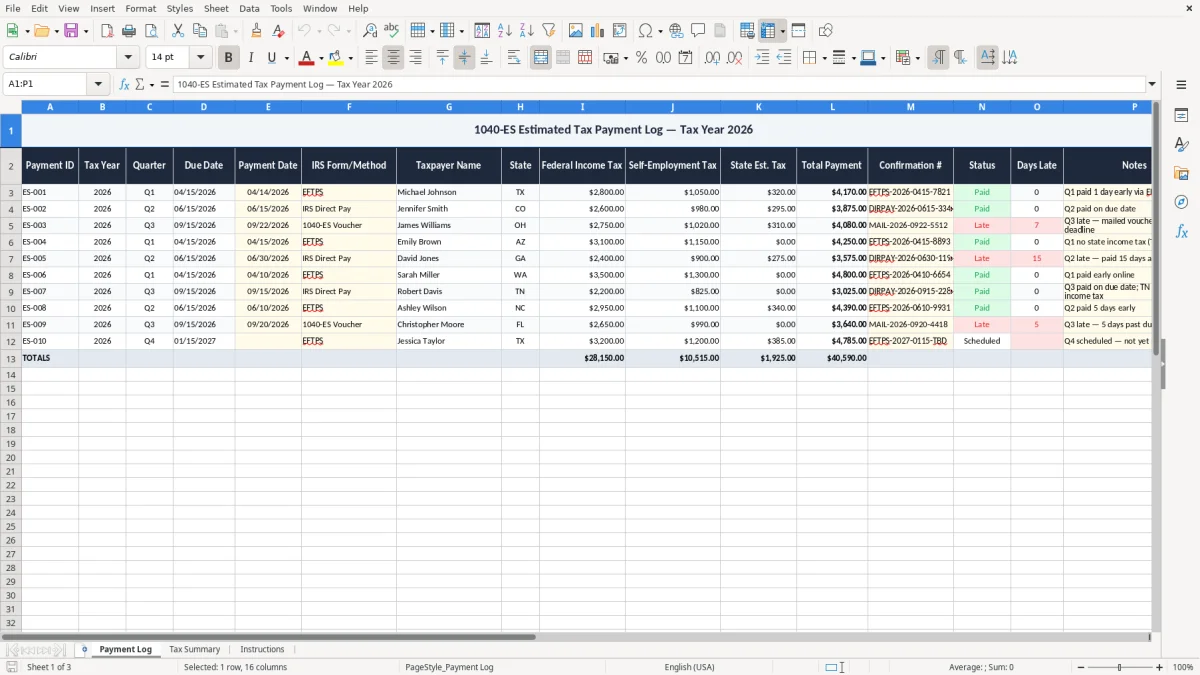
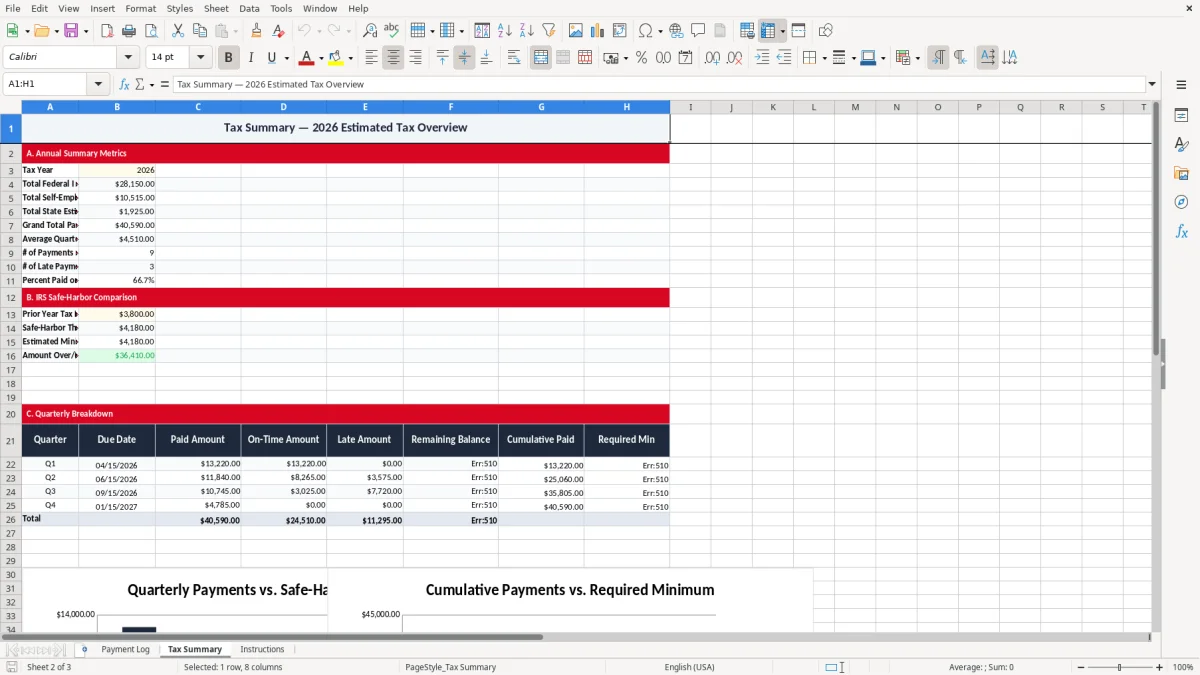
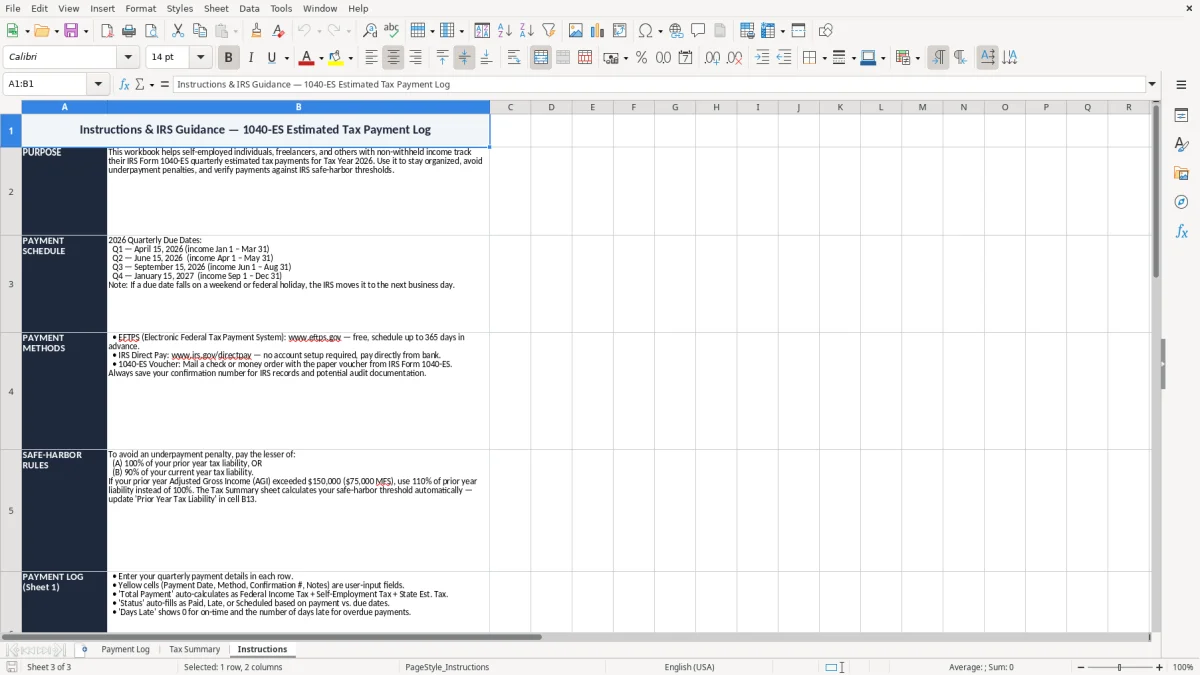
This 1040-ES estimated tax payment log is an Excel workbook for tracking your quarterly federal tax payments, due dates, amounts, and notes in one place. It includes three tabs: Payment Log, Tax Summary, and Instructions.
Use it if you pay taxes with Form 1040-ES during 2026 and want a clean record of each payment before you file Form 1040. The layout is built for quick entry, year-end review, and a simple running picture of what you have paid.
The workbook is practical for a sole proprietor, freelancer, or small LLC owner who needs a plain record before each quarterly deadline. If you have ever lost track of one $1,250 payment or had to rebuild your totals from bank statements, this sheet fixes that problem fast.
This workbook fits the people who actually make quarterly tax payments in real life: a sole proprietor on Schedule C, a single-member LLC, a freelancer with no payroll withholding, or a couple with two income streams and no extra W-4 withholding. The log is most useful when cash flow is uneven and you need to see exactly what has been paid before the next deadline.
A contractor with four employees may run payroll every two weeks, but still owe personal estimated taxes on business profit. If that owner sets aside $1,500 from each strong month and makes a $4,500 quarterly payment, the log shows whether the cash is there before the next Form 1040-ES date.
The need spikes around April 15, June 15, September 15, and January 15, when the next payment is due. If you wait until the day before the deadline, a clean worksheet saves you from guessing whether you already paid $875 or $1,875.
This is also a good fit for someone who gets a 1099 side gig on top of wage income. A household with $90,000 of W-2 wages and $18,000 of freelance profit can use the log to separate what the employer withheld from what still needs to be sent with 1040-ES.
The IRS expects you to keep proof of each payment, the date it was made, and the amount applied to the correct tax year. For most recordkeeping, the practical standard is at least 3 years, and longer if you have items that affect later filings.
For self-employment income, the payment log supports the numbers that ultimately flow into Form 1040, Schedule C, and Schedule SE. The point is not to guess your tax; it is to document the quarterly deposits so you can match them to the return at year-end.
For 2026 estimated taxes, the four federal deadlines are April 15, June 15, September 15, and January 15. If your income is steady and you owe $10,000 for the year, that usually means roughly $2,500 per quarter unless your numbers change.
If you pay through EFTPS or IRS Direct Pay, the confirmation number belongs in the note field. That gives you a clean audit trail when you compare your worksheet to the bank feed or your year-end tax organizer.
The most common failure is not the tax math; it is the missing record. If you make four payments of $2,000 each and forget to log one of them, you can overpay by $2,000 when you do your year-end estimate or, just as bad, think you are covered when you are not.
I have seen taxpayers miss one quarterly payment, then scramble in January and still face an underpayment penalty because the payment landed after the cutoff. That penalty may be small on one return, but a repeated miss can cost real money and force a time-consuming IRS notice response.
Bank feeds can drop descriptions or split transactions in ways that make tax review harder. If you paid $1,250 through a direct transfer and later need to prove which quarter it covered, a dated log is faster than digging through months of statements.
Another mistake is mixing the tax year with the payment year. A January 15 payment may be the fourth installment for the prior year, and if you label it wrong you can distort your estimated taxes calculation by an entire quarter.
The way to make this spreadsheet stick is to tie it to the same day you already do money work. Most people update it right after payroll, after the month-end close, or when they send the Form 1040-ES payment online.
If you have one business and four quarterly payments, a spreadsheet is usually enough. Once you are managing multiple entities, payroll, sales tax, and cash-flow forecasting across several accounts, move the payment tracking into a bookkeeping system like QuickBooks and keep the spreadsheet only as a review copy.
A simple habit beats a perfect template that sits unused. If you spend 5 minutes after each payment and 10 minutes each quarter reviewing the totals, you can stay ahead of the deadline instead of rebuilding the year from scratch.
It tracks each quarterly estimated tax payment you make for 2026 so you can match the date, amount, and quarter to your Form 1040 filing later. It is a recordkeeping tool, not a tax calculator.
Use it if you are a sole proprietor, freelancer, single-member LLC owner, or anyone paying personal estimated taxes outside payroll withholding. It also works for a household that wants one place to record federal tax payments.
The four federal due dates for 2026 are April 15, June 15, September 15, and January 15. Those are the dates you should use when labeling the four installment payments in the log.
Keep it with your tax records for at least 3 years after you file, and longer if it supports items that affect later returns. The log is useful if you need to compare your payments to IRS notices or your bank history.
No. It gives you a clean payment record, but it does not compute your full tax liability or prepare your return. Use it alongside your bookkeeping and the numbers that flow into Schedule C and Schedule SE.
Enter the payment method and any reference number you may need later, such as EFTPS, IRS Direct Pay, check number, or confirmation code. If you paid $2,000 and split it across two dates, note that clearly so the quarter totals stay accurate.