Goodwill Donation Value Log Template
12
Free download
Track quarterly estimated tax savings, income, expenses, liability, and quarter buckets for self-employed filers in 2026.


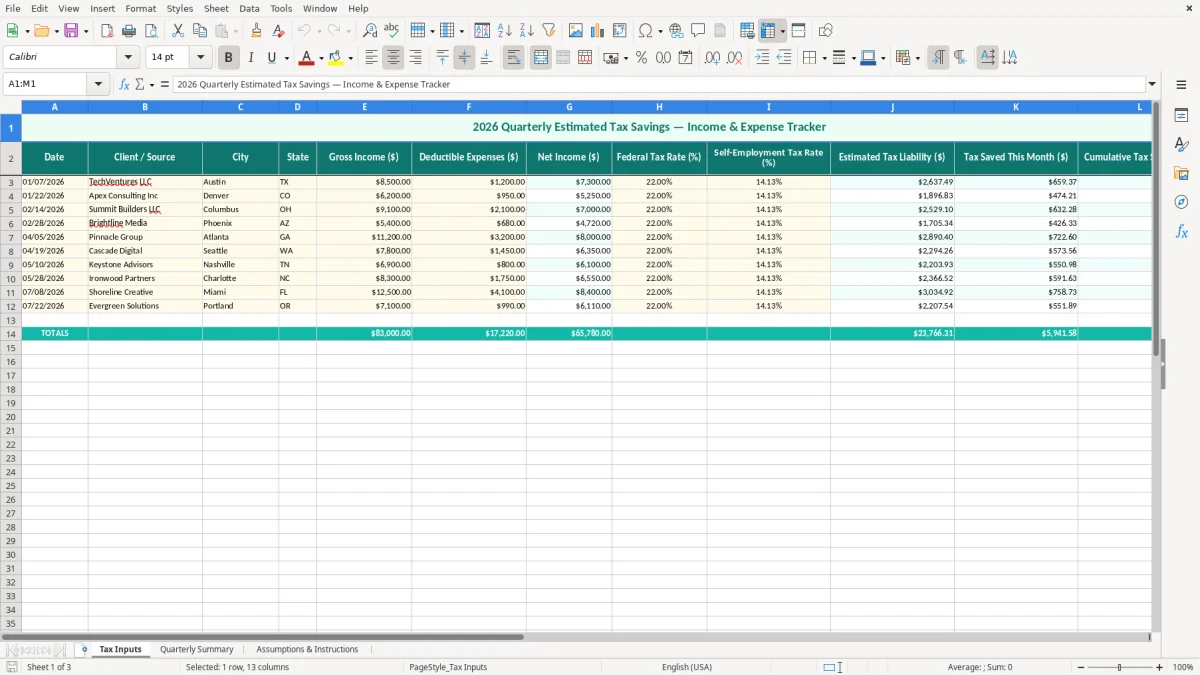
This Excel template tracks quarterly estimated tax savings by month, with income, deductible expenses, net income, tax rates, estimated liability, and quarter buckets on one sheet. It is built for anyone making estimated taxes payments during 2026, especially a sole proprietor, contractor, or small LLC.
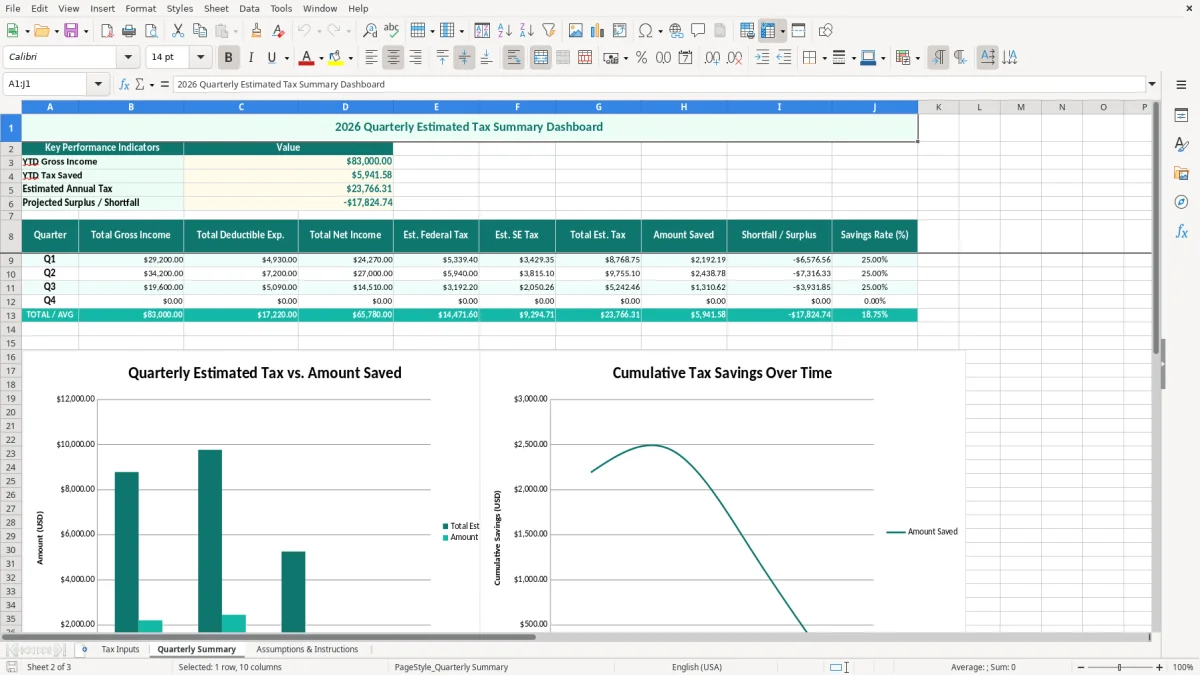
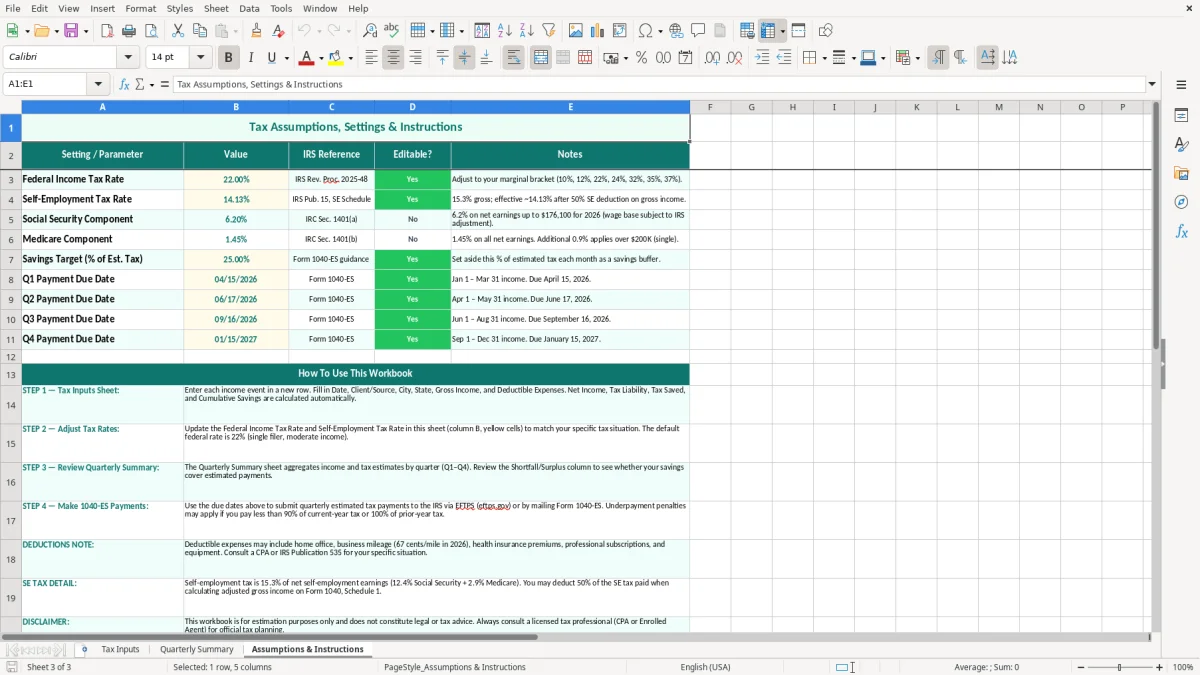
The workbook has three tabs: Tax Inputs, Quarterly Summary, and Assumptions & Instructions. You enter activity on the input tab, review the quarter totals on the summary tab, and keep your rate assumptions and notes in one place.
This workbook is for the people who have to set money aside before the bill arrives: a sole proprietor on Schedule C, a bookkeeper at an LLC, a 1099 contractor with uneven cash flow, or a household with side income and no withholding. If you make $8,000 in one month and $2,000 the next, the question is not theory — it is how much cash stays in the tax bucket after every deposit.
A small plumbing contractor with 4 employees might use the sheet to separate owner draws from business tax reserves. An online store doing 300 orders a month can use it to test whether a $25,000 quarter really leaves enough aside for federal tax and self-employment tax.
The timing matters. You feel it at the end of March, June, September, and December, when you are deciding whether the quarter’s revenue can support a tax transfer without breaking payroll or vendor payments.
For a household with two incomes and one spouse doing freelance work, the spreadsheet gives a simple answer: if the freelance side produces $12,000 of net profit in a quarter and you reserve 25% to 30%, you are looking at roughly $3,000 to $3,600 sitting aside for the next payment cycle.
The IRS expects you to keep records that support your return, generally for 3 years and sometimes up to 7. For estimated tax planning, the practical deadlines are the 1040-ES installments due April 15, June 15, September 15, and January 15 in 2026.
If you are self-employed, the tax you are estimating is usually a combination of federal income tax and Schedule SE self-employment tax at 15.3% — 12.4% Social Security plus 2.9% Medicare — before any deductions or credits. A $40,000 net profit does not stay $40,000; a rough reserve at 20% to 30% means setting aside about $8,000 to $12,000 over the year.
Wages subject to FICA are different because the employee pays 6.2% Social Security and 1.45% Medicare, with the employer matching the same amount. That is why the sheet separates federal tax from self-employment tax: a contractor on Form 1099-NEC needs a different reserve than a payroll employee on a W-2.
A sole proprietor or single-member LLC usually needs a larger savings cushion than a payroll job because there is no withholding. Once net profit climbs well above $50,000 a year, some owners start comparing that reserve pattern with an S-corp structure, where payroll can reduce the self-employment tax hit but adds payroll runs and filings.
The failure is usually not math; it is timing. You make $18,000 in a good quarter, spend too much of it, and then discover there is not enough left when the quarterly payment is due.
If you forget to move 25% of every deposit into a separate account, a $10,000 tax bill becomes an emergency. You then cover it with personal savings or a card, which turns a tax payment into avoidable interest and stress.
Another common mistake is using gross receipts as if they were profit. A contractor with $60,000 of revenue and $18,000 of deductible expenses has $42,000 of net income, and that difference can change the reserve by thousands of dollars over the year.
Skipping a quarterly payment can trigger an underpayment penalty even if you pay later. The penalty is often small on one missed installment, but on repeated shortfalls you lose cash and time reconciling the account before year-end close.
Use the file at a fixed point in the month, not when you remember it. The cleanest routine is after the last deposit of the week or right after your bookkeeping close, so the reserve decision is tied to actual numbers, not estimates from memory.
If you are crossing 100 rows a month, juggling multiple income streams, or needing bank feeds and reconciliation, you are outgrowing a simple tracker. At that point, QuickBooks or a payroll system will handle the transaction volume better than a manual workbook.
It tracks income, deductible expenses, net income, tax rates, estimated liability, monthly tax savings, cumulative savings, and the quarter bucket for each entry.
It is built for freelancers, independent contractors, sole proprietors, single-member LLC owners, and households with side income that is not fully covered by withholding.
Update it every time you receive income or at least once a week. If you wait until the end of the quarter, the savings number is too late to guide cash flow.
Yes. It helps you estimate the cash you should reserve before the Form 1040-ES due dates on April 15, June 15, September 15, and January 15.
Because a contractor’s reserve is usually made up of both pieces, and Schedule SE self-employment tax at 15.3% is not the same as federal income tax.
Move up when the file becomes hard to reconcile, you are handling many transactions, or you need bank feeds, invoicing, and payroll together. That is usually when QuickBooks becomes more efficient than a manual worksheet.