Goodwill Donation Value Log Template
12
Free download
Worksheet for Schedule SE self-employment tax, with instructions and a summary dashboard for 2026 estimates.


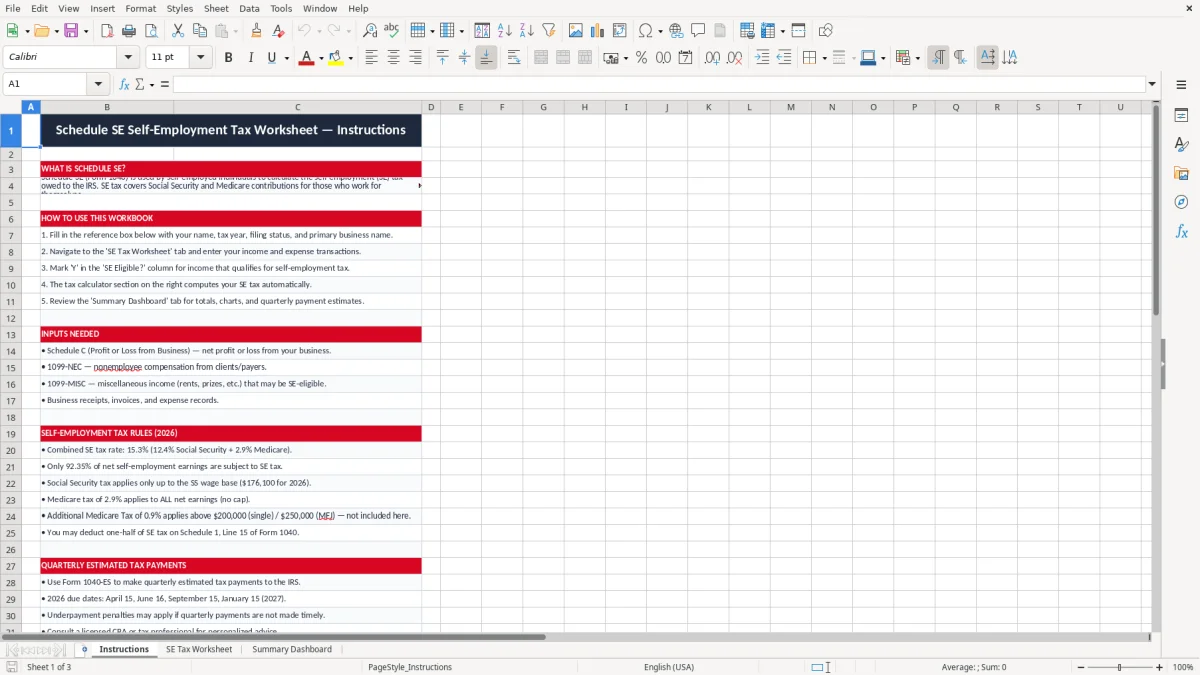
This Schedule SE Excel template helps you estimate self-employment tax for 2026 and keep the calculation tied to your Schedule C profit. It includes an Instructions tab, a SE Tax Worksheet, and a Summary Dashboard for a clean year-end check.
Use it if you file as a sole proprietor, single-member LLC, or partner receiving self-employment income. The workbook shows the taxable profit, the Schedule SE tax base, and the figures you need to line up with Form 1040.
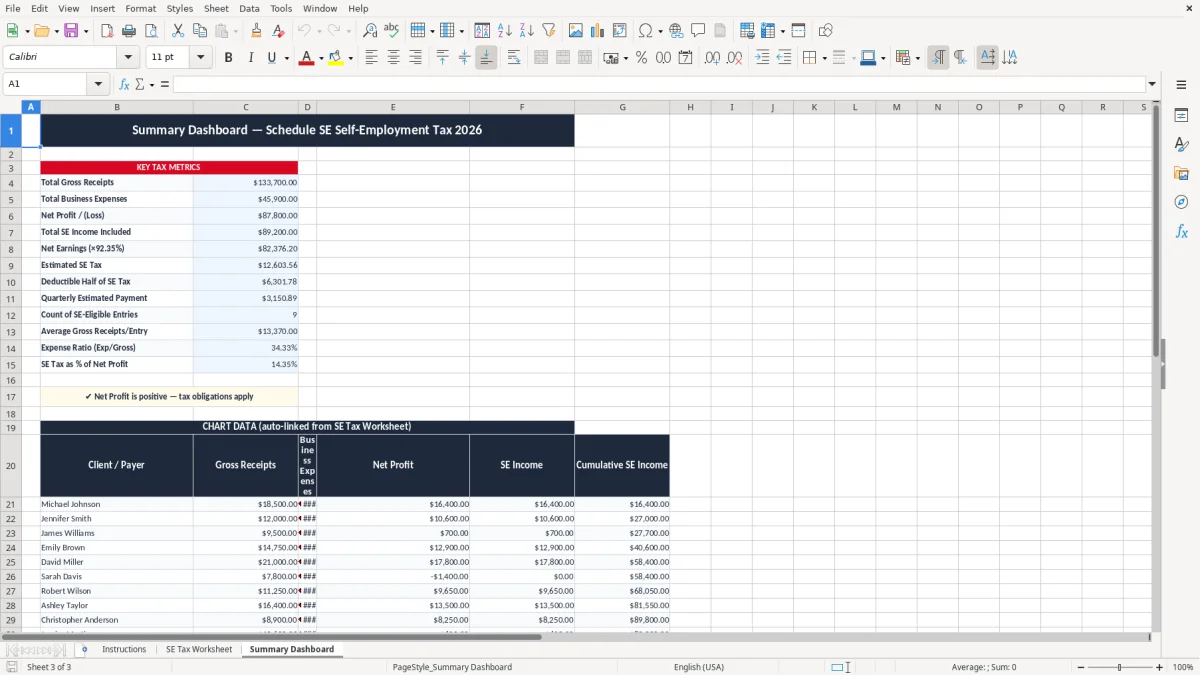
It is built for the person who wants one place to enter net profit, adjust for the deductible half of self-employment tax, and review the total before making estimated taxes. Image 1, image 2, and image 3 match the three tabs in the file.
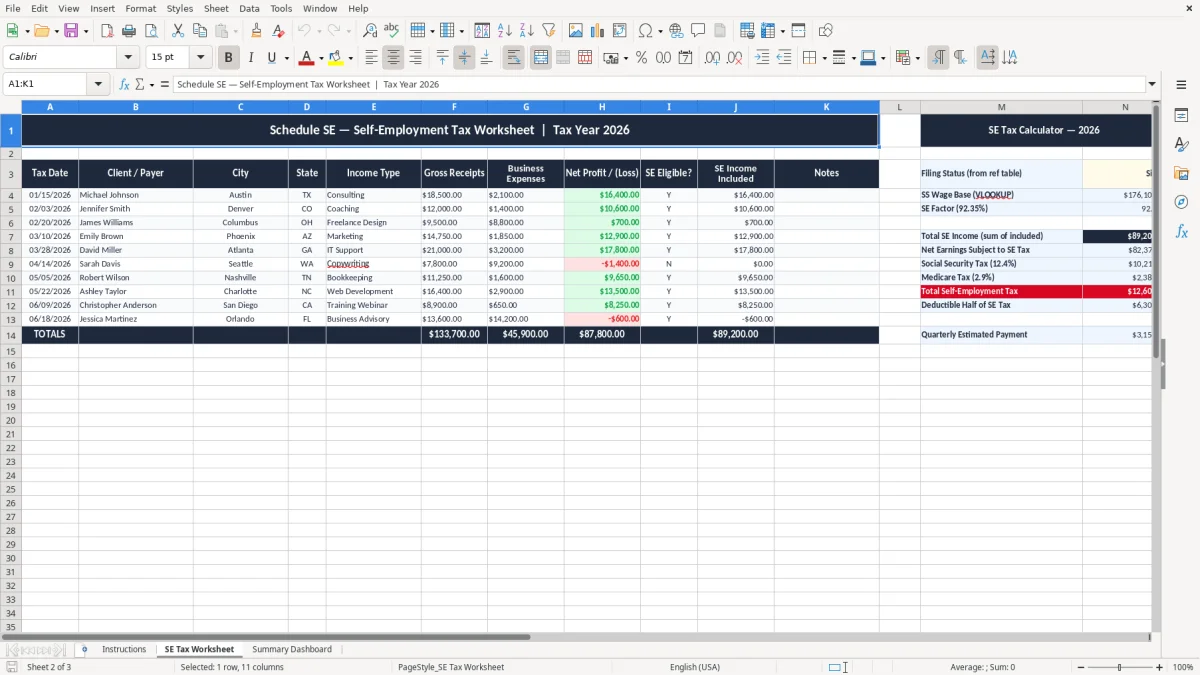
This worksheet is for the people who actually have to turn business income into a tax number: a sole proprietor on Schedule C, a single-member LLC taxed as disregarded, or a partner with ordinary self-employment income. If you made $68,000 of net profit, the question is not theoretical; you need a worksheet that shows the amount that flows into Schedule SE and then to Form 1040.
The file fits the moment when you are doing a quarterly tax check, a year-end close, or a return prep session with a banker’s box of receipts. A bookkeeper at an LLC with $12,500 of monthly gross receipts can use it to estimate the owner’s tax hit before cutting the 1040-ES payment.
It is most useful when your income is uneven. One month you clear $9,000, the next month you clear $3,400, and you still need a clean annual estimate for self-employment tax.
The dashboard gives you a fast review point. If your year-to-date profit is $54,000 and you know roughly 92.35% of that is the tax base, you can see immediately whether your payment plan is too light.
People usually open a worksheet like this at tax season, after a strong quarter, or right before an estimated payment deadline. That is when the difference between a $7,800 tax estimate and a $9,200 tax estimate affects cash flow in a real way.
The IRS treats self-employment tax as the Social Security and Medicare portion owed on net earnings from self-employment. The combined rate is 15.3%: 12.4% for Social Security and 2.9% for Medicare, with the deductible half reflected on the return.
For the calculation, the worksheet should follow the standard 92.35% net-earnings base used in Schedule SE. If your net profit is $80,000, the base is $73,880, and the tax before any additional Medicare considerations is materially higher than a flat 15.3% of gross receipts would suggest.
The result feeds into Form 1040, and the payment planning side usually runs through 1040-ES. The quarterly due dates are April 15, June 15, September 15, and January 15, so this worksheet is useful long before the return is filed.
You do not pay self-employment tax on every dollar that came into the business bank account. A contractor with $120,000 of receipts and $42,000 of expenses may only be taxed on the remaining net profit, which is why a worksheet built around net income is the correct tool.
A S-corp is different because wages run through payroll and are subject to FICA rather than self-employment tax. For a plain Schedule C filer, though, this worksheet stays the simplest way to see the amount that really matters.
The biggest mistake is treating self-employment tax like a rough guess and then discovering the shortfall when the quarter is already closed. If you understate tax by $1,500 and miss an estimated payment, that is not just a number on paper; it is cash you no longer have when the 1040-ES deadline hits.
Another common error is using gross receipts instead of net profit. A business with $95,000 in sales and $61,000 in expenses should not be taxed as if every dollar were income, and that mistake can overstate the tax bill by thousands.
If you forget to include all business income, the worksheet will look clean and still be wrong. I have seen owners miss a $6,800 side-job check or a few thousand dollars of app revenue, then scramble when the return shows a much larger amount due than expected.
Skipping a quarterly estimate can create a penalty and a cash flow squeeze at the same time. A quarter that should have been covered by a $2,200 payment can turn into a larger year-end balance that competes with rent, payroll, or vendor bills.
When input cells and formula cells are not separated, you overwrite calculations and lose the trail. That is how a $74,000 profit gets entered as $47,000, and the owner then makes a payment based on the wrong base for the next three months.
Use the worksheet on the same day you close the books or pull the monthly profit & loss report. If you do it every quarter, you will see whether your estimated payment is drifting before the amount gets large enough to hurt cash flow.
If you are tracking multiple owners, payroll, and recurring deductions, move the tax workflow into QuickBooks or a payroll system. A spreadsheet is still fine for a solo filer with one profit number, but it stops being the best tool once the process turns into monthly entity-level accounting.
It calculates a self-employment tax estimate based on your net profit and shows the result in a worksheet format you can review before filing. The workbook is built around the same flow you would use when preparing Schedule SE and Form 1040.
You should use it if you report business income as a sole proprietor, a single-member LLC, or another self-employed filer who owes self-employment tax. It is also useful for a bookkeeper or owner who wants a quarterly estimate before sending 1040-ES payments.
Update it after each monthly close or at least once per quarter, because that matches the estimated tax cycle. If your profit changes by a few thousand dollars, your self-employment tax estimate can move by hundreds of dollars.
No. It is a planning and calculation worksheet, not a filing system. You still enter the final numbers on Schedule SE and Form 1040, and you still need the rest of your return package.
You need your net business profit, not just gross receipts. For a clean estimate, pull the figure from your profit & loss report or bookkeeping records and use the annual total that belongs on your tax return.
The dashboard gives you a fast summary without hunting through the worksheet. That matters when you want to compare your tax estimate with cash available for a quarterly payment or with the amount you already set aside in a business savings account.