Itemized vs. Standard Deduction Excel Template
7
Free download
Track Goodwill donations, estimated fair market values, receipts, appraisal status, and deductible amounts with this Excel template.


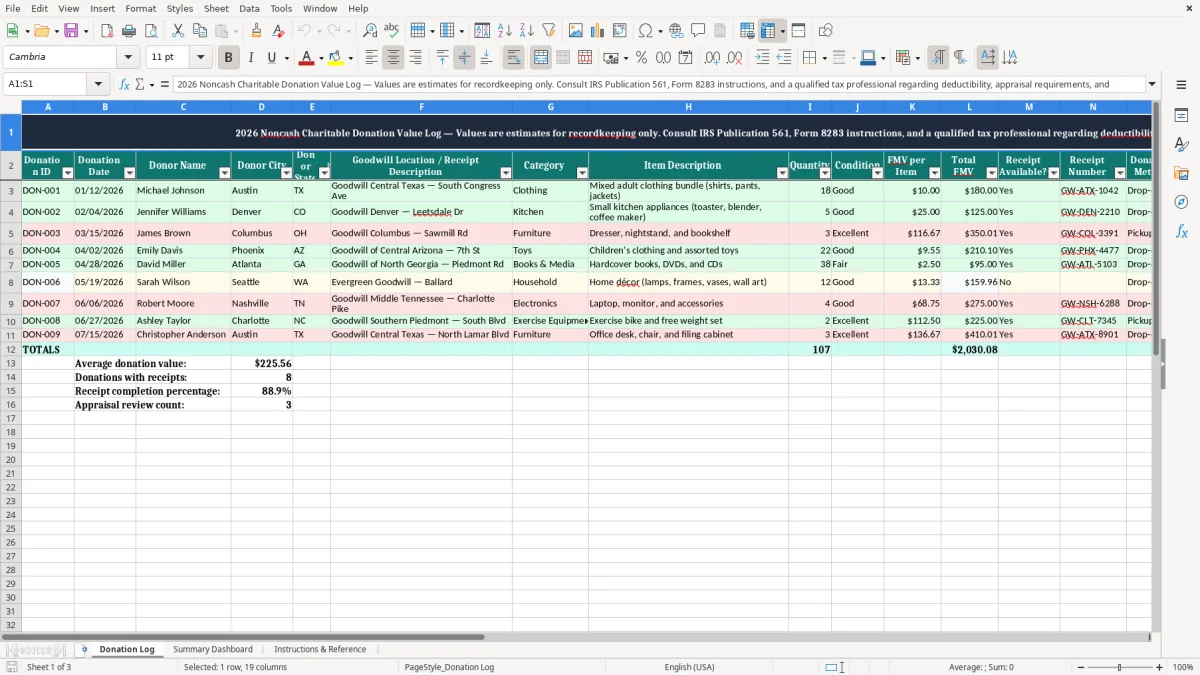
Use this Goodwill Noncash Donation Value Log Excel Template to record donated items, estimate fair market value, organize receipts, and maintain tax records. The template is designed for clothing, household goods, furniture, electronics, appliances, books, and other noncash charitable contributions made to Goodwill. Each donation record can include the date, donor information, Goodwill location, item category, item description, quantity, condition, estimated value, receipt details, appraisal status, deductible amount, and supporting notes.
Keeping these details together helps create a consistent record of contributions and makes it easier to review documentation during tax preparation. Donation values in the workbook are estimates for recordkeeping only. The template does not determine deductibility or replace professional tax advice.
Start by assigning a unique Donation ID to each contribution or donation batch, such as DON-001. Enter the donation date, donor name, city, state, and the Goodwill location or receipt description. Choose a category and describe the donated items clearly enough to identify them later.
Enter the quantity, condition, and estimated fair market value per item. The Total FMV field is intended to calculate quantity multiplied by FMV per Item. Indicate whether a receipt is available, add the receipt number, and select the donation method.
Review the appraisal fields when the type or value of property may require additional documentation. Enter a deductible amount only after reviewing current IRS guidance, contribution limitations, substantiation requirements, and any applicable appraisal rules.
Use the Notes column to identify where receipts, photographs, appraisals, and other supporting records are stored. Keep the completed workbook with the related tax documentation and update it whenever records are added or corrected.
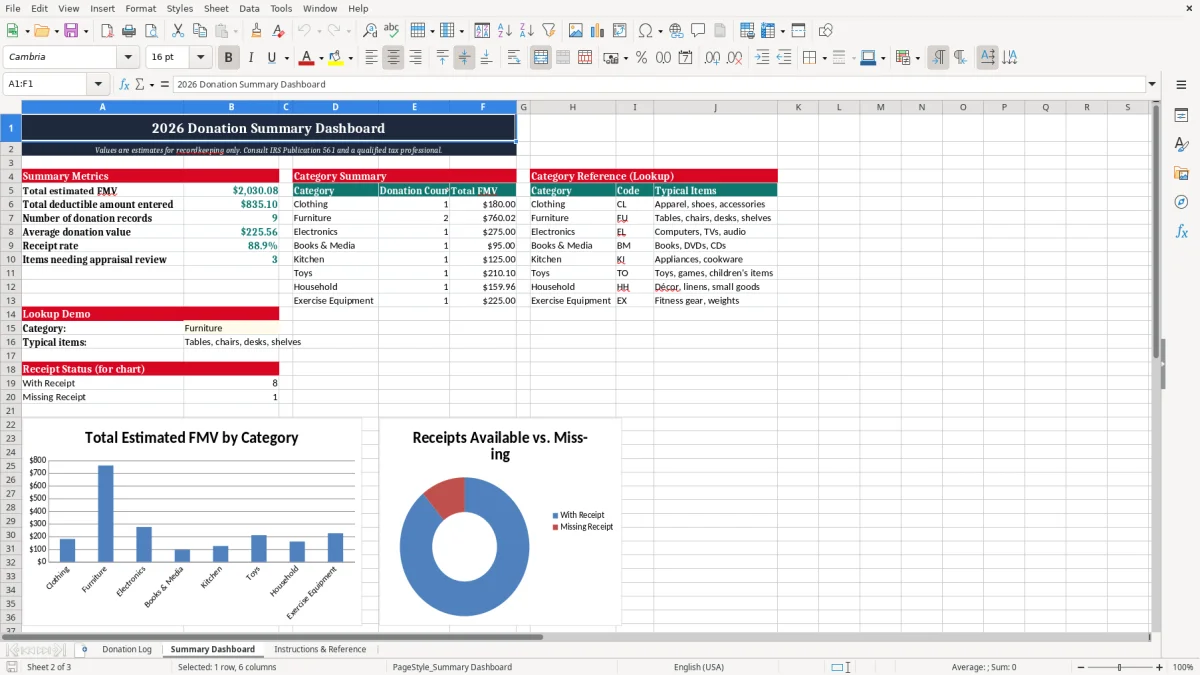
A Goodwill donation value log provides a structured place to document noncash charitable contributions throughout the year. Instead of relying on memory, loose receipts, or handwritten notes, you can record each donation when it occurs and preserve the details needed for later review. The log is useful for clothing, kitchen goods, furniture, electronics, books, appliances, and other household property donated to Goodwill.
A detailed entry can identify the donation date, Goodwill location, item category, description, quantity, condition, and estimated fair market value. It can also show whether a receipt was retained and where related records are stored. This organization is especially helpful when several donation trips occur during the year or when multiple people in a household contribute items.
The workbook is not a valuation guide and does not establish a deductible amount. Goodwill generally does not assign values to donated property, so the donor is responsible for maintaining a reasonable basis for any estimate and for reviewing current requirements. Recording condition and item descriptions helps explain how an estimate was developed, while photographs or other notes may provide additional support.
The Donation ID field also makes it easier to connect a spreadsheet row with a paper receipt, scanned acknowledgment, photograph folder, or tax preparation file. By keeping these records together, you can identify missing information before tax preparation begins and give a tax professional a clearer summary of your noncash contributions. The template supports better organization, but applicable law, contribution limits, substantiation rules, and appraisal requirements still determine how a donation should be treated.
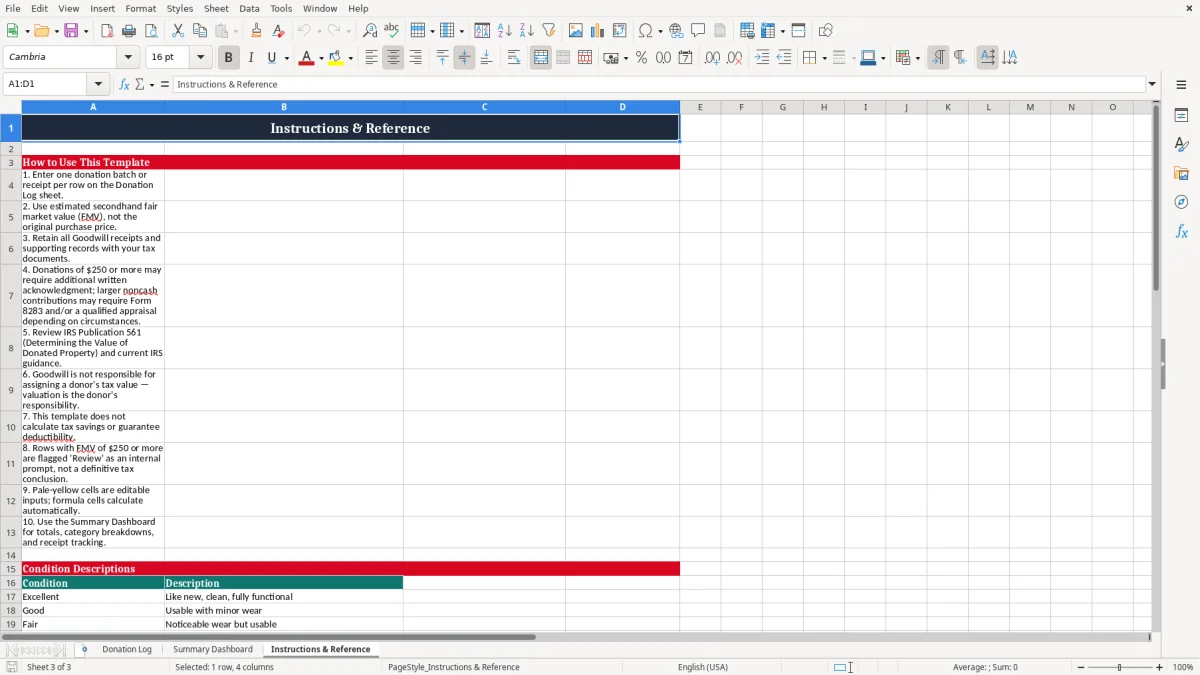
Fair market value is generally an estimate of what a willing buyer might pay a willing seller for property in its current condition, rather than the original purchase price or the cost of a new replacement item. When using this Goodwill donation log, describe each group of items carefully and record a value that reflects condition, age, brand, completeness, and local resale circumstances. Clothing that is clean and gently used may have a different value from clothing that is worn, damaged, stained, or incomplete.
A working small appliance may differ from one that is untested or missing parts. Furniture should be described by type and condition, including visible wear or damage. Grouping similar items can save time, but the description should remain specific enough to support the quantity and estimate entered.
The FMV per Item column is intended for the estimated value of one item, while Total FMV can reflect the quantity multiplied by that amount. For example, a record for eighteen clothing items at ten dollars per item would show an estimated total of one hundred eighty dollars. Use the Notes field to document assumptions, sources of comparison, photographs, or unusual circumstances.
Do not automatically use retail prices, replacement costs, sentimental value, or the amount originally paid. Values should be reasonable for used property in the condition donated. If a contribution is unusually valuable, complex, or subject to special rules, additional documentation may be appropriate.
The template includes appraisal fields so you can note whether an appraisal may be required and whether it has been completed. Because valuation and deduction rules can change and depend on the facts, review current IRS guidance and consult a qualified tax professional before relying on an amount for a return.
A receipt and substantiation tracking system helps you maintain evidence that a donation occurred and connects that evidence to the correct spreadsheet entry. When Goodwill provides a receipt or acknowledgment, record the Donation ID, donation date, Goodwill location, and receipt number together. Mark Receipt Available?
as Yes when the document has been retained, and use the Notes field to identify whether it is stored in a paper folder, scanned tax folder, cloud drive, or another secure location. If a receipt is not available, do not create a receipt number or assume that the missing document can be reconstructed later. Instead, document what information is available and review the situation under current rules.
The receipt may confirm the recipient organization and date, but it may not establish the value of donated goods. For that reason, item descriptions, quantities, condition notes, photographs, and valuation support can be important parts of a complete record. The template also includes appraisal and deductible amount fields so you can monitor outstanding documentation without treating the spreadsheet as a final tax determination.
For higher-value property or special categories, requirements may differ from ordinary household donations. Some contributions may need a qualified appraisal, additional acknowledgment, or Form 8283 documentation, depending on applicable rules and circumstances. Keep supporting records organized by Donation ID so a receipt can be matched to the items and estimates it relates to.
Review the workbook periodically for blank dates, missing receipt numbers, unclear descriptions, and appraisal fields that need attention. A clear log can make tax preparation more efficient, but it should be used together with official IRS instructions and advice from a qualified tax professional when needed.
An annual noncash contribution record is most useful when it is updated consistently and supported by documents outside the spreadsheet. Begin each entry soon after the donation so the item description, quantity, condition, location, and receipt information are accurate. Use a unique Donation ID for every donation or batch, and avoid reusing identifiers when correcting or adding records.
Similar items may be grouped when they share a category, condition, and valuation approach, but unusually valuable or different property may be better recorded on separate rows. The template's categories, donation methods, receipt fields, appraisal fields, and notes help create a repeatable process for each contribution. At the end of each month or quarter, review the log for incomplete records and confirm that digital receipts and photographs are stored in the location stated in Notes.
At year-end, review total estimated FMV amounts, compare entries with saved acknowledgments, and identify records that may need professional review. The Deductible Amount column should be used carefully because an estimated value is not automatically the amount allowed on a tax return. Applicable limitations may depend on adjusted gross income, the type of property, the recipient organization, the condition of donated goods, and required substantiation.
Preserve the original receipts and supporting files rather than relying on the workbook alone. Consider making a backup copy with a clear year label, such as Goodwill Donations 2026, and protect access if the file contains personal information.
This template is intended to support organization and recordkeeping, not to replace current IRS publications, Form 8283 instructions, Goodwill policies, or individualized tax advice. Consulting a qualified tax professional can help address unusual property, large contributions, appraisal questions, and filing requirements.
Goodwill generally does not assign a value to donated goods. The donor should maintain a reasonable fair market value estimate and review applicable tax guidance.
Total FMV is intended to represent Quantity multiplied by FMV per Item. It is an estimated recordkeeping amount, not an automatic deduction.
Yes. Retain the receipt or written acknowledgment with the related Donation ID and record its number and storage location in the workbook.
Enter an amount only after reviewing current substantiation rules, contribution limitations, appraisal requirements, and any applicable professional tax advice.
Appraisal requirements can depend on the type and value of property and the circumstances of the contribution. Review current IRS guidance or consult a qualified tax professional.
Yes. The log is designed for clothing, household goods, furniture, electronics, appliances, books, and other noncash contributions made to Goodwill.