Goodwill Donation Value Log Template
12
Free download
Compare itemized and standard deductions with an Excel template for tracking expenses, documentation, category totals, and tax planning.


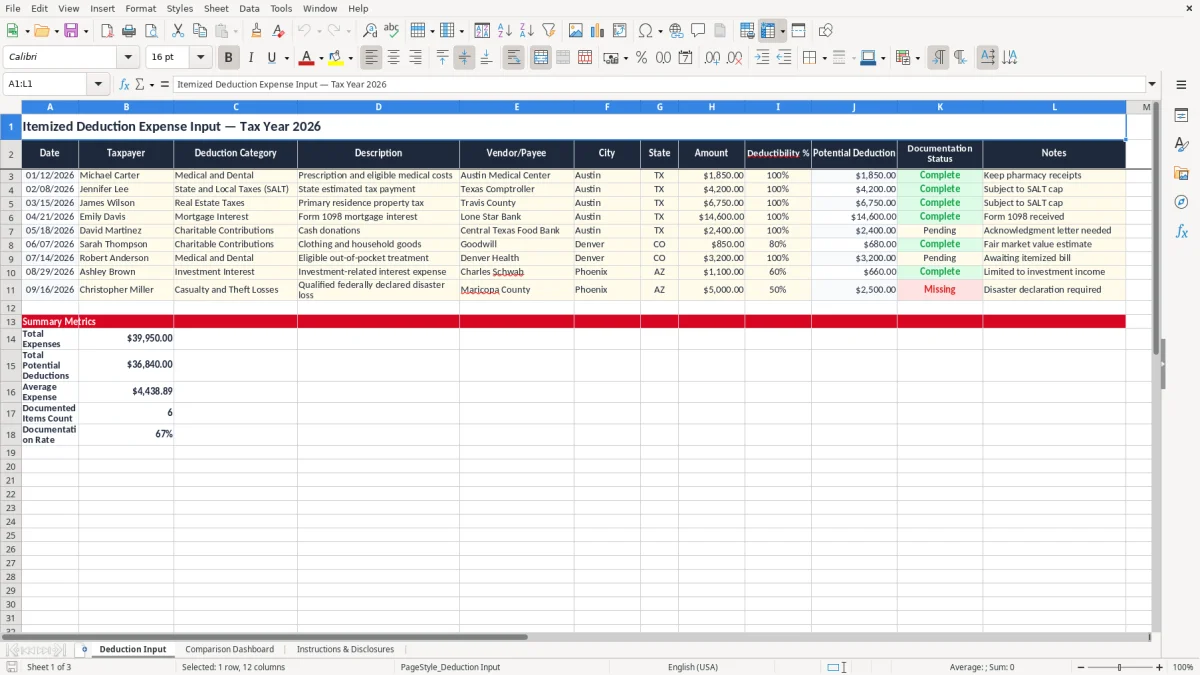
Use this Excel template to organize potentially deductible expenses and compare an estimated itemized deduction total with the standard deduction. The workbook is designed for tax-year planning, expense tracking, documentation review, and preliminary decision-making. Enter medical and dental costs, state and local taxes, real estate taxes, mortgage interest, charitable contributions, and other potentially eligible expenses in a structured table.
The template calculates potential deductions based on the amount and deductibility percentage you enter, helping you review your records before preparing a tax return. Because deduction rules, limits, thresholds, and filing-status amounts can change, treat the workbook as an organizational and educational tool rather than a final tax calculation. Confirm the results with current IRS guidance or a qualified tax professional.
Open the Deduction Input worksheet and enter one expense per row. Add the date, taxpayer, deduction category, description, vendor or payee, city, state, amount, and deductibility percentage. Use the Documentation Status field to identify whether receipts, statements, acknowledgments, or other supporting records are complete, and add clarifying information in Notes.
Review the Summary worksheet to see category totals and the estimated itemized deduction amount. Compare that amount with the standard deduction that applies to the taxpayer's filing status and tax year. If the itemized total appears higher, review every category for eligibility, thresholds, caps, reimbursements, and other limitations before relying on the result.
If the standard deduction is higher, retain the workbook as a supporting planning record and continue to preserve source documents. Update the tax year, filing status, and standard deduction assumptions when necessary.
Do not include the same payment twice, and do not treat an expense as deductible solely because it appears in the workbook. Use current official guidance or consult a qualified tax professional before filing.
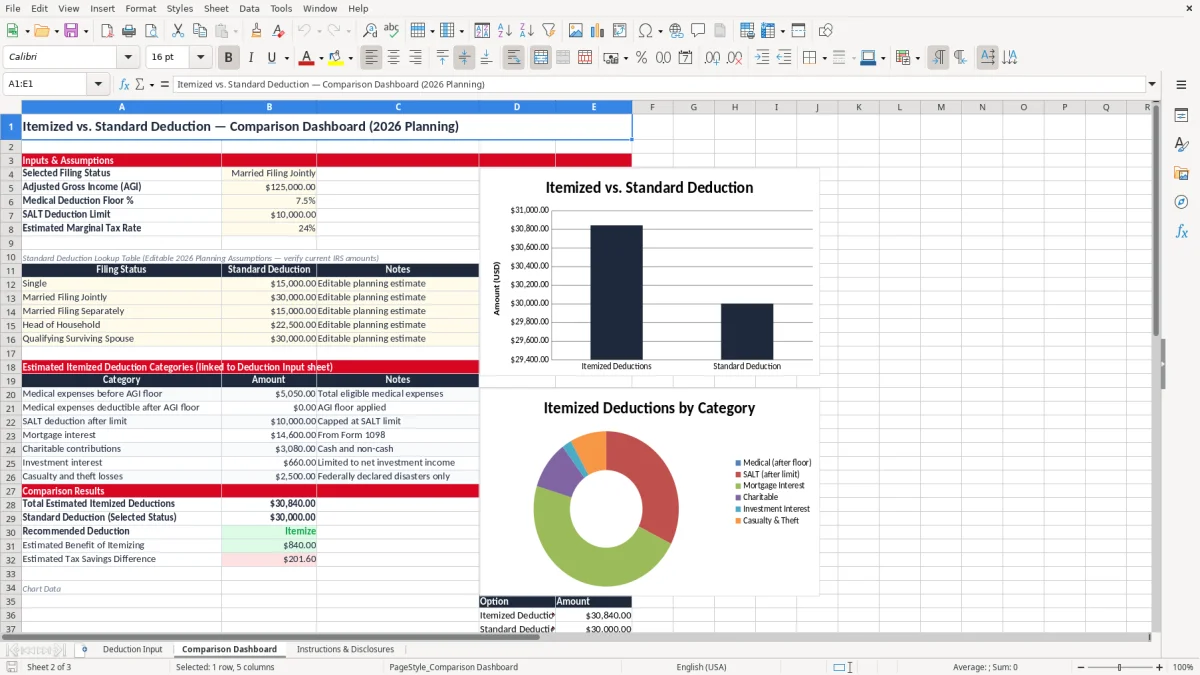
An itemized deduction vs. standard deduction spreadsheet is a planning tool that helps taxpayers compare two possible deduction methods. The standard deduction is a fixed amount determined under applicable tax rules and generally depends on filing status and other circumstances.
Itemizing involves listing qualifying expenses individually and applying the rules, thresholds, and limitations associated with each category. This Excel template places both concepts into a practical recordkeeping workflow.
The Deduction Input worksheet is built for detailed entries. Each row can represent a separate payment or expense, with fields for the date, taxpayer, category, description, vendor, city, state, amount, deductibility percentage, documentation status, and notes. The potential deduction field helps estimate the portion that may qualify, while the summary area groups entries for a broader review.
This comparison is useful because a larger total is not automatically allowable. Medical expenses may be subject to income-based thresholds, state and local taxes may be subject to a cap, and charitable contributions may require specific records or valuation support.
Mortgage interest can also depend on loan and property details. The spreadsheet helps organize the information needed for review, but it does not replace official forms or professional judgment.
Use the workbook to prepare questions, identify missing documents, and make a preliminary comparison. Before filing, verify the applicable tax year, filing status, eligibility requirements, limitations, and current IRS guidance. The final deduction decision should be based on allowable amounts, not merely the total of every expense entered.
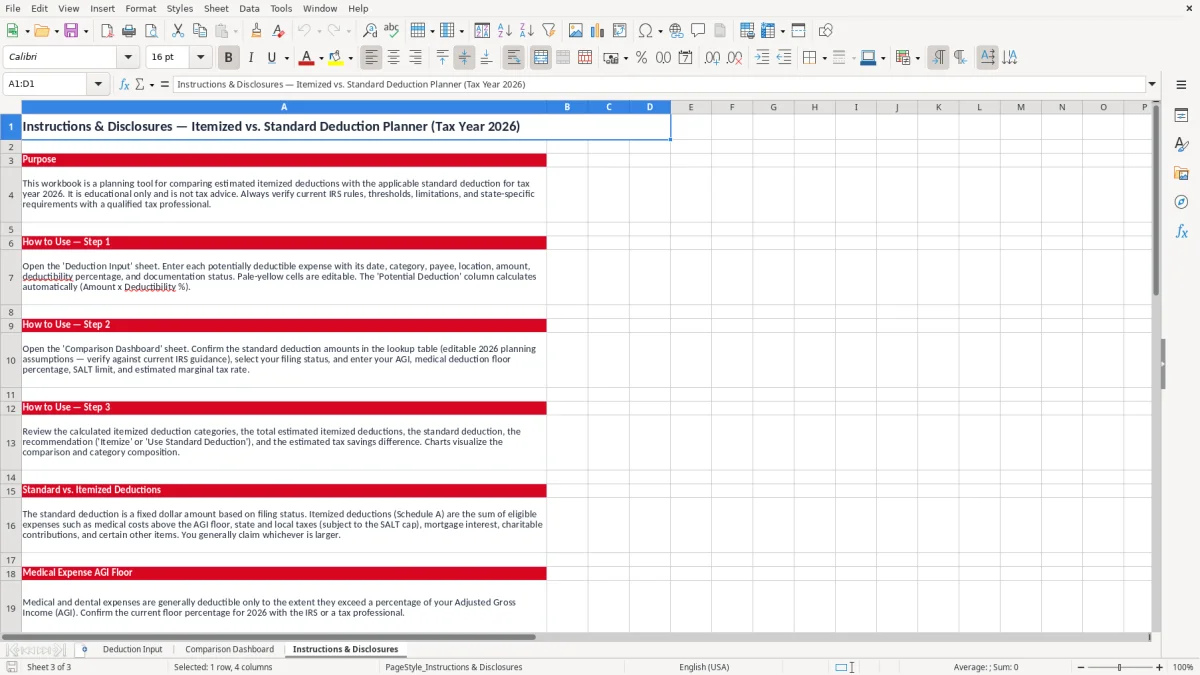
Effective expense tracking begins with consistent data entry. Enter each potentially deductible payment on its own row rather than combining unrelated transactions into a single annual total.
A separate row makes it easier to reconcile the workbook with bank records, receipts, tax statements, and payment confirmations. Use the actual transaction date, identify the taxpayer, and select the closest deduction category available in the template.
Descriptions should be specific enough to explain the expense later. For example, identify a property tax payment, a mortgage interest statement, a qualifying medical purchase, or a charitable contribution rather than entering a vague label such as “tax items.” Add the vendor or payee and location when those details help establish what was paid and where the transaction occurred.
Enter the full amount paid, then use the deductibility percentage when only part of the expense may qualify. A partial percentage can be useful for separating a potentially deductible share from a personal, reimbursed, or otherwise nonqualifying portion. Do not use the percentage to bypass tax rules; it is only an estimate field for organizing the information.
Documentation Status is an important control. Mark whether a receipt, statement, acknowledgment, or other record is complete, and use Notes to explain missing documents, reimbursements, shared costs, or unusual circumstances. Review incomplete records before comparing totals.
Finally, check for duplicate entries and retain source documents outside the spreadsheet. The workbook should support your records, not serve as the only evidence of an expense.
The central purpose of this template is to provide a clear preliminary comparison. After expenses are entered, the workbook can total potential deductions by category and combine them into an estimated itemized amount.
That estimate can then be compared with the standard deduction applicable to the taxpayer’s filing status and tax year. The method with the larger allowable amount may be more beneficial, but the result must be reviewed under current tax law.
Itemized deductions can include qualifying medical and dental expenses, state and local taxes, real estate taxes, mortgage interest, charitable contributions, and other categories that remain eligible. Each category can have separate requirements.
For example, some medical costs may be limited by an income-based floor, SALT entries may be capped, and charitable contributions may require substantiation. An amount entered in the spreadsheet is not necessarily an amount that can be claimed.
The standard deduction may be simpler because it does not require listing individual expenses in the same way. However, simplicity alone should not determine the choice.
A taxpayer should compare the allowable itemized total with the correct standard deduction amount and consider any circumstances that affect eligibility or filing requirements. The workbook can make this review easier by placing category totals and documentation notes together.
Use the comparison as a planning checkpoint rather than a final return calculation. Confirm the tax year and filing status, update assumptions when laws change, remove ineligible expenses, apply applicable limitations, and verify the final figures against official instructions. When the result is close or the situation is complex, professional review can help avoid an incorrect deduction method.
Good documentation is essential when reviewing itemized deductions. The Excel template includes a Documentation Status field so you can identify which entries are supported and which require follow-up.
Begin by gathering receipts, invoices, payment confirmations, bank or credit card records, insurance statements, tax bills, lender forms, and written acknowledgments. Match these records to the individual rows in the workbook whenever possible.
For medical and dental expenses, retain records showing the service or purchase, payment date, and any insurance reimbursement. For state and local taxes, preserve payment confirmations, tax statements, and property tax bills.
Mortgage interest should generally be reviewed against the applicable lender statement. Charitable contributions may require receipts or written acknowledgments, and noncash contributions may require additional descriptions or valuation records depending on the circumstances.
Use Notes to record information that may otherwise be forgotten, such as whether an amount was reimbursed, whether a payment covered multiple people, or whether only a percentage may qualify. If documentation is missing, do not delete the entry automatically. Mark it incomplete and investigate whether a replacement statement or confirmation can be obtained.
Store the workbook with a clear file name and keep a backup in a secure location. Protect confidential information and limit access when the file contains personal financial details.
Before filing, reconcile totals, look for duplicate payments, confirm that categories are appropriate, and verify all limits and eligibility requirements. This template supports organization and planning, but current IRS instructions and professional advice should control the final tax treatment.
It helps organize potentially deductible expenses, calculate estimated category totals, track supporting documentation, and compare an estimated itemized deduction amount with the standard deduction.
No. It provides an organizational and preliminary planning estimate. Eligibility, thresholds, caps, filing status, tax-year rules, and other limitations must be verified using current guidance or professional advice.
The template includes categories for medical and dental expenses, state and local taxes, real estate taxes, mortgage interest, charitable contributions, and other potentially eligible itemized deductions.
The potential deduction is estimated by multiplying the entered amount by the deductibility percentage. Use it only to organize a potentially qualifying portion; it does not override applicable tax rules.
Not automatically. Review the total for eligibility, category-specific limitations, documentation, reimbursements, filing status, and the correct tax-year standard deduction before making a final decision.
Keep receipts, invoices, payment confirmations, tax bills, lender statements, insurance records, charitable acknowledgments, and other documents supporting each entry. The spreadsheet should not be your only record.