Goodwill Donation Value Log Template
12
Free download
Estimate potential EITC with an Excel spreadsheet for income, filing status, qualifying children, phase-in, phase-out, and eligibility.


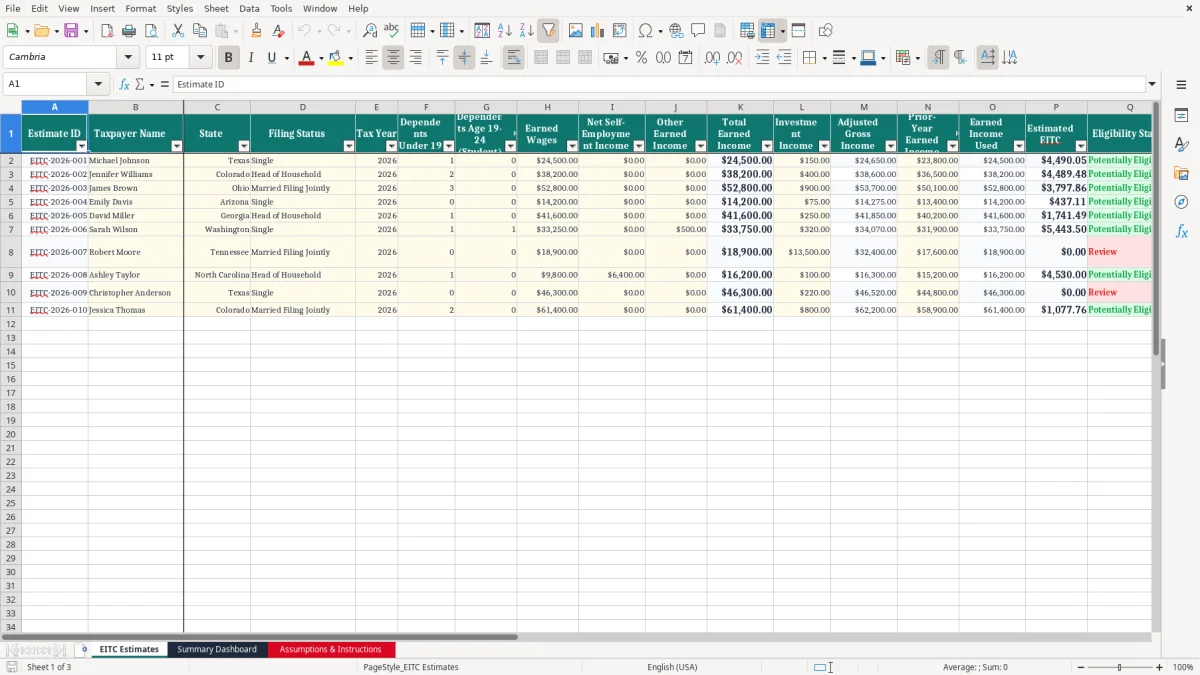
This earned income credit estimate Excel spreadsheet helps individuals and families create a preliminary estimate of a potential Earned Income Tax Credit (EITC). Enter filing status, earned income, investment income, and qualifying child information to review an estimated credit, maximum credit category, phase-in calculation, phase-out reduction, and eligibility indicators. The workbook is designed for tax planning, scenario comparison, and organized recordkeeping.
It includes an input sheet, a summary dashboard, and an assumptions and instructions sheet containing the lookup values used by the model. Results are estimates for educational and planning purposes only.
EITC rules, income limits, maximum credits, and qualifying-child requirements can change from year to year, so verify the assumptions for the applicable federal tax year before relying on the result. Review the current IRS instructions or consult a qualified tax professional before filing.
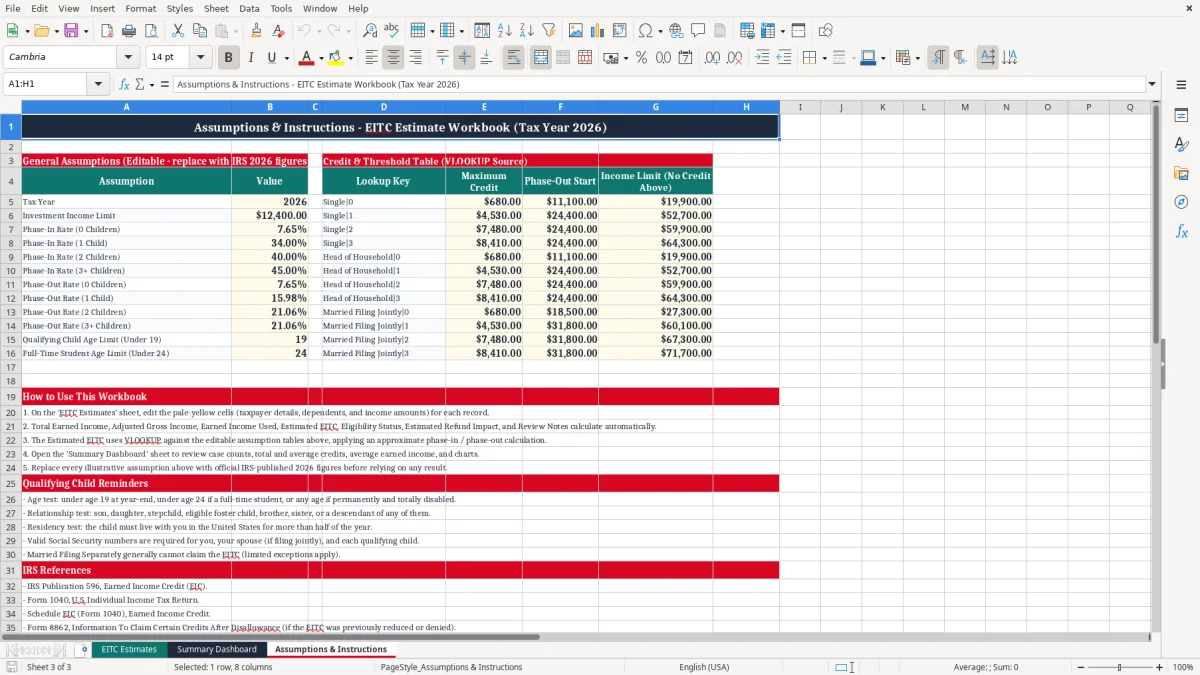
Start on the Assumptions & Instructions sheet and confirm that the maximum credits, income thresholds, phase-in rates, phase-out rates, phase-out thresholds, and investment-income limit match the federal tax year you are evaluating. Next, open the EITC Estimates sheet and complete the highlighted input cells. Select the filing status used on the federal return, enter earned income, enter investment income, and provide the number of qualifying children.
Complete the available child eligibility questions carefully. Count a child only when the applicable IRS age, relationship, residency, and joint-return requirements are satisfied; being listed as a dependent alone does not establish EITC eligibility. Review the calculated maximum potential credit, phase-in amount, phase-out reduction, final estimated credit, and eligibility notes.
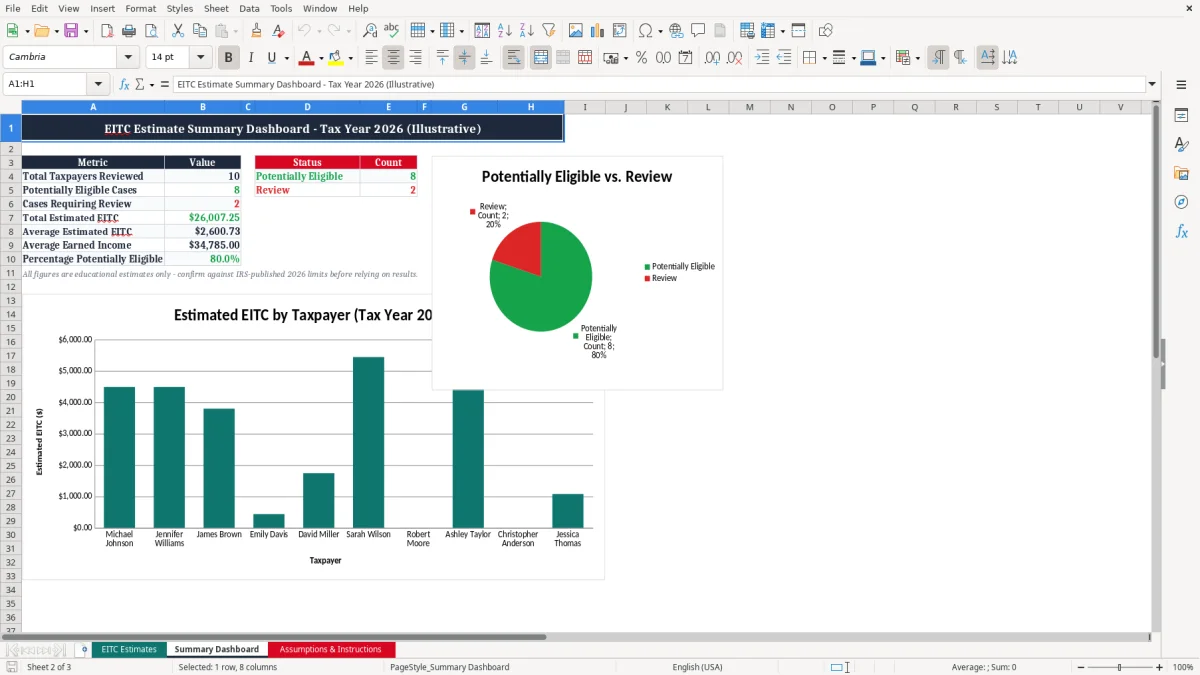
Then open the Summary Dashboard to view the household scenario in a condensed format and review the chart. Create a separate saved copy for each tax year or household scenario so that prior assumptions are not overwritten.
If the workbook displays a warning or zero estimate, read the associated note and check the inputs before drawing a conclusion. Confirm every result against current IRS guidance, especially for married taxpayers, self-employment income, investment income, military or clergy income, Social Security number requirements, and qualifying-child rules.
An earned income credit estimate spreadsheet is an Excel planning tool that helps taxpayers explore whether they may qualify for the federal Earned Income Tax Credit. Instead of searching through separate worksheets or performing repeated calculations by hand, users can enter key household information in one place and review an organized estimate.
The workbook typically considers filing status, earned income, investment income, and the number of qualifying children. It then applies tax-year lookup values to show a possible maximum credit, phase-in amount, phase-out reduction, and final estimated credit.
This type of spreadsheet is useful before preparing a tax return because it makes the relationship between income and the credit easier to understand. Lower earned income may increase the credit during the phase-in range, while income above an applicable threshold may reduce the credit during the phase-out range.
Investment income can also affect eligibility when it exceeds the current IRS limit. A household may use the workbook to compare several scenarios, such as different levels of self-employment income or changes in qualifying-child status.
The estimate is not an official IRS determination. EITC eligibility includes rules that may require documentation and professional interpretation, including Social Security numbers, residency, relationship, age, filing restrictions, and special income rules.
Tax-year values must be updated before use because credit amounts and thresholds change. Used with current IRS instructions, this spreadsheet can support better planning, clearer discussions with a tax professional, and more consistent household records.
The spreadsheet estimates the Earned Income Tax Credit by organizing the main variables that affect the calculation. First, the user selects a filing status and enters earned income and investment income. Earned income may include qualifying wages, salaries, tips, and net self-employment earnings.
Investment income is entered separately because the EITC has a specific limit that can make a taxpayer ineligible when exceeded. The workbook also records qualifying children and groups the result into four categories: zero children, one child, two children, or three or more children.
After the inputs are completed, the model identifies the applicable tax-year assumptions. These may include the maximum credit, earned-income limit, phase-in rate, phase-out rate, and phase-out threshold for the filing-status and child category combination. The phase-in calculation generally increases the potential credit as earned income rises through the initial range.
Once income reaches the maximum-credit area, the credit may remain level for a range. When relevant income exceeds the phase-out threshold, the model applies a reduction until the estimated credit reaches zero or another limiting condition applies.
The result should be read as an estimate rather than a promise of a refund. The EITC is a federal tax credit, and the final amount depends on the complete tax return and all applicable IRS rules. The spreadsheet does not independently verify documents, determine every form of disqualified income, or replace filing software.
Review warning messages, confirm that the child information is accurate, and update all lookup values for the correct tax year. If income is complex or eligibility is uncertain, obtain advice from a qualified tax professional.
This EITC Excel template can be useful for employees, freelancers, independent contractors, and families who want a preliminary view of a possible Earned Income Tax Credit. It can support personal tax planning, nonprofit financial counseling, community tax assistance, and conversations with a preparer.
A taxpayer with wages can use it to organize annual income information, while a self-employed taxpayer can use it to model how changes in net earnings might affect the estimate. Parents and caregivers can also use the qualifying-child section to organize information before reviewing the official requirements.
The workbook is especially helpful when comparing scenarios. For example, a user may save one copy for a current income estimate and another for a projected income amount.
The dashboard makes it easier to compare the estimated credit, income figures, and eligibility status without reviewing every formula. The assumptions sheet also gives users a central location to record the applicable tax-year values, reducing the risk of mixing data from different years.
However, not every household can rely on a simple estimate. Married-filing-separately restrictions, multiple qualifying claims, nonresident or resident status, missing or invalid Social Security numbers, investment income, clergy income, military income, and unusual self-employment situations may require additional analysis. A qualifying child must satisfy all relevant IRS tests; being related to the taxpayer or listed as a dependent is not sufficient by itself.
Use the template as a planning aid, not as proof of eligibility. Always verify the completed estimate against current IRS publications, official instructions, and professional guidance when needed.
Accurate results begin with accurate inputs. Use the federal filing status that will actually appear on the tax return, and enter earned income for the same tax year covered by the assumptions sheet.
Include qualifying wages, salary, tips, and net earnings from self-employment as appropriate, but do not classify unemployment compensation, pensions, interest, or other non-earned amounts as earned income. Enter investment income separately and review the current IRS definition and limit because the treatment of investment amounts can affect eligibility.
Take special care with qualifying children. Confirm age, relationship, residency, and joint-return requirements before entering a child as qualifying. If more than three children qualify, use the three-or-more category shown by the workbook.
Keep supporting records, such as income statements and residency documentation, with the saved spreadsheet copy. If the estimate is based on projected income, label the file clearly and update it when actual information becomes available.
Before using the final number, check the Assumptions & Instructions sheet for the correct tax year and review every warning on the estimates sheet. A zero result may reflect excessive investment income, a phase-out calculation, an ineligible filing situation, missing qualifying information, or an incorrect input. The workbook may not cover every IRS rule, so do not use a favorable result as confirmation that a credit can be claimed.
Compare the estimate with current IRS guidance or ask a qualified tax professional to review complicated circumstances. Saving dated versions of the workbook creates a useful audit trail and helps prevent outdated thresholds from being reused in a later year.
It estimates a potential federal Earned Income Tax Credit using filing status, earned income, investment income, and qualifying-child information. It can display a maximum credit category, phase-in calculation, phase-out reduction, estimated credit, and eligibility indicators.
No. It is an educational planning template and does not provide an official IRS determination. Confirm current tax-year rules and review the completed tax return with IRS instructions or a qualified tax professional.
Enter qualifying wages, salaries, tips, and applicable net self-employment income. Do not enter unemployment compensation, pensions, interest, or other non-earned income in the earned-income field.
The EITC has an investment-income limit. When investment income exceeds the applicable limit for the tax year, a taxpayer may be ineligible even when other income and family details appear to qualify.
Children should be counted only when they satisfy all applicable IRS requirements, including age, relationship, residency, and joint-return rules. The workbook groups results into zero, one, two, or three or more children.
Yes, but update the assumptions and lookup values for each tax year before calculating an estimate. Save separate copies for different years or scenarios so outdated credit amounts and thresholds are not reused.