W-4 Estimator Excel – Free Template (2026)
12
Free download
Track 2026 employee and employer Social Security, Medicare, wage-base limits, and Additional Medicare Tax using editable payroll assumptions.


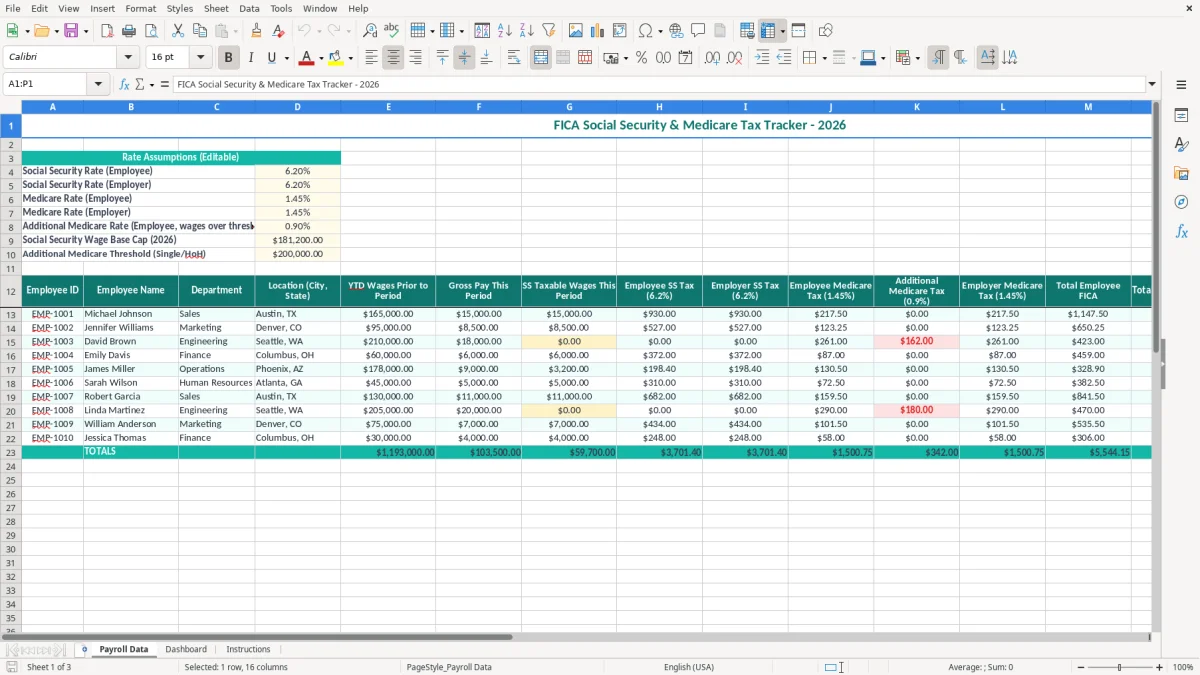
This FICA Social Security and Medicare tracker calculates payroll-tax amounts from editable 2026 rate assumptions. It includes employee and employer rates, the $181,200 Social Security wage base, the $200,000 Additional Medicare threshold for single and head-of-household filers, and a dashboard for reviewing totals.
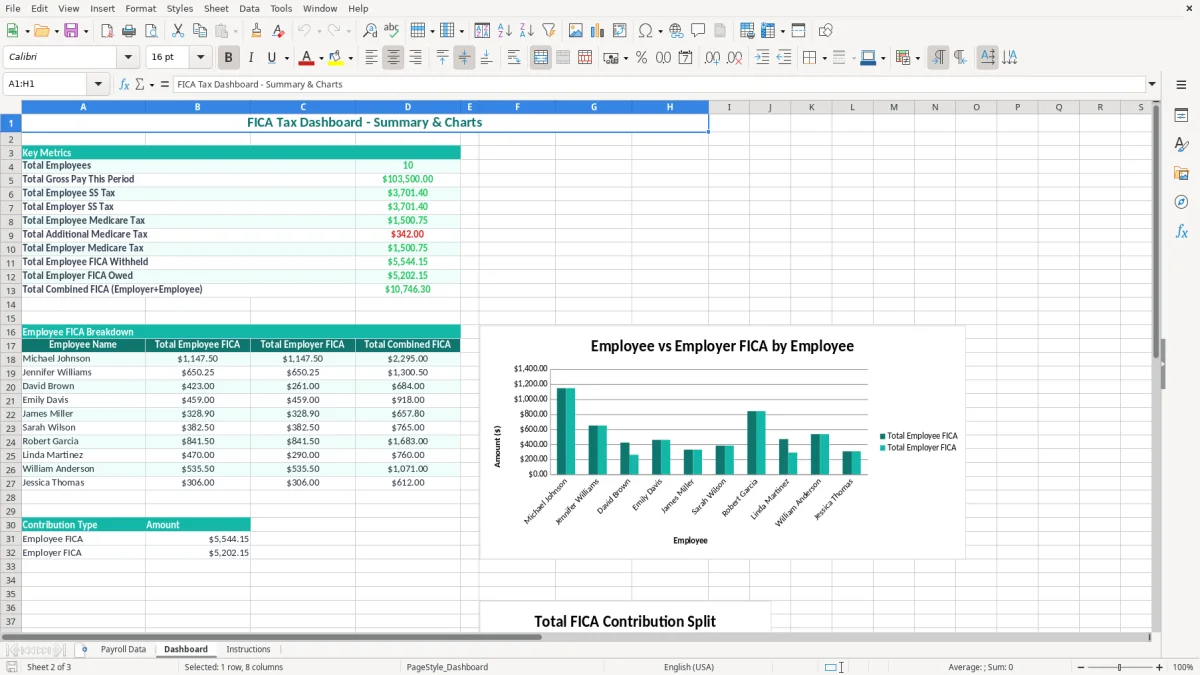
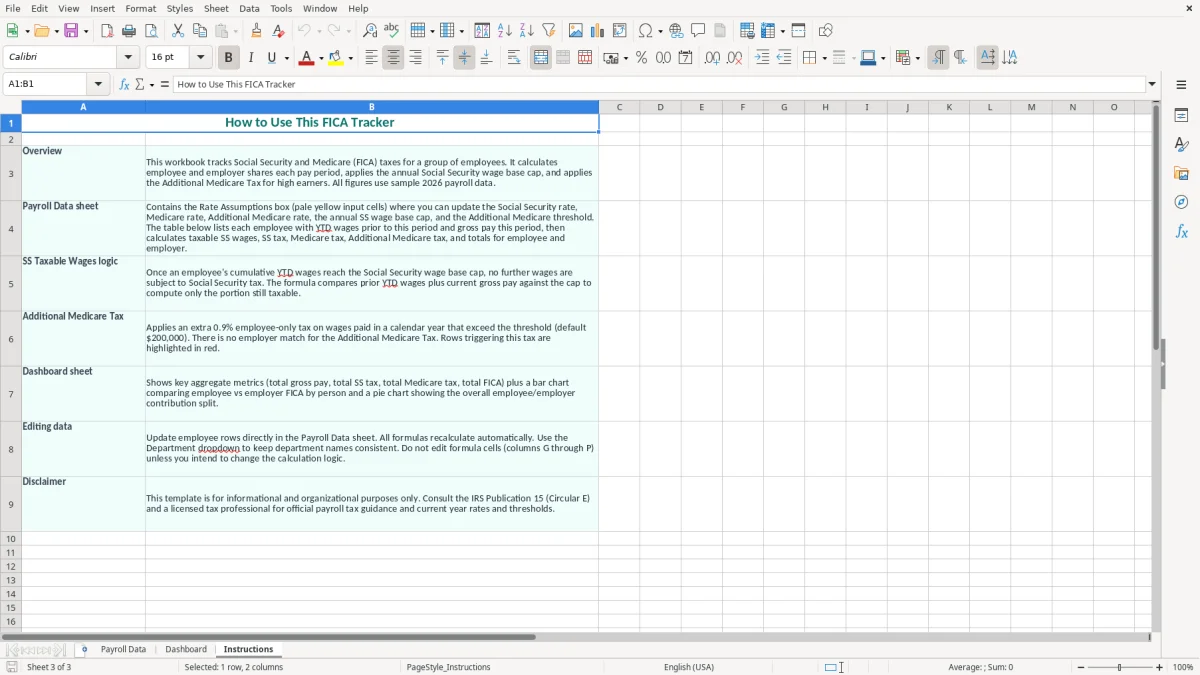
Use the Payroll Data tab to maintain the assumptions and enter payroll information. The Dashboard summarizes the results, while Instructions explains the workbook. Image 1 shows the teal Payroll Data layout and yellow input cells; image 2 shows the dashboard; image 3 shows the guidance tab.
A payroll clerk, office manager, or small-business bookkeeper uses a FICA tracker when payroll is processed and when the payroll liability account is reconciled. It is especially useful for a four-employee contractor that runs biweekly payroll: the owner can compare the workbook's employee withholding and employer expense with the payroll service report before sending the tax deposit.
The workbook separates the assumptions from the review process. In image 1, the Payroll Data tab begins with a teal Rate Assumptions (Editable) header. The listed fields include employee and employer Social Security rates, employee and employer Medicare rates, the Additional Medicare rate, the Social Security Wage Base Cap (2026), and the Additional Medicare Threshold (Single/HoH).
Suppose a plumber earns $5,000 in a biweekly check. At 6.20%, the employee Social Security withholding is $310.00 and the employer Social Security cost is another $310.00. Medicare at 1.45% is $72.50 on each side, so the combined regular FICA cost shown for that check is $765.00 before any Additional Medicare amount.
The practical value is the side-by-side review: $382.50 is withheld from the employee and $382.50 is the employer match. You can identify a missing employer liability before the payroll journal entry reaches the general ledger.
At month-end, a bookkeeper can compare the Dashboard with the payroll register and the FICA liability account. At year-end, the same review supports the totals used to check Forms W-2 and the final payroll tax filings.
This is not limited to construction. A nonprofit treasurer reviewing a $12,000 monthly payroll, or an online store with three staff members, can use the same rate-and-threshold view. The key choice is to use the spreadsheet as a control check, not as a replacement for a payroll provider's tax filing system.
For 2026, the employee FICA Social Security rate is 6.20% and the employer rate is 6.20%. The employee and employer Medicare rates are each 1.45%. Together, regular FICA is 7.65% on the employee side and 7.65% on the employer side, or 15.30% combined before any Additional Medicare Tax.
The Payroll Data tab stores these rates as editable percentage assumptions. It also shows a 2026 Social Security Wage Base Cap of $181,200. For an employee with $200,000 of annual covered wages, Social Security withholding reaches $11,234.40 because $181,200 × 6.20% equals $11,234.40; Medicare continues on the full $200,000.
The workbook includes a 0.90% Additional Medicare Rate for employee wages over the $200,000 threshold labeled for Single/HoH filers. On $25,000 above that threshold, the additional withholding is $225.00. This tax is an employee withholding item; it is not matched by the employer.
The threshold is based on the employee's wages and filing-status information, while an employer generally begins withholding Additional Medicare Tax after wages paid by that employer exceed $200,000 in the calendar year. The employee ultimately reconciles the tax on Form 1040 when multiple jobs or other compensation affect the result.
Regular Medicare has no Social Security-style wage cap. An employer therefore continues calculating the 1.45% employer Medicare amount on covered wages after an employee passes $181,200. The employee's W-4 information does not change the regular 6.20% and 1.45% rates, although it can affect federal income-tax withholding.
Use this tracker to check arithmetic, then reconcile it to the payroll register and employment-tax filings. FICA is separate from federal income-tax withholding, state payroll taxes, FUTA, and SUTA; do not combine those liabilities in the Dashboard totals unless the workbook's instructions specifically direct you to do so.
The most expensive errors usually come from applying a correct rate to the wrong wage amount. A bookkeeper may calculate 6.20% on a worker's full $190,000 annual wages instead of stopping Social Security at $181,200. That overstates employee withholding by $545.60 because $8,800 × 6.20% was taxed after the wage base had already been reached.
Another recurring mistake is treating the Social Security cap as a Medicare cap. A $220,000 employee should not have regular Social Security calculated on the final $38,800, but Medicare still applies to the full covered wage amount. A payroll file that stops both taxes at $181,200 can understate Medicare by $562.60 at 1.45% on $38,800.
Additional Medicare Tax causes a different problem. It is a 0.90% employee-only withholding, not an employer match. Matching it on the company side adds $90 to the employer liability for every $10,000 subject to the extra tax and makes the payroll journal entry wrong.
Small companies also post the employee withholding as a payroll expense instead of a liability. On a $50,000 payroll, regular employee FICA is $3,825.00, but that amount is withheld from workers and owed to the government; the employer's separate $3,825.00 is the company expense.
Timing creates another failure. If a payroll register is dated 12/31/2026 but the bank withdrawal clears in January 2027, recording the payment date as the expense date can leave the year-end FICA payable balance understated. Keep the payroll date, tax liability date, and payment date visible in your reconciliation support.
Finally, changing a rate in the middle of the year without documenting the change makes a W-2 comparison difficult. Save a dated copy and compare the Dashboard with quarterly employment-tax filings; a $200 discrepancy found in January is much easier to correct than twelve unexplained payroll adjustments.
A tracker becomes useful when you attach it to a payroll event rather than opening it only at year-end. Set a recurring review for the same day each payroll is approved. For a biweekly employer, that creates 26 control points in 2026 instead of one rushed reconciliation after the final December check.
Use Excel's existing formatting consistently: the yellow assumption cells in image 1 should be changed only when the underlying 2026 rate or threshold changes. Do not type replacement rates into individual payroll rows. One centralized assumption prevents a 6.20% rate from becoming 6.02% in a single copied formula.
This workbook is a good review layer for a small payroll, but it is not a substitute for tax deposits, employee-level wage records, or filed employment-tax returns. If you process 100 employees across several states, corrections occur weekly, or the payroll register exceeds 10,000 rows, use a payroll provider or accounting system as the source of record.
For a four-person company, a weekly 10-minute reconciliation is usually more practical than migrating immediately to a complex system. For a 40-person company with multiple pay rates and jurisdictions, the opposite is true: automate payroll and keep the spreadsheet only for exception review.
It organizes the 2026 employee and employer Social Security and Medicare assumptions, including 6.20% Social Security, 1.45% Medicare, the $181,200 Social Security wage base cap, and the 0.90% Additional Medicare rate above the $200,000 Single/HoH threshold. Use the Dashboard to review the payroll results.
No. The employer matches regular Social Security at 6.20% and regular Medicare at 1.45%, but the 0.90% Additional Medicare Tax is an employee-only withholding. The employer does not record a matching expense for that additional amount.
Stop calculating Social Security withholding and the employer Social Security match on wages above the 2026 $181,200 wage base. Continue regular Medicare at 1.45% for both employee and employer on covered wages, because Medicare does not use that Social Security cap.
The employer withholding trigger is based on wages paid by that employer during the calendar year. The employee's final Additional Medicare Tax liability is determined on Form 1040 using filing-status thresholds and total Medicare-taxable compensation, so multiple jobs can change the final result.
Yes. The Rate Assumptions (Editable) section contains yellow input cells for the employee and employer rates, wage base cap, and threshold. For the 2026 version, verify the displayed values before use and document any approved change rather than overriding rates in individual payroll rows.
No. It is a calculation and reconciliation aid. Compare it with your payroll register, tax liability reports, and employment-tax filings, but use your payroll provider or accounting system to handle deposits, filings, employee records, and corrections.