FICA Social Security Medicare Excel – Free Template (2026)
2
Free download
Estimate 2026 federal paycheck withholding for employees using salary, filing status, credits, deductions, pay frequency, and extra withholding.


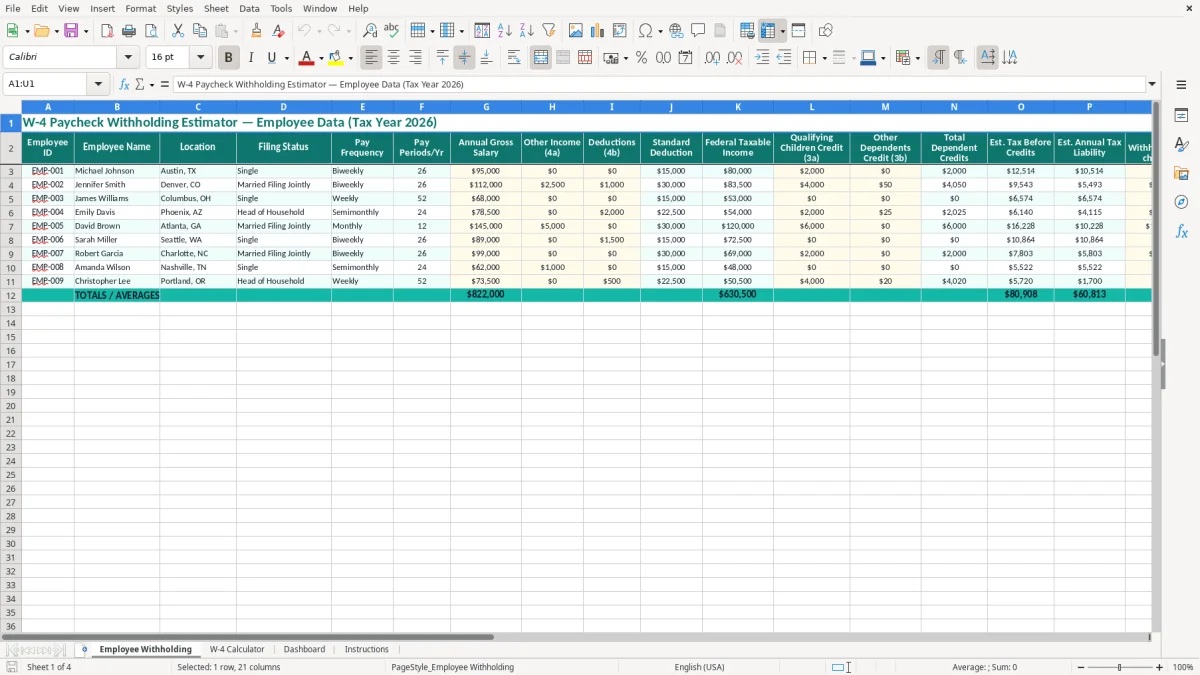
This W-4 paycheck withholding estimator is an Excel spreadsheet for projecting an employee’s 2026 federal tax withholding, annual liability, and expected refund or balance due. It contains employee input fields, a W-4 Calculator, a Dashboard, and Instructions for reviewing the estimate.
Use it during onboarding, an annual benefits review, or after an employee submits a new Form W-4. Enter salary, filing status, pay frequency, other income, deductions, dependent credits, current withholding, and extra withholding so you can compare projected tax with planned paycheck deductions.
A payroll coordinator uses this spreadsheet when a new hire completes Form W-4, but the useful work does not stop there. Employees often need a fresh estimate after marriage, divorce, the birth of a child, a second job, a large bonus, or a change in deductible income. The Employee Withholding tab gives you one row per employee and places the inputs beside the projected result.
Consider a plumbing contractor with four employees. One worker earns $52,000 and is paid biweekly; another earns $78,000 and reports $2,500 of other income on Step 4(a). Entering both records shows how the second employee’s additional income can increase the annual liability even when the regular salary withholding looks similar.
The visible columns include Employee ID, Employee Name, Location, Filing Status, Pay Frequency, Pay Periods/Yr, and Annual Gross Salary. Image 1 shows the Employee Withholding layout, where payroll can scan employee identity and compensation before reviewing tax fields.
An employee with two jobs may discover in August that the combined withholding is too low. Enter the second income in Other Income (4a), add any Deductions (4b), and compare the resulting Est. Annual Tax Liability with Total Annual Withholding. If the difference is $1,300 and 10 paychecks remain, an additional $130 per paycheck is a practical starting estimate for review.
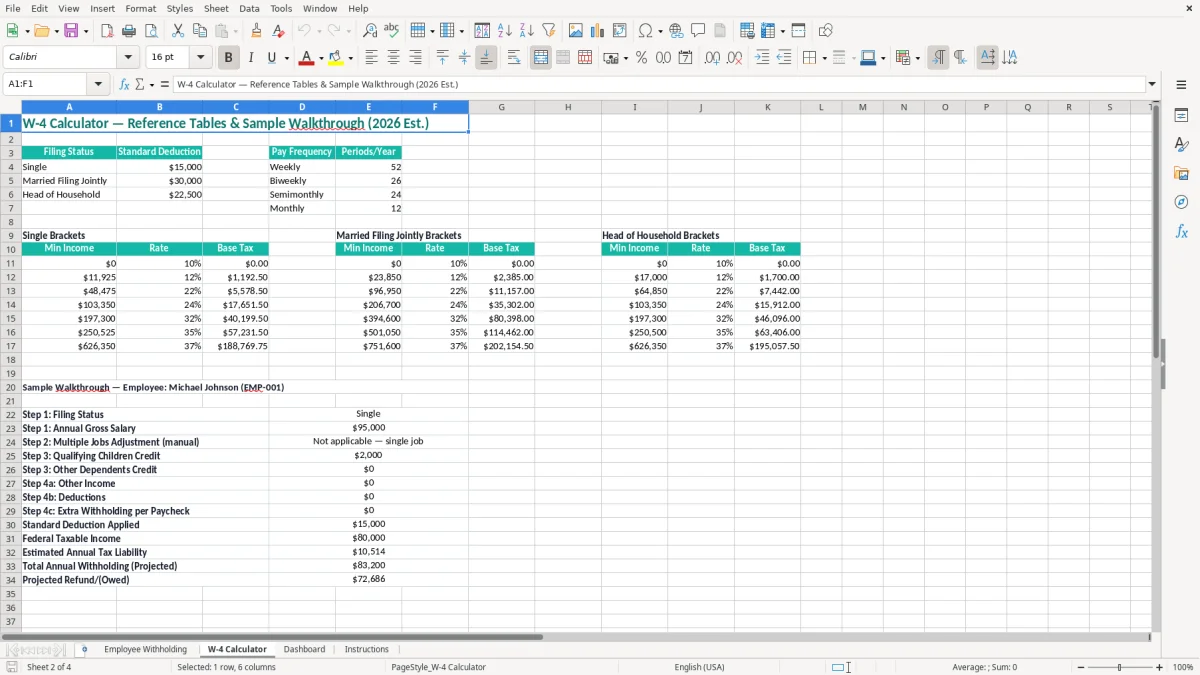
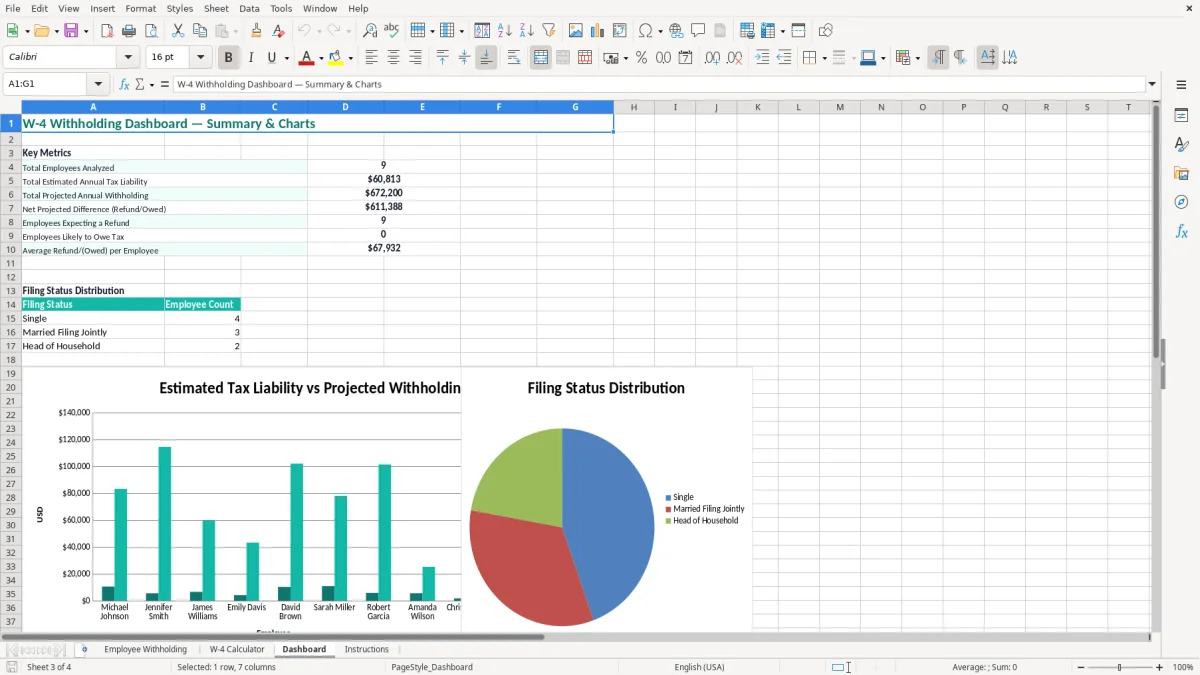
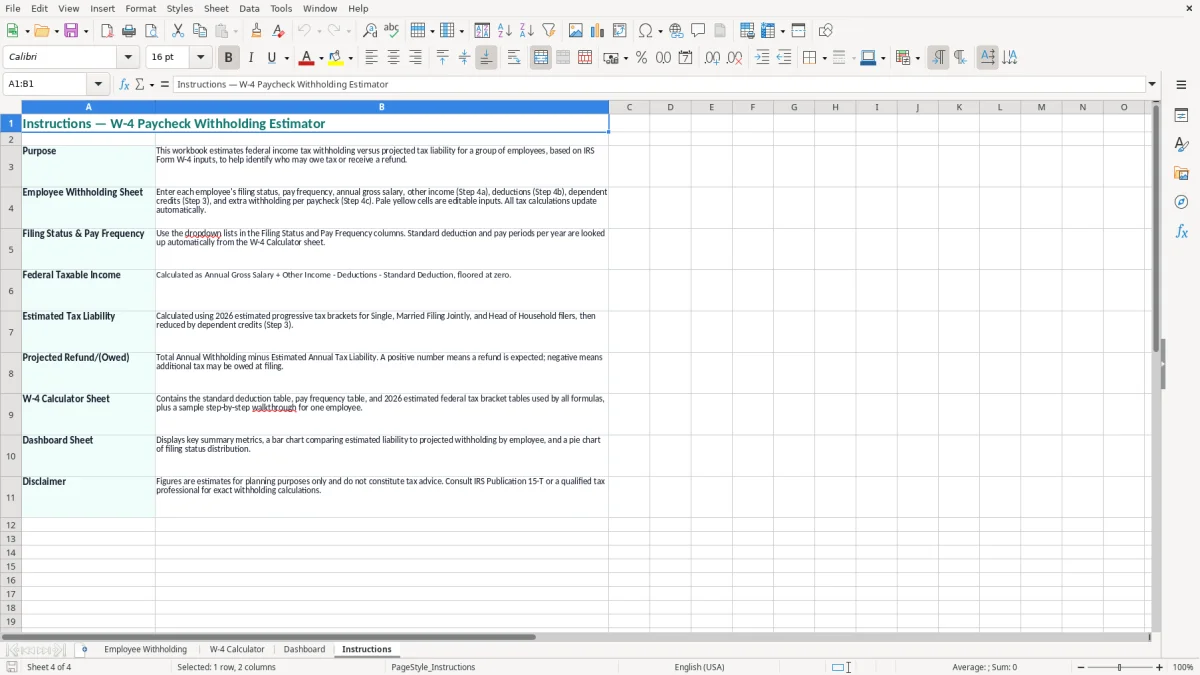
Image 2 shows the W-4 Calculator tab, which provides a separate place to examine the estimate. Image 3 shows the Dashboard for reviewing the workbook’s results, while image 4 shows the Instructions tab for the intended entry and review sequence.
Form W-4 tells an employer how to calculate federal income-tax withholding; it is not a tax return and it does not determine the employee’s final Form 1040 liability. The 2026 estimate in this workbook uses the employee’s salary, filing status, other income, deductions, dependent credits, current withholding, and extra withholding as planning inputs.
Other Income (4a) is intended for income such as interest, dividends, retirement income, or a second job when the employee chooses to account for it through withholding. Deductions (4b) can reflect deductions beyond the applicable standard deduction. Qualifying Children Credit (3a) and Other Dependents Credit (3b) are kept in separate columns so you can trace the source of Total Dependent Credits.
Extra Withholding/Paycheck (4c) is a direct per-pay-period addition. For example, $75 entered against 26 biweekly pay periods adds $1,950 to annual withholding. That is a withholding adjustment, not a credit and not a reduction of taxable wages.
Federal income-tax withholding is separate from FICA. In 2026, the employee share of FICA remains 6.2% for Social Security plus 1.45% for Medicare, or 7.65% before any additional Medicare-tax rules. This spreadsheet’s federal estimate should not be used to calculate Social Security, Medicare, state income tax, unemployment tax, or benefit deductions.
The IRS expects employers to use the applicable 2026 withholding guidance and deposit payroll taxes on the employer’s assigned schedule. A W-4 estimate can identify a likely shortfall, but payroll must still follow the employer’s payroll system and the employee’s signed Form W-4. Review the Calculator and Instructions tabs before changing a deduction.
The most expensive error is treating a paycheck number as proof that the employee is fully covered for the year. A worker earning $95,000 may have adequate withholding from one job, yet a spouse’s wages, interest income, or a year-end bonus can create a balance due. A $2,000 gap discovered in December is much harder to correct than an $80 adjustment made across 25 remaining paychecks.
Do not enter a monthly salary in Annual Gross Salary or enter a whole-year extra amount in Extra Withholding/Paycheck. If an employee requests $1,200 of additional withholding for the year and you enter $1,200 per paycheck on a biweekly schedule, the workbook projects $31,200 instead. Confirm both the dollar unit and Pay Periods/Yr before relying on Status.
Another recurring mistake is copying a prior filing status after a life event. A married employee who selects Married Filing Jointly but has a second job may need the multiple-jobs adjustment in Form W-4 Step 2. The spreadsheet can expose the income gap, but it cannot replace the employee’s completed form or calculate every household tax circumstance.
A projected refund is not automatically a success. If annual withholding exceeds estimated liability by $2,600, the employee may be giving up roughly $217 per month in cash flow. Conversely, a projected amount owed can lead to an underpayment problem if the employee ignores it and makes no adjustment before the remaining payroll runs.
Never use a stale Current Withholding/Paycheck value after a raise or payroll-system change. Reconcile one recent pay stub to the entry, check whether a bonus used a different withholding method, and document the date of each estimate. Keep the workbook access-controlled because it contains names, salaries, locations, and tax-related information.
Set one recurring review point instead of opening the file only when an employee complains about a refund or balance due. The cleanest routine is a short review after each payroll run for changed employees, followed by a broader check before year-end payroll and before employees submit updated Forms W-4.
For a 20-person company, a 15-minute review of four changed employees is usually more reliable than rebuilding every employee’s estimate at year-end. Use the W-4 Calculator for the detailed check, then return to Employee Withholding so the central record remains current.
Keep pay-frequency labels consistent: do not mix “Biweekly” and “Every Two Weeks” when the workbook expects one label. A biweekly employee generally has 26 pay periods, while a semimonthly employee has 24; confusing those counts changes a $100 extra withholding entry by $200 per year.
Once payroll exceeds roughly 50 employees, includes multiple states, or processes commissions and irregular bonuses every pay period, move the authoritative calculation into a payroll provider. Keep this spreadsheet as a review and communication tool, not as a replacement for payroll tax deposits, Form W-2 reporting, or the employer’s 2026 withholding system.
It estimates federal taxable income, dependent credits, annual tax liability, annual withholding, and a projected refund or amount owed from the employee inputs. It does not calculate FICA, state income tax, unemployment tax, benefits, or the final Form 1040 result.
Start with Employee Withholding. Enter the employee and compensation data there, then use the W-4 Calculator for a closer review, the Dashboard for a summary, and Instructions for the workbook’s intended workflow.
Enter the requested additional amount for one paycheck in Extra Withholding/Paycheck. For example, $50 on a biweekly schedule with 26 pay periods represents $1,300 of additional annual withholding.
No. The Location column identifies the employee’s location, but the estimate is for federal income-tax withholding. State income-tax rules, local taxes, and reciprocity requirements must be handled through the applicable payroll process.
No. The workbook is an estimate and planning aid. The employer must use the employee’s completed Form W-4 and the applicable 2026 IRS withholding procedures when setting payroll withholding.
Withholding estimates may differ because of bonuses, multiple jobs, investment income, changing wages, credits, deductions, retirement contributions, state taxes, or other Form 1040 items. The final tax return includes the household’s complete income and deductions, not just this workbook’s fields.