Goodwill Donation Value Log Template
12
Free download
Track client payments, expenses, net income, quarters, and 1099-NEC status for contractor income in 2026.


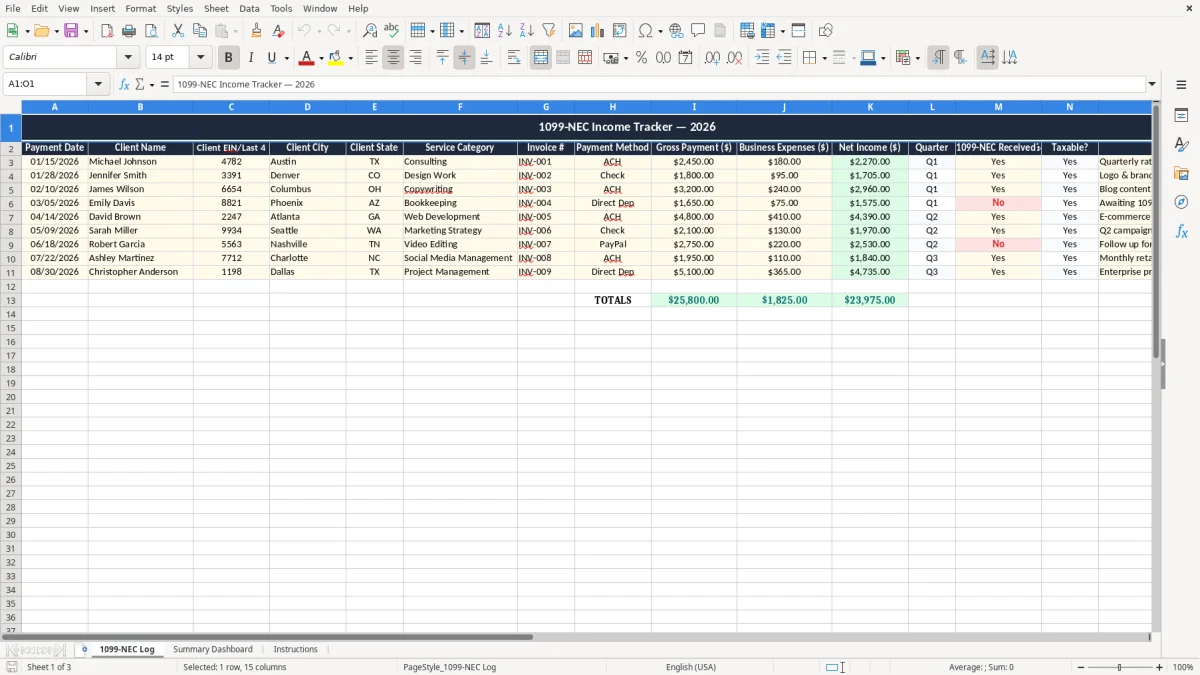
This 1099-NEC income tracker Excel template logs contractor payments, expenses, net income, quarter, and whether a client has issued the form. It gives you one place to sort payments by client, invoice number, and tax status.
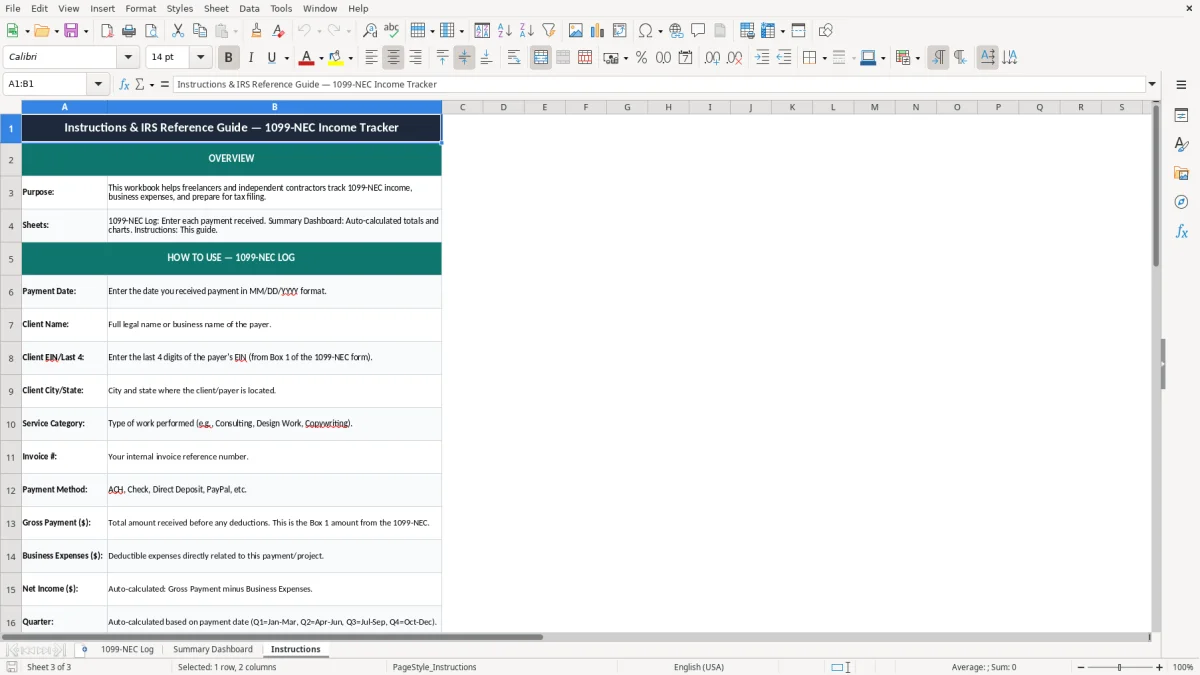
The workbook contains three tabs: 1099-NEC Log, Summary Dashboard, and Instructions. Use it to keep your cash flow visible while you prepare for estimated taxes and year-end reporting.
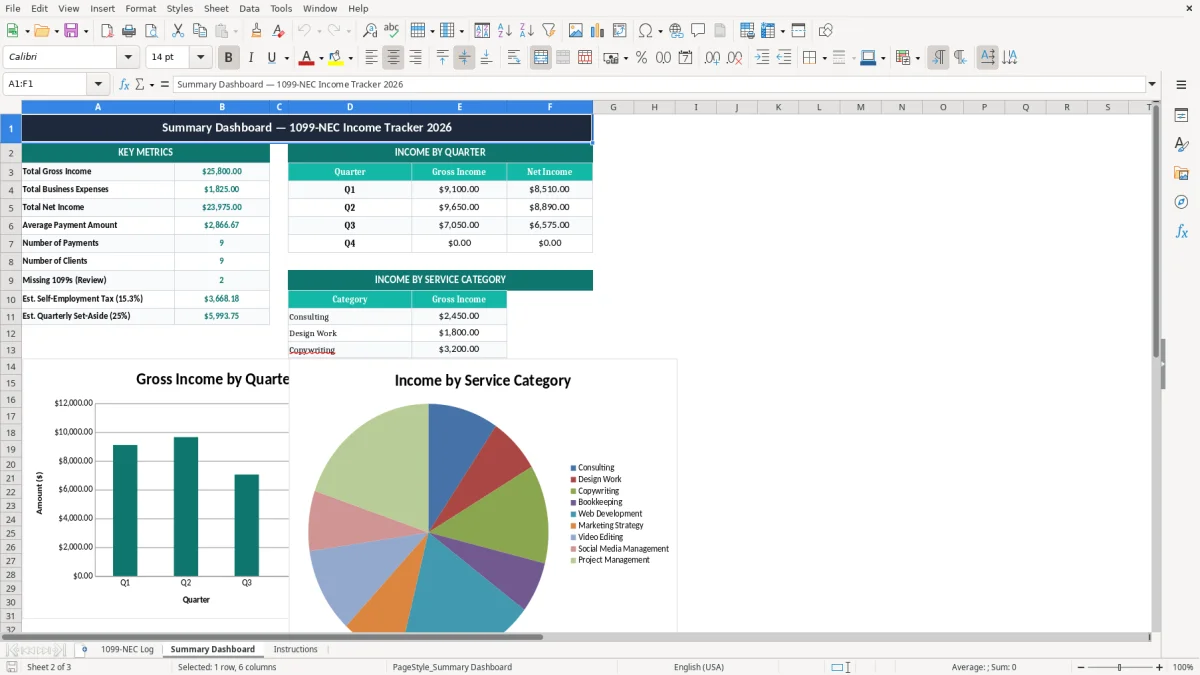
Image 1 shows the entry sheet with a single line for each payment. Image 2 shows the dashboard view, and image 3 gives you setup guidance so you can start with clean records.
This tracker fits the self-employed person who gets paid by clients instead of a payroll department. A sole proprietor filing Schedule C, a designer working through an LLC, or a bookkeeper handling side-income from three clients can all use the same log.
Picture a general contractor with 4 workers and 18 monthly subcontractor invoices, or a freelancer with 12 clients and $7,500 in payments each month. If you miss even one $1,200 invoice in a quarter, your cash flow estimate for estimated taxes is off by enough to matter.
The pressure points are quarter-end, year-end close, and the week before tax filing. That is when you want every payment date, invoice number, and expense amount already sitting in the same sheet instead of spread across email, banking, and receipts.
The entry tab keeps gross receipts away from business expenses, so you can see the net income from each job. That matters when one client pays $3,200 but you spent $240 on subcontract help and materials to earn it.
The IRS expects you to keep records that support the income you report on Form 1040 and Schedule C. For most tax records, the practical retention period is 3 years, and it can stretch to 7 years when you are dealing with underreported income or major basis items.
A client paying a contractor $600 or more in the year usually belongs on a 1099-NEC file trail, and the payment history should tie back to that form. If you are a contractor, you use this tracker to confirm which clients paid you, how much, and whether the year-end form matches your own books.
Quarter labels are not cosmetic. They help you estimate the four 1040-ES payment dates in 2026: April 15, June 15, September 15, and January 15.
If you only watch gross receipts, a $10,000 month can look healthy while $2,700 of expenses quietly eats the margin. Net income gives you the number that actually feeds your tax estimate and your owner draw.
This sheet is for contractor income, not payroll. A W-2 employee has FICA withheld through payroll, while you as a contractor usually track the full income yourself and handle the tax side through your own records.
The most common failure is partial records. You remember the $2,450 ACH deposit from January, but the $180 expense attached to that job never gets entered, so your net income is overstated by $180 and your tax estimate drifts upward.
If you skip the client EIN or last four digits, the record is harder to reconcile when you compare your spreadsheet to a year-end 1099-NEC. That can cost you hours in January, especially if you are sorting 40 or 50 payments at once.
Many people track income in one file and expenses in another, then never connect them. If 24 projects each carry $75 to $250 of direct costs, the lost detail can hide several thousand dollars of deductible spending by year-end.
If you leave this until March, every missing receipt becomes a decision under pressure. That is how a contractor ends up underestimating estimated taxes, then paying an unexpected balance plus penalty interest when the return is filed.
A clean log is not about neatness. It keeps you from underreporting income, forgetting deductible expenses, or scrambling through old bank statements the night before your return is due.
Use the sheet the same day you get paid. If you batch 8 payments every Friday, the work stays under 10 minutes and you do not have to rebuild the month from memory.
If you are pushing past 300 transactions a month, or if one client starts issuing dozens of partial payments, move the bookkeeping into QuickBooks and keep the spreadsheet only as a review layer. A tracker works well for a freelancer or small LLC; it starts to strain when transaction volume turns into a full-time accounting job.
Do not wait for perfection. A consistent log with 98% of payments entered on time is far more useful than a pristine file that only gets touched once in March.
It records contractor payments, related expenses, and net income so you can follow your income through the year and prepare cleaner tax records.
It is built for freelancers, independent contractors, and small business owners who receive client payments instead of wages on a W-2.
Yes. By grouping income by quarter, it gives you a better base for estimated taxes and the 1040-ES payment schedule.
The log supports Schedule C reporting on Form 1040 and helps you keep the income trail that sits behind a 1099-NEC.
Enter the payment date, client name, client EIN or last four digits, city, state, service category, invoice number, payment method, gross payment, expenses, net income, quarter, and notes.
If your payment volume grows to hundreds of rows a month or you need deeper automation, move the books to a system like QuickBooks and keep the spreadsheet for review only.