Case Tracker Excel – Free Template (2026)
4
Free download
Plan crops, dates, yields, costs, beds, and harvest status with an XLSX garden planner for home gardeners and small growing spaces.


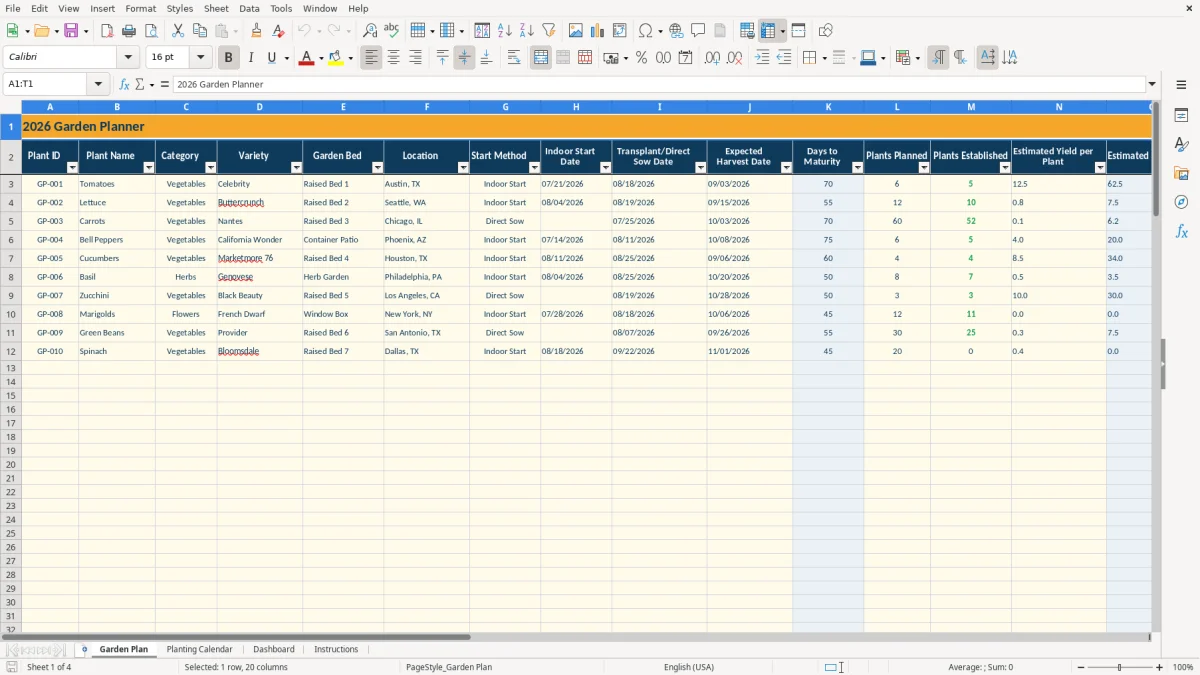
This garden planner organizes your crops, varieties, beds, planting dates, expected harvests, quantities, yields, and costs in one XLSX workbook. It contains Garden Plan, Planting Calendar, Dashboard, and Instructions tabs so you can move from crop selection to seasonal tracking.
Enter your plants in the pale yellow input cells on Garden Plan. The workbook uses VLOOKUP to retrieve days to maturity, calculates estimated yield and total cost, and labels each row Planned, Growing, or Harvest Due based on its dates and today’s date.
A home gardener can use this workbook when planning spring starts, summer succession crops, or a fall garden. A community garden coordinator can assign crops to Raised Bed 1, Raised Bed 2, and other locations, while a household gardener can compare the cost of a small patio container area with a larger bed.
Garden Plan records the Garden Bed and Location alongside the crop. The sample rows show Tomatoes in Raised Bed 1 in Austin, TX, Lettuce in Raised Bed 2 in Seattle, WA, and Carrots in Raised Bed 3 in Chicago, IL. That makes the location field useful when the same household manages beds with different sunlight or planting conditions.
Use Indoor Start Date, Transplant/Direct Sow Date, and Expected Harvest Date for each crop. The sample Tomatoes row has 6 plants planned, 5 established, and an estimated yield of 12.5 per established plant, producing a calculated estimated total yield of 62.5. Lettuce and Carrots demonstrate how the same layout works for different crop types and quantities.
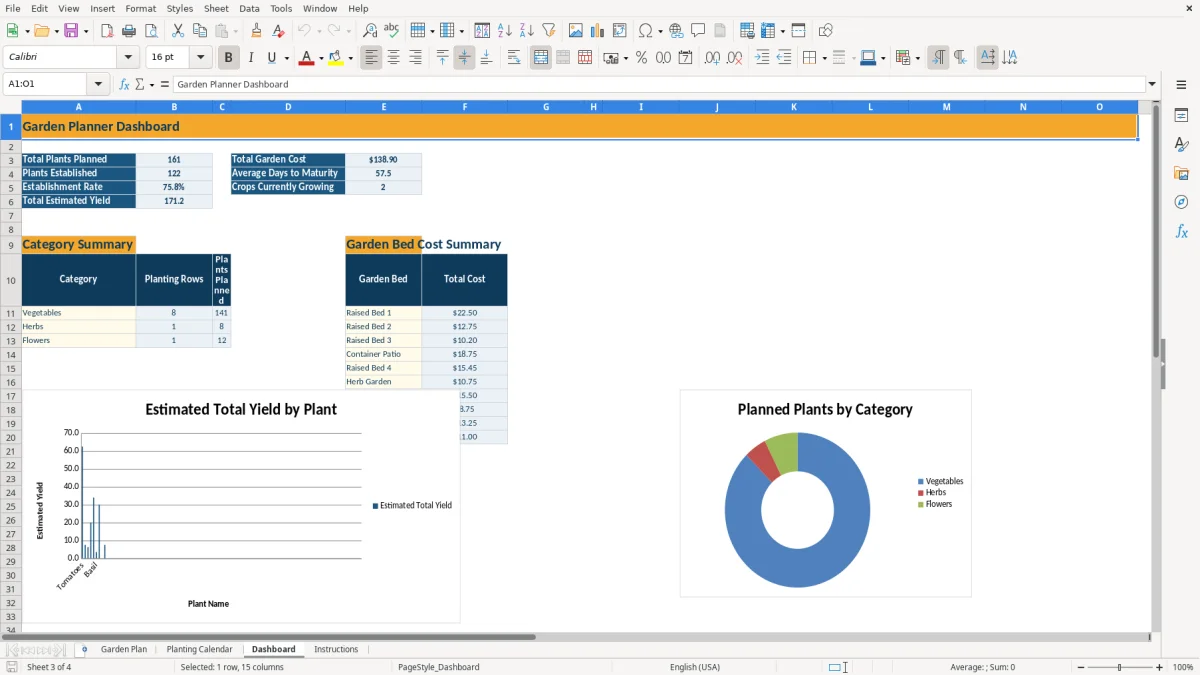
The Dashboard summarizes planned plants, established plants, establishment rate, total estimated yield, average days to maturity, growing crops, and total cost. Its category and bed summaries help you see whether the season is concentrated in vegetables or spread across vegetables, herbs, and flowers.
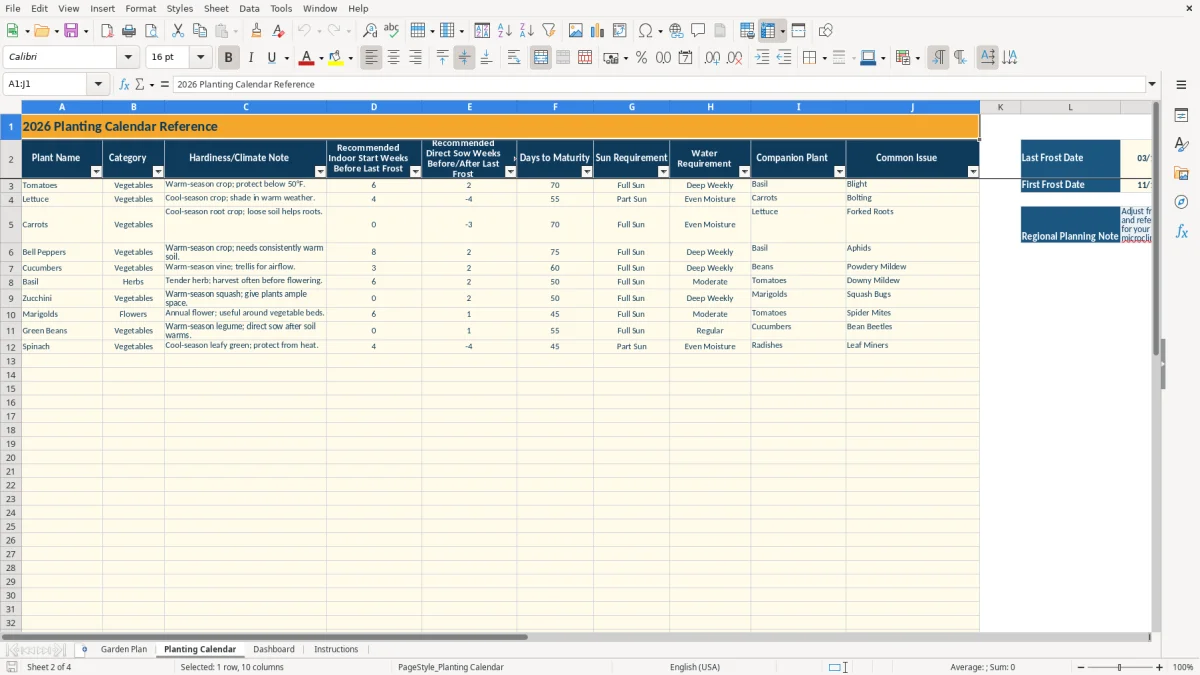
The Planting Calendar is a reference sheet, not a live local weather service. It includes recommended indoor-start and direct-sow timing, days to maturity, hardiness or climate notes, sun requirement, water requirement, companion plant, and common issue for the listed crops.
The reference area includes a Last Frost Date and First Frost Date. The sample values are 03/15/2026 and 11/15/2026, but the Instructions tab tells you to update them for your region and microclimate. Do not treat the sample dates as a forecast or as a universal planting rule.
Garden Plan retrieves Days to Maturity with VLOOKUP from Planting Calendar. If Plant Name is Tomatoes, the reference row for Tomatoes supplies 70 days; Lettuce supplies 55 days; Carrots supplies 70 days. Changing a crop name in only one sheet can leave the lookup blank, so preserve matching names.
Status is calculated from the Expected Harvest Date and the Transplant/Direct Sow Date. A future planting date is Planned, a started crop with a future harvest is Growing, and a passed expected harvest date is Harvest Due. The formulas use TODAY, so the displayed status changes as the calendar advances.
The most expensive planning errors are usually simple data-entry mismatches. If you type a crop name that does not match the Planting Calendar, Days to Maturity may remain blank even though the crop is otherwise complete. That weakens the average maturity figure on Dashboard and makes timing comparisons less useful.
Estimated Total Yield uses plants established, not plants planned, multiplied by estimated yield per plant. For example, the sample Tomatoes row uses 5 established plants and 12.5 yield per plant, so the result is 62.5. If you leave established plants at 6 after one plant fails, the displayed yield will be overstated by 12.5 units.
Total Cost adds Seed Cost and Soil/Fertilizer Cost for each row. A $4.50 seed cost plus an $18.00 soil or fertilizer cost produces $22.50 for the sample Tomatoes row. If you enter the same purchase on several rows, the Dashboard bed summary will count it several times; record each cost once and assign it to the appropriate planting line.
Status is only as useful as the dates behind it. A harvest date left in the past can show Harvest Due even after you already picked the crop, while a postponed transplant date can leave a crop marked Planned. Update the three editable planning dates when weather or plant growth changes rather than overriding the status formula.
Use one short weekly review instead of trying to reconstruct the season later. A practical routine is to check the garden on the same day each week, update Plants Established and dates in Garden Plan, then open Dashboard to compare the current totals with your plan.
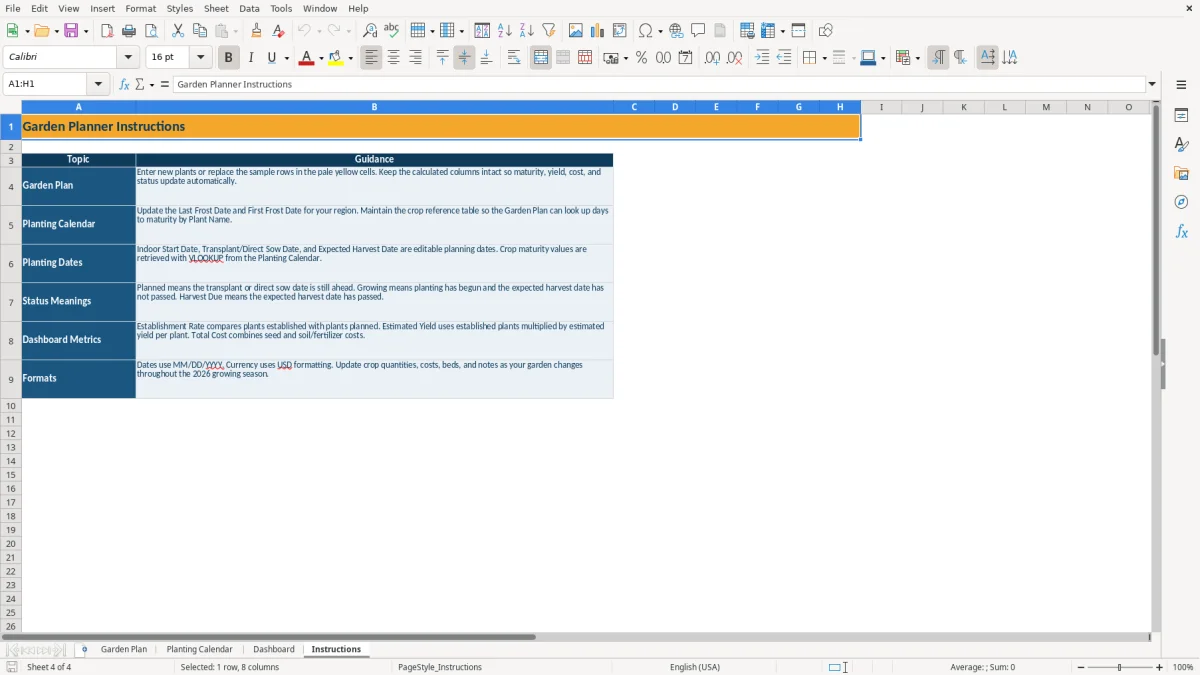
Leave Days to Maturity, Estimated Total Yield, Total Cost, and Status intact. The workbook already uses formulas across the planning rows, and the Instructions tab specifically separates editable planning fields from calculated outputs.
This XLSX workbook is well suited to a garden with a defined list of beds and seasonal crops. If you need task assignments, irrigation records, inventory purchasing, multiple growing seasons in one database, or mobile field entry, a dedicated garden-management system may be more appropriate than adding complexity to this file.
It tracks Plant ID, Plant Name, Category, Variety, Garden Bed, Location, Start Method, three planning dates, maturity, planned and established quantities, yield, seed cost, soil or fertilizer cost, status, and notes. The formula columns calculate maturity, yield, total cost, and status.
Estimated Total Yield is calculated by multiplying Plants Established by Estimated Yield per Plant. In the sample Tomatoes row, 5 established plants multiplied by 12.5 estimated yield equals 62.5.
Open Planting Calendar and update the Last Frost Date and First Frost Date in the reference area. The sample dates are 03/15/2026 and 11/15/2026; replace them with dates appropriate for your region and microclimate.
Garden Plan uses VLOOKUP to find the Plant Name in Planting Calendar. Keep the crop names aligned between the two tabs and do not remove the matching reference row.
Planned means the transplant or direct-sow date is ahead. Growing means planting has begun and the expected harvest date has not passed. Harvest Due means the expected harvest date is earlier than today.