Mileage Reimbursement Excel – Free Template (2026)
44
Free download
Track DoorDash delivery miles, earnings, tips, deductible miles, and mileage deduction in one Excel sheet.


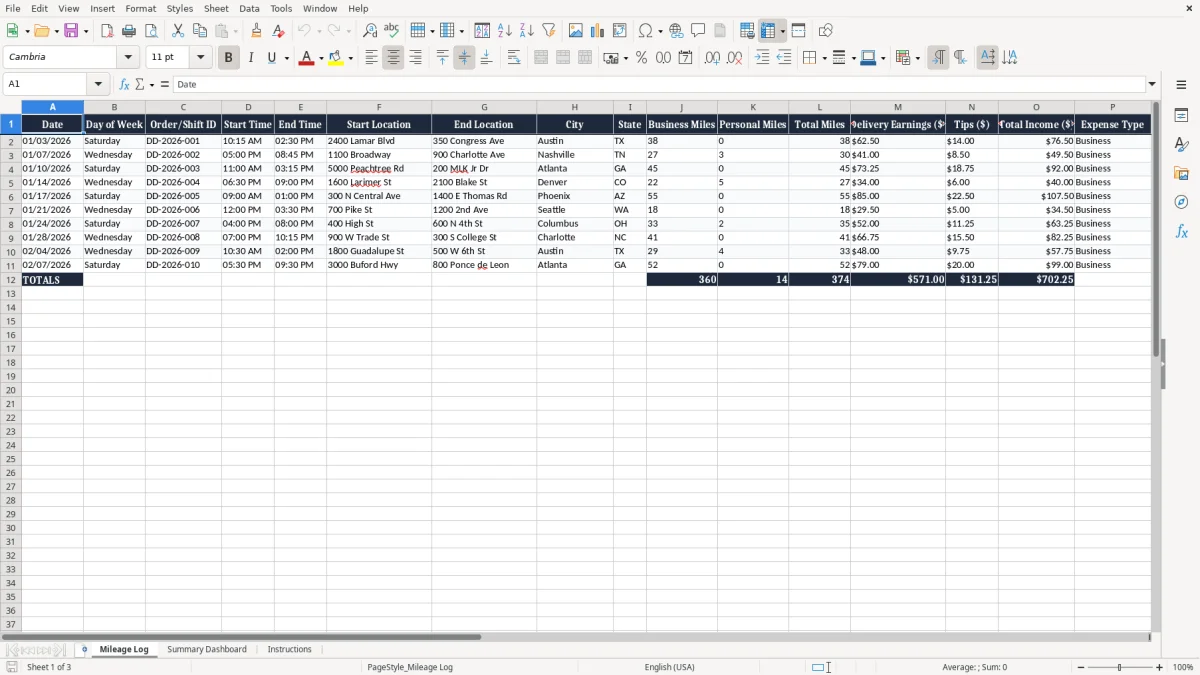
This Doordash driver mileage log Excel template tracks delivery miles, earnings, tips, deductible miles, and taxable income in one workbook. It includes a Mileage Log tab, a Summary Dashboard tab, and an Instructions tab.
Use it to record each shift or order with date, time, start and end location, city, state, mileage, and income. The layout is built for mileage deduction records, so you can separate business use from personal miles and keep the numbers ready for tax time.
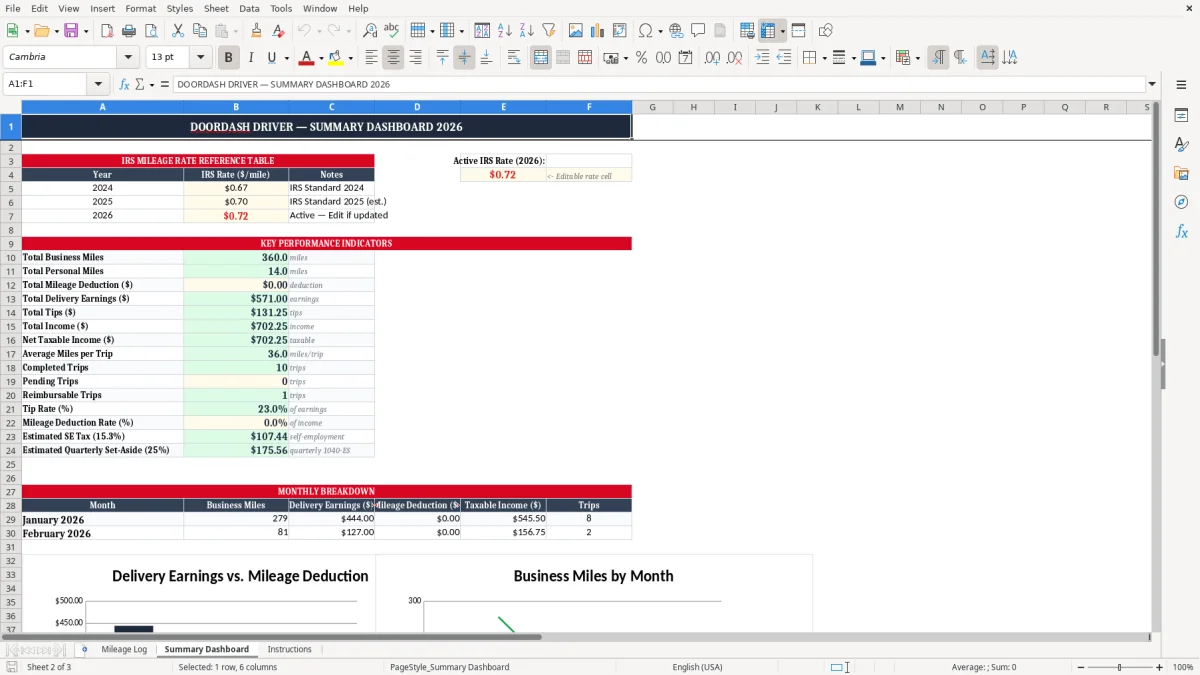
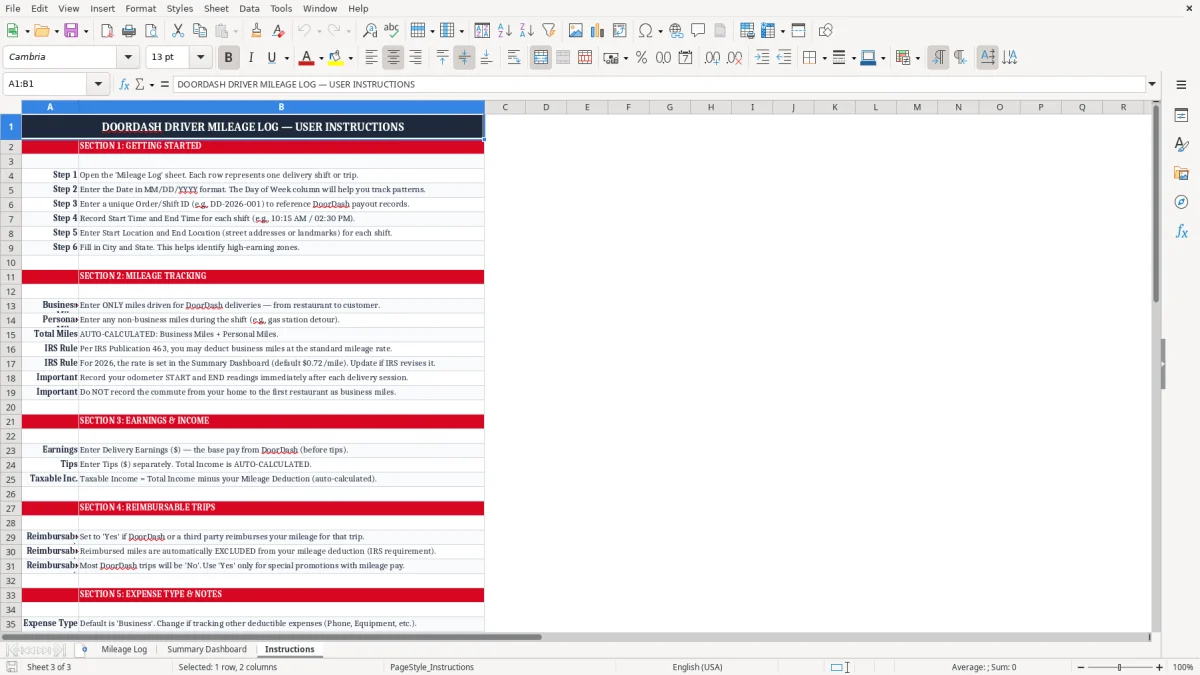
Image 1 shows the entry sheet with 22 columns across a frozen header row. Image 2 shows the dashboard summary, and image 3 gives you the setup notes so you can start logging trips the same day.
If you drive for DoorDash as a sole proprietor or through a single-member LLC, this sheet fits the way your week actually works: short trips, multiple stops, and a mix of business and personal driving. A driver who logs 28 business miles on lunch runs and 46 miles on dinner shifts can see the deduction build row by row instead of trying to reconstruct it from memory in March.
The Mileage Log tab is where the work happens. You enter date, shift ID, start and end time, location, city, state, business miles, personal miles, earnings, tips, notes, and status, then use the dashboard to see the totals.
This is the right fit for a driver doing 5 to 20 deliveries a day, an office manager at a courier LLC who tracks part-time drivers, or a household where one spouse drives evenings and the other tracks expenses on a shared budget. If you log 120 business miles in a week at a rate of 67¢ per mile, that is $80.40 of deductible mileage before you even count the rest of the month.
You need it most during the weekly cash check, the month-end review, and the tax prep rush before Form 1040 filing. A driver with $650 in delivery pay and $180 in tips wants the mileage record tied to the same rows, because the deduction is what keeps the net profit realistic.
The Summary Dashboard gives you the big picture: miles, income, and deduction totals. That is the difference between knowing you had a busy month and knowing whether the route mix actually paid enough after gas, repairs, and self-employment tax.
The IRS expects mileage records that are contemporaneous and specific: date, business purpose, and miles driven. For self-employed delivery work reported on Schedule C, you generally keep records for 3 years after filing, and longer if there is a basis issue or missing income reporting.
For 2026 planning, the mileage deduction still depends on business miles multiplied by the standard mileage rate in effect for the year. If you log 1,800 business miles in a quarter and your effective rate is 67¢ per mile, that is $1,206.00 of deduction support you can carry into your return prep.
Business miles tied to actual delivery work are the core item. Personal miles are not deductible, and the sheet separates them so you do not inflate your claim by mixing a grocery run with a dinner shift.
Your net DoorDash income flows to Schedule SE for self-employment tax, which is 15.3% before income tax effects. If the log shows $14,400 of gross delivery income for the year and $6,200 of deductible miles plus other expenses, the mileage record is doing real work by lowering the amount exposed to that tax.
A log that only says “worked tonight” is weak. A log that shows 06/14/2026, 6:30 PM to 9:00 PM, Austin, TX, 31 business miles, and stacked orders downtown gives you the kind of support that matches what the IRS expects to see if it ever asks.
The most expensive mistake is leaving mileage to memory. If you wait until Sunday night to guess what happened on Monday, you will undercount miles, and a 200-mile miss at 67¢ per mile is $134.00 of deduction gone for good.
Another common problem is mixing personal miles into the business total. If you include a 12-mile side trip home as business mileage, you overstate the deduction and create a record that will not line up when you review gas receipts, app history, and delivery times.
Drivers often write down the order number but skip the start and end location. That seems harmless until you need to explain why a 19-mile route between two neighborhoods made sense, and the notes field is empty.
Some drivers also forget to track tips separately from delivery pay. If you made $520 in base pay and $210 in tips in one week, combining them is not fatal, but it makes cash flow analysis weaker and hides what the app actually paid versus what customers added.
The real cost is not just the lost deduction. A sloppy year can also create underreported income on Form 1040, a messy Schedule C, and extra hours spent rebuilding the log from bank deposits and app screenshots instead of closing the books.
The spreadsheet works best when you treat it like part of the shift wrap-up. If you enter trips at the end of each day or every Sunday night, you keep the numbers close to the work and avoid the pile-up that turns a log into a chore.
Copy the prior row when the same city or state repeats, then overwrite only the date, time, and miles. That saves minutes on every entry, and over 200 rows it adds up to real time.
If you are running multiple drivers, handling weekly invoicing, or sorting hundreds of routes a month, a spreadsheet starts to feel thin. At that point, a system like QuickBooks or a delivery ops platform is a better fit than forcing one workbook to do everything.
Yes. If you do both, keep one log and distinguish the platform in the notes or shift ID. That way your business miles, tips, and delivery earnings stay in one place for Schedule C reporting.
Yes. The sheet separates Business Miles and Personal Miles so you can show what was deductible and what was not. If a route includes a grocery stop or a personal detour, that detail matters.
The IRS recordkeeping rule is generally 3 years from the date you file, and longer in some cases. If you drive for income, keep the workbook, backup files, and any supporting app screenshots together.
It lowers your business profit before income tax is figured. If you log 1,500 business miles and use a 67¢ rate, that is $1,005.00 of deduction support that reduces the income shown on Schedule C.
Because you need a quick view of gross driving income, not just miles. A week with $480 in base pay and $160 in tips looks very different from a week with the same miles but only $90 in tips.
Review the totals, confirm that business miles are separated from personal use, and use the dashboard numbers when you prepare Form 1040. If your mileage log is clean, tax prep goes faster and you spend less time rebuilding the year from scratch.