Case Tracker Excel – Free Template (2026)
4
Free download
Plan multi-day Indian weddings with task tracking, vendor contacts, budget comparisons, deposits, balances, and U.S. currency formatting.


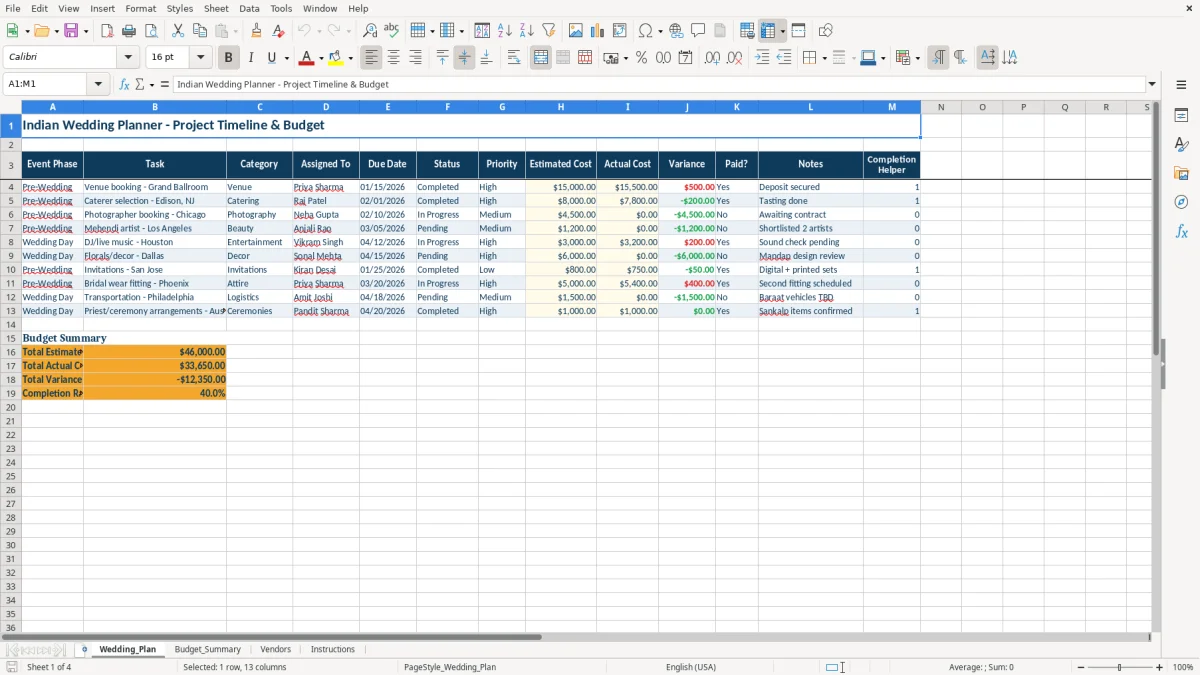
This Indian wedding planner Excel workbook organizes multi-day event tasks, vendor information, and wedding spending in one XLSX file. It contains Wedding_Plan, Budget_Summary, Vendors, and Instructions tabs for families and planners coordinating ceremonies and receptions in the United States.
Use Wedding_Plan to assign owners, due dates, priorities, costs, and statuses across Pre-Wedding, Wedding Day, and Post-Wedding phases. Budget_Summary compares planned and actual spending, while Vendors records quotes, deposits, balances, contract status, ratings, and notes.
Indian weddings in the United States often combine several event phases rather than one appointment. A family may coordinate mehendi, sangeet, ceremony, reception, and post-wedding work across different venues, cities, relatives, and vendors. The Wedding_Plan tab gives each item a phase, owner, due date, priority, status, cost estimate, actual cost, and notes.
In the sample workbook, the venue booking is marked Pre-Wedding, assigned to Priya Sharma, and due 01/15/2026. The caterer selection is due 02/01/2026, while the photographer booking is due 02/10/2026 and remains In Progress. Replace these populated examples with the actual schedule for your family or planning team.
Use Assigned To for a parent, sibling, planner, or coordinator instead of keeping responsibility in text messages. A task such as a Chicago photographer booking or an Edison, NJ caterer selection can then be reviewed by the person responsible for the contract and follow-up.
Image 1 shows the Wedding_Plan layout, including the 13 planning columns. The status and priority dropdowns keep entries consistent, while the calculated fields show whether an actual cost has been entered and whether the task is completed.
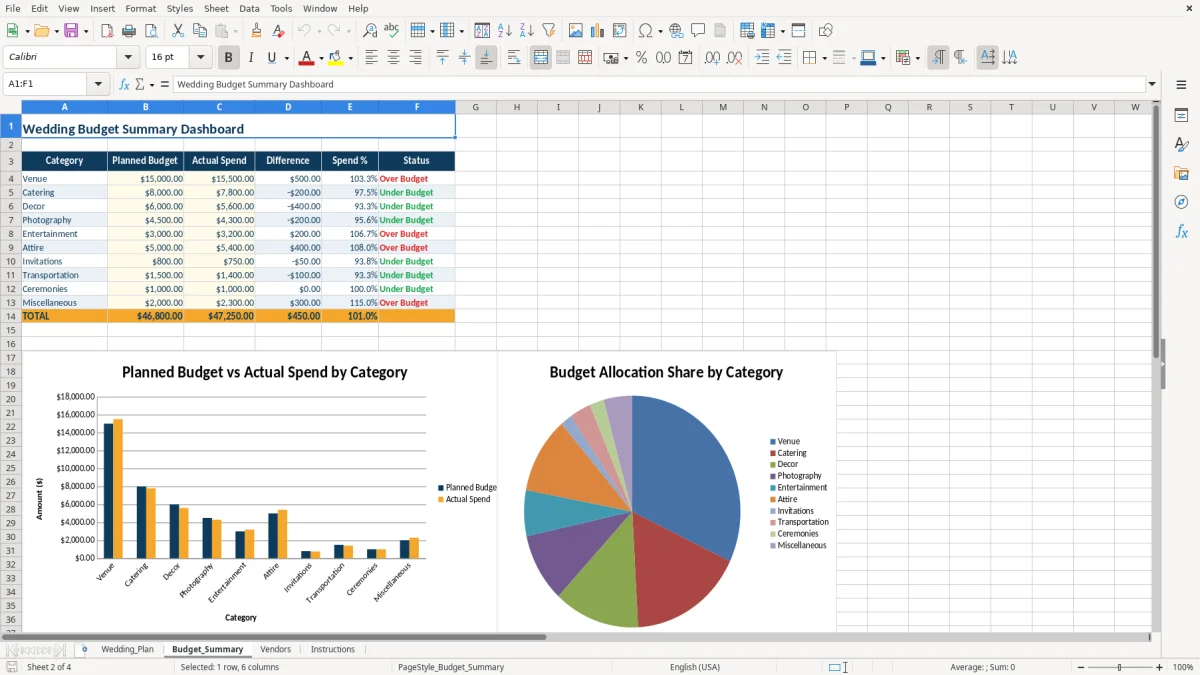
This workbook uses U.S. currency formatting and editable budget assumptions rather than claiming fixed supplier rates. Enter the amounts you receive from venues, caterers, decorators, photographers, and other suppliers. The sample figures illustrate the workflow: the venue shows $15,000 planned and $15,500 actual, while catering shows $8,000 planned and $7,800 actual.
Budget_Summary organizes spending into ten visible categories, including Venue, Catering, Decor, Photography, Entertainment, Attire, Invitations, Transportation, Ceremonies, and Miscellaneous. Difference is calculated as Actual Spend minus Planned Budget, and the status identifies each category as Under Budget or Over Budget.
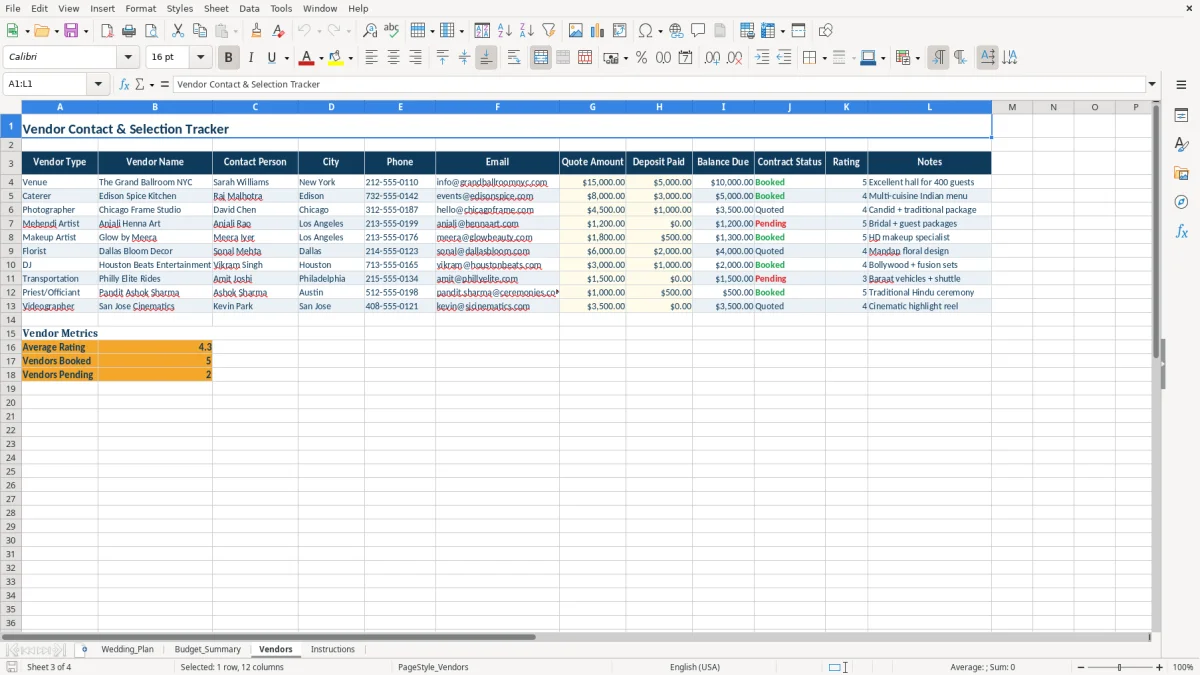
The Vendors tab calculates Balance Due from Quote Amount less Deposit Paid. The sample venue quote is $15,000 with a $5,000 deposit, and the sample caterer quote is $8,000 with a $3,000 deposit. Enter actual contract figures as payments are made, then use Contract Status to distinguish Pending, Quoted, Booked, and Cancelled vendors.
Image 2 shows the Budget_Summary dashboard with two charts: one compares planned and actual amounts by category, and the other shows allocation share. Image 3 shows vendor contact, quote, deposit, balance, contract, and rating fields.
The most expensive planning errors usually come from mixing estimates, deposits, and final invoices. If a $15,000 venue quote is entered as the actual spend before the final charge is known, the budget view can look complete while the payment record is still unfinished. Keep Planned Budget, Actual Spend, Quote Amount, and Deposit Paid distinct.
Typing over Variance, Paid?, Difference, Spend %, Status, Balance Due, or summary totals removes the workbook’s calculations. For example, Balance Due should calculate the $10,000 remaining balance on the sample $15,000 venue quote after its $5,000 deposit; it should not be typed manually.
A vendor with a quote but no contract status can be mistaken for a booked supplier. The workbook provides four explicit choices—Pending, Quoted, Booked, and Cancelled—so update the status immediately after a decision or contract change.
Another problem is entering task costs without updating the task status. The sample photographer has an actual cost of $0 and an In Progress status, which communicates that the booking is not complete. Use the Notes column for details such as Awaiting contract, Deposit secured, or Tasting done rather than relying on memory.
Choose one fixed review time each week and open Wedding_Plan before the family or planning-team check-in. Sort your attention by due date and High priority, then update status, actual cost, payment notes, and the person responsible. This takes less effort than reconstructing decisions from separate messages.
Edit the yellow input cells described in Instructions, including Estimated Cost, Actual Cost, Planned Budget, Actual Spend, Quote Amount, and Deposit Paid. Do not replace calculated outputs. A practical weekly check is to compare the Vendors balance due with the relevant task cost and then confirm the Budget_Summary actual amount.
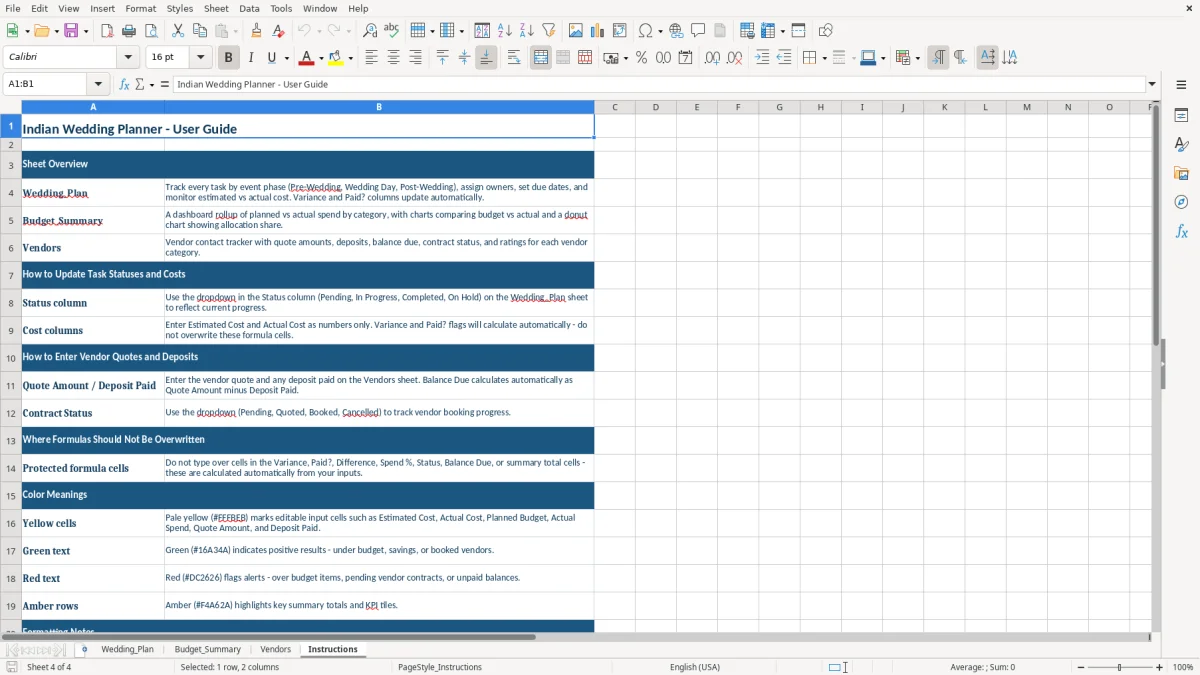
Image 4 shows the Instructions tab, including the four-sheet overview, input guidance, formula warnings, color meanings, and examples of the MM/DD/YYYY and $1,234.56 formats. The XLSX file is best treated as a shared planning workbook; if vendor records, payments, or task rows become too extensive for the prepared layout, move the process to a dedicated planning or accounting system rather than altering formula cells casually.
The workbook contains Wedding_Plan, Budget_Summary, Vendors, and Instructions. Together they cover multi-phase tasks, category spending, supplier contacts and payments, and editing guidance.
Yes. Use the Event Phase and Task columns on Wedding_Plan to organize multi-day Indian wedding activities. The sample rows include Pre-Wedding work, and you can replace them with your own ceremony and reception schedule.
Wedding_Plan calculates Variance and Paid? and includes a completion helper. Budget_Summary calculates Difference, Spend %, Status, and totals. Vendors calculates Balance Due, average rating, and booked or pending counts. Do not overwrite these formula cells.
On Vendors, enter Quote Amount and Deposit Paid. Balance Due calculates the difference; for example, the sample $15,000 venue quote less its $5,000 deposit leaves $10,000 due.
Instructions identifies pale yellow cells as editable inputs, green text as positive results, red text as alerts, and amber rows as key totals or KPI areas. Dates use MM/DD/YYYY, and monetary values use U.S. currency formatting such as $1,234.56.